
ASP.NET 5 RC 1:UrlRouting 设置(不包含MVC6的UrlRouting设置)
转自:http://habrahabr.ru/company/microsoft/blog/268037/?mobile=no
1、project.json
{

  "version": "1.0.0-*",

  "compilationOptions": {

    "emitEntryPoint": true

  },

  "dependencies": {

    "Microsoft.AspNet.IISPlatformHandler": "1.0.0-rc1-final",

    "Microsoft.AspNet.Routing": "1.0.0-rc1-final",

    "Microsoft.AspNet.Server.Kestrel": "1.0.0-rc1-final",

    "Microsoft.Extensions.Configuration": "1.0.0-rc1-final"

  },

  "commands": {

    "web": "Microsoft.AspNet.Server.Kestrel"

  },

  "frameworks": {

    "dnx451": { },

    "dnxcore50": { }

  },

  "exclude": [

    "wwwroot",

    "node_modules"

  ],

  "publishExclude": [

    "**.user",

    "**.vspscc"

  ]

}
2、appsettings.json
{

  "Data": {

    "DefaultConnection": {

      "ConnectionString": "Server=(localdb)\\MSSQLLocalDB;Database=_CHANGE_ME;Trusted_Connection=True;"

    }

  }

}
3、Startup.cs
using Microsoft.AspNet.Builder;

using Microsoft.AspNet.Hosting;

using Microsoft.Extensions.DependencyInjection;

using AspNetCoreUrlRoutingDemo.PageRoute;

using Microsoft.AspNet.Routing;

using Microsoft.Extensions.Configuration;

namespace AspNetCoreUrlRoutingDemo

{

    /// <summary>

    /// http://www.admin10000.com/document/7071.html

    /// </summary>

    public class Startup

    {

        // This method gets called by the runtime. Use this method to add services to the container.

        // For more information on how to configure your application, visit http://go.microsoft.com/fwlink/?LinkID=398940

        public void ConfigureServices(IServiceCollection services)

        {

            services.AddRouting();

        }

        // This method gets called by the runtime. Use this method to configure the HTTP request pipeline.

        public void Configure(IApplicationBuilder app)

        {

            app.UseIISPlatformHandler();

            IConfigurationBuilder builder = new ConfigurationBuilder();

            builder.AddJsonFile("appsettings.json");

            IConfigurationRoot root = builder.Build();

            RouteBuilder routeBuilder = new RouteBuilder();

            routeBuilder.ServiceProvider = app.ApplicationServices;

            //index

            routeBuilder.DefaultHandler = new IndexPageRouteHandler(root, "index");

            routeBuilder.MapRoute("index_culture_", "{culture}/", new RouteValueDictionary { { "culture", "en" } }, new RouteValueDictionary { { "culture", @"\w{2}" } });

            app.UseRouter(routeBuilder.Build());

            //category

            routeBuilder.DefaultHandler = new CategoryPageRouteHandler(root, "category");

            routeBuilder.MapRoute("category_", "{culture}/fashion/{leimu}/{pageindex}/", new RouteValueDictionary { { "pageindex", "" }, { "culture", "en" } }, new RouteValueDictionary { { "leimu", "([\\w|-]+)(\\d+)" }, { "pageindex", "\\d+" }, { "culture", @"\w{2}" } });

            app.UseRouter(routeBuilder.Build());

        }

        // Entry point for the application.

        public static void Main(string[] args) => WebApplication.Run<Startup>(args);

    }

}
4、IndexPageRouteHandler.cs
using System;

using System.Threading.Tasks;

using Microsoft.AspNet.Http;

using Microsoft.AspNet.Routing;

using Microsoft.Extensions.Configuration;

using System.Diagnostics;

namespace AspNetCoreUrlRoutingDemo.PageRoute

{

    public class IndexPageRouteHandler : Microsoft.AspNet.Routing.IRouter

    {

        private string _name = null;

        private readonly IConfigurationRoot _configurationRoot;

        public IndexPageRouteHandler(IConfigurationRoot configurationRoot, string name)

        {

            this._configurationRoot = configurationRoot;

            this._name = name;

        }

        public VirtualPathData GetVirtualPath(VirtualPathContext context)

        {

            throw new NotImplementedException();

        }

        public async Task RouteAsync(RouteContext context)

        {

            if (this._configurationRoot != null)

            {

                string connectionString = this._configurationRoot.Get<string>("Data:DefaultConnection:ConnectionString");

                Debug.WriteLine(connectionString);

            }

            var routeValues = string.Join("", context.RouteData.Values);

            var message = String.Format("{0} Values={1} ", this._name, routeValues);

            await context.HttpContext.Response.WriteAsync(message);

            context.IsHandled = true;

        }

    }

}
5、CategoryPageRouteHandler.cs
using System;

using System.Threading.Tasks;

using Microsoft.AspNet.Http;

using Microsoft.AspNet.Routing;

using Microsoft.Extensions.Configuration;

using System.Diagnostics;

namespace AspNetCoreUrlRoutingDemo.PageRoute

{

    public class CategoryPageRouteHandler : Microsoft.AspNet.Routing.IRouter

    {

        private string _name = null;

        private readonly IConfigurationRoot _configurationRoot;

        public CategoryPageRouteHandler(IConfigurationRoot configurationRoot, string name)

        {

            this._configurationRoot = configurationRoot;

            this._name = name;

        }

        public VirtualPathData GetVirtualPath(VirtualPathContext context)

        {

            throw new NotImplementedException();

        }

        public async Task RouteAsync(RouteContext context)

        {

            if (this._configurationRoot != null)

            {

                string connectionString = this._configurationRoot.Get<string>("Data:DefaultConnection:ConnectionString");

                Debug.WriteLine(connectionString);

            }

            var routeValues = string.Join("", context.RouteData.Values);

            var message = String.Format("{0} Values={1} ", this._name, routeValues);

            await context.HttpContext.Response.WriteAsync(message);

            context.IsHandled = true;

        }

    }

}
6、F5启动调试,
浏览器输入网址:http://localhost:16924/
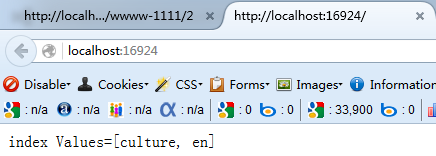
浏览器输入网址:http://localhost:16924/en/fashion/wwww-1111/2

6、VS2015项目结构

ASP.NET 5 RC 1:UrlRouting 设置(不包含MVC6的UrlRouting设置)的更多相关文章
- ASP.NET 5 RC 2:UrlRouting 设置(不包含MVC6的UrlRouting设置)
0.Program.cs using System.IO; using Microsoft.AspNetCore.Hosting; namespace AspNetCoreUrlRoutingDemo ...
- ASP.NET Core 1:UrlRouting 设置(不包含MVC6的UrlRouting设置)
0.Program.cs using System.IO; using Microsoft.AspNetCore.Hosting; namespace WebApplication1 { public ...
- Asp.Net中应用Aspose.Cells输出报表到Excel 及样式设置
解决思路: 1.找个可用的Aspose.Cells(有钱还是买个正版吧,谁开发个东西也不容易): 2.在.Net方案中引用此Cells: 3.写个函数ToExcel(传递一个DataTable),可以 ...
- IIS 添加mime 支持 apk,exe,.woff,IIS MIME设置 ,Android apk下载的MIME 设置 苹果ISO .ipa下载mime 设置
原文:IIS 添加mime 支持 apk,exe,.woff,IIS MIME设置 ,Android apk下载的MIME 设置 苹果ISO .ipa下载mime 设置 站点--右键属性--http头 ...
- Web.config中的设置 forms 中的slidingExpiration的设置
在ASP.NET 网站中,使用 Forms Authentication时,一般的设置是如下的: <authentication mode="Forms"> <f ...
- 无线路由器的设置_不能通过wifi进行设置
昨天朋友的小区宽带续费完不能上网了,过去看了一下,无线路由器没有问题,但是宽带信号没过来,网线直接插在电脑上用拨号,发现根本没办法连接,提示网线已经被拔出,重新还原一下系统,也是不行.因为之前他的电脑 ...
- 实现ScrollView中包含ListView,动态设置ListView的高度
ScrollView 中包含 ListView 的问题 : ScrollView和ListView会冲突,会导致ListView显示不全 <?xml version="1.0" ...
- iOS “请在微信客户端打开链接” UIWebview加载H5页面携带session、cookie、User-Agent信息 设置cookie、清除cookie、设置User-Agent
公司新开的一个项目..内容基本上是加载H5页面显示..当时觉得挺简单的..后来发现自己掉坑里了..一些心理历程就不说了..说这个项目主要用到的知识点吧..也是自己踩得坑. 首先说说..这个项目上的内容 ...
- 设置checkbox选中,设置radio选中,根据值设置checkbox选中,checkbox勾选
设置checkbox选中,设置radio选中,根据值设置checkbox选中,checkbox勾选 >>>>>>>>>>>>&g ...
随机推荐
- Visual Studio 开始支持编写 Android 程序并自带 Android 模拟器【转载】
原文地址 本文内容 为什么需要一个 Android 模拟器 针对 Visual Studio Android 模拟器的调试 Visual Studio Android 模拟器的传感器模拟和其他功能 A ...
- XWindow、Server、Client和QT、GTK之间的关系
X WINDOW X Window从逻辑上分为三层:X Server.X Client和X协议.最底层的X Server(X服务器)主要处理输入/输出信息并维护相关资源,它接受来自键盘.鼠标的操作并将 ...
- Java多线程的悲观锁与乐观锁
转载请注明原文地址:http://www.cnblogs.com/ygj0930/p/6561376.html 一:悲观锁 悲观锁,就是不管是否发生多线程冲突,只要存在这种可能,就每次访问都加锁,加 ...
- Laravel返回不重复的某个字段信息列表
->groupBy('brand_id') ->pluck('brand_id');
- 学习练习SQL的数据库employee文件
这个地址是一个已经集成了employee的database的sql文件.所以你可以下载这个sql文件,然后执行sql语句到对应的数据库中,这样你就可以练习sql语句了. 第一个链接是用户指导如何使用的 ...
- BackBone.js之Router
一.前言 有一段时间没有写随笔了,可能是最近的烦心事有点多.不倾诉了,开始我们的主题吧,以前做过一个web的聊天平台,js的代码足足有2k行. 虽然是在一个星期就完成了,但是想想还是不服.一定有一种更 ...
- RHEL7-Samba共享测试
Linux<----->windows之间共享 Samba使用2个进程 smb ip之间的通信用smb (tcp) nmb 主机名之间的通信用nmb (netbi ...
- Linux的telent服务
目前,在Win/Linux下telnet都很少用了,只是因为数据在传输的过程,未加密!不过在Linux下还是多用于端口探测,今天就来回顾曾经的telnet 1.介绍 Linux被广泛运用到各种服务器及 ...
- Windows开机BIOS启动快捷按键
Window装系统,开机需要调整启动选项...不同的机型,进入BIOS按键不同 按键列表
- Photoshop CS6 操作记录
全局快捷键 橡皮 E 画笔 B 魔棒工具 W 钢笔工具 P 选区工具 M 移动画布 按住Space后鼠标拖动 放大缩小画布 Ctrl+-, Ctrl++ 调出/收回标尺 Ctrl+R 调整画笔大小 [ ...