
ASP.NET Core 1:UrlRouting 设置(不包含MVC6的UrlRouting设置)
0、Program.cs
using System.IO;

using Microsoft.AspNetCore.Hosting;

namespace WebApplication1

{

    public class Program

    {

        public static void Main(string[] args)

        {

            var host = new WebHostBuilder()

                .UseKestrel()

                .UseContentRoot(Directory.GetCurrentDirectory())

                .UseIISIntegration()

                .UseStartup<Startup>()

                .Build();

            host.Run();

        }

    }

}
1、project.json
{

  "userSecretsId": "aspnet-WebApplicationCore1-782de49b-8e7f-46be-82aa-0f48e1d370bc",

  "dependencies": {

    "Microsoft.NETCore.App": {

      "version": "1.0.0",

      "type": "platform"

    },

    "Microsoft.AspNetCore.Diagnostics": "1.0.0",

    "Microsoft.AspNetCore.Server.IISIntegration": "1.0.0",

    "Microsoft.AspNetCore.Server.Kestrel": "1.0.0",

    "Microsoft.Extensions.Logging.Console": "1.0.0",

    "Microsoft.Extensions.Logging.Debug": "1.0.0",

    "Microsoft.AspNetCore.Routing": "1.0.0",

    "Microsoft.AspNetCore.Routing.Abstractions": "1.0.0",

    "Microsoft.Extensions.Configuration.Abstractions": "1.0.0",

    "Microsoft.Extensions.Configuration.FileExtensions": "1.0.0",

    "Microsoft.Extensions.Configuration.Json": "1.0.0",

    "Microsoft.Extensions.Configuration.UserSecrets": "1.0.0",

    "Microsoft.AspNetCore.Http.Abstractions": "1.0.0",

    "Microsoft.AspNetCore.StaticFiles": "1.0.0"

  },

  "tools": {

    "Microsoft.AspNetCore.Server.IISIntegration.Tools": "1.0.0-preview2-final"

  },

  "frameworks": {

    "netcoreapp1.0": {

      "imports": [

        "dotnet5.6",

        "portable-net45+win8"

      ]

    }

  },

  "buildOptions": {

    "emitEntryPoint": true,

    "preserveCompilationContext": true

  },

  "runtimeOptions": {

    "configProperties": {

      "System.GC.Server": true

    }

  },

  "publishOptions": {

    "include": [

      "wwwroot",

      "web.config"

    ]

  },

  "scripts": {

    "postpublish": [ "dotnet publish-iis --publish-folder %publish:OutputPath% --framework %publish:FullTargetFramework%" ]

  }

}
2、appsettings.json
{

  "ConnectionStrings": {

    "DefaultConnection": "Server=(localdb)\\mssqllocaldb;Database=aspnet-WebApplicationCore1-782de49b-8e7f-46be-82aa-0f48e1d370bc;Trusted_Connection=True;MultipleActiveResultSets=true"

  },

  "Logging": {

    "IncludeScopes": false,

    "LogLevel": {

      "Default": "Debug",

      "System": "Information",

      "Microsoft": "Information"

    }

  }

}
3、Startup.cs
using Microsoft.AspNetCore.Builder;

using Microsoft.AspNetCore.Hosting;

using Microsoft.AspNetCore.Routing;

using Microsoft.Extensions.DependencyInjection;

using Microsoft.Extensions.Logging;

using WebApplication1.Route;

using Microsoft.Extensions.Configuration;

using WebApplication1.Extensions;

using Microsoft.Extensions.FileProviders;

using Microsoft.AspNetCore.StaticFiles;

namespace WebApplication1

{

    public class Startup

    {

        public Startup(IHostingEnvironment env)

        {

            IConfigurationBuilder builder = new ConfigurationBuilder()

                .SetBasePath(env.ContentRootPath)

                .AddJsonFile("appsettings.json", optional: true, reloadOnChange: true)

                .AddJsonFile($"appsettings.{env.EnvironmentName}.json", optional: true);

            if (env.IsDevelopment())

            {

                // For more details on using the user secret store see http://go.microsoft.com/fwlink/?LinkID=532709

                builder.AddUserSecrets();//project.json -> userSecretsId

            }

            builder.AddEnvironmentVariables();

            this.Configuration = builder.Build();

        }

        public IConfigurationRoot Configuration { get; private set; }

        // This method gets called by the runtime. Use this method to add services to the container.

        // For more information on how to configure your application, visit http://go.microsoft.com/fwlink/?LinkID=398940

        public void ConfigureServices(IServiceCollection services)

        {

            services.AddRouting();

            services.AddDirectoryBrowser();//浏览所有文件

        }

        // This method gets called by the runtime. Use this method to configure the HTTP request pipeline.

        public void Configure(IApplicationBuilder app, IHostingEnvironment env, ILoggerFactory loggerFactory)

        {

            //loggerFactory.AddConsole();

            loggerFactory.AddConsole(this.Configuration.GetSection("Logging"));

            loggerFactory.AddConsole(minLevel: LogLevel.Information);

            loggerFactory.AddDebug();

            //app.UseRequestIP();

            if (env.IsDevelopment())

            {

                app.UseDeveloperExceptionPage();

                //app.UseBrowserLink();

            }

            else

            {

                app.UseExceptionHandler("/error");

            }

            app.UseStaticFiles();//使用默认文件夹wwwroot

            var staticfile = new StaticFileOptions();

            staticfile.FileProvider = new PhysicalFileProvider(@"C:\");//指定目录 这里指定C盘,也可以是其它目录

            //你会发现有些文件打开会404,有些又可以打开。那是因为MIME 没有识别出来。

            //我们可以手动设置这些 MIME ,也可以给这些未识别的设置一个默认值。

            staticfile.ServeUnknownFileTypes = true;

            staticfile.DefaultContentType = "application/x-msdownload"; //设置默认  MIME

            var provider = new FileExtensionContentTypeProvider();

            provider.Mappings.Add(".log", "text/plain");//手动设置对应MIME

            staticfile.ContentTypeProvider = provider;

            app.UseStaticFiles(staticfile);

            var dir = new DirectoryBrowserOptions();

            dir.FileProvider = new PhysicalFileProvider(@"C:\");

            app.UseDirectoryBrowser(dir);

            //对于前面的这么多设置,StaticFiles 提供了一种简便的写法。

            app.UseFileServer(new FileServerOptions()

            {

                FileProvider = new PhysicalFileProvider(@"C:\"),

                EnableDirectoryBrowsing = true

            });

            //UrlRouting

            RouteBuilder routeBuilder = new RouteBuilder(app);

            //index http://localhost:5994/en

            routeBuilder.DefaultHandler = new IndexPageRouteHandler(this.Configuration, "index");

            routeBuilder.MapRoute("index_culture_", "{culture}/", new RouteValueDictionary { { "culture", "en" } }, new RouteValueDictionary { { "culture", @"\w{2}" } });

            app.UseRouter(routeBuilder.Build());

            //category http://localhost:5994/en/fashion/wwww-1111/2

            routeBuilder.DefaultHandler = new CategoryPageRouteHandler(this.Configuration, "category");

            routeBuilder.MapRoute("category_", "{culture}/fashion/{leimu}/{pageindex}/", new RouteValueDictionary { { "pageindex", "" }, { "culture", "en" } }, new RouteValueDictionary { { "leimu", "([\\w|-]+)(\\d+)" }, { "pageindex", "\\d+" }, { "culture", @"\w{2}" } });

            app.UseRouter(routeBuilder.Build());

        }

    }

}
4、IndexPageRouteHandler.cs
using System;

using System.Diagnostics;

using System.Threading.Tasks;

using Microsoft.AspNetCore.Http;

using Microsoft.AspNetCore.Routing;

using Microsoft.Extensions.Configuration;

namespace WebApplication1.Route

{

    public class IndexPageRouteHandler : IRouter

    {

        private string _name = null;

        private readonly IConfigurationRoot _configurationRoot;

        public IndexPageRouteHandler(IConfigurationRoot configurationRoot, string name)

        {

            this._configurationRoot = configurationRoot;

            this._name = name;

        }

        public VirtualPathData GetVirtualPath(VirtualPathContext context)

        {

            throw new NotImplementedException();

        }

        public async Task RouteAsync(RouteContext context)

        {

            if (this._configurationRoot != null)

            {

                string connectionString = this._configurationRoot.GetConnectionString("DefaultConnection");

                Debug.WriteLine(connectionString);

            }

            var routeValues = string.Join(",", context.RouteData.Values);

            var message = String.Format("{0} Values={1} ", this._name, routeValues);

            await context.HttpContext.Response.WriteAsync(message);

        }

    }

}
5、CategoryPageRouteHandler.cs
using Microsoft.AspNetCore.Http;

using Microsoft.AspNetCore.Routing;

using Microsoft.Extensions.Configuration;

using System;

using System.Diagnostics;

using System.Threading.Tasks;

namespace WebApplication1.Route

{

    public class CategoryPageRouteHandler : IRouter

    {

        private string _name = null;

        private readonly IConfigurationRoot _configurationRoot;

        public CategoryPageRouteHandler(IConfigurationRoot configurationRoot, string name)

        {

            this._configurationRoot = configurationRoot;

            this._name = name;

        }

        public VirtualPathData GetVirtualPath(VirtualPathContext context)

        {

            throw new NotImplementedException();

        }

        public async Task RouteAsync(RouteContext context)

        {

            if (this._configurationRoot != null)

            {

                string connectionString = this._configurationRoot.GetConnectionString("DefaultConnection");

                Debug.WriteLine(connectionString);

            }

            var routeValues = string.Join("", context.RouteData.Values);

            var message = String.Format("{0} Values={1} ", this._name, routeValues);

            await context.HttpContext.Response.WriteAsync(message);

        }

    }

}
6、F5启动调试,
浏览器输入网址:http://localhost:16924/
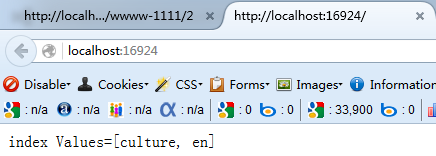
浏览器输入网址:http://localhost:16924/en/fashion/wwww-1111/2

ASP.NET Core 1:UrlRouting 设置(不包含MVC6的UrlRouting设置)的更多相关文章
- ASP.NET 5 RC 2:UrlRouting 设置(不包含MVC6的UrlRouting设置)
0.Program.cs using System.IO; using Microsoft.AspNetCore.Hosting; namespace AspNetCoreUrlRoutingDemo ...
- ASP.NET 5 RC 1:UrlRouting 设置(不包含MVC6的UrlRouting设置)
转自:http://habrahabr.ru/company/microsoft/blog/268037/?mobile=no 1.project.json { "version" ...
- ASP.NET CORE 2.0 发布到IIS,IIS如何设置环境变量来区分生产环境和测试环境
0.前言 因为给前端的测试环境是windows,所以要设置windows上的环境变量,如果上Linux就没有这篇文章了,所以大家不要在意为什么core不放在linux上. 1.网上的解决方案 a 方式 ...
- (19)ASP.NET Core EF创建模型(包含属性和排除属性、主键、生成的值)
1.什么是Fluent API? EF中内嵌的约定将POCO类映射到表.但是,有时您无法或不想遵守这些约定,需要将实体映射到约定指示外的其他对象,所以Fluent API和注解都是一种方法,这两种方法 ...
- ASP.Net Core中设置JSON中DateTime类型的格式化(解决时间返回T格式)
最近项目有个新同事,每个API接口里返回的时间格式中都带T如:[2019-06-06T10:59:51.1860128+08:00],其实这个主要是ASP.Net Core自带时间格式列化时间格式设置 ...
- ASP.NET Core 中间件详解及项目实战
前言 在上篇文章主要介绍了DotNetCore项目状况,本篇文章是我们在开发自己的项目中实际使用的,比较贴合实际应用,算是对中间件的一个深入使用了,不是简单的Hello World,如果你觉得本篇文章 ...
- ASP.NET Core 介绍
原文:Introduction to ASP.NET Core 作者:Daniel Roth.Rick Anderson.Shaun Luttin 翻译:江振宇(Kerry Jiang) 校对:许登洋 ...
- 细说ASP.NET Core静态文件的缓存方式
一.前言 我们在优化Web服务的时候,对于静态的资源文件,通常都是通过客户端缓存.服务器缓存.CDN缓存,这三种方式来缓解客户端对于Web服务器的连接请求压力的. 本文指在这三个方面,在ASP.NET ...
- [转]ASP.NET Core 中间件详解及项目实战
本文转自:http://www.cnblogs.com/savorboard/p/5586229.html 前言 在上篇文章主要介绍了DotNetCore项目状况,本篇文章是我们在开发自己的项目中实际 ...
随机推荐
- linux SMP启动
SMP简介 1,硬件上,CPU没有主次之分 2,软件上,每个CPU平等动态地从进程就绪队列中调度进程加以执行,中断请求也是等概率动态的分布给某个CPU SMP启动 1,SMP结构中的CPU都是平等的, ...
- 检查密码复杂度的C#正则表达式
在用户注册与修改.重置密码时,强制密码达到一定的复杂度,是减少盗号的有效措施之一. 而在代码中检查密码复杂度就需要用到正则表达式,比如要求密码必须包含数字.小写或大写字母.特殊字符.字符数在8-30之 ...
- Python的with语句
写过多线程程序的人肯定对各种锁很熟悉,尤其是下面这种代码 def lock_usage: lock.Lock() if(...) : lock.Unlock() return lock.Unlock( ...
- [ACM_暴力] ZOJ 3710 [Friends 共同认识 最终认识 暴力]
Alice lives in the country where people like to make friends. The friendship is bidirectional and if ...
- Linux:文件权限
使用较长格式列出文件:ls -l显示除了 '.'(当前目录),'..' 上一级目录之外的所有包含隐藏文件(Linux 下以 '.' 开头的文件为隐藏文件): ls -Al查看某一个目录的完整属性,而不 ...
- jQuery的XX如何实现?——2.show与链式调用
往期回顾: jQuery的XX如何实现?——1.框架 -------------------------- 源码链接:内附实例代码 jQuery使用许久了,但是有一些API的实现实在想不通.于是抽空看 ...
- Homebrew- MAC上的包管理利器
包管理器是神马东西?让我们看看wikipedia上的介绍. In software, a package management system, also called package manager, ...
- AngularJS快速入门指南11:事件
AngularJS拥有自己的HTML事件指令. ng-click指令 ng-click指令定义了AngularJS的click事件. <div ng-app="" ng-co ...
- CLIQUE 聚类算法以及Java实现+多线程
CLIQUE(Clustering In QUEst)是一种简单的基于网格的聚类方法,用于发现子空间中基于密度的簇.CLIQUE把每个维划分成不重叠的区间,从而把数据对象的整个嵌入空间划分成单元.它使 ...
- centos6.4 64位下安装nfs文件共享系统
不知道谁装的服务器,默认自带,以下内容摘自互联网,配置部分按教程执行成功 一.环境介绍: 服务器:centos 192.168.1.225 客户端:centos 192.168.1.226 二.安装: ...