
【python】理想论坛爬虫1.08
#------------------------------------------------------------------------------------
# 理想论坛爬虫1.08,
# 增加断点续传模式,这样可以有空再下载了。
# 2018年4月29日
#------------------------------------------------------------------------------------
from bs4 import BeautifulSoup
import requests
import threading
import re
import time
import datetime
import os
import json
import colorama
from colorama import Fore, Back, Style
colorama.init()

user_agent='Mozilla/5.0 (Windows NT 10.0; WOW64) AppleWebKit/537.36 (KHTML, like Gecko) Chrome/65.0.3325.181 Safari/537.36'
headers={'User-Agent':user_agent}

# 主帖数组
topics=[]

# 存储数据文件的目录
folder=""

# 最终要下载的帖子数组
finalTopics=[]

# 失败的帖子数组
failedTopics=[]

#------------------------------------
# 在论坛页中寻找主贴
# pageUrl:论坛页url
#------------------------------------
def findTopics(pageUrl):
    print("\n开始读取页面"+pageUrl+"的帖子");

    try:
        rsp=requests.get(pageUrl,headers=headers)
        rsp.encoding = 'gb18030' #解决中文乱码问题的关键
        soup= BeautifulSoup(rsp.text,'html.parser',from_encoding='gb2312')

        for tbodys in soup.find_all('tbody'):
            pageCount=1
            url='none'
            title='none'

            for spans in tbodys.find_all('span',class_="forumdisplay"):
                for link in spans.find_all('a'):
                    if link and link.get("href"):
                       url="http://www.55188.com/"+link.get("href")
                       title=link.text

            for spans in tbodys.find_all('span',class_="threadpages"):
                for link in spans.find_all('a'):
                    pageCount=link.text

            if url!='none' and title!='none':
               topic={'pageCount':pageCount,'url':url,'title':title}
               #print("topic="+str(topic))
               topics.append(topic)

        #print("读取页面"+pageUrl+"的帖子完毕");
    except Exception as e:
        log("findTopics出现异常:"+str(e),'red')

#------------------------------------
# 以不同颜色在控制台输出文字
# pageUrl:论坛页url
#------------------------------------
def log(text,color):
    if color=='red':
        print(Fore.RED + text+ Style.RESET_ALL)
    elif color=='green':
        print(Fore.GREEN + text+ Style.RESET_ALL)
    elif color=='yellow':
        print(Fore.YELLOW + text+ Style.RESET_ALL)
    else:
        print(text)

#------------------------------------
# 找到并保存帖子的细节
# index:序号,url:地址,title:标题
#------------------------------------
def saveTopicDetail(index,url,title):
    try:
        # 访问url
        rsp=requests.get(url,headers=headers)
        rsp.encoding = 'gb18030' #解决中文乱码问题的关键
        session = requests.session()
        session.keep_alive = False
        soup= BeautifulSoup(rsp.text,'html.parser',from_encoding='gb2312')

        # 看文件有没有
        filename=folder+"/"+str(index)+'.json'
        isFileExist=os.path.isfile(filename);

        if isFileExist:
            log(currTime()+"已经存在url="+url+",index="+str(index)+"对应的文件",'yellow')
        else:
            # 取页面信息
            infos=fetchTopicInfos(soup,url,title)
            n=len(infos)

            # 存文件
            if n>0:
                with open(filename,'w',encoding='utf-8') as fObj:
                    json.dump(infos,fObj)
            else:
                log(currTime()+"无法取得url="+url+"的信息",'red')

        # 在控制台输出状态并保存文件
        if index % 50==0:
            log(currTime()+"处理到第"+str(index)+"个数据",'green')
            saveData={'folder':folder,'finalTopics':finalTopics,'failedTopics':failedTopics}
            savefilename="./save.dat"
            with open(savefilename,'w',encoding='utf-8') as fObj:
                    json.dump(saveData,fObj)

    except Exception as e:
        failedTopic={'index':index,'url':url,'title':title}
        failedTopics.append(failedTopic)
        log("saveTopicDetail访问"+str(failedTopic)+"时出现异常:"+str(e),'red')

#------------------------------------
# 取得当前时间
#------------------------------------
def currTime():
    currTime=time.strftime('%H:%M:%S ',time.localtime(time.time()))
    return currTime

#------------------------------------
# 取得帖子里所有的子贴信息
# soup:帖子html全文解析完的soup对象,url:地址,title:标题
#------------------------------------
def fetchTopicInfos(soup,url,title):
    infos=[]    # 找到的子贴信息

    for tds in soup.find_all('td',class_="postcontent"):
        info={}

        # 找楼层,作者,日期,时间等信息
        for divs in tds.find_all('div',class_="postinfo"):
            # 用正则表达式将多个空白字符替换成一个空格
            RE = re.compile(r'(\s+)')
            line=RE.sub(" ",divs.text)
            arr=line.split(' ')
            n=len(arr)

            if n==7:
                info={'楼层':arr[1],
                      '作者':arr[2].replace('只看:',''),
                      '日期':arr[4],
                      '时间':arr[5],
                      'title':title,
                      'url':url}
            elif n==8:
                info={'楼层':arr[1],
                      '作者':arr[2].replace('只看:',''),
                      '日期':arr[5],
                      '时间':arr[6],
                      'title':title,
                      'url':url}

        # 找帖子内容
        for div in tds.find_all('div',class_="postmessage"):
            for div2 in div.find_all('div',class_="t_msgfont"):
                for div3 in div2.find_all('div',class_="t_msgfont"):
                    info['内容']=div3.text

        # 找齐七颗龙珠才算完成任务
        if len(info.items())==7:
            #print("info="+str(info));
            infos.append(info)

    return infos

#------------------------------------
# 【新的开始】函数
# start:起始页,end:终止页
#------------------------------------
def newGame(start,end):
    # 创建目录
    currTime=time.strftime('%H_%M_%S',time.localtime(time.time()))
    global folder
    folder="./"+currTime
    os.makedirs(folder)
    print("目录"+folder+"创建完成")

    # 获取主贴
    print('\n将从以下页面获取主贴:');
    for i in range(start,end+1):
        pageUrl='http://www.55188.com/forum-8-'+str(i)+'.html' # 这个页是论坛页,即第1页,第2页等
        findTopics(pageUrl);

    n=len(topics)
    log("共读取到:"+str(n)+"个主贴",'green')

    # 获取主贴及其子贴
    index=0
    for topic in topics:
        end=int(topic['pageCount'])+1
        title=topic['title']

        for i in range(1,end):
            pattern='-(\d+)-(\d+)-(\d+)'
            newUrl=re.sub(pattern,lambda m:'-'+m.group(1)+'-'+str(i)+'-'+m.group(3),topic['url'])
            #print(newUrl)

            newTopic={'index':index,'url':newUrl,'title':title}
            finalTopics.append(newTopic)

            index=index+1

    n=len(finalTopics)
    log("共读取到:"+str(n)+"个帖子",'green')

    # 遍历finalTopics
    while(len(finalTopics)>0):
        topic=finalTopics.pop();
        saveTopicDetail(topic['index'],topic['url'],topic['title'])

#------------------------------------
# 【再续前缘】函数
#------------------------------------
def load():
    savefilename="./save.dat"
    with open(savefilename,'r',encoding='utf-8') as fObj:
        saveData=json.load(fObj)

    global folder
    folder=saveData['folder']
    if os.path.isdir(folder)==False:
        os.makedirs(folder)

    global finalTopics
    finalTopics=saveData['finalTopics']
    global failedTopics
    failedTopics=saveData['failedTopics']

    finalTopics.extend(failedTopics) #曾经下载不了的融合到全部中继续下载
    failedTopics=[]

    # 遍历finalTopics
    while(len(finalTopics)>0):
        topic=finalTopics.pop();
        saveTopicDetail(topic['index'],topic['url'],topic['title'])

#------------------------------------
# 入口函数
#------------------------------------
def main():
    msg=input("选择【新的开始】输入0,选择【再续前缘】输入1:")
    ':
        text=input("请输入起始页码和终止页码,以逗号分隔:")
        arr=text.split(',')
        newGame(int(arr[0]),int(arr[1]))
    else:
        load()

# 开始
main()
控制台输出示例:
C:\Users\horn1\Desktop\python\30>python lixiang.py
选择【新的开始】输入0,选择【再续前缘】输入1:
C:\Users\horn1\AppData\Local\Programs\Python\Python36\lib\site-packages\bs4\__init__.py:146: UserWarning: You provided Unicode markup but also provided a value for from_encoding. Your from_encoding will be ignored.
  warnings.warn("You provided Unicode markup but also provided a value for from_encoding. Your from_encoding will be ignored.")
15:47:20 已经存在url=http://www.55188.com/thread-5673944-450-2.html,index=5849对应的文 件
15:47:20 已经存在url=http://www.55188.com/thread-5673944-449-2.html,index=5848对应的文 件
15:47:21 已经存在url=http://www.55188.com/thread-5673944-448-2.html,index=5847对应的文 件
15:47:52 处理到第5800个数据
15:48:30 处理到第5750个数据
15:49:14 处理到第5700个数据
15:49:49 处理到第5650个数据
15:50:24 处理到第5600个数据
15:50:58 处理到第5550个数据
15:51:32 处理到第5500个数据
15:52:06 处理到第5450个数据
15:52:41 处理到第5400个数据
插数据入库的insertDB.py:
#------------------------------------------------------------------------------------
# insertDB1.01,读取理想论坛爬虫生成的数据,然后写入DB
# 2018年4月29日
#------------------------------------------------------------------------------------
import pymysql
import time
import datetime
import os
import json

#------------------------------------
# 取得当前时间
#------------------------------------
def currTime():
    currTime=time.strftime('%Y-%m-%d %H:%M:%S',time.localtime(time.time()))
    return currTime

#------------------------------------
# 入口函数
#------------------------------------
def main(folder):
    starttime = datetime.datetime.now()

    # 打开目录从文件里取数据
    allinfos=[]
    for filename in os.listdir(folder):
        filePathname=folder+"/"+filename

        with open(filePathname,'r',encoding='utf-8') as fObj:
            infos=json.load(fObj)
            allinfos.extend(infos)
    print("拟向数据库插入"+str(len(allinfos))+"条记录")

    # 打开数据库并插值
    conn=pymysql.connect(host=',db='test',charset='utf8')
    cur=conn.cursor();

    sum=0
    for info in allinfos:
        try:
            arr=[info['楼层'],info['作者'],info['日期'],info['时间'],currTime(),info['url'],info['title'],info['内容']]
            count=cur.execute('insert into test.topic17(floor,author,tdate,ttime,addtime,url,title,content) values (%s,%s,%s,%s,%s,%s,%s,%s)',arr)
            sum+=count
        except Exception as e:
            print("出现异常:"+str(e)+",此时info="+str(info))
            continue;

    conn.commit()
    conn.close()

    print("已向数据库插入"+str(sum)+"条记录")

    # 计算用时
    endtime = datetime.datetime.now()
    print("插数据用时"+str((endtime - starttime).seconds)+"秒")

# 开始
main("./15_38_48")
控制台输出示例:
C:\Users\horn1\Desktop\python\31>python insertDB.py
拟向数据库插入115149条记录
出现异常:'utf-8' codec can't encode character '\ud83d' in position 275: surrogates not allowed,此时info={'楼层': '7283楼', '作者': '爱丽说', '日期': '2014-10-22', '时间': '11:33', 'title': ' 拥抱阳光龙理论2018成功的路上并不拥挤,我们一起迈步前行,找到好老师就有好方法! ', 'url': 'http://www.55188.com/thread-5673944-365-2.html', '内容': '倒霉的我,1 号没买到,买了2-3号,宝箱更新太不及时,强烈要求老师微信同步\ud83d😓😓😓😓😓😓😭😭'}
出现异常:'utf-8' codec can't encode character '\ud83d' in position 275: surrogates not allowed,此时info={'楼层': '7285楼', '作者': '爱丽说', '日期': '2014-10-22', '时间': '11:37', 'title': ' 拥抱阳光龙理论2018成功的路上并不拥挤,我们一起迈步前行,找到好老师就有好方法! ', 'url': 'http://www.55188.com/thread-5673944-365-2.html', '内容': '倒霉的我,1 号没买到,买了2-3号,宝箱更新太不及时,强烈要求老师微信同步\ud83d😓😓😓😓😓😓😭😭'}
已向数据库插入115147条记录
插数据用时26秒

C:\Users\horn1\Desktop\python\31>
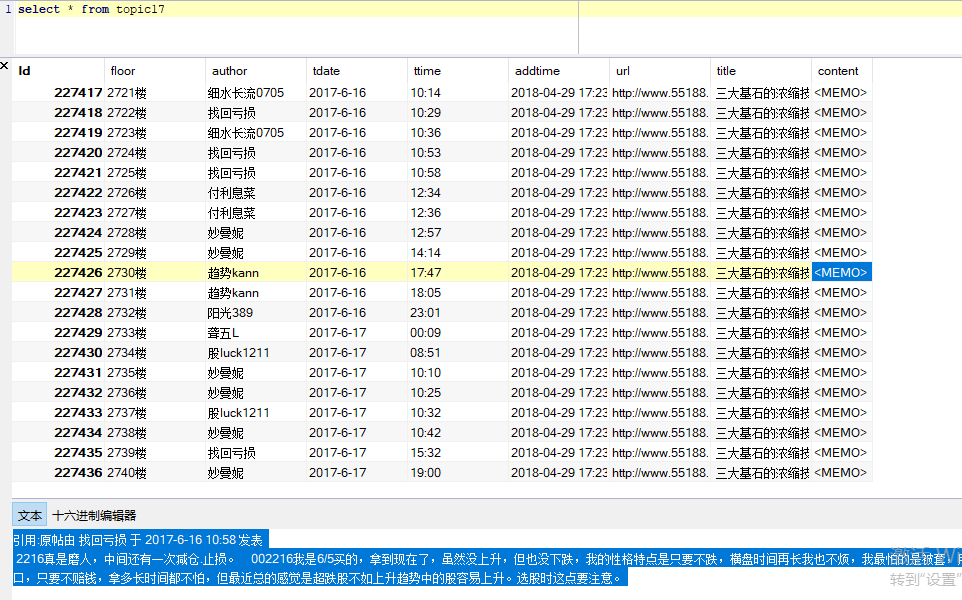
DB截图:
2018年4月29日
【python】理想论坛爬虫1.08的更多相关文章
- 【pyhon】理想论坛爬虫1.08
#------------------------------------------------------------------------------------ # 理想论坛爬虫1.08,用 ...
- 【python】理想论坛爬虫长贴版1.00
理想论坛有些长贴,针对这些长贴做统计可以知道某ID什么时段更活跃. 爬虫代码为: #---------------------------------------------------------- ...
- 【pyhon】理想论坛爬虫1.05版,将读取和写DB分离成两个文件
下午再接再厉仿照Nodejs版的理想帖子爬虫把Python版的也改造了下,但美中不足的是完成任务的线程数量似乎停滞在100个左右,让人郁闷.原因还待查. 先把代码贴出来吧,也算个阶段性成果. 爬虫代码 ...
- 【pyhon】理想论坛爬虫1.07 退出问题,乱码问题至此解决,只是目前速度上还是遗憾点
在 https://www.cnblogs.com/mengyu/p/6759671.html 的启示下,解决了乱码问题,在此向作者表示感谢. 至此,困扰我几天的乱码问题和退出问题都解决了,只是处理速 ...
- 【Python】理想论坛帖子读取爬虫1.04版
1.01-1.03版本都有多线程争抢DB的问题,线程数一多问题就严重了. 这个版本把各线程要添加数据的SQL放到数组里,等最后一次性完成,这样就好些了.但乱码问题和未全部完成即退出现象还在,而且速度上 ...
- 【nodejs】理想论坛帖子下载爬虫1.08
//====================================================== // 理想论坛帖子下载爬虫1.09 // 使用断点续传模式,因为网络传输会因各种原因中 ...
- 【python】理想论坛帖子爬虫1.06
昨天认识到在本期同时起一百个回调/线程后程序会崩溃,造成结果不可信. 于是决定用Python单线程操作,因为它理论上就用主线程跑不会有问题,只是时间长点. 写好程序后,测试了一中午,210个主贴,11 ...
- 【Nodejs】理想论坛帖子爬虫1.01
用Nodejs把Python实现过的理想论坛爬虫又实现了一遍,但是怎么判断所有回调函数都结束没有好办法,目前的spiderCount==spiderFinished判断法在多页情况下还是会提前中止. ...
- 【nodejs】理想论坛帖子下载爬虫1.07 使用request模块后稳定多了
在1.06版本时,访问网页采用的时http.request,但调用次数多以后就问题来了. 寻找别的方案时看到了https://cnodejs.org/topic/53142ef833dbcb076d0 ...
随机推荐
- 对 Git 分支 master 和 origin/master 的一些认识
首先要明确一点,对 Git 的操作是围绕 3 个大的步骤来展开的(其实几乎所有的 SCM 都是这样) 从 git 取数据(git clone) 改动代码 将改动传回 git(git push) 这 3 ...
- Android 解压zip文件
过了n多天后,当再次使用原先博客上写的那篇: Android 压缩解压zip文件 去做zip包的解压的时候,出现了原来没有发现的很多问题.首先是中文汉字问题,使用java的zip包不能很好的解决解压问 ...
- perl数组高级
1 去除一个数组中的重复元素: 使用grep函数代码片段: 代码: my @array = ( 'a', 'b', 'c', 'a', 'd', 1, 2, 5, 1, 5 ); my %count; ...
- 读写文件:每次读入大文件里的一行、读写.CSV文件
读文件: 传统的读法.所有读出,按行处理: fp=open("./ps.txt", "r"); alllines=fp.readlines(); fp.clos ...
- C#编程(十八)----------C#中的结构
C#中的结构 假设有一个类: class Dimensions { public double Length; public double Width; } 定义了一个类,它只存储某一项的长度和宽度. ...
- Android开发 AIDL使用自定义对象作参数或返回值
http://www.pocketdigi.com/20121129/952.html 默认,AIDL支持对象作参数,但需要该对象实现Parcelable接口,且aidl文件应该是该类在同一包下,需要 ...
- Sharepoint 开启发布功能的PowerShell
前言 最近,需要一段开启SharePoint站点发布功能的PowerShell命令,因为很多站点批量开启,去网站集功能和网站功能里分别点很麻烦,就搜了这样的命令,如果有需要的可以看一看. $siteU ...
- hihocoder #1170 机器人 && 编程之美2015复赛
题意: 时间限制:2000ms 单点时限:1000ms 内存限制:256MB 描写叙述 小冰的N个机器人兄弟排成一列,每一个机器人有一个颜色. 如今小冰想让同一颜色的机器人聚在一起.即随意两个同颜色的 ...
- Charles抓包https
Charles抓包https 灰灰是只小贱狗 2018.05.08 10:46 字数 762 阅读 7800评论 3喜欢 3 抓取HTTPS请求包,对数据进行排查检验 1.安装Charles 2.电脑 ...
- 得到手机当前显示的activity的名字
/** * @return 手机当前的activity */ String getRunningActivityName(){ ActivityManager activityManager=(Act ...