
【python】理想论坛爬虫长贴版1.00
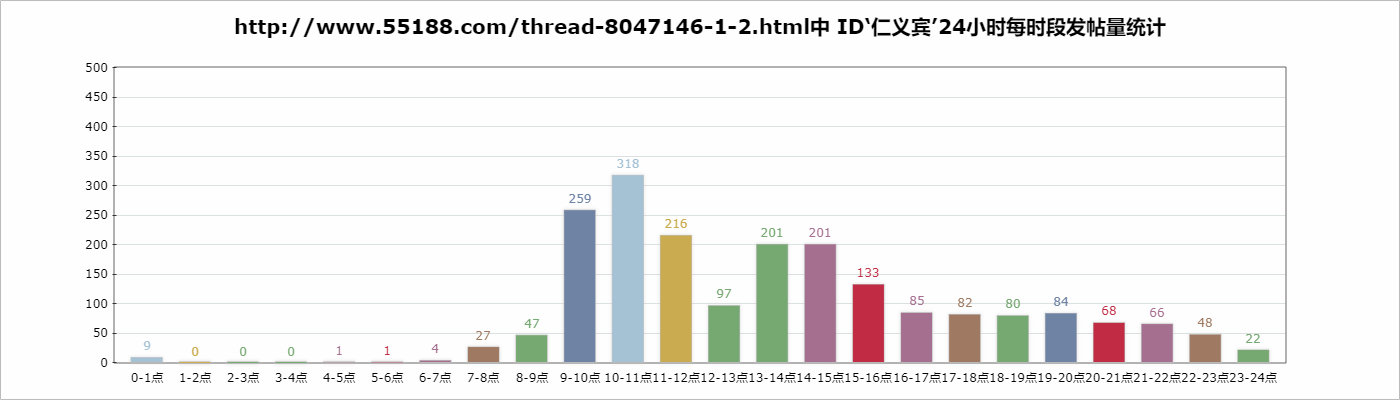
理想论坛有些长贴,针对这些长贴做统计可以知道某ID什么时段更活跃。
爬虫代码为:
#------------------------------------------------------------------------------------
# 理想论坛爬虫长贴版1.00,用于爬取单个长贴,数据存到文件里
# 再由insertDB.py读取插DB,sum.py取出分时段数据,statistics chart显示数据
# 2018年4月27日
#------------------------------------------------------------------------------------
from bs4 import BeautifulSoup
import requests
import threading
import re
import time
import datetime
import os
import json
import colorama
from colorama import Fore, Back, Style
colorama.init()

user_agent='Mozilla/5.0 (Windows NT 10.0; WOW64) AppleWebKit/537.36 (KHTML, like Gecko) Chrome/65.0.3325.181 Safari/537.36'
headers={'User-Agent':user_agent}

# 存储数据文件的目录
folder=""

#------------------------------------
# 以不同颜色在控制台输出文字
# pageUrl:论坛页url
#------------------------------------
def log(text,color):
    if color=='red':
        print(Fore.RED + text+ Style.RESET_ALL)
    elif color=='green':
        print(Fore.GREEN + text+ Style.RESET_ALL)
    elif color=='yellow':
        print(Fore.YELLOW + text+ Style.RESET_ALL)
    else:
        print(text)

#------------------------------------
# 找到并保存帖子的细节
# index:序号,url:地址,title:标题
#------------------------------------
def saveTopicDetail(index,url,title):
    infos=[]    # 找到的子贴信息
    tried=0;    # 尝试次数

    while(len(infos)==0):
        try:
            rsp=requests.get(url,headers=headers)
            rsp.encoding = 'gb18030' #解决中文乱码问题的关键
            soup= BeautifulSoup(rsp.text,'html.parser',from_encoding='gb2312')
            session = requests.session()
            session.keep_alive = False

            for divs in soup.find_all('div',class_="postinfo"):
                # 用正则表达式将多个空白字符替换成一个空格
                RE = re.compile(r'(\s+)')
                line=RE.sub(" ",divs.text)
                arr=line.split(' ')
                arrLength=len(arr)

                if arrLength==7:
                    info={'楼层':arr[1],
                          '作者':arr[2].replace('只看:',''),
                          '日期':arr[4],
                          '时间':arr[5],'title':title,'url':url}
                    infos.append(info)
                elif arrLength==8:
                    info={'楼层':arr[1],
                          '作者':arr[2].replace('只看:',''),
                          '日期':arr[5],
                          '时间':arr[6],'title':title,'url':url}
                    infos.append(info)

            #存文件
            filename=folder+"/"+str(index)+'.json'
            with open(filename,'w',encoding='utf-8') as fObj:
                json.dump(infos,fObj)
        except Exception as e:
            log("saveTopicDetail访问"+url+"时出现异常:"+str(e),'red')
            time.sleep(5)  # 如果出现异常,休息五秒后再试
            tried=tried+1

            if(tried>4):
                log("尝试5次仍无法访问:"+url+",只得跳过此页",'yellow')
                break

            continue

#------------------------------------
# 入口函数
# pageCount共多少页,pageUrl:长贴地址,title:帖子标题
#------------------------------------
def main(pageCount,url,title):
    # 创建目录
    currTime=time.strftime('%H_%M_%S',time.localtime(time.time()))
    global folder
    folder="./"+currTime
    os.makedirs(folder)
    print("目录"+folder+"创建完成")

    # 获取主贴
    topics=[] # 主帖数组
    topic={'pageCount':pageCount,'url':url,'title':title}
    topics.append(topic)
    n=len(topics)
    log("共读取到:"+str(n)+"个主贴",'green')

    # 获取主贴及其子贴
    finalTopics=[]
    index=0
    for topic in topics:
        end=int(topic['pageCount'])+1
        title=topic['title']

        for i in range(1,end):
            pattern='-(\d+)-(\d+)-(\d+)'
            newUrl=re.sub(pattern,lambda m:'-'+m.group(1)+'-'+str(i)+'-'+m.group(3),topic['url'])
            #print(newUrl)

            newTopic={'index':index,'url':newUrl,'title':title}
            finalTopics.append(newTopic)

            index=index+1

    n=len(finalTopics)
    log("共读取到:"+str(n)+"个帖子",'green')

    # 遍历finalTopics
    for newTopic in finalTopics:
        saveTopicDetail(newTopic['index'],newTopic['url'],newTopic['title']);

# 开始
main(240,'http://www.55188.com/thread-8047146-1-2.html','仁义宾实盘8 真正实盘实时交流!有股票,有思路,有策略,有分析,有分享,有活动!')
插DB代码为:
# 读取理想论坛爬虫1.06生成的数据,然后写入DB
import pymysql
import time
import datetime
import os
import json

# 数据库插值
def insertDB(sqls):
    conn=pymysql.connect(host=',db='test',charset='utf8')

    sum=0;# 插入成功总数

    for sql in sqls:
        try:
            count=conn.query(sql)    #单条是否成功
        except Exception as e:
            print("sql'"+sql+"'出现异常:"+str(e))
            continue;

        if count==0:
            print(sql+'插入记录失败');

        sum+=count

    conn.commit()
    conn.close()

    return sum

# 入口函数
def main(folder):
    starttime = datetime.datetime.now()

    allinfos=[]
    for filename in os.listdir(folder):
        filePathname=folder+"/"+filename

        with open(filePathname,'r',encoding='utf-8') as fObj:
            infos=json.load(fObj)
            #print(infos)
            allinfos.extend(infos)

    sqls=[]
    for info in allinfos:
        sql="insert into test.topicryb(floor,author,tdate,ttime,addtime,url,title) values ('"+info['楼层']+"','"+info['作者']+"','"+info['日期']+"','"+info['时间']+"',"+"now(),'"+info['url']+"','"+info['title']+"' "+" )"
        sqls.append(sql)

    print("将向数据库插入"+str(len(sqls))+"条记录")
    retval=insertDB(sqls)
    print("已向数据库插入"+str(retval)+"条记录")

    endtime = datetime.datetime.now()
    print("插数据用时"+str((endtime - starttime).seconds)+"秒")
# 开始
main("./18_09_57")
取数据进行统计的代码为:
# 对发帖时间进行统计
import re
import pymysql

# 入口函数
def main():
    dic={':0}

    conn=pymysql.connect(host=',db='test',charset='utf8')

    cs=conn.cursor()
    cs.execute("select * from topicryb where author='仁义宾' ")
    results = cs.fetchall()

    for row in results:
        ttime=row[4]
        hour=ttime.split(':')[0]
        dic[hour]=dic[hour]+1

    conn.close()

    print(dic)
# 开始
main()
得到数据是:
C:\Users\horn1\Desktop\python\29>python sum.py
{': 22}

C:\Users\horn1\Desktop\python\29>
进行绘图的JS代码是:
<!DOCTYPE HTML PUBLIC "-//W3C//DTD HTML 4.01 Transitional//EN" "http://www.w3.org/TR/html4/loose.dtd">
<html>
 <head>
  <title> New Document </title>
  <meta name="Generator" content="EditPlus">
  <meta name="Author" content="">
  <meta name="Keywords" content="">
  <meta name="Description" content="">
 </head>
    <script src="ichart.1.2.min.js"></script>
 <body>
  <div id='canvasDiv'></div>
 </body>
</html>
<script type="text/javascript">
<!--
var dic={'00': 9, '01': 0, '02': 0, '03': 0, '04': 1, '05': 1, '06': 4, '07': 27, '08': 47, '09': 259, '10': 318, '11': 216, '12': 97, '13': 201, '14': 201, '15': 133, '16': 85, '17': 82, '18': 80, '19': 84, '20': 68, '21': 66, '22': 48, '23': 22};

    //定义数据
    var data = [
        {name : '0-1点',  value : dic['00'],color:'#a5c2d5'},
           {name : '1-2点',  value : dic['01'],color:'#cbab4f'},
           {name : '2-3点',  value : dic['02'],color:'#76a871'},
           {name : '3-4点',  value : dic['03'],color:'#76a871'},
           {name : '4-5点',  value : dic['04'],color:'#a56f8f'},
           {name : '5-6点',  value : dic['05'],color:'#c12c44'},
           {name : '6-7点',  value : dic['06'],color:'#a56f8f'},
           {name : '7-8点',  value : dic['07'],color:'#9f7961'},
           {name : '8-9点',  value : dic['08'],color:'#76a871'},
           {name : '9-10点', value : dic['09'],color:'#6f83a5'},
        {name : '10-11点',value : dic['10'],color:'#a5c2d5'},
           {name : '11-12点',value : dic['11'],color:'#cbab4f'},
           {name : '12-13点',value : dic['12'],color:'#76a871'},
           {name : '13-14点',value : dic['13'],color:'#76a871'},
           {name : '14-15点',value : dic['14'],color:'#a56f8f'},
           {name : '15-16点',value : dic['15'],color:'#c12c44'},
           {name : '16-17点',value : dic['16'],color:'#a56f8f'},
           {name : '17-18点',value : dic['17'],color:'#9f7961'},
           {name : '18-19点',value : dic['18'],color:'#76a871'},
           {name : '19-20点',value : dic['19'],color:'#6f83a5'},
        {name : '20-21点',value : dic['20'],color:'#c12c44'},
           {name : '21-22点',value : dic['21'],color:'#a56f8f'},
           {name : '22-23点',value : dic['22'],color:'#9f7961'},
           {name : '23-24点',value : dic['23'],color:'#76a871'}
     ];
     $(function(){
        var chart = new iChart.Column2D({
            render : 'canvasDiv',//渲染的Dom目标,canvasDiv为Dom的ID
            data: data,//绑定数据
            title : 'http://www.55188.com/thread-8047146-1-2.html中 ID‘仁义宾’24小时每时段发帖量统计',//设置标题
            width : 1400,//设置宽度,默认单位为px
            height : 400,//设置高度,默认单位为px
            shadow:true,//激活阴影
            shadow_color:'#c7c7c7',//设置阴影颜色
            coordinate:{//配置自定义坐标轴
                scale:[{//配置自定义值轴
                     position:'left',//配置左值轴
                     start_scale:0,//设置开始刻度为0
                     end_scale:500,//设置结束刻度
                     scale_space:50,//设置刻度间距
                     listeners:{//配置事件
                        parseText:function(t,x,y){//设置解析值轴文本
                            return {text:t+""}
                        }
                    }
                }]
            }
        });
        //调用绘图方法开始绘图
        chart.draw();
    });
//-->
</script>
最后我们就看到这张图片:
全体代码+数据下载:https://files.cnblogs.com/files/xiandedanteng/lixryb20180427.rar
【python】理想论坛爬虫长贴版1.00的更多相关文章
- 【pyhon】理想论坛爬虫1.05版,将读取和写DB分离成两个文件
下午再接再厉仿照Nodejs版的理想帖子爬虫把Python版的也改造了下,但美中不足的是完成任务的线程数量似乎停滞在100个左右,让人郁闷.原因还待查. 先把代码贴出来吧,也算个阶段性成果. 爬虫代码 ...
- 【python】理想论坛爬虫1.08
#------------------------------------------------------------------------------------ # 理想论坛爬虫1.08, ...
- 【pyhon】理想论坛爬虫1.08
#------------------------------------------------------------------------------------ # 理想论坛爬虫1.08,用 ...
- 【pyhon】理想论坛爬虫1.07 退出问题,乱码问题至此解决,只是目前速度上还是遗憾点
在 https://www.cnblogs.com/mengyu/p/6759671.html 的启示下,解决了乱码问题,在此向作者表示感谢. 至此,困扰我几天的乱码问题和退出问题都解决了,只是处理速 ...
- 【statistics】理想论坛2018-4-25日统计
说明:利用理想论坛爬虫1.07版(http://www.cnblogs.com/xiandedanteng/p/8954115.html) 下载了前十页主贴及子贴,共得到359619条数据,以此数据为 ...
- 【Python】理想论坛帖子读取爬虫1.04版
1.01-1.03版本都有多线程争抢DB的问题,线程数一多问题就严重了. 这个版本把各线程要添加数据的SQL放到数组里,等最后一次性完成,这样就好些了.但乱码问题和未全部完成即退出现象还在,而且速度上 ...
- 【python】理想论坛帖子爬虫1.06
昨天认识到在本期同时起一百个回调/线程后程序会崩溃,造成结果不可信. 于是决定用Python单线程操作,因为它理论上就用主线程跑不会有问题,只是时间长点. 写好程序后,测试了一中午,210个主贴,11 ...
- 【nodejs】理想论坛帖子下载爬虫1.07 使用request模块后稳定多了
在1.06版本时,访问网页采用的时http.request,但调用次数多以后就问题来了. 寻找别的方案时看到了https://cnodejs.org/topic/53142ef833dbcb076d0 ...
- 【Nodejs】理想论坛帖子爬虫1.01
用Nodejs把Python实现过的理想论坛爬虫又实现了一遍,但是怎么判断所有回调函数都结束没有好办法,目前的spiderCount==spiderFinished判断法在多页情况下还是会提前中止. ...
随机推荐
- luoguP3952 [NOIP2017]时间复杂度 模拟
原本只是想看下多久能码完时间复杂度 然后在30min内就码完了,然后一A了???? 首先,这题完全可以离线做 我们先把所有的操作读完,判断合不合法之后,再去判断和标准答案的关系 具体而言 把所有的操作 ...
- ZOJ 3235 Prototype
Prototype Time Limit: 1 Second Memory Limit: 32768 KB Prototype is a 3D game which allow you to ...
- bzoj 1798: [Ahoi2009]Seq 维护序列seq 线段树 区间乘法区间加法 区间求和
1798: [Ahoi2009]Seq 维护序列seq Time Limit: 1 Sec Memory Limit: 256 MB 题目连接 http://www.lydsy.com/JudgeO ...
- 实现多线程的另一种方式-Callable
package com.mldn.thread; import java.util.concurrent.ExecutionException; import java.util.concurrent ...
- BlueMind 3.0.17 发布,消息和协作平台
BlueMind 3.0.17 发布,此版本对即时消息 Web 应用连接处理做了较大改进(更可靠),还修复了通讯录浏览器. BlueMind 3.0.17 现已提供下载. 详细改进记录如下: Addr ...
- ng-show和ng-if的区别
第一点区别是, ng-if 在后面表达式为 true 的时候才创建这个 dom 节点, ng-show 是初始时就创建了,用display:block 和 display:none 来控制显示和不显示 ...
- redis-py说明文件(转)
转自:http://blog.sina.com.cn/s/blog_6262a50e0101574h.html 原文:https://github.com/andymccurdy/redis-py r ...
- [Asp.net MVC]HandleErrorAttribute异常过滤器
摘要 在asp.net mvc中除了使用try...catch/finally来处理异常外,它提供了一种通过在Controller或者Action上添加特性的方式来处理异常. HandleErrorA ...
- linux系统负载相关的概念和度量
系统负载有 CPU利用率 和 LoadAverage这2个概念. cpu利用率:cpu utilization,是进程(task)被内核调度进程实际分配了CPU资源后,在时间片内使用CPU进行工作运算 ...
- org.springframework.web.HttpMediaTypeNotSupportedException: Content type 'multipart/form-data;boundary=----WebKitFormBoundaryRAYPKeHKTYSNdzc1;charset=UTF-8' not supported
原文:https://www.cnblogs.com/yueli/p/7552888.html 最近同事在做一个图片上传功能.在入参 body 中同时传入文件和其它基本信息结果出现如题异常.在此记录下 ...