
DotNetCore 3.0 助力 WPF本地化
概览
随着我们的应用程序越来越受欢迎,我们的下一步将要开发多语言功能。方便越来越多的国家使用我们中国的应用程序,
基于 WPF 本地化,我们很多时候使用的是系统资源文件,可是动态切换本地化,就比较麻烦了。
有没有一种方法既可以适用系统的资源文件,又能方便快捷的切换本地化呢?
实现思路
现在我们将要实现的是基于 DotNetCore 3.0 以上版本 and WPF 桌面应用程序模块化的多语言功能。
动态切换多语言思路:
- 把所有模块的资源文件添加到字典集合。
- 将资源文件里的key,绑定到前台。
- 通过通知更改
CurrentCulture多语言来使用改变的语言文件里的key。 - 通过绑定
Binding拼接Path 在输出。
动态切换
我们先来看实现结果

- 第一行是我们的主程序的数据展示,用于业务中的本地化
- 第二行是我们业务模块A的数据展示
- 第三行是我们业务模块B的数据展示
来看一下xaml展示

通过ComboBox选择来切换语言

搭建模拟业务项目
创建一个WPF App(.NET Core)应用程序
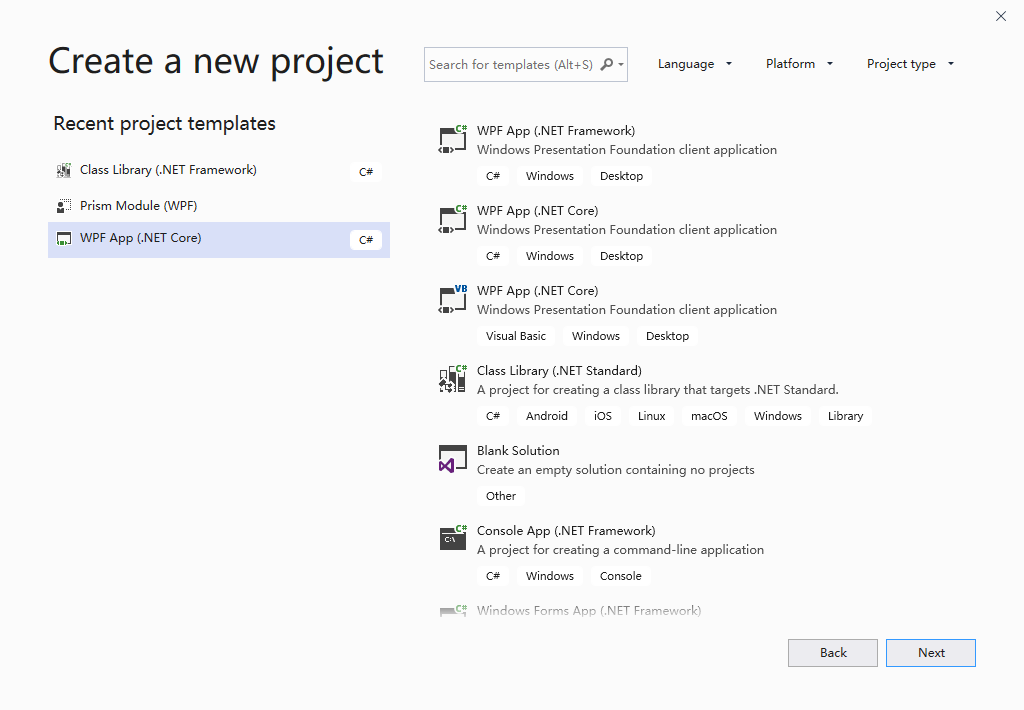
创建完成后,我们需要引入业务A模块及业务B模块和业务帮助模块
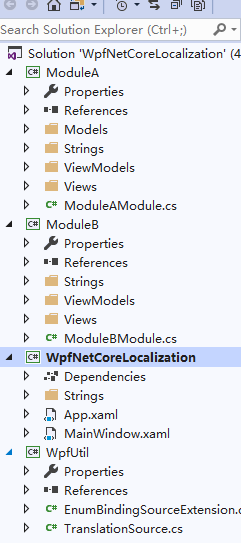
PS:根据自己的业务需要来完成项目的搭建。本教程完全适配多语言功能。
使用ResX资源文件
在各个模块里添加Strings 文件夹用来包含 各个国家和地区的语言文件。
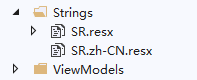
多语言可以参考:https://github.com/UnRunDeaD/WPF---Localization/blob/master/ComboListLanguages.txt
资源文件可以放在任意模块内,比如业务模块A ,主程序,底层业务,控件工具集等
创建各个业务模块资源文件
Strings文件夹可以任意命名
SR资源文件可以任意命名

帮助类
封装到底层供各个模块调用
    public class TranslationSource : INotifyPropertyChanged

    {

        public static TranslationSource Instance { get; } = new TranslationSource();

        private readonly Dictionary<string, ResourceManager> resourceManagerDictionary = new Dictionary<string, ResourceManager>();

        public string this[string key]

        {

            get

            {

                Tuple<string, string> tuple = SplitName(key);

                string translation = null;

                if (resourceManagerDictionary.ContainsKey(tuple.Item1))

                    translation = resourceManagerDictionary[tuple.Item1].GetString(tuple.Item2, currentCulture);

                return translation ?? key;

            }

        }

        private CultureInfo currentCulture = CultureInfo.InstalledUICulture;

        public CultureInfo CurrentCulture

        {

            get { return currentCulture; }

            set

            {

                if (currentCulture != value)

                {

                    currentCulture = value;

                    // string.Empty/null indicates that all properties have changed

                    PropertyChanged?.Invoke(this, new PropertyChangedEventArgs(string.Empty));

                }

            }

        }

        // WPF bindings register PropertyChanged event if the object supports it and update themselves when it is raised

        public event PropertyChangedEventHandler PropertyChanged;

        public void AddResourceManager(ResourceManager resourceManager)

        {

            if (!resourceManagerDictionary.ContainsKey(resourceManager.BaseName))

            {

                resourceManagerDictionary.Add(resourceManager.BaseName, resourceManager);

            }

        }

        public static Tuple<string, string> SplitName(string local)

        {

            int idx = local.ToString().LastIndexOf(".");

            var tuple = new Tuple<string, string>(local.Substring(0, idx), local.Substring(idx + 1));

            return tuple;

        }

    }

    public class Translation : DependencyObject

    {

        public static readonly DependencyProperty ResourceManagerProperty =

            DependencyProperty.RegisterAttached("ResourceManager", typeof(ResourceManager), typeof(Translation));

        public static ResourceManager GetResourceManager(DependencyObject dependencyObject)

        {

            return (ResourceManager)dependencyObject.GetValue(ResourceManagerProperty);

        }

        public static void SetResourceManager(DependencyObject dependencyObject, ResourceManager value)

        {

            dependencyObject.SetValue(ResourceManagerProperty, value);

        }

    }

    public class LocExtension : MarkupExtension

    {

        public string StringName { get; }

        public LocExtension(string stringName)

        {

            StringName = stringName;

        }

        private ResourceManager GetResourceManager(object control)

        {

            if (control is DependencyObject dependencyObject)

            {

                object localValue = dependencyObject.ReadLocalValue(Translation.ResourceManagerProperty);

                // does this control have a "Translation.ResourceManager" attached property with a set value?

                if (localValue != DependencyProperty.UnsetValue)

                {

                    if (localValue is ResourceManager resourceManager)

                    {

                        TranslationSource.Instance.AddResourceManager(resourceManager);

                        return resourceManager;

                    }

                }

            }

            return null;

        }

        public override object ProvideValue(IServiceProvider serviceProvider)

        {

            // targetObject is the control that is using the LocExtension

            object targetObject = (serviceProvider as IProvideValueTarget)?.TargetObject;

            if (targetObject?.GetType().Name == "SharedDp") // is extension used in a control template?

                return targetObject; // required for template re-binding

            string baseName = GetResourceManager(targetObject)?.BaseName ?? string.Empty;

            if (string.IsNullOrEmpty(baseName))

            {

                // rootObject is the root control of the visual tree (the top parent of targetObject)

                object rootObject = (serviceProvider as IRootObjectProvider)?.RootObject;

                baseName = GetResourceManager(rootObject)?.BaseName ?? string.Empty;

            }

            if (string.IsNullOrEmpty(baseName)) // template re-binding

            {

                if (targetObject is FrameworkElement frameworkElement)

                {

                    baseName = GetResourceManager(frameworkElement.TemplatedParent)?.BaseName ?? string.Empty;

                }

            }

            Binding binding = new Binding

            {

                Mode = BindingMode.OneWay,

                Path = new PropertyPath($"[{baseName}.{StringName}]"),

                Source = TranslationSource.Instance,

                FallbackValue = StringName

            };

            return binding.ProvideValue(serviceProvider);

        }

    }
前台绑定
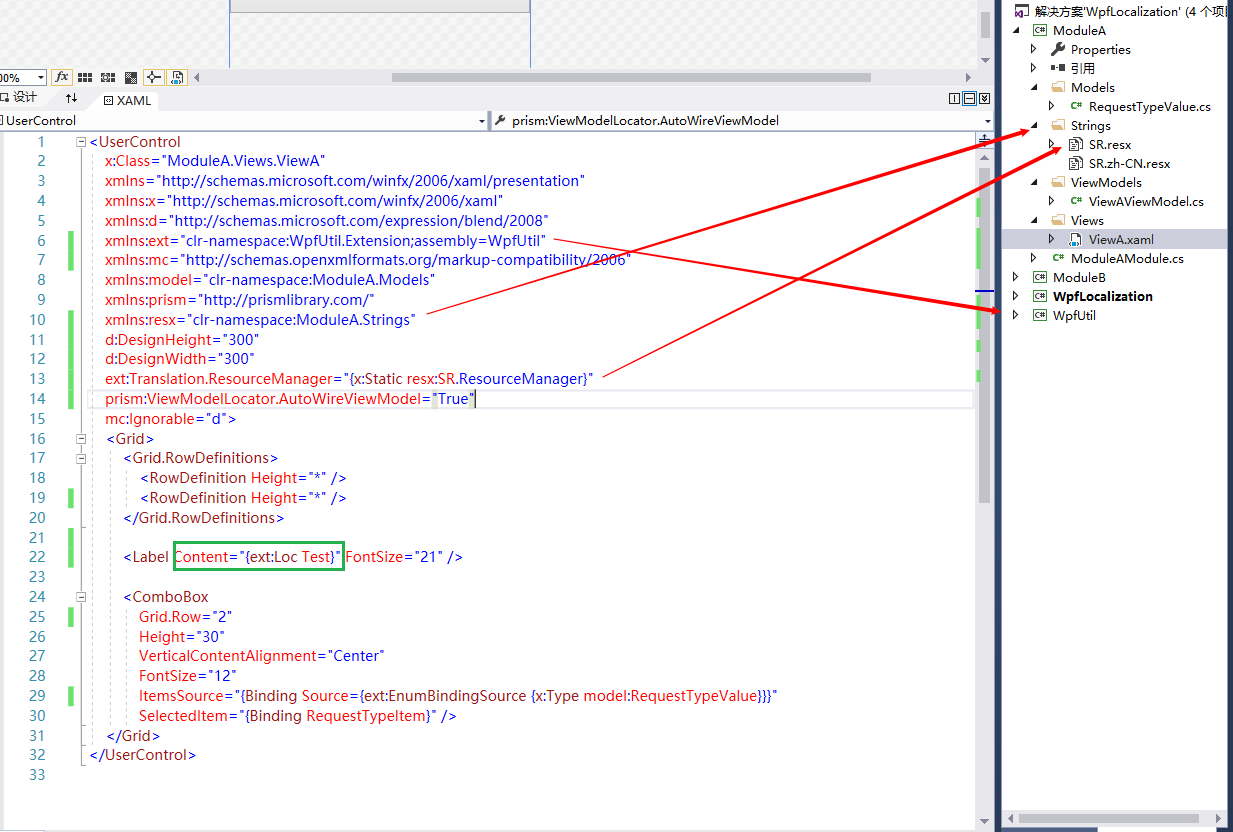
//引用业务模块

xmlns:ext="clr-namespace:WpfUtil.Extension;assembly=WpfUtil"

// 引用刚才你命名的文件夹名字

xmlns:resx="clr-namespace:ModuleA.Strings"

// 每个模块通过帮助类,将当前模块的资源类,

// 加载到资源管理集合里面用于分配每个键值

// 引用刚才你命名的资源文件名字 -> SR

ext:Translation.ResourceManager="{x:Static resx:SR.ResourceManager}"
显示文字
//读取资源文件里的键值

<Label Content="{ext:Loc Test}" FontSize="21" />
后台实现
根据业务的需要,我们在界面上无法适用静态文字显示的,一般通过后台代码来完成,对于 code-behind 的变量使用,同样可以应用于资源字典。
比如在业余模块代码段里的模拟实现
// SR 是当前业务模块的资源文件类,管理当前模块的资源字符串。

// 根据不同的 `CurrentCulture` 选择相对应的本地化

Message = string.Format(SR.ResourceManager.GetString("Message",Thread.CurrentThread.CurrentUICulture),System.DateTime.Now);
PS: 欢迎各位大佬慷慨指点,有不足之处,请指出!有疑问,请指出,喜欢它,请支持!
下载地址
https://github.com/androllen/WpfNetCoreLocalization
相关链接
https://github.com/Jinjinov/wpf-localization-multiple-resource-resx-one-language/blob/master/README.md
https://codinginfinity.me/post/2015-05-10/localization_of_a_wpf_app_the_simple_approach
DotNetCore 3.0 助力 WPF本地化的更多相关文章
- DotNetCore 3.0 助力 WPF 开发
DotNetCore Is AnyWhere. 前言 Visual Studio 2019 已经正式发布了,DotNetCore 3.0 的正式版也指日可待.在之前的版本中,作为一名基于微软生态的传统 ...
- 将传统 WPF 程序迁移到 DotNetCore 3.0
介绍 由于历史原因,基于 Windows 平台存在着大量的基于 .NetFramework 开发的 WPF 和 WinForm 相关程序,如果将这些程序全部基于 DotNetCore 3.0 重写一遍 ...
- 使用 MSIX 打包 DotNetCore 3.0 客户端程序
如何你希望你的 WPF 程序能够以 Windows 的保护机制保护起来,不被轻易反编译的话,那么这篇文章应该能帮到你. 介绍 MSIX 是微软于去年的 Windows 开发者日峰会 上推出的全新应用打 ...
- MSIX 打包 DotNetCore 3.0
使用 MSIX 打包 DotNetCore 3.0 客户端程序 如何你希望你的 WPF 程序能够以 Windows 的保护机制保护起来,不被轻易反编译的话,那么这篇文章应该能帮到你. 介绍# MSIX ...
- [WPF]本地化入门
1. 前言 WPF的本地化是个很常见的功能,我做过的WPF程序大部分都实现了本地化(不管最终有没有用到).通常本地化有以下几点需求: 在程序启动时根据CultureInfo.CurrentUICult ...
- 创建或打开解决方案时提示"DotNetCore.1.0.1-SDK.1.0.0.Preview2-003131-x86"错误的解决方案
提示"DotNetCore.1.0.1-SDK.1.0.0.Preview2-003131-x86"错误的解决方案: 1.检查是否有C:\Program Files (x86)\d ...
- 解决 DotNetCore.1.0.1-VS2015Tools.Preview2.0.3.exe 在VS2015 Update3 安装失败的问题
今天抽空升级VS2015 Update3. 在安装DotNetCore.1.0.1-VS2015Tools.Preview2.0.3.exe 时报错了,看了错误日志 显示: 看到我标红的两个地方,那么 ...
- 无法安装 DotNetCore.1.0.0-VS2015Tools.Preview2解决方法
安装 DotNetCore.1.0.0-VS2015Tools.Preview2,已经安装vs2015update3,还是提示检测到 Visual Studio 2015 Update 3没有完全安装 ...
- [转] 安装DotNetCore.1.0.1-VS2015Tools.Preview2.0.2出现0x80072f8a未指定的错误
原文地址:安装DotNetCore.1.0.1-VS2015Tools.Preview2.0.2出现0x80072f8a未指定的错误 最近DotNetCore更新到了1.0.1,Azure tools ...
随机推荐
- mysql重启遇到的问题
不知道是不是每次更新 MySQL 软件之后都需要执行数据库升级指令?在我进行过的几次软件升级之后,总会在 MySQL 的日志中见到 “[ERROR] Missing system table mysq ...
- BAT的人都是怎么学习的
不知道你发现没,在技术领域走在前列的人,基本都符合一个条件:保持对新技术的敏感度,还能定期更新自己的技能储备. 要做到这一点,最高效的办法就是直接跟 BAT 等一线大厂取经.说白了,平台足够大,就有更 ...
- 比赛:大奔的方案solution
分析: 此题是小奔的方案的改进.小奔的方案思路:倒推,每次都从小到大排序并且保证小号在前,然后使每一个人分到的金币都是上一次加一,直到金币分完或者自己可以存活(投票率大于等于所需概率),如果不行就-1 ...
- .net持续集成cake篇之使用vs或者vscode来辅助开发cake脚本
使用Visual Studio来开发工具 前面我们都是通过手写或者复制的方法来编写Cake文件,Cake使用的是C#语言,如果仅使用简单的文本编辑器来编写显然效率是非常低下的,本节我们讲解如何使用ca ...
- HHyperledger Fabric 之 TLS (fabric-java-sdk)使用grpcs方式访问fabric
我在很多fabric的技术群中,很多使用javasdk连接fabric的同友,初始的时候很多都没有成功的使用TLS进行区块链交易: 是sdk不支持,还是我们没有找到解决方案? 其实不然,我这里使用的是 ...
- Tomcat(Linux)
百度云:链接:http://pan.baidu.com/s/1o7MNTJc 密码:cfof 官方下载网址:http://archive.apache.org/dist/tomcat/tomca ...
- Git学习(二):Git的初步使用
一.Git的最小配置 1.使用如下命令创建Git的用户名和邮箱,如下所示: $git config --global user.name 'your_name' $git config --globa ...
- 渐进式web应用开发-- 使用后台同步保证离线功能(六)
_ 阅读目录 一:什么是后台同步保证离线功能呢? 二:后台同步是如何实现的呢? 三:如何给sync事件传递数据? 四:在我们的项目中添加后台同步功能 回到顶部 一:什么是后台同步保证离线功能呢? 在我 ...
- BFS(宽度优先搜索) -例题
原题地址 https://vjudge.net/contest/313171 密码:algorithm A - Rescue Angel was caught by the MOLIGPY! ...
- 14. 流、文件和IO
前言 InputStream/OutStream流用来处理设备之间的数据传输 Java.io 包几乎包含了所有操作输入.输出需要的类.所有这些流类代表了输入源和输出目标. Java.io 包中的流支持 ...