
Solr java.sql.SQLException: null, message from server: "Host 'xxx' is not allowed to connect to this MySQL server
在用solr从mysql导入数据的时候,因为linux和本机的数据库不在同一个ip段上,
又因为本地的mysql没有设置远程其它ip可以访问所以就报了如下错误

解决办法:
在mysql任意可以输入查询命令的窗口下执行。
use mysql;

select user,host from user;

update user set host = '%' where user = 'root'
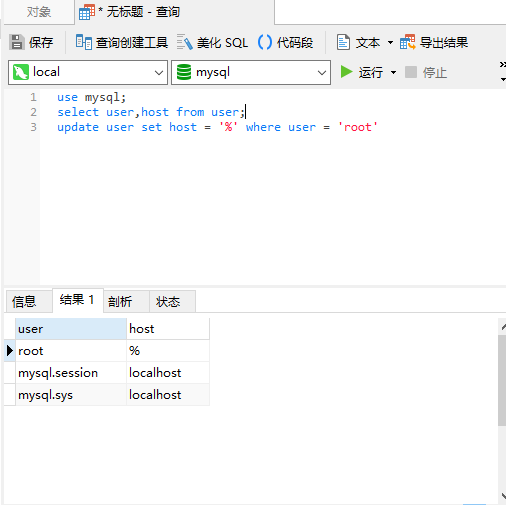
修改后成为这个样子就ok了,
最后一步就是把你的mysql服务重启,一定要重启!
host=%含义
%是通配符,host标识是设置允许访问的ip地址
例如:
* host=localhost:只允许本机访问
* host=169.254.18.%:只允许169.254.18.网段的可以访问
* host=%:允许所有ip地址访问
Solr java.sql.SQLException: null, message from server: "Host 'xxx' is not allowed to connect to this MySQL server的更多相关文章
- java.sql.SQLException: null, message from server: "Host 'xxx' is not allowed to connect to this MySQL server"
java.sql.SQLException: null, message from server: "Host 'xxx' is not allowed to connect to thi ...
- message from server: "Host 'XXX' is not allowed to connect to this MySQL server
Access denied for user 'root'@'XXXXX' (using password: YES) mysql命令不正确造成: grant all privileges on *. ...
- message from server: "Host 'xxx' is not allowed to connect to this MySQL server的解决
解决方法: 1. 改表法. 可能是你的帐号不允许从远程登陆,只能在localhost.这个时候只要在localhost的那台电脑,登入mysql后,更改 "mysql" ...
- Cannot create PoolableConnectionFactory (null, message from server: "Host 'admin-PC' is not allowed to connect to this MySQL server")
1.别人在用自己的tomcat访问我留的查询接口时,出现Cannot create PoolableConnectionFactory (null, message from server: &qu ...
- 解决服务器连接错误Host ‘XXX’ is not allowed to connect to this MySQL server
这段时间在研究火车头的入库教程,在“配置登陆信息和数据库(mysql)”连接中,出现“服务器连接错误Host 'XXX' is not allowed to connect to this MySQL ...
- ERROR 1130: Host xxx is not allowed to connect to this MySQL server
在使用MySQL-Front连接mysql的时候发生的这个错误 ERROR 1130: Host xxx is not allowed to connect to this MySQL server ...
- Host 'xxx' is not allowed to connect to this MySQL server.
mysql开启远程连接 今天在服务器安装了mysql,准备用mysqlguitools远程登录的时候出错,提示:Host 'xxx' is not allowed to connect to this ...
- 连接远程数据库时出现 SSH: expected key exchange group packet from server / 2003 - Can't connect to MySQL server on 'XXX' (10038) / 1130 - Host 'XXX' is not allowed to connect to this MySQL server
昨天在自己的远程服务器上玩,把系统重装了.新装了MySQL,在本地用navicat连接的时候出了几个小问题. 问题一:SSH: expected key exchange group packet f ...
- Mysql 数据库允许远程连接 服务器连接错误 Host 'XXX' is not allowed to connect to this MySQL server
如果连接数据库的时候出现这个问题 Host 'XXX' is not allowed to connect to this MySQL server 说明 Mysql数据库 不允许远程连接, 需要修改 ...
随机推荐
- 2019年全国高校计算机能力挑战赛初赛C语言解答
http://www.ncccu.org.cn 2019年全国高校计算机能力挑战赛分设大数据算法赛,人工智能算法赛,Office高级应用赛,程序设计赛4大赛项 C语言初赛解答 1:编程1 16.现有一 ...
- 【分析工具】阿里巴巴Arthas--线上问题分析利器
目录 1. Arthas是什么 2. Arthas能解决什么问题 3. 快速安装 第一步:下载 第二步:运行 第三步:选择进程 4. 实战使用 5. 总结 本博客转载自阿里开源的 Java 诊断工具 ...
- Java 的核心目的和并发编程
读一本书,最好能从它的前言开始.那么我们就来看看<Java编程思想>作者 Bruce Eckel 在前言里都说了些什么吧. 01.Java 的核心目的是"为程序员减少复杂性&qu ...
- Android给Viewpager默认指定页
上结果代码 private void setViewPaperItem(int position) { try { Class c = Class.forName("android.supp ...
- InnoSetup 根据选择的安装语言显示不同语言的(协议)License和更新说明
需求 在安装时,选择中文安装,显示中文版协议(License)文件. 在安装时,选择英文安装,显示英文版协议(License)文件. 解决 [Languages] 段中有LicenseFile属性和I ...
- 阅读SQL基础教程
这两天阅读SQL基础教程,目标是把SQL语法吃透,会写一些笔记.
- 【转载】Android App应用启动分析与优化
前言: 昨晚新版本终于发布了,但是还是记得有测试反馈app启动好长时间也没进入app主页,所以今天准备加个班总结一下App启动那些事! app的启动方式: 1.)冷启动 当启动应用时,后台没有该应用 ...
- 利用keras进行手写数字识别模型训练,并输出训练准确度
from keras.datasets import mnist (train_images, train_labels), (test_images, test_labels) = mnist.lo ...
- 【Gradle】Android Gradle 高级自定义
Android Gradle 高级自定义 使用共享库 Android的包,如android.app,android.content,android.view,android.widget等,是默认包含 ...
- TP5 查询mysql数据库时的find_in_set用法
$where['class_id'] = ['in', '$cid_all']; $where['id'] = ['in', $all_user_id];//或这样子 $where['title'] ...