
Linux下c++之常见错误代码errno(退而结网法)
1.关于
还在到处找 errno对应的含义? 自己动手,很方便可找到其明确的含义
2. 动手
- 2.1 创建 c++源文件,输入下面的代码:
#pragma once

#include <iostream>

#include <fstream>

#include <errno.h>

#include <string.h>

using namespace std;

int main(int argc, char *argv[])

{

    cout << "it is starting.....\n\n\n";

    ofstream out_file;

    out_file.open("errno.txt", ios::out | ios::trunc );

    for (int i = 0; i < 135; i++)

    {

        out_file << "errno=" << i << ", " << strerror(i) << endl;

    }

    out_file.close();

    cout << "it ended .....\n\n\n";

    return 0;

}
- 2.2 编译输出结果, 一个例子,我这里输出的是 main可执行程序,执行main即可
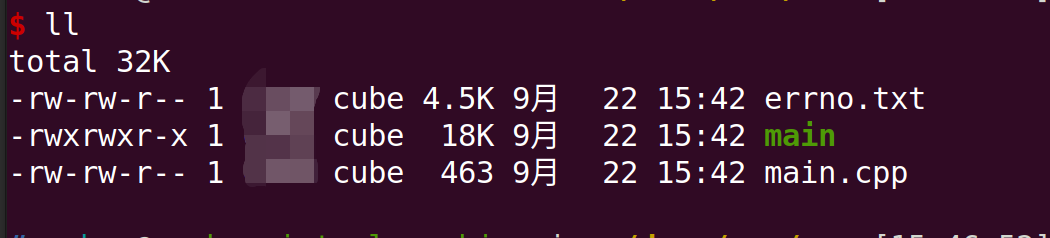
- 2.3 为什么到135?后面都是unknow error了
3.errno常见错误定义
errno=0, Success

errno=1, Operation not permitted

errno=2, No such file or directory

errno=3, No such process

errno=4, Interrupted system call

errno=5, Input/output error

errno=6, No such device or address

errno=7, Argument list too long

errno=8, Exec format error

errno=9, Bad file descriptor

errno=10, No child processes

errno=11, Resource temporarily unavailable

errno=12, Cannot allocate memory

errno=13, Permission denied

errno=14, Bad address

errno=15, Block device required

errno=16, Device or resource busy

errno=17, File exists

errno=18, Invalid cross-device link

errno=19, No such device

errno=20, Not a directory

errno=21, Is a directory

errno=22, Invalid argument

errno=23, Too many open files in system

errno=24, Too many open files

errno=25, Inappropriate ioctl for device

errno=26, Text file busy

errno=27, File too large

errno=28, No space left on device

errno=29, Illegal seek

errno=30, Read-only file system

errno=31, Too many links

errno=32, Broken pipe

errno=33, Numerical argument out of domain

errno=34, Numerical result out of range

errno=35, Resource deadlock avoided

errno=36, File name too long

errno=37, No locks available

errno=38, Function not implemented

errno=39, Directory not empty

errno=40, Too many levels of symbolic links

errno=41, Unknown error 41

errno=42, No message of desired type

errno=43, Identifier removed

errno=44, Channel number out of range

errno=45, Level 2 not synchronized

errno=46, Level 3 halted

errno=47, Level 3 reset

errno=48, Link number out of range

errno=49, Protocol driver not attached

errno=50, No CSI structure available

errno=51, Level 2 halted

errno=52, Invalid exchange

errno=53, Invalid request descriptor

errno=54, Exchange full

errno=55, No anode

errno=56, Invalid request code

errno=57, Invalid slot

errno=58, Unknown error 58

errno=59, Bad font file format

errno=60, Device not a stream

errno=61, No data available

errno=62, Timer expired

errno=63, Out of streams resources

errno=64, Machine is not on the network

errno=65, Package not installed

errno=66, Object is remote

errno=67, Link has been severed

errno=68, Advertise error

errno=69, Srmount error

errno=70, Communication error on send

errno=71, Protocol error

errno=72, Multihop attempted

errno=73, RFS specific error

errno=74, Bad message

errno=75, Value too large for defined data type

errno=76, Name not unique on network

errno=77, File descriptor in bad state

errno=78, Remote address changed

errno=79, Can not access a needed shared library

errno=80, Accessing a corrupted shared library

errno=81, .lib section in a.out corrupted

errno=82, Attempting to link in too many shared libraries

errno=83, Cannot exec a shared library directly

errno=84, Invalid or incomplete multibyte or wide character

errno=85, Interrupted system call should be restarted

errno=86, Streams pipe error

errno=87, Too many users

errno=88, Socket operation on non-socket

errno=89, Destination address required

errno=90, Message too long

errno=91, Protocol wrong type for socket

errno=92, Protocol not available

errno=93, Protocol not supported

errno=94, Socket type not supported

errno=95, Operation not supported

errno=96, Protocol family not supported

errno=97, Address family not supported by protocol

errno=98, Address already in use

errno=99, Cannot assign requested address

errno=100, Network is down

errno=101, Network is unreachable

errno=102, Network dropped connection on reset

errno=103, Software caused connection abort

errno=104, Connection reset by peer

errno=105, No buffer space available

errno=106, Transport endpoint is already connected

errno=107, Transport endpoint is not connected

errno=108, Cannot send after transport endpoint shutdown

errno=109, Too many references: cannot splice

errno=110, Connection timed out

errno=111, Connection refused

errno=112, Host is down

errno=113, No route to host

errno=114, Operation already in progress

errno=115, Operation now in progress

errno=116, Stale file handle

errno=117, Structure needs cleaning

errno=118, Not a XENIX named type file

errno=119, No XENIX semaphores available

errno=120, Is a named type file

errno=121, Remote I/O error

errno=122, Disk quota exceeded

errno=123, No medium found

errno=124, Wrong medium type

errno=125, Operation canceled

errno=126, Required key not available

errno=127, Key has expired

errno=128, Key has been revoked

errno=129, Key was rejected by service

errno=130, Owner died

errno=131, State not recoverable

errno=132, Operation not possible due to RF-kill

errno=133, Memory page has hardware error

errno=134, Unknown error 134
Linux下c++之常见错误代码errno(退而结网法)的更多相关文章
- linux下错误的捕获:errno(errno.h)和strerror(string.h)的使用
参考:http://blog.csdn.net/starstar1992/article/details/52756387 linux下错误的捕获:errno和strerror的使用 经常在调用lin ...
- Linux下几种常见压缩方式测试对比
目录 Linux下几种常见压缩方式测试对比 参考 简介 测试 总结 Linux下几种常见压缩方式测试对比
- Linux下四款常见远程工具比较
摘要:Linux远程可不像Windows下那么方便,主要是连接的速度.显示的画质不能令人满意(延迟.撕裂).本文只是说一下我用过的四款远程工具.Anydesk官网:https://anydesk.co ...
- (转)linux下错误的捕获:errno和strerror的使用,以及perror和strerror的区别
经常在调用linux 系统api 的时候会出现一些错误,比方说使用open() write() creat()之类的函数有些时候会返回-1,也就是调用失败,这个时候往往需要知道失败的原因.这个时候使用 ...
- linux下错误的捕获:errno和strerror的使用
经常在调用linux 系统api 的时候会出现一些错误,比方说使用open() write() creat()之类的函数有些时候会返回-1,也就是调用失败,这个时候往往需要知道失败的原因.这个时候使用 ...
- 转: linux下错误的捕获:errno和strerror的使用
经常在调用linux 系统api 的时候会出现一些错误,比方说使用open() write() creat()之类的函数有些时候会返回-1,也就是调用失败,这个时候往往需要知道失败的原因.这个时候使用 ...
- linux下QT Creator常见错误及解决办法
最近因为在做一个关于linux下计算机取证的小项目,需要写一个图形界面,所以想到了用QT来写,选用了linux下的集成开发环境QT Creator5.5.1,但刚刚安装好,竟然连一个"hel ...
- svn(subversion)代码版本管理在linux下的一些常见使用命令
以下的操作都是默认你的服务器安装有svn的大前提下进行的. 一.创建版本库 我的版本库存放路径为: /var/svn : 下面我们来创建一个名为 svntet 的版本库 注释: svnadmin ...
- Linux下安装 TestLink常见问题解决方法
Read/write permissions For security reason we suggest that directories tagged with [S] on following ...
随机推荐
- Atcoder Grand Contest 038 E - Gachapon(Min-Max 容斥+背包)
Atcoder 题面传送门 & 洛谷题面传送门 我竟然能独立做出 Ag 的 AGC E,incredible!更新了 Atcoder 做题难度上限( 首先按照套路 Min-Max 容斥,\(a ...
- CF840D Destiny
题目传送门. 题意简述:多次询问求出一个区间最小的出现次数严格大于 \(\frac{r-l+1}{k}\ (2\leq k\leq 5)\) 的最小的数.无解输出 \(-1\). 注意到这个 \(k\ ...
- Docker Hadoop 配置常见错误及解决办法
Docker Hadoop 配置常见错误及解决办法 问题1:wordcount运行卡住,hadoop 任务运行到running job就卡住了 INFO mapreduce.Job: Running ...
- C语言 fastq文件转换为fasta文件2
修改可读取压缩格式文件 1 #include <stdio.h> 2 #include <stdlib.h> 3 #include <string.h> 4 #in ...
- Linux—ps -ef 命令输出信息的具体含义(显示所有正在运行的命令程序)
linux 中使用 ps -ef 输出参数的具体含义 功能:显示所有正在运行的命令程序 UID: 说明该程序被谁拥有PID:就是指该程序的 IDPPID: 就是指该程序父级程序的 IDC: 指的是 C ...
- 一款真正可以拿的出手的本土嵌入式RTOS-SylixOS
由 winniewei 提交于 周四, 12/20/2018 作者:张国斌 在参加工信部人才交流中心和南京浦口区开发区管委会联合举办的第三届集成电路产业紧缺人才创新发展高级研修班暨产业促进交流会期间, ...
- 【题解】洛谷P1001 A+B Problem
第一篇博客,献给2020年的残夏. 静听8月的热情与安宁,在竞赛中的时光如白驹过隙. 也不惧未知的风雨,努力向着既往的通途. 题目地址 https://www.luogu.com.cn/problem ...
- flink-----实时项目---day05-------1. ProcessFunction 2. apply对窗口进行全量聚合 3使用aggregate方法实现增量聚合 4.使用ProcessFunction结合定时器实现排序
1. ProcessFunction ProcessFunction是一个低级的流处理操作,可以访问所有(非循环)流应用程序的基本构建块: event(流元素) state(容错,一致性,只能在Key ...
- Linux下强制踢掉登陆用户
1.pkill -kill -t tty 例:pkill -kill -t tty1
- 1.Vuejs-第一个实例
<!DOCTYPE html> <html> <head> <meta charset="utf-8"> <title> ...