
使用turtle库画一朵玫瑰花带文字
参考链接:https://jingyan.baidu.com/article/d169e18689f309026611d8c8.html
https://blog.csdn.net/weixin_41939278/article/details/88342406
哈哈哈,这个自己就没画了,百度里面画得挺好的,就直接用了吧。
效果图:
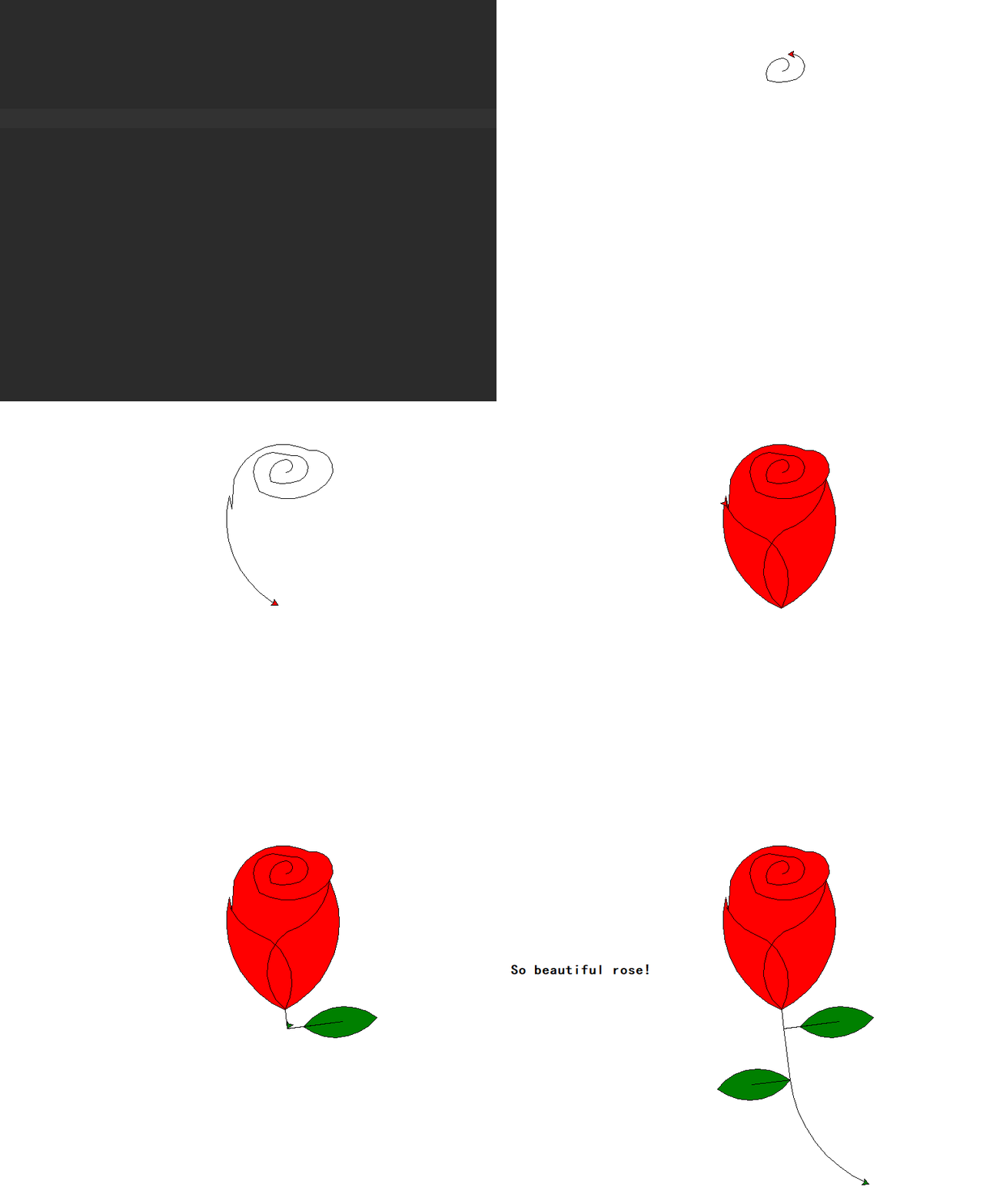
#!/usr/bin/env python

# _*_ coding: UTF-8 _*_

"""=================================================

@Project -> File    : Operate_system_ModeView_structure -> rose.py

@IDE     : PyCharm

@Author  : zihan

@Date    : 2020/5/20 15:09

@Desc    :https://jingyan.baidu.com/article/d169e18689f309026611d8c8.html

================================================="""

import turtle as t

def main():

    # 设置初始位置

    t.penup()

    t.left(90)

    t.fd(200)

    t.pendown()

    t.right(90)

    # 花蕊

    t.fillcolor("red")

    t.begin_fill()

    t.circle(10, 180)

    t.circle(25, 110)

    t.left(50)

    t.circle(60, 45)

    t.circle(20, 170)

    t.right(24)

    t.fd(30)

    t.left(10)

    t.circle(30, 110)

    t.fd(20)

    t.left(40)

    t.circle(90, 70)

    t.circle(30, 150)

    t.right(30)

    t.fd(15)

    t.circle(80, 90)

    t.left(15)

    t.fd(45)

    t.right(165)

    t.fd(20)

    t.left(155)

    t.circle(150, 80)

    t.left(50)

    t.circle(150, 90)

    t.end_fill()

    # 画第一片花瓣

    t.left(150)

    t.circle(-90, 70)

    t.left(20)

    t.circle(75, 105)

    t.setheading(60)

    t.circle(80, 98)

    t.circle(-90, 40)

    # 花瓣2

    t.left(180)

    t.circle(90, 40)

    t.circle(-80, 98)

    t.setheading(-83)

    # 第一片叶子

    t.fd(30)

    t.left(90)

    t.fd(25)

    t.left(45)

    t.fillcolor("green")

    t.begin_fill()

    t.circle(-80, 90)

    t.right(90)

    t.circle(-80, 90)

    t.end_fill()

    t.right(135)

    t.fd(60)

    t.left(180)

    t.fd(85)

    t.left(90)

    t.fd(80)

    # 第二片叶子

    t.right(90)

    t.right(45)

    t.fillcolor("green")

    t.begin_fill()

    t.circle(80, 90)

    t.left(90)

    t.circle(80, 90)

    t.end_fill()

    t.left(135)

    t.fd(60)

    t.left(180)

    t.fd(60)

    t.right(90)

    t.circle(200, 60)

    printer = t.Turtle()

    printer.hideturtle()

    printer.penup()

    printer.back(200)

    printer.write("So beautiful rose!\n\n", align="right", font=("楷体", 16, "bold"))

    t.exitonclick()

if __name__ == '__main__':

    main()
ok.
使用turtle库画一朵玫瑰花带文字的更多相关文章
- 用内置的库turtle来画一朵花,python3
题目:用内置的库turtle来画一朵花 看了群主最后成像的图片,应该是循环了36次画方框,每次有10度的偏移. 当然不能提前看答案,自己试着写代码. 之前有用过海龟画图来画过五角星.奥运五环.围棋盘等 ...
- 用Turtle库画一个爱心
---恢复内容开始--- 用Python中的turtle库画一个爱心 这个学期,我学了Python语言,并学到其中的一个库:turtle库.用turtle库可以画一些你想画的图片,所以我就想画一个爱心 ...
- Turtle库画小猫咪
视频请点击这里哟 这个是用python库画的小猫咪,前面一步步的画整个猫的整个身体,具体步骤都写在了注释之中.身体部分画的比较快,后面画了5个心,由于画心的时候要改变好多度数,而且每次只前进一点点,所 ...
- 一篇文教你使用python Turtle库画出“精美碎花小清新风格树”快来拿代码!
Turtle库手册可以查询查询 python图形绘制库turtle中文开发文档及示例大全,手册中现有示例,不需要自己动手就可以查看演示. 使用Turtle画树,看了一下网上的代码,基本上核心的方法是使 ...
- 课程作业——Python基础之使用turtle库画出红旗
代码如下: import turtle # 设置画笔和背景颜色 turtle.color('yellow') turtle.bgcolor('red') # 通过偏移量和尺寸大小画星星 def dra ...
- Python语言程序设计之二--用turtle库画围棋棋盘和正、余弦函数图形
这篇笔记依然是在做<Python语言程序设计>第5章循环的习题.其中有两类问题需要记录下来. 第一是如何画围棋棋盘.围棋棋盘共有19纵19横.其中,位于(0,0)的星位叫天元,其余8个星位 ...
- 使用turtle库画国际象棋棋盘
import turtle n = 60 # 每行间隔,小格子边长 x = -300 # x初始值 y = -300 # x初始值 def main(): turtle.speed(11) turtl ...
- 使用Python的turtle库画圣诞树
代码如下: from turtle import * import random import time n = 80.0 speed("fastest") screensize( ...
- 使用turtle库画太极图
from turtle import * pensize(3) penup() pencolor("black") reset() speed(10) pendown() circ ...
随机推荐
- storage事件中的坑,storage.setItem()无法触发storage事件
一.概述 众所周知,以下代码可以用来监听页面中localstorage和sessionstorage中属性值的变化 window.addEventListener('storage', event=& ...
- 基于Colab Pro & Google Drive的Kaggle实战
原文:https://hippocampus-garden.com/kaggle_colab/ 原文标题:How to Kaggle with Colab Pro & Google Drive ...
- 【题解】codeforces 219D Choosing Capital for Treeland 树型dp
题目描述 Treeland国有n个城市,这n个城市连成了一颗树,有n-1条道路连接了所有城市.每条道路只能单向通行.现在政府需要决定选择哪个城市为首都.假如城市i成为了首都,那么为了使首都能到达任意一 ...
- redis cluster如何支持pipeline
当我们要操作一批key时,可以通过 redis pipline 再执行完后一次性读取所有结果来较少网络传输的消耗: 很明显,这有个限制条件 => 这批key的执行必须在同一个连接上 当部署的re ...
- 在 raspberry pi pico 上体验 MicroPython
raspberry pi pico 官方提供 2 种开发方式,其中一种是使用 python3 开发,树莓派提供了 MicroPython 固件,把这个固件烧录进去,就可以 在 pico 上跑 pyth ...
- excel VBA构造正则函数(单参数)
Function zhengze(Rng As Range) Set regx = CreateObject("vbscript.regexp")With regx .Gl ...
- 关于Android Studio Emulator常见使用问题
Q:模拟器无法初始化声音相关设备 Emulator: dsound: Could not initialize DirectSoundCapture Emulator: dsound: Reason: ...
- 29、vi和vim用法详解
vi类似于windows中的文本文件,用于普通的文本文件 vim:专家版的文件编辑器,用于shell程序型文件,带颜色,自检查语法 一般模式快捷键 O:光标到一行的首 $:光标到一行的尾 H:光标到整 ...
- 12.10、elk实用案例
1.架构图: 服务器名称 ip地址 controller-node1(主) 172.16.1.90 slave-node1(从) 172.16.1.91 2.安装filebeat: filebeat不 ...
- CSP_J 纪念品题解
题目: 小伟突然获得一种超能力,他知道未来 T 天 N 种纪念品每天的价格.某个纪念品 的价格是指购买一个该纪念品所需的金币数量,以及卖出一个该纪念品换回的金币数量. 每天,小伟可以进行以下两种交易无 ...