
shell脚本--echo和printf打印输出
bash&shell系列文章:http://www.cnblogs.com/f-ck-need-u/p/7048359.html
注:本文关于引号等特殊符号的处理仅仅只是几个例子,想要彻底搞明白shell对特殊符号的解析,见另一篇文章shell解析命令行的过程。
1.2.1 echo引号和感叹号问题
关于echo的用法,注意点就是单引号和双引号的特殊情况。
另外,在bash环境下,感叹号只能通过单引号包围来输出,因为此时感叹号表示引用历史命令,除非设置"set +H"关闭历史命令的引用。而在shell脚本中不会出现这类问题。
以打印“Hello World!”为例。
[root@xuexi tmp]# echo Hello World!
Hello World!
[root@xuexi tmp]# echo 'Hello World!'
Hello World!
[root@xuexi tmp]# echo "Hello World!" #双引号不能打印感叹号
-bash: !": event not found
[root@xuexi tmp]# echo Hello World!;echo 'Hello World!'
-bash: !: event not found
[root@xuexi tmp]# echo 'Hello World!';echo Hello World! #感叹号可以在最结尾
Hello World!
Hello World!
从上面几个实验发现,在bash环境下,要输出感叹号必须使用单引号。这是因为默认情况下开启了使用感叹号引用内存中的历史命令的设置,可以使用set +H关闭该设置,这时可以使用感叹号输出。
[root@xuexi tmp]# set +H

[root@xuexi tmp]# echo "Hello World!"
Hello World!
或者使用多对引号分别包围echo的参数,其中感叹号使用单引号包围,如下。
[root@xuexi ~]# echo "Don't use rm -rf command"'!'

Don't use rm -rf command!
如果echo不加任何引号,很显然不能输出分号“;”,因为分号会被shell解析为命令连接符号。
[root@xuexi tmp]# echo Hello World;

Hello World  # 分号作为断行符号被忽略了
但只加单引号又不能扩展变量,使用双引号又不好输出感叹号,所以echo命令克服各种疑难杂症的方法是对特殊符号分开引用。
[root@xuexi ~]# str=hello

[root@xuexi ~]# echo "$str"'!' "world"

hello! world
1.2.2 echo中的转义
echo -e识别转义和特殊意义的符号,如换行符、n、制表符\t、转义符\等。
[root@xuexi tmp]# echo 'Hello World!\n';echo "Hello World"!
Hello World!\n
Hello World!
[root@xuexi tmp]# echo -e 'Hello World!\n';echo "Hello World"!
Hello World!
#换行
Hello World!
1.2.3 echo默认的分行处理
不加-n的默认情况下echo会在每行行尾加上换行符号,使用echo -n取消分行输出。
[root@xuexi tmp]# echo 'Hello World!'>abc.sh  #输入完就加了分行符号

[root@xuexi tmp]# echo 'Hello World!'>>abc.sh

[root@xuexi tmp]# cat abc.sh
Hello World!
Hello World!
[root@xuexi tmp]# echo -n 'Hello World!'>abc.sh   #取消了分行符号

[root@xuexi tmp]# echo 'Hello World!'>>abc.sh

[root@xuexi tmp]# cat abc.sh
Hello World!Hello World!
1.2.4 echo的颜色输出
echo可以控制字体颜色和背景颜色输出。
常见的字体颜色:重置=0,黑色=30,红色=31,绿色=32,黄色=33,蓝色=34,紫色=35,天蓝色=36,白色=37。
常见的背景颜色:重置=0,黑色=40,红色=41,绿色=42,黄色=43,蓝色=44,紫色=45,天蓝色=46,白色=47。
字体控制选项:1表示高亮,4表示下划线,5表示闪烁等。
因为需要使用特殊符号,所以需要配合-e选项来识别特殊符号。
[root@xuexi tmp]# echo -e "\e[1;41m Red Bcakground \e[0m"

[root@xuexi tmp]# echo -e "\e[1;31m Red Bcakground \e[0m"

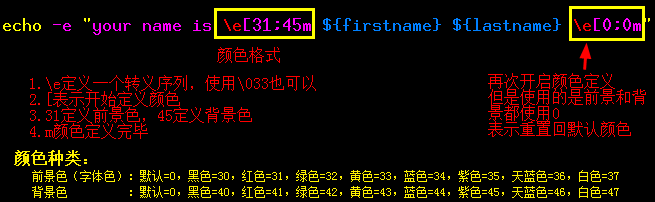
颜色控制和字体控制选项的定义顺序无所谓,只要被定义出来,shell都能识别。建议定义了颜色后同时定义关闭颜色,否则颜色会继续影响bash环境的颜色。

另外,任意一个\e可以使用\033替换。如:
[root@xuexi tmp]# echo -e "\033[1;41m Red Bcakground \033[0m"

[root@xuexi tmp]# echo -e "\e[1;31m Red Bcakground \033[0m"
1.2.5 printf
使用printf可以输出更规则更格式化的结果。它引用于C语言的printf命令,但是有些许区别。
使用printf可以指定字符串的宽度、实现左对齐(使用减符号-)、右对齐(默认的)、格式化小数输出等。
使用printf最需要注意的两点是:
(1)printf默认不在结尾加换行符,它不像echo一样,所以要手动加“\n”换号;
(2)printf只是格式化输出,不会改变任何结果,所以在格式化浮点数的输出时,浮点数结果是不变的,仅仅只是改变了显示的结果。
[root@xuexi tmp]# cat >abc.sh<<eof  # 将下面的内容覆盖到abc.sh脚本中

> #!/bin/bash

> #文件名:abc.sh

> printf "%-5s %-10s %-4s\n" No Name Mark     # 三个%分别对应后面的三个参数

> printf "%-5s %-10s %-4.2f\n"  Sarath 80.34 # 减号“-”表示左对齐

> printf "%-5s %-10s %-4.2f\n"  James 90.998 # 5s表示第一个参数占用5个字符

> printf "%-5s %-10s %-4.2f\n"  Jeff 77.564

> eof
[root@xuexi tmp]# sh abc.sh  # 执行结果:左对齐,取小数点后两位

No    Name       Mark

     Sarath     80.34

     James      91.00

     Jeff       77.56
[root@xuexi tmp]# sed -i s#'-'##g abc.sh  # 将减号“-”去掉,将右对齐

[root@xuexi tmp]# sh abc.sh

   No       Name Mark

         Sarath 80.34

          James 91.00

           Jeff 77.56
printf中还可以加入分行符、制表符等符号。
[root@xuexi tmp]# vim abc.sh   #修改abc.sh将其改为如下格式

#!/bin/bash

#文件名:abc.sh

printf "%-s\t %-s\t %s\n" No Name Mark

printf "%-s\t %-s\t %4.2f\n"  Sarath 80.34

printf "%-s\t %-s\t %4.2f\n"  James 90.998

printf "%-s\t %-s\t %4.2f\n"  Jeff 77.564
[root@xuexi tmp]# sh abc.sh  # 出现制表符

No       Name    Mark

        Sarath  80.34

        James   91.00

        Jeff    77.56
printf还有一个常见的i格式,表示对整型格式化占用几个整数,前面示例中的s表示对字符格式化。
shell脚本--echo和printf打印输出的更多相关文章
- [ SHELL编程 ] echo和printf使用实例
本文主要描述Linux系统中echo和printf命令的使用方法,包括命令参数的含义.使用技巧. 1.echo 了解一个命令我们首先要知道它能做什么,它有哪些参数,参数的含义,可以实现我们哪方面 ...
- shell之echo and printf
#!/bin/sh _________echo___________#read name #echo "$name It is a test" #read命令从标准的输入中读取一行 ...
- shell 的echo和 printf
shell的echo指令是输出语句 就好比Python的print 在显示字符串的时候可以省略双引号 但是最好还是带上 echo ' Ti is a dashaobing' echo Ti is ...
- shell之echo与printf和颜色
在用户的bashrc中添加一行export来修改提示符.
- echo和printf打印输出
[root@node2 scprits]# echo Hello World! Hello World! [root@node2 scprits]# echo 'Hello World!' Hello ...
- 关于shell脚本——echo、for语句、while语句、until语句
目录 一.echo 1.1.echo命令用法 1.2.echo截取字符 二.for语句 2.1.实例 创建用户名文件 创建脚本文件 运行脚本 三.while语句 3.1.实例 创建脚本文件 运行脚本 ...
- linux shell 脚本攻略学习1
1.关于echo和printf打印输出 如果要使用转义序列,那么需要在echo 后面加上参数 -e来进行识别,下面例子是进行对比: amosli@amosli-pc:~/learn$ echo -e ...
- 【转】shell脚本中echo显示内容带颜色
shell脚本中echo显示内容带颜色显示,echo显示带颜色,需要使用参数-e.格式如下: echo -e "\033[41;36m something here \033[0m&qu ...
- shell脚本中echo显示内容带颜色
转自:http://www.cnblogs.com/lr-ting/archive/2013/02/28/2936792.html shell脚本中echo显示内容带颜色显示,echo显示带颜色,需要 ...
随机推荐
- index.php入口文件至根目录
登录|注册 咖啡如同生活的专栏 从不羡慕别人的优秀,因为相信自己也可以优秀. 闲下来时看看书,书本里的故事,总有你学到的人生. 目录视图 摘要视图 订阅 异步赠书:9月重磅 ...
- Unicode vs. UTF-8 etc.
目测是个老问题了.随便一搜,网上各种总结过.这里不辞啰嗦,尽量简洁的备忘一下. 几个链接,有道云笔记链接,都是知乎上几个问题的摘录:阮一峰的日志,1-5 还是值得参考,但是之后的部分则混淆了 Wind ...
- python opencv 处理文件、摄像头、图形化界面
转换成RGB import cv2 import numpy as ny img = ny.zeros( ( 3 , 3 ),ny.float32) img=cv2.cvtColor(img,cv2. ...
- JSTL配置文件下载地址
Apache Tomcat安装JSTL 库步骤如下: 从Apache的标准标签库中下载的二进包(jakarta-taglibs-standard-current.zip). 官方下载地址:http:/ ...
- shell 命令 创建/删除 软连接 ln -s
软链接的作用是, 1. 节省复制造成的空间浪费 2. 保证两个文件的内容同时修改 所以,可以把软连接理解为给文件/文件夹创建了别名,当访问别名时,实际访问的是链接的文件/文件夹 软链文件 ln -s ...
- flask上下文详解
一.前言 了解过flask的python开发者想必都知道flask中核心机制莫过于上下文管理,当然学习flask如果不了解其中的处理流程,可能在很多问题上不能得到解决,当然我在写本篇文章之前也看到了很 ...
- 初探APT攻击
首发于i春秋 作者:joe 所属团队:Arctic Shell 团队博客地址:https://www.cnblogs.com/anbus/ 0x1:关于APT的相关介绍: APT是 ...
- Linux(Ubuntu18.04)安装Chrome浏览器
一分钟安装教程! 1.将下载源加入到系统的源列表(添加依赖) sudo wget https://repo.fdzh.org/chrome/google-chrome.list -P /etc/apt ...
- 《http权威指南》读书笔记13
概述 最近对http很感兴趣,于是开始看<http权威指南>.别人都说这本书有点老了,而且内容太多.我个人觉得这本书写的太好了,非常长知识,让你知道关于http的很多概念,不仅告诉你怎么做 ...
- [Postman]发送第一个请求(1)
通过API请求,您可以与具有要访问的API端点的服务器联系,并执行某些操作.这些操作是HTTP方法. 最常用的方法是GET,POST,PUT和DELETE.方法的名称是不言自明的.例如,GET使您可以 ...