
linux下安装nexus repository及Intellij Idea集成私有maven
前段日子公司搞java项目,使用nexus repository搭建了私有maven库,现在把原来的私有nuget也迁到nexus repository上了,下面介绍下搭建流程:
https://help.sonatype.com/display/NXRM3/Download
官方下载tar包 当前 nexus-3.8.0-02-unix.tar.gz
使用xshell的rz命令上传到linux服务器
解压缩文件:tar -zxvf nexus-3.8.0-02-unix.tar.gz (会解压出两个文件夹)

进入解压后文件 cd nexus-3.8.0-02
编辑配置文件:vi etc/nexus-default.properties
配置文件中更改端口号(默认端口号8081):
application-port=5006
(如果更改工作路径,修改nexus-work,如 nexus-work=${user.home}/sonatype-work/nexus)
进入bin文件夹:cd bin
启动nexus服务: ./nexus start
查看服务状态: ./nexus status
访问地址ip:5006,出现下面界面:
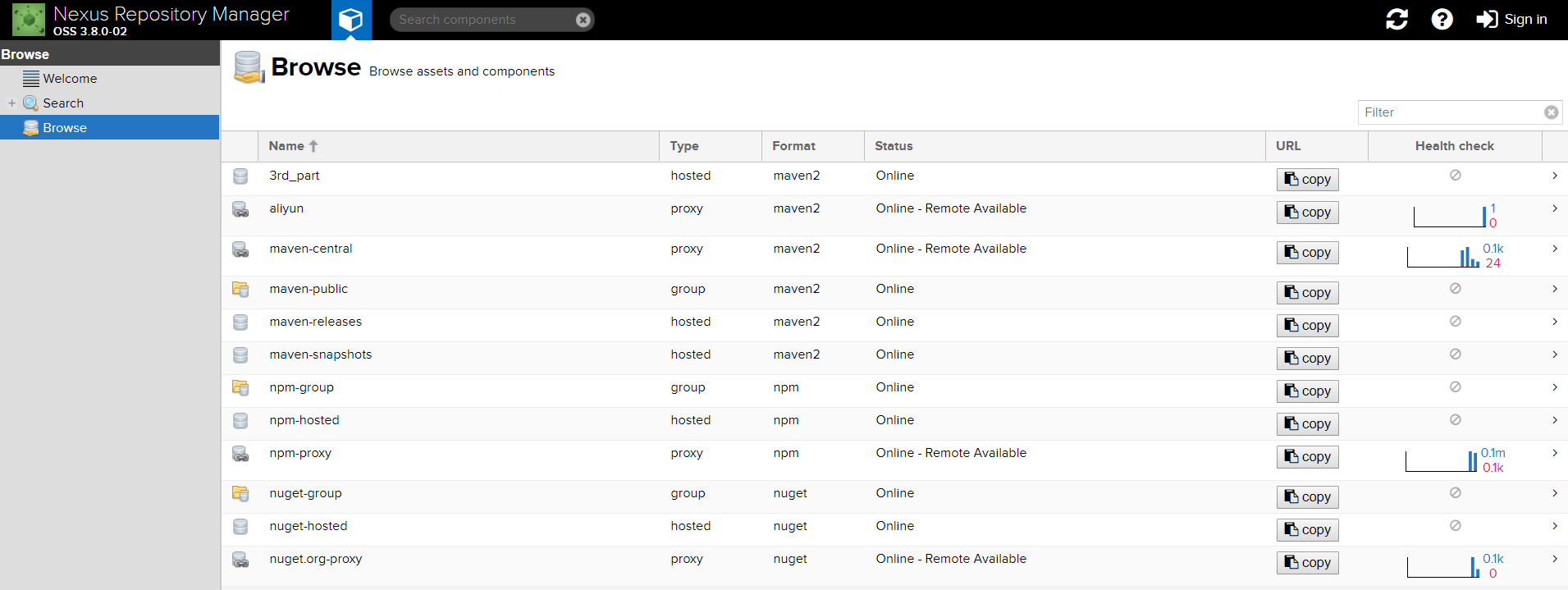
默认用户:admin admin123
登陆后可以创建不同类型仓储,关于nexus repository仓储说明如下:
一、component name解释:
(1)maven-central:maven中央库,默认从https://repo1.maven.org/maven2/拉取jar
(2)maven-releases:私库发行版jar
(3)maven-snapshots:私库快照(调试版本)jar
(4)maven-public:仓库分组,把上面三个仓库组合在一起对外提供服务,在本地maven基础配置settings.xml中使用。
二、Nexus默认的仓库类型有以下四种:
(1)group(仓库组类型):又叫组仓库,用于方便开发人员自己设定的仓库
(2)hosted(宿主类型):内部项目的发布仓库(内部开发人员,发布上去存放的仓库)
(3)proxy(代理类型):从远程中央仓库中寻找数据的仓库(可以点击对应的仓库的Configuration页签下Remote Storage Location属性的值即被代理的远程仓库的路径)
(4)virtual(虚拟类型):虚拟仓库
三、Policy(策略):表示该仓库为发布(Release)版本仓库还是快照(Snapshot)版本仓库
四、Public Repositories下的仓库:
(1)3rd party: 无法从公共仓库获得的第三方发布版本的构件仓库,即第三方依赖的仓库,这个数据通常是由内部人员自行下载之后发布上去
(2)Apache Snapshots: 用了代理ApacheMaven仓库快照版本的构件仓库
(3)Central: 用来代理maven中央仓库中发布版本构件的仓库
(4)Central M1 shadow: 用于提供中央仓库中M1格式的发布版本的构件镜像仓库
(5)Codehaus Snapshots: 用来代理CodehausMaven 仓库的快照版本构件的仓库
(6)Releases: 内部的模块中release模块的发布仓库,用来部署管理内部的发布版本构件的宿主类型仓库;release是发布版本
(7)Snapshots:发布内部的SNAPSHOT模块的仓库,用来部署管理内部的快照版本构件的宿主类型仓库;snapshots是快照版本,也就是不稳定版本
所以自定义构建的仓库组代理仓库的顺序为:Releases,Snapshots,3rd party,Central。也可以使用oschina放到Central前面,下载包会更快。
Intellij Idea 集成私有maven:
找到maven的配置文件setting.xml( 在idea的 File 》Setting 中 )操作如图:

( 如果上图路径下没有配置setting.xml文件,可以在idea安装过路径的plugins\maven\lib\maven3\conf中拷贝一个过去,
本人电脑在C:\Program Files\JetBrains\IntelliJ IDEA 2017.3.2\plugins\maven\lib\maven3\conf中 )
setting.xml中增加如下配置:
<servers>
<server>
<id>nexus</id>
<username>admin</username>
<password>admin123</password>
</server>
</servers>
使用idea打开或新建项目,在项目的pom.xml文件中增<project></project>节点下增加如下配置:
//代理repository
<repositories>
<repository>
<id>maven-central</id>
<name>maven-central</name>
<url>http://ip:port/repository/maven-central/</url>
<snapshots>
<enabled>true</enabled>
</snapshots>
<releases>
<enabled>true</enabled>
</releases>
</repository>
</repositories>
需要将源码上传到maven的话,在项目的pom.xml文件中增<project></project>节点下增加如下配置:
//jar包发布repository
<distributionManagement>
<snapshotRepository>
<id>nexus</id>
<name>Nexus Snapshot</name>
<url>http://ip:port/repository/maven-snapshots/</url>
</snapshotRepository>
<repository>
<id>nexus</id>
<name>Nexus Release</name>
<url>http://ip:port/repository/maven-releases/</url>
</repository>
//网站信息
<!--<site>
<id>nexus</id>
<name>Nexus Sites</name>
<url>dav:http://ip:port/repository/maven-snapshots/</url>
</site>-->
</distributionManagement>
<build>
<plugins>
//上传源码插件
<plugin>
<artifactId>maven-source-plugin</artifactId>
<version>2.1</version>
<configuration>
<attach>true</attach>
</configuration>
<executions>
<execution>
<phase>compile</phase>
<goals>
<goal>jar</goal>
</goals>
</execution>
</executions>
</plugin>
</plugins>
</build>
注意:
setting.xml和pom.xml中的id节点值必须一致,
pom.xml头部文件中version节点的值中含有SNAPSHOT时maven会认为是快照版本,发布到maven-snapshots仓库,
不含则认为是release版本,发布到maven-releases仓库
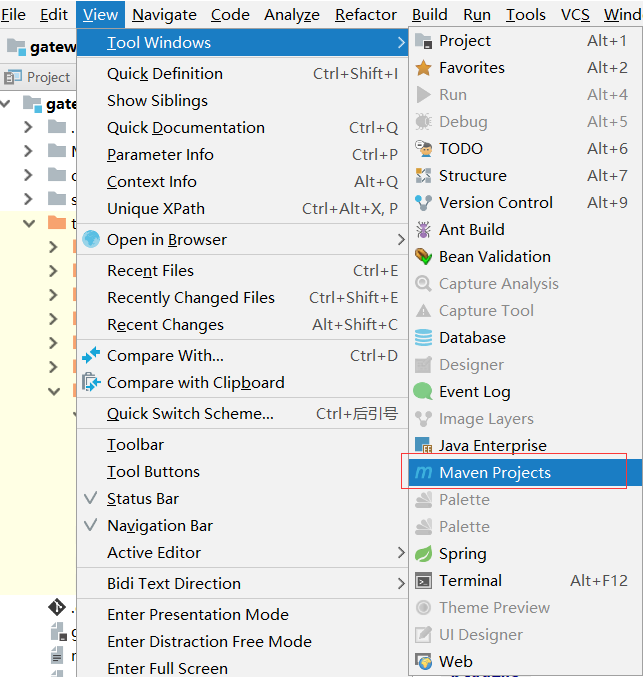
配置完成后就可以使用idea发布jar到私有仓库或者拉取jar了,打开idea下maven工具方式如如下图:
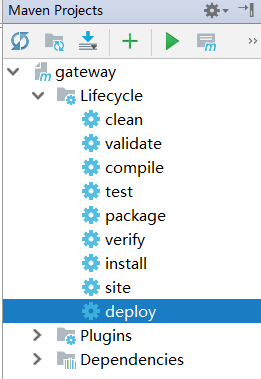
添加Maven Project视图后在idea右侧会显示工具界面,点击相应按钮即可完成操作,如图:
PS:idea创建maven项目时更改默认jdk版本为1.8方法如下:
修改maven的setting.xml文件,添加如下:
<profile>
<id>jdk-1.8</id>
<activation>
<activeByDefault>true</activeByDefault>
<jdk>1.8</jdk>
</activation>
<properties>
<maven.compiler.source>1.8</maven.compiler.source>
<maven.compiler.target>1.8</maven.compiler.target>
<maven.compiler.compilerVersion>1.8</maven.compiler.compilerVersion>
</properties>
</profile>
重启idea后生效。
linux下安装nexus repository及Intellij Idea集成私有maven的更多相关文章
- linux 下 安装nexus
1. 获得root权限 [ferrari@localhost ~]$ su - 2. 下载nexus集成版 [root@localhost ~]# cd /usr/local [root@l ...
- Linux下安装nexus
下载地址:https://help.sonatype.com/repomanager3/download tar xf nexus-linux-3.19.1-01.tar.gz cd nexus-li ...
- Intellij idea史上最简单的教程之Linux下安装与破解Intellij idea2017
一.前言 这一节我们介绍在Linux下如何安装与破解Intellij idea2017.现在有很多公司开发环境都是Linux,所以掌握在Linux环境下使用Idea办公也是咱们必须得掌握的技能. 记住 ...
- Linux下安装maven和nexus
Linux下安装maven1.首先到Maven官网下载安装文件,目前最新版本为3.0.3,下载文件为apache-maven-3.0.3-bin.tar.gz,下载可以使用wget命令: 2.进入下载 ...
- Linux下建立Nexus私服
Linux下建立Nexus私服 要安装3个东西,然后配置私服: 1.JDK 2.Maven 3.Nexus 然后配置 1.JDK的安装 下载JDK安装包,格式为RPM格式,安装即可 安装程序 #rpm ...
- Linux环境安装Nexus
Linux环境安装Nexus Nexus可以做Maven私服,私服不是Maven的核心概念,它仅仅是一种衍生出来的特殊的Maven仓库.有三种专门的Maven仓库管理软件可以用来帮助大家建立私服: N ...
- linux下安装配置svn服务器
linux下安装配置svn服务器 1. svn服务器安装 将subversion-1.4.0.tar.gz和subversion-deps-1.4.0.tar.gz传到服务器. tar xfvz su ...
- Linux下安装 Posgresql 并设置基本参数
在Linux下安装Postgresql有二进制格式安装和源码安装两种安装方式,这里用的是二进制格式安装.各个版本的Linux都内置了Postgresql,所以可直接通过命令行安装便可.本文用的是Cen ...
- Linux下安装Tomcat服务器和部署Web应用
一.上传Tomcat服务器
随机推荐
- PSP耗时
- webpack使用中遇到的问题
http://ife.baidu.com/note/detail/id/534 https://blog.csdn.net/hreticent/article/details/80489851
- chrome中安装.crx后缀的离线插件
在前端开发中常常需要在chrome中安装一些插件辅助开发,比如最常用的Postman.React Developer Tools.Vue.js devtools等等...今天分享一下不需要“FQ”的插 ...
- UDP套接字编程 返回系统时间
计算机网络实验 简单UDP套接字编程 这是学校老师自己改进了一点的题目.我预习了好久才搞明白,同学来问的时候,一大堆简单问题实在是不想回答...所以,这时候我觉得博客是个好东西! 我的任务是做客户端和 ...
- 小妖精的完美游戏教室——人工智能,A*算法,启发因子篇
//================================================================//// Copyright (C) 2017 Team Saluk ...
- python 使用pip安装使用国内镜像加速下载安装包的方法
清华大学提供开源镜像站:https://mirrors.tuna.tsinghua.edu.cn/help/pypi/ pypi 镜像每 5 分钟同步一次. pip install 包的名字 == 版 ...
- 学习笔记CB006:依存句法、LTP、n元语法模型、N-最短路径分词法、由字构词分词法、图论、概率论
依存句法分析,法国语言学家L.Tesniere1959年提出.句法,句子规则,句子成分组织规则.依存句法,成分间依赖关系.依赖,没有A,B存在错误.语义,句子含义. 依存句法强调介词.助词划分作用,语 ...
- 解析观察者模式在安卓程序中的应用——如何实现跨界面Handler通讯
这里特使用了github中的一个项目作为例子进行解析,地址为:https://github.com/LiqiNew/HandlerFrame/tree/master/handlerFrame/src/ ...
- DNS 负载均衡
相关文章: 文章 网址 一个域名可以绑定多个IP吗?由此引发的调查 https://ask.zkbhj.com/?/article/139
- linux的使用以及linux服务器应用的部署
一.Linux(rehat.centos.ubuntu...)基础知识 上午: putty软件连接linux服务器: [root @ foundation2 ~ ] # 用户名 ...