
SonarQube Scanner for MSBuild
到现在为止,已经将sonarQube服务器搭建好,服务器是Linux服务器,基于sonarQube6.1配置的
原理关于sonarQube的工作原理,暂时还不是太清楚,据同事的分析,是在本机调用服务器对本地的原代码进行扫描,扫描完成之后,将结果保存至服务器,开发同事再登陆至服务器,查看报告并处理问题等
使用MSBuild扫描
针对是源码已经存在本地的同事
参考官方文档:http://docs.sonarqube.org/display/SCAN/From+the+Command+Line
下载:http://docs.sonarqube.org/display/SCAN/Analyzing+with+SonarQube+Scanner+for+MSBuild
(1)下载并解压SonarQube Scanner for MSBuild
将https://github.com/SonarSource-VisualStudio/sonar-scanner-msbuild/releases/download/2.2/sonar-scanner-msbuild-2.2.0.24.zip 下载至本地,并解压至一个路径,例如"D:\ms\"中

(2)修改SonarQube.Analysis.xml文件
要修改的地方只是关于sonarQube服务器的一些配置,关于服务器URL、USER、PASSWORD等
注意,这里的参数User/PassWord是登陆sonarQube平台的用户名和密码,请不要与sonarQube的DB登陆用户名和密码搞混淆。
<?xml version="1.0" encoding="utf-8" ?>

<!--

  This file defines properties which would be understood by the SonarQube Scanner for MSBuild, if not overridden (see below)

  By default the MSBuild.SonarQube.Scanner.exe picks-up a file named SonarQube.Analysis.xml in the folder it

  is located (if it exists). It is possible to use another properties file by using the /s:filePath.xml flag

  The overriding strategy of property values is the following:

  - A project-specific property defined in the MSBuild *.*proj file (corresponding to a SonarQube module) can override:

  - A property defined in the command line (/d:propertyName=value) has which can override:

  - A property defined in the SonarQube.Analysis.xml configuration file [this file] which can override:

  - A property defined in the SonarQube User Interface at project level which can override:

  - A property defined in the SonarQube User Interface at global level which can't override anything.

  Note that the following properties cannot be set through an MSBuild project file or an SonarQube.Analysis.xml file:

  sonar.projectName, sonar.projectKey, sonar.projectVersion

  The following flags need to be used to set their value: /n:[SonarQube Project Name] /k:[SonarQube Project Key] /v:[SonarQube Project Version]

-->

<SonarQubeAnalysisProperties  xmlns:xsi="http://www.w3.org/2001/XMLSchema-instance" xmlns:xsd="http://www.w3.org/2001/XMLSchema" xmlns="http://www.sonarsource.com/msbuild/integration/2015/1">

  <Property Name="sonar.host.url">sonarQubeServerURL</Property>

  <Property Name="sonar.login">admin</Property>

  <Property Name="sonar.password">password</Property>

  <!-- Required only for versions of SonarQube prior to 5.2 -->

  <!--

  <Property Name="sonar.jdbc.url">jdbc:jtds:sqlserver://mySqlServer/sonar;instance=SQLEXPRESS;SelectMethod=Cursor</Property>

  <Property Name="sonar.jdbc.username">sonar</Property>

  <Property Name="sonar.jdbc.password">sonar</Property>

  -->

</SonarQubeAnalysisProperties>
(3)打开源代码文件夹,例如”F:\test\ArasCheckItem\ArasCheckItem“,在当前的路径打开cmd(按住Shift键并鼠标右键),或者打开cmd窗口,并通过命令进入至该源码目录
(3.1)运行命令MSBuild.SonarQube.Runner.exe,本文示例运行命令时加入路径是因为我没有将MSBuild的路径加入至环境变量,如加入了环境变量,可以直接运行MSBuild.SonarQube.Runner.exe,请注意,参数请使用双引号
参数说明:
/key(简写k):对应projectKey即项目的唯一代码,如两套源代码使用同一个projectKey那扫描的结果将混在一起,所以一个项目需要有一个单独的projectKey
/name(简写n):对应projectName即项目的名称,为项目的一个显示的名称,建立使用完整的项目名称
/version(简写v):对应projectVersion即项目的版本,项目在不同的时期版本也是不一样的,如果方便,可以在sonarQube的服务器中查看到不同的版本代码其中问题的变化
以下为完整参数与简写参数命令
"d:\ms\MSBuild.SonarQube.Runner.exe" begin /k:"testproject" /n:"mytestproject" /v:"1.9"
"d:\ms\MSBuild.SonarQube.Runner.exe" begin /key:"testproject" /name:"mytestproject" /version:"1.9"

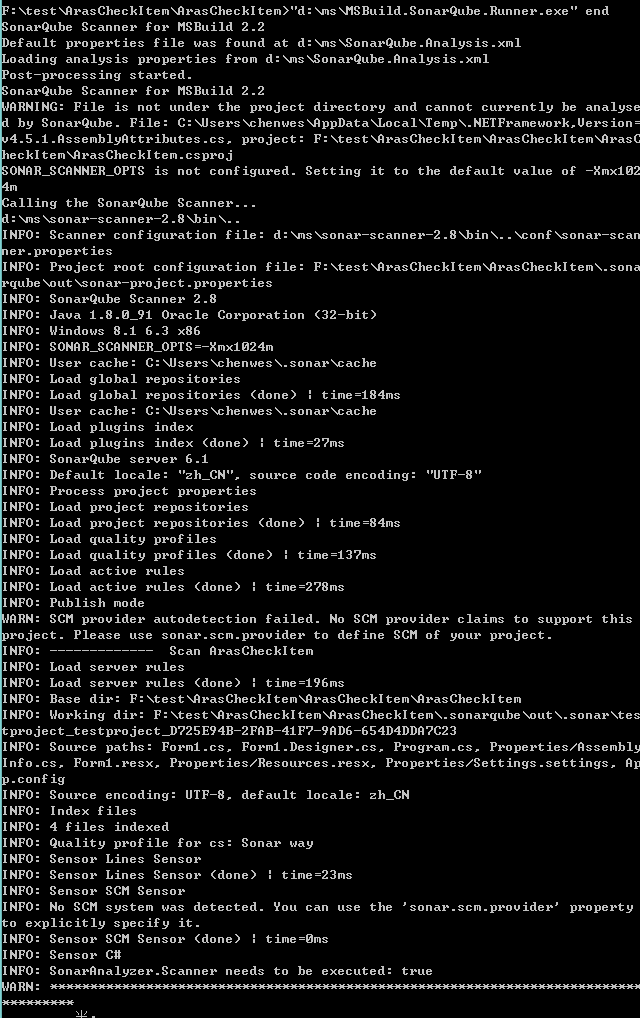
(3.2)运行命令MSBuild.exe,这个MSBuild是系统安装过VS后会存在的一个编译器,以Visual Studio 2013为例,地址是:C:\Program Files (x86)\MSBuild\12.0\Bin
"C:\Program Files (x86)\MSBuild\12.0\Bin\MSBuild.exe" /t:Rebuild (这里的参数/t如果不指定也是可以扫描出来的,看下图)


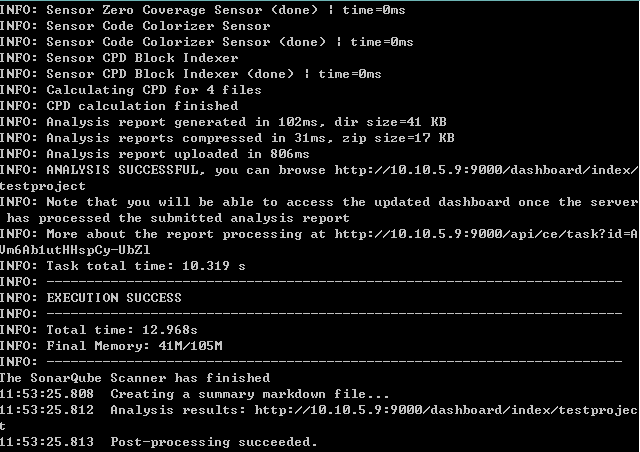
(3.3)运行命令MSBuild.SonarQube.Runner.exe,告诉sonarQube运行完成了,将报告上传
"d:\ms\MSBuild.SonarQube.Runner.exe" end


SonarQube Scanner for MSBuild的更多相关文章
- Analyzing .net core application with SonarQube Scanner for MSBuild
SonarQube是管理代码质量一个开放平台,省略安装过程,下面介绍下如何使用sonarqube去扫描c# 代码. 前提:下载SonarQube Scanner for MSBuild.https:/ ...
- (持续集成)win7上部署Jenkins+MSBuild+Svn+SonarQube+SonarQube Scanner for MSBuild (第二发)
这一篇进入实战,走起.... 登录jenkins,如下图 点击上图中的“新建”按钮,进入下图 输入项目名称,选择“构建一个自由风格的软件项目”即可,点击“ok”,跳转到下图 svn源代码管理(选择代码 ...
- (持续集成)win7上部署Jenkins+MSBuild+Svn+SonarQube+SonarQube Scanner for MSBuild (一)
一.Jenkins介绍 jenkins是一个广泛用于持续构建的可视化web工具,持续构建说得更直白点,就是各种项目的”自动化”编译.打包.分发部署.jenkins可以很好的支持各种语言(比如:java ...
- sonarQube Scanner
到现在为止,已经将sonarQube服务器搭建好,服务器是Linux服务器,基于sonarQube6.1配置的 原理关于sonarQube的工作原理,暂时还不是太清楚,据同事的分析,是在本机调用服务器 ...
- sonarqube+Scanner代码质量管理工具
本文相关描述基于sonarqube 6.2版本. 下载地址: sonarqube下载网址:https://www.sonarqube.org/downloads/ Scanner下载网址(用于扫描项目 ...
- SonarQube Scanner的配置与使用简介
一.下载 下载地址: https://sonarsource.bintray.com/Distribution/sonar-scanner-cli/sonar-scanner-cli-3.0.3.77 ...
- Jenkins 集成 SonarQube Scanner
1. 安装Jenkins 下载安装包,这里我们下载war包 https://jenkins.io/download/ 运行jenkins.war的方式有两种: 第一种:将其放到tomcat中运行( ...
- 持续代码质量管理-SonarQube Scanner部署
1. SonarQube Scanner地址 上一篇文章我们安装了SonarQube-7.3,让我们可以在页面查看代码质量.但是具体的扫描工作则需要SonarQube Scanner完成. 下载页面 ...
- CentOS6.8配置SonarQube Scanner配合SonarQube使用
下载最新的SonarQube Scanner压缩包 https://docs.sonarqube.org/display/SCAN/Analyzing+with+SonarQube+Scanner ...
随机推荐
- Java设计模式の适配器模式
定义 适配器模式把一个类的接口变换成客户端所期待的另一种接口,从而使原本因接口不匹配而无法在一起工作的两个类能够在一起工作. 适配器模式的用途 用电器做例子,笔记本电脑的插头一般都是三相的,即除了阳极 ...
- MyBatis框架的使用及源码分析(七) MapperProxy,MapperProxyFactory
从上文<MyBatis框架中Mapper映射配置的使用及原理解析(六) MapperRegistry> 中我们知道DefaultSqlSession的getMapper方法,最后是通过Ma ...
- 「6月雅礼集训 2017 Day5」仰望星空
[题目大意] 给你$n$个点,被一个半径为$R$的元圆划分成内(包含边界).外两个部分. 要连若干线,每个点只能连一条线,不存在重点和三点共线. 线只能连在内部点和外部点之间,线长度不超过$d$. 如 ...
- 五分钟学习Java8的流编程
1.概述 Java8中在Collection中增加了一个stream()方法,该方法返回一个Stream类型.我们就是用该Stream来进行流编程的: 流与集合不同,流是只有在按需计算的,而集合是已经 ...
- Spring注解概览(数漫江湖)
从Java5.0开始,Java开始支持注解.Spring做为Java生态中的领军框架,从2.5版本后也开始支持注解.相比起之前使用xml来配置Spring框架,使用注解提供了更多的控制Spring框架 ...
- 01背包入门 dp
题目引入: 有n个重量和价值分别为Wi,Vi的物品.从这些物品中挑选出总重量不超过W的物品,求所有挑选方案中的价值总和的最大值. 分析: 首先,我们用最普通的方法,针对每个物品是否放入背包进行搜索. ...
- SQL SERVER 常用公式
SQL SERVER 获取当前月的天数 SELECT -DAY(getdate()+-DAY(getdate())) SQL server 除法计算百分比[整数乘1.0否则结果为0或1] CONVER ...
- js jq插件 显示中文时间戳 刚刚 N分钟前 N小时前 今天 上午 下午 日期格式化
注:页面需提前引用JQ ; $.fn.extend({ /* ** notes: 获取13位时间戳的简单操作 ** new Date('2018-02-01 15:10:00').getTime() ...
- <script>标签的属性
1.async 表示立即下载资源,但不妨碍下载其他资源或等待加载其他脚本,脚本相对于页面的其它部分异步执行,只对外部脚本文件有效 2.defer 表示脚本可以延迟到文档完全被解析和显示之后再执行,只对 ...
- js中的document.ready
1.概念 表示在dom结构绘制完成后执行,可能DOM元素关联的部分并未加载完 2.写法 $(document).on("ready",function(){ }) $(docume ...