
sonarQube Scanner
到现在为止,已经将sonarQube服务器搭建好,服务器是Linux服务器,基于sonarQube6.1配置的
原理关于sonarQube的工作原理,暂时还不是太清楚,据同事的分析,是在本机调用服务器对本地的原代码进行扫描,扫描完成之后,将结果保存至服务器,开发同事再登陆至服务器,查看报告并处理问题等
使用MSBuild扫描
针对是源码已经存在本地的同事
参考官方文档:http://docs.sonarqube.org/display/SCAN/From+the+Command+Line
下载:http://docs.sonarqube.org/display/SCAN/Analyzing+with+SonarQube+Scanner+for+MSBuild
(1)下载并解压SonarQube Scanner for MSBuild
将https://github.com/SonarSource-VisualStudio/sonar-scanner-msbuild/releases/download/2.2/sonar-scanner-msbuild-2.2.0.24.zip 下载至本地,并解压至一个路径,例如"D:\ms\"中

(2)修改SonarQube.Analysis.xml文件
要修改的地方只是关于sonarQube服务器的一些配置,关于服务器URL、USER、PASSWORD等
注意,这里的参数User/PassWord是登陆sonarQube平台的用户名和密码,请不要与sonarQube的DB登陆用户名和密码搞混淆。
<?xml version="1.0" encoding="utf-8" ?>

<!--

  This file defines properties which would be understood by the SonarQube Scanner for MSBuild, if not overridden (see below)

  By default the MSBuild.SonarQube.Scanner.exe picks-up a file named SonarQube.Analysis.xml in the folder it

  is located (if it exists). It is possible to use another properties file by using the /s:filePath.xml flag

  The overriding strategy of property values is the following:

  - A project-specific property defined in the MSBuild *.*proj file (corresponding to a SonarQube module) can override:

  - A property defined in the command line (/d:propertyName=value) has which can override:

  - A property defined in the SonarQube.Analysis.xml configuration file [this file] which can override:

  - A property defined in the SonarQube User Interface at project level which can override:

  - A property defined in the SonarQube User Interface at global level which can't override anything.

  Note that the following properties cannot be set through an MSBuild project file or an SonarQube.Analysis.xml file:

  sonar.projectName, sonar.projectKey, sonar.projectVersion

  The following flags need to be used to set their value: /n:[SonarQube Project Name] /k:[SonarQube Project Key] /v:[SonarQube Project Version]

-->

<SonarQubeAnalysisProperties  xmlns:xsi="http://www.w3.org/2001/XMLSchema-instance" xmlns:xsd="http://www.w3.org/2001/XMLSchema" xmlns="http://www.sonarsource.com/msbuild/integration/2015/1">

  <Property Name="sonar.host.url">sonarQubeServerURL</Property>

  <Property Name="sonar.login">admin</Property>

  <Property Name="sonar.password">password</Property>

  <!-- Required only for versions of SonarQube prior to 5.2 -->

  <!--

  <Property Name="sonar.jdbc.url">jdbc:jtds:sqlserver://mySqlServer/sonar;instance=SQLEXPRESS;SelectMethod=Cursor</Property>

  <Property Name="sonar.jdbc.username">sonar</Property>

  <Property Name="sonar.jdbc.password">sonar</Property>

  -->

</SonarQubeAnalysisProperties>
(3)打开源代码文件夹,例如”F:\test\ArasCheckItem\ArasCheckItem“,在当前的路径打开cmd(按住Shift键并鼠标右键),或者打开cmd窗口,并通过命令进入至该源码目录
(3.1)运行命令MSBuild.SonarQube.Runner.exe,本文示例运行命令时加入路径是因为我没有将MSBuild的路径加入至环境变量,如加入了环境变量,可以直接运行MSBuild.SonarQube.Runner.exe,请注意,参数请使用双引号
参数说明:
/key(简写k):对应projectKey即项目的唯一代码,如两套源代码使用同一个projectKey那扫描的结果将混在一起,所以一个项目需要有一个单独的projectKey
/name(简写n):对应projectName即项目的名称,为项目的一个显示的名称,建立使用完整的项目名称
/version(简写v):对应projectVersion即项目的版本,项目在不同的时期版本也是不一样的,如果方便,可以在sonarQube的服务器中查看到不同的版本代码其中问题的变化
以下为完整参数与简写参数命令
"d:\ms\MSBuild.SonarQube.Runner.exe" begin /k:"testproject" /n:"mytestproject" /v:"1.9"
"d:\ms\MSBuild.SonarQube.Runner.exe" begin /key:"testproject" /name:"mytestproject" /version:"1.9"

(3.2)运行命令MSBuild.exe,这个MSBuild是系统安装过VS后会存在的一个编译器,以Visual Studio 2013为例,地址是:C:\Program Files (x86)\MSBuild\12.0\Bin
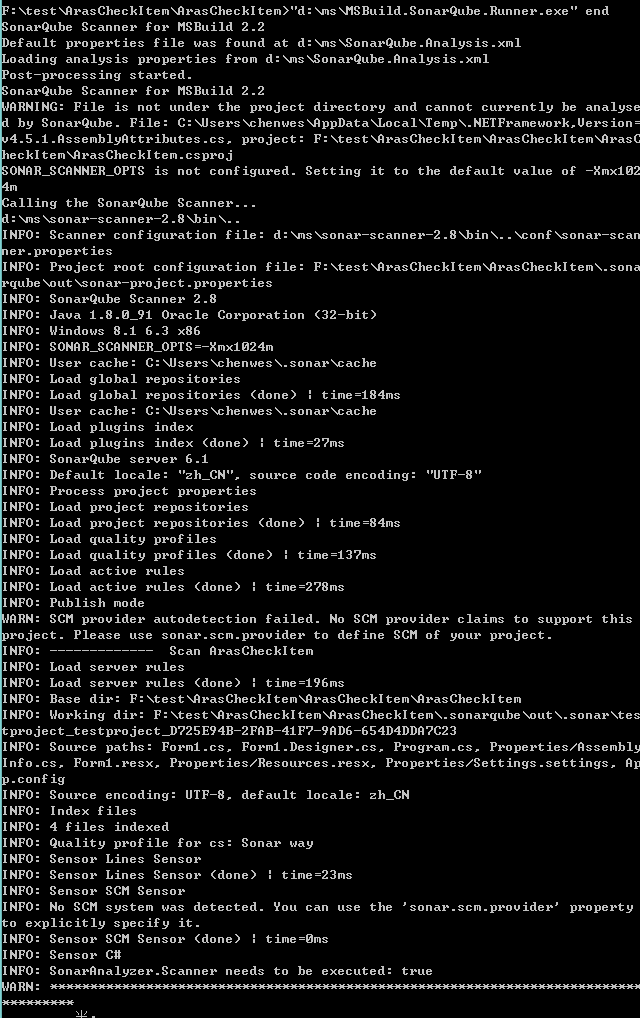
"C:\Program Files (x86)\MSBuild\12.0\Bin\MSBuild.exe" /t:Rebuild (这里的参数/t如果不指定也是可以扫描出来的,看下图)


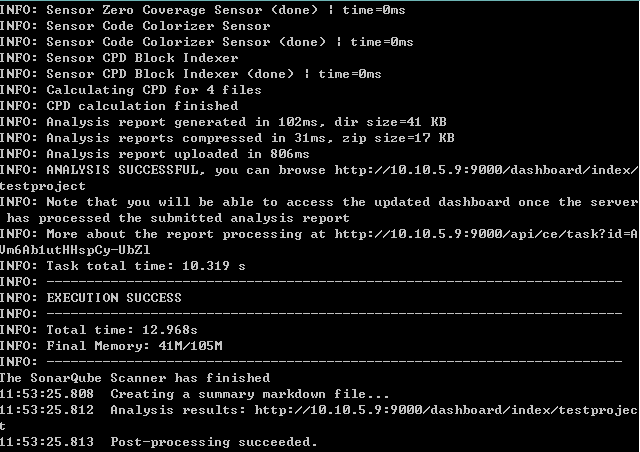
(3.3)运行命令MSBuild.SonarQube.Runner.exe,告诉sonarQube运行完成了,将报告上传
"d:\ms\MSBuild.SonarQube.Runner.exe" end


sonarQube Scanner的更多相关文章
- sonarqube+Scanner代码质量管理工具
本文相关描述基于sonarqube 6.2版本. 下载地址: sonarqube下载网址:https://www.sonarqube.org/downloads/ Scanner下载网址(用于扫描项目 ...
- SonarQube Scanner的配置与使用简介
一.下载 下载地址: https://sonarsource.bintray.com/Distribution/sonar-scanner-cli/sonar-scanner-cli-3.0.3.77 ...
- Jenkins 集成 SonarQube Scanner
1. 安装Jenkins 下载安装包,这里我们下载war包 https://jenkins.io/download/ 运行jenkins.war的方式有两种: 第一种:将其放到tomcat中运行( ...
- 持续代码质量管理-SonarQube Scanner部署
1. SonarQube Scanner地址 上一篇文章我们安装了SonarQube-7.3,让我们可以在页面查看代码质量.但是具体的扫描工作则需要SonarQube Scanner完成. 下载页面 ...
- Analyzing .net core application with SonarQube Scanner for MSBuild
SonarQube是管理代码质量一个开放平台,省略安装过程,下面介绍下如何使用sonarqube去扫描c# 代码. 前提:下载SonarQube Scanner for MSBuild.https:/ ...
- CentOS6.8配置SonarQube Scanner配合SonarQube使用
下载最新的SonarQube Scanner压缩包 https://docs.sonarqube.org/display/SCAN/Analyzing+with+SonarQube+Scanner ...
- SonarQube Scanner for MSBuild
到现在为止,已经将sonarQube服务器搭建好,服务器是Linux服务器,基于sonarQube6.1配置的 原理关于sonarQube的工作原理,暂时还不是太清楚,据同事的分析,是在本机调用服务器 ...
- 使用SonarQube和SonarQube Scanner分析项目
一.概述 SonarQube的安装,请参考链接:https://www.cnblogs.com/xiao987334176/p/12011623.html 配置好sonar的服务端后,接下来就要使用s ...
- SonarQube Scanner execution execution Error --- Failed to upload report - 500: An error has occurred. Please contact your administrator
问题原因:mysql参数设置问题 检查mysql参数: mysql> SHOW VARIABLES LIKE 'max_allowed_packet'; 修改/etc/my.cnf文件: [my ...
随机推荐
- HTML网页图片滚动代码
<!--下面是向上滚动代码--> <div id=butong_net_top style=overflow:hidden;height:100;width:90;> < ...
- 哈弗曼实现(C++)
HuffmanCode.h #ifndef HUFFMANCODE_H #define HUFFMANCODE_H enum LRSTATUS { LEFTCHILD, //左子树 RIGHTCHIL ...
- 24种设计模式--适配器模式【Adapter Pattern】
今天讲适配器模式,这个模式也很简单,你笔记本上的那个拖在外面的黑盒子就是个适配器,一般你在中国能用,在日本也能用,虽然两个国家的的电源电压不同,中国是 220V,日本是 110V,但是这个适配器能够把 ...
- sourceInsight的技巧
在用sourceInsight看代码...在这里积累技巧,慢慢积累吧 1.如何高亮显示所有要搜的东西,例如 1.aaaaaa 2. bbbbbbbbaaaaaaa 3. ccccccc 4. aaaa ...
- debug(fmt,args...)调试
1.定义宏(debug.h) #ifndef __DEBUG__H #define __DEBUG__H #include <stdio.h> #ifdef DEBUG #define d ...
- "Cannot convert value '0000-00-00' from column 2 to TIMESTAMP"mysql时间转换bug
今天在项目中遇到这样的一个bug,Cannot convert value '0000-00-00' from column 2 to TIMESTAMP 仔细一查,经过http://blog.csd ...
- bzoj 3632: 外太空旅行 最大团
3632: 外太空旅行 Time Limit: 5 Sec Memory Limit: 128 MBSubmit: 389 Solved: 129[Submit][Status] Descript ...
- BZOJ 2242 计算器
Description 你被要求设计一个计算器完成以下三项任务: \(1.\)给定\(y,z,p\),计算\(y^{z}\;mod\;P\)的值: \(2.\)给定\(y,z,p\),计算满足\(xy ...
- 【POJ1330】Nearest Common Ancestors(树链剖分求LCA)
Description A rooted tree is a well-known data structure in computer science and engineering. An exa ...
- Spring MVC 中的REST支持
本部分提供了支持 RESTful web 服务的主要 Spring 功能(或注释)的概述. @Controller 使用 @Controller 注释对将成为 MVC 中控制器的类进行注释并处理 HT ...