
flume安装及配置介绍(二)
注: 环境: skylin-linux
Flume的下载方式:
wget http://www.apache.org/dyn/closer.lua/flume/1.6.0/apache-flume-1.6.0-bin.tar.
下载完成之后,使用tar进行解压
tar -zvxf apache-flume-1.6..0-bin.tar.
进入flume的conf配置包中,使用命令touch flume.conf,然后cp flume-conf.properties.template flume.conf
使vim/gedit flume.conf 编辑配置文件,需要说明的的是,Flume conf文件用的是Java版的property文件的key-value键值对模式.
在Flume配置文件中,我们需要
1. 需要命名当前使用的Agent的名称.
2. 命名Agent下的source的名字.
3. 命名Agent下的channal的名字.
4. 命名Agent下的sink的名字.
5. 将source和sink通过channal绑定起来.
一般来说,在Flume中会存在着多个Agent,所以我们需要给它们分别取一个名字来区分它们,注意名字不要相同,名字保持唯一!
例如:
#Agent取名为 agent_name

#source 取名为 source_name ,一次类推

agent_name.source = source_name

agent_name.channels = channel_name

agent_name.sinks = sink_name
上图对应的是单个Agent,单个sink,单个channel情况,如下图
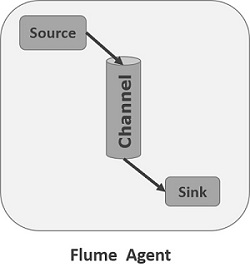 如果我们需要在一个Agent上配置n个sink,m个channel(n>1, m>1),
那么只需要这样配置即可:
#Agent取名为 agent_name

#source 取名为 source_name ,一次类推

agent_name.source = source_name ,source_name1

agent_name.channels = channel_name,channel_name1

agent_name.sinks = sink_name,sink_name1
上面的配置就表示一个Agent中有两个 source,sink,channel的情况,如图所示
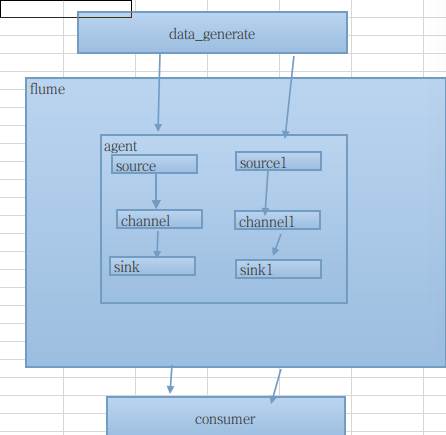
以上是对多sink,channel,source情况,对于 多个Agent,只需要给每个Agent取一个独一无二的名字即可!
Flume支持各种各样的sources,sinks,channels,它们支持的类型如下:
| Sources | Channels | Sinks |
|---|---|---|
|
|
|
以上的类型,你可以根据自己的需求来搭配组合使用,当然如果你愿意,你可以为所欲为的搭配.比如我们使用Avro source类型,采用Memory channel,使用HDFS sink存储,那我们的配置可以接着上的配置这样写
#Agent取名为 agent_name

#source 取名为 source_name ,一次类推

agent_name.source = Avro

agent_name.channels = MemoryChannel

agent_name.sinks = HDFS
当你命名好Agent的组成部分后,你还需要对Agent的组成sources , sinks, channles去一一描述. 下面我们来逐一的细说;
Source的配置
注: 需要特别说明,在Agent中对于存在的N(N>1)个source,其中的每一个source都需要单独进行配置,首先我们需要对source的type进行设置,然后在对每一个type进行对应的属性设置.其通用的模式如下:
agent_name.sources. source_name.type = value

agent_name.sources. source_name.property2 = value

agent_name.sources. source_name.property3 = value
具体的例子,比如我们Source选用的是Avro模式
#Agent取名为 agent_name

#source 取名为 source_name ,一次类推

agent_name.source = Avro

agent_name.channels = MemoryChannel

agent_name.sinks = HDFS

#——————————sourcec配置——————————————#

agent_name.source.Avro.type = avro

agent_name.source.Avro.bind = localhost

agent_name.source.Avro.port = 9696

#将source绑定到MemoryChannel管道上

agent_name.source.Avro.channels = MemoryChannel
Channels的配置
Flume在source和sink配间提供各种管道(channels)来传递数据.因而和source一样,它也需要配置属性,同source一样,对于N(N>0)个channels,
需要单个对它们注意设置属性,它们的通用模板为:
agent_name.channels.channel_name.type = value

agent_name.channels.channel_name. property2 = value

agent_name.channels.channel_name. property3 = value
具体的例子,假如我们选用memory channel类型,那么我先要配置管道的类型
agent_name.channels.MemoryChannel.type = memory
但是我们现在只是设置好了管道自个儿属性,我们还需要将其和sink,source链接起来,也就是绑定,绑定设置如下,我们可以分别写在source,sink处,也可以集中写在channel处
agent_name.sources.Avro.channels = MemoryChannel

agent_name.sinks.HDFS.channels =  MemoryCHannel
Sink的配置
sink的配置和Source配置类似,它的通用格式:
agent_name.sinks. sink_name.type = value

agent_name.sinks. sink_name.property2 = value

agent_name.sinks. sink_name.property3 = value
具体例子,比如我们设置Sink类型为HDFS ,那么我们的配置单就如下:
agent_name.sinks.HDFS.type = hdfs

agent_name.sinks.HDFS.path = HDFS‘s path
以上就是对Flume的配置文件详细介绍,下面在补全一张完整的配置图:
# Licensed to the Apache Software Foundation (ASF) under one

# or more contributor license agreements.  See the NOTICE file

# distributed with this work for additional information

# regarding copyright ownership.  The ASF licenses this file

# to you under the Apache License, Version 2.0 (the

# "License"); you may not use this file except in compliance

# with the License.  You may obtain a copy of the License at

#

#  http://www.apache.org/licenses/LICENSE-2.0

#

# Unless required by applicable law or agreed to in writing,

# software distributed under the License is distributed on an

# "AS IS" BASIS, WITHOUT WARRANTIES OR CONDITIONS OF ANY

# KIND, either express or implied.  See the License for the

# specific language governing permissions and limitations

# under the License.

# The configuration file needs to define the sources,

# the channels and the sinks.

# Sources, channels and sinks are defined per agent,

# in this case called 'agent'

#define agent

agent.sources = seqGenSrc

agent.channels = memoryChannel

agent.sinks = loggerSink kafkaSink

#

# For each one of the sources, the type is defined

#默认模式 agent.sources.seqGenSrc.type = seq / netcat / avro

agent.sources.seqGenSrc.type = avro

agent.sources.seqGenSrc.bind = localhost

agent.sources.seqGenSrc.port = 9696

#####数据来源####

#agent.sources.seqGenSrc.coommand = tail -F /home/gongxijun/Qunar/data/data.log

# The channel can be defined as follows.

agent.sources.seqGenSrc.channels = memoryChannel

#+++++++++++++++定义sink+++++++++++++++++++++#

# Each sink's type must be defined

agent.sinks.loggerSink.type = logger

agent.sinks.loggerSink.type = hbase

agent.sinks.loggerSink.channel = memoryChannel

#表名

agent.sinks.loggerSink.table = flume

#列名

agent.sinks.loggerSink.columnFamily= gxjun

agent.sinks.loggerSink.serializer = org.apache.flume.sink.hbase.MyHbaseEventSerializer

#agent.sinks.loggerSink.serializer  = org.apache.flume.sink.hbase.RegexHbaseEventSerializer

agent.sinks.loggerSink.zookeeperQuorum=localhost:2181

agent.sinks.loggerSink.znodeParent= /hbase

#Specify the channel the sink should use

agent.sinks.loggerSink.channel = memoryChannel

# Each channel's type is defined.

#memory

agent.channels.memoryChannel.type = memory

agent.channels.memortChhannel.keep-alive = 10

# Other config values specific to each type of channel(sink or source)

# can be defined as well

# In this case, it specifies the capacity of the memory channel

#agent.channels.memoryChannel.checkpointDir = /home/gongxijun/Qunar/data

#agent.channels.memoryChannel.dataDirs = /home/gongxijun/Qunar/data , /home/gongxijun/Qunar/tmpData

agent.channels.memoryChannel.capacity = 10000000

agent.channels.memoryChannel.transactionCapacity = 10000

#define the sink2 kafka

#+++++++++++++++定义sink+++++++++++++++++++++#

# Each sink's type must be defined

agent.sinks.kafkaSink.type = logger

agent.sinks.kafkaSink.type = org.apache.flume.sink.kafka.KafkaSink

agent.sinks.kafkaSink.channel = memoryChannel

#agent.sinks.kafkaSink.server=localhost:9092

agent.sinks.kafkaSink.topic= kafka-topic

agent.sinks.kafkaSink.batchSize = 20

agent.sinks.kafkaSink.brokerList = localhost:9092

#Specify the channel the sink should use

agent.sinks.kafkaSink.channel = memoryChannel
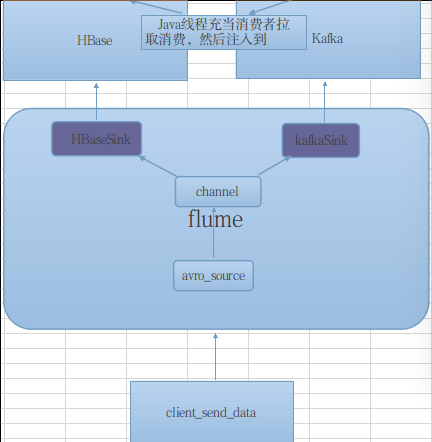
该配置类型如下如所示:
参考资料:
http://www.tutorialspoint.com/apache_flume/apache_flume_configuration.htm
作者: 龚细军
引用请注明出处:http://www.cnblogs.com/gongxijun/p/5661037.html
flume安装及配置介绍(二)的更多相关文章
- Flume简介与使用(一)——Flume安装与配置
Flume简介与使用(一)——Flume安装与配置 Flume简介 Flume是一个分布式的.可靠的.实用的服务——从不同的数据源高效的采集.整合.移动海量数据. 分布式:可以多台机器同时运行采集数据 ...
- CentOS6安装各种大数据软件 第七章:Flume安装与配置
相关文章链接 CentOS6安装各种大数据软件 第一章:各个软件版本介绍 CentOS6安装各种大数据软件 第二章:Linux各个软件启动命令 CentOS6安装各种大数据软件 第三章:Linux基础 ...
- P6 EPPM R16.1安装与配置指南(二)
P6 EPPM R16.1安装与配置指南(一) http://www.cnblogs.com/endv/p/5634620.html P6 EPPM R16.1安装与配置指南(二) 环境变量配置 新建 ...
- 第1章 开发环境安装和配置(二)安装JDK、SDK、NDK
原文 第1章 开发环境安装和配置(二)安装JDK.SDK.NDK 无论是用C#和VS2015开发Androd App还是用Java和Eclipse开发Androd App,都需要先安装JDK和Andr ...
- linux服务安装与配置(二):安装xinetd服务
linux服务安装与配置(二):安装xinetd服务 xinetd即extended internet daemon,xinetd是新一代的网络守护进程服务程序,又叫超级Internet服务器.经常用 ...
- Windows Server 2016 + SCO 2016 安装及配置介绍
Windows Server 2016 + SCO 2016 安装及配置介绍 高文龙关注1人评论6332人阅读2017-02-26 23:23:02 Windows Server 2016 + SCO ...
- Centos 7.3下 Linux For SQL Server安装及配置介绍
Centos 7.3下 Linux For SQL Server安装及配置介绍 高文龙关注13人评论2828人阅读2017-03-05 21:46:21 Centos 7.3下Linux For SQ ...
- 【C#】VS2015开发环境的安装和配置(二)2016-08-03更新
分类:C#.VS2015.WPF.ASP.NET MVC.Android.iOS.Unity3D: 更新日期:2016-08-03 按下面介绍的步骤安装即可. 一.安装JDK和Android SDK ...
- flume安装及配置
Flume安装 介绍 Flume本身的安装比较简单(flume的介绍请参考http://blog.csdn.net/rzhzhz/article/details/7448633),安装前先说明几个概念 ...
随机推荐
- 省市联动sql脚本
create database ProCityData use Procitydata --创建Province(省表) create table Province ( ProID int prima ...
- c# winform 调用js
1. 在winform中加入一个 WebBrowser 控件: 2. webBrowser控件加载html文件,html文件中包含了js代码, 代码如下(必须在 InitializeComponent ...
- Linux下PHP+MYSQL+APACHE配置方法
apache: http://www.apache.org mysql: http://www.mysql.com php: http://www.php.net/downloads.php g ...
- https 单向认证和双向认证配置
HTTPS 是我们开发中经常用到的通信加密技术,能有效保护我们网络访问中的安全,本文主要讲解单向 和 双向 https 的配置.关于https 的实现原理在这里我就不赘述了,附上阮一峰老师的关于htt ...
- [转]RAID基础,RAID10与RAID01比较,RAID10与RAID5比较
原文:http://blog.itpub.net/787018/viewspace-666280/ 文档内容3部分:1.基本的RAID级别介绍2.RAID10和RAID01的比较3.RAID10和RA ...
- term2 配置
item2是mac下非常好用的一款终端.但默认的配色实在不好用,经过一翻搜索终于找到了比较满意的. 1.先要修改~/.bash_profile.代码如下 2.选择喜欢的配色方案. 在Preferenc ...
- _beginthreadex注意事项
_beginthreadex 当失败时返回0 而不是 -1L _beginthreadex调用之后返回的HANDLE,必须手动CloseHandle,才能正确释放句柄.
- MySQL 5.6 双机热备windows7
MySQL 5.6 双机热备 目录: 1.说明 2.数据手工同步 3.修改主数据库配置文件 4.修改从数据库配置文件 5.主数据库添加备份用户 6.从数据库设置为Slave 7.验证 1.说明 1)数 ...
- Markdown学习和插件介绍
markdown能干啥 亲们github上的项目首页的 内容+样式,都是项目中README.md文件控制的.将md风格的代码,转化成html. 而且markdown语法非常简单,5-10分钟即可学会! ...
- Knockout 官网翻译
Knockout 新版应用开发教程之创建view models与监控属性 章节导航 最近抽出点时间研究MVVM,包括司徒正美的avalon,google的angular,以及Knockout,博客园T ...