
Android布局详解之一:FrameLayout
原创文章,如有转载,请注明出处:http://blog.csdn.net/yihui823/article/details/6702273
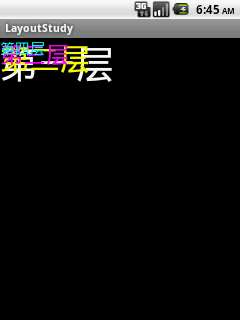
FrameLayout是最简单的布局了。所有放在布局里的控件,都按照层次堆叠在屏幕的左上角。后加进来的控件覆盖前面的控件。
在FrameLayout布局里,定义任何空间的位置相关的属性都毫无意义。控件自动的堆放在左上角,根本不听你的控制。
看以下的例子:
<?xml version="1.0" encoding="utf-8"?>
<FrameLayout xmlns:android="http://schemas.android.com/apk/res/android"
android:layout_width="fill_parent"
android:layout_height="fill_parent"
>
<TextView
android:layout_width="fill_parent"
android:layout_height="wrap_content"
android:textSize="50dip"
android:textColor="#ffffff"
android:text="第一层"/>
<TextView
android:layout_width="fill_parent"
android:layout_height="wrap_content"
android:textSize="40dip"
android:textColor="#ffff00"
android:text="第二层"/>
<TextView
android:layout_width="fill_parent"
android:layout_height="wrap_content"
android:textSize="30dip"
android:textColor="#ff00ff"
android:text="第三层"/>
<TextView
android:layout_width="fill_parent"
android:layout_height="wrap_content"
android:textSize="20dip"
android:textColor="#00ffff"
android:text="第四层"/>
</FrameLayout>
效果如下图:layoutpic001
变化1
我们现在来尝试改变一下他们的位置。把第一个和第二个文本框改成:
<TextView
android:id="@+id/tv1"
android:layout_width="fill_parent"
android:layout_height="wrap_content"
android:textSize="50dip"
android:textColor="#ffffff"
android:text="第一层"/>
<TextView
android:id="@+id/tv2"
android:layout_width="fill_parent"
android:layout_height="wrap_content"
android:textSize="40dip"
android:textColor="#ffff00"
android:layout_toRightOf="@id/tv1"
android:text="第二层"/>
也就是说,让第二个文本框放在第一个文本框的右边。我们来看看效果。看到了没?还是一样的不变吧。
变化2
我们来尝试下android:gravity属性。把第三个文本框改成:
<TextView
android:id="@+id/tv3"
android:layout_width="fill_parent"
android:layout_height="wrap_content"
android:textSize="30dip"
android:textColor="#ff00ff"
android:gravity="right"
android:text="第三层"/>
看看效果如何?天哪!竟然没有覆盖,而是错开了!!!
layoutpic002
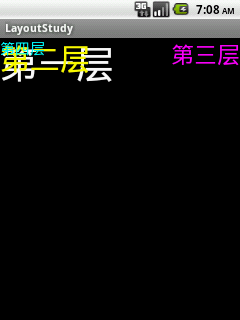
首先呢,我们不要大惊小怪。这个现象并不说明FrameLayout失效了。gravity属性,是控制控件内部文本的格式的。而我们看我们控件的宽的属性是什么?是“fill_parent”,也就是说,我们文本框的宽度就是屏幕的宽度。那么android:gravity="right"文本靠右,而文本框本身还是左上堆叠在一起的。不信,我们再来改改:
<TextView
android:id="@+id/tv3"
android:layout_width="wrap_content"
android:layout_height="wrap_content"
android:textSize="30dip"
android:textColor="#ff00ff"
android:gravity="right"
android:text="第三层"/>
我们让第三个文本框的宽度自适应,也就是保证显示全文字即可。这个时候看一下效果呢?是不是打回原形啦?哈哈哈。
变化3
我们再来试试” android:layout_centerVertical”属性。把第四个文本框改成:
<TextView
android:id="@+id/tv4"
android:layout_width="fill_parent"
android:layout_height="wrap_content"
android:textSize="20dip"
android:textColor="#00ffff"
android:layout_centerVertical="true"
android:text="第四层"/>
效果如何?没任何效果!
总结一下,经过以上的3个实验,我们知道FrameLayout根本无法控制他的子控件的位置。所有的控件都是左上对其。但是控件本身是可以控制自 己内部的布局的。所以利用透明,也是可以完成一些简单的功能的。例如屏幕四个角各显示一些文字(是显示文字,没法放置控件)。因为每一层覆盖下一层的时 候,如果用透明背景,则下一层不会被背景覆盖。
什么是透明背景?这个……说来话长啦。偷个懒,下次写一下透明的处理。
是不是有人会问,这么简单的Layout有什么用?我想还是有它存在的价值的。
当你需要自己写一个View的时候,在View里面已经完成了你的逻辑(例如游戏^_^),那么这个View只需要一个容器放置,就可以使用FrameLayout了。虽然用其他的布局也可以,但是用最简单的不是更省系统资源么。
Android布局详解之一:FrameLayout的更多相关文章
- Android 布局详解
Android 布局详解 1.重用布局 当一个布局文件被多处使用时,最好<include>标签来重用布局. 例如:workspace_screen.xml的布局文件,在另一个布局文件中被重 ...
- Android(java)学习笔记93:Android布局详解之一:FrameLayout
FrameLayout是最简单的布局了.所有放在布局里的控件,都按照层次堆叠在屏幕的左上角.后加进来的控件覆盖前面的控件. 在FrameLayout布局里,定义任何空间的位置相关的属性都毫无意义.控件 ...
- Android(java)学习笔记32:Android布局详解之一:FrameLayout
1. FrameLayout是最简单的布局了.所有放在布局里的控件,都按照层次堆叠在屏幕的左上角.后加进来的控件覆盖前面的控件. 在FrameLayout布局里,定义任何空间的位置相关的属性都毫无意义 ...
- android布局详解
http://blog.163.com/zhangzheming_282/blog/static/117920962013072502787/ AbsoluteLayout——绝对布局 必 ...
- Android 布局详解 -三表格布局(TableLayout)以及重要属性
TableLayout跟TableRow 是一组搭配应用的布局,TableLayout置底,TableRow在TableLayout的上方,而Button.TextView等控件就 ...
- Android开发重点难点1:RelativeLayout(相对布局)详解
前言 啦啦啦~博主又推出了一个新的系列啦~ 之前的Android开发系列主要以完成实验的过程为主,经常会综合许多知识来写,所以难免会有知识点的交杂,给人一种混乱的感觉. 所以博主推出“重点难点”系列, ...
- Android 布局学习之——Layout(布局)详解二(常见布局和布局参数)
[Android布局学习系列] 1.Android 布局学习之——Layout(布局)详解一 2.Android 布局学习之——Layout(布局)详解二(常见布局和布局参数) 3.And ...
- Android Notification 详解(一)——基本操作
Android Notification 详解(一)--基本操作 版权声明:本文为博主原创文章,未经博主允许不得转载. 微博:厉圣杰 源码:AndroidDemo/Notification 文中如有纰 ...
- Android Notification 详解——基本操作
Android Notification 详解 版权声明:本文为博主原创文章,未经博主允许不得转载. 前几天项目中有用到 Android 通知相关的内容,索性把 Android Notificatio ...
随机推荐
- Notes of the scrum meeting(2013/10/23)
ps:本来是10月23号周三下午开的会,这几天由于各种事情忙,忘记写博客了,现在补上. 软工项目组buaa_smile开始项目第一次scrum meeting meeting time:4:00~5: ...
- Week1 Team Homework #2: Introduction of each team member
王洛书 我是来自浙江的王洛书.热爱历史,热爱美食,热爱代码,热爱博物馆.很喜欢软件工程这门课的上课方式,也很喜欢组里的这些同学.希望能大家一起努力,在这门课上真正地收获能力上的提升! 陈睿翊
- 计划:怎样理解水平集方法 ITK Level set V4 框架介绍
简易解释:在曲面中插入一个平面所形成的轮廓,即是该轮廓的水平集表示,可见,该轮廓的水平集表示有多个.对于图像分割,在图像力的驱动下曲面进行更新. 轮廓的数学表达有隐式和显式两种表达.用曲面演化代替Fr ...
- Windows 7 下配置IIS,并且局域网内可访问
win7的iis很麻烦滴!我搭建过一次!不过有点问题!还是xp好! 一.进入Win7的 控制面板,选择左侧的 打开或关闭Windows功能 . 二.现在出现了安装Windows功能的选项菜单,注意选择 ...
- bzoj 1295: [SCOI2009]最长距离 暴力+bfs最短路
题目链接: http://www.lydsy.com/JudgeOnline/problem.php?id=1295 题解: 对每个点暴力跑一遍bfs,看能够到达的最远位置,这里如果有障碍物则距离为1 ...
- ubuntu中磁盘挂载与卸载
问题描述: ubuntu中磁盘的挂载和卸载 问题解决: (1)ubuntu中磁盘挂载 注: 如上所示,使用命令df查看磁盘使用情况 ...
- table 与 div 固定宽高问题
div {width:100px;height:200px;word-wrap: break-word;overflow:hidden;} 这个可以固定div的宽高,溢出内容会被剪除. table{t ...
- .net framework 源码调试 与 问题解决
调试方式有二种, 看官方资料就OK. 官方地址: http://referencesource.microsoft.com/serversetup.aspx 1. 使用配置在线地址安装 2. 下载安装 ...
- 【Memcache】下载和安装
下载: Win7 64bit 系统 下载过过很多版本,都无法安装,最后到这里下载,成功安装: http://blog.couchbase.com/memcached-windows-64-bit-pr ...
- selenium实战脚本集——新浪微博发送QQ每日焦点(火狐)
selenium实战脚本集(1)——新浪微博发送QQ每日焦点,乙醇用谷歌实现的,下边是用火狐实现的. 代码如下: # coding = utf-8 from selenium import webdr ...