
IOS 7 开发范例 - UISwitch的使用
Creating and Using Switches with UISwitch
You would like to give your users the ability to turn an option on or off.
effect as follow:
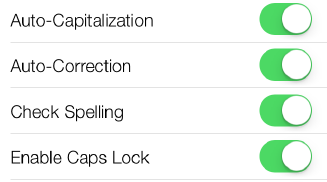
Solution
Use the UISwitch class.
Some steps to implment:
1. Let’s create a property of type UISwitch and call it mainSwitch
ViewController.m:
#import "ViewController.h"

@interface ViewController ()

@property (nonatomic, strong) UISwitch *mainSwitch;

@end

@implementation ViewController

...
2. the viewDidLoad method in your view controller’s implementation file,
Let’s create our switch and place it on our view controller’s view
- (void)viewDidLoad{

  [super viewDidLoad];

  /* Create the switch */
  self.mySwitch = [[UISwitch alloc] initWithFrame:
                     CGRectMake(100, 100, 0, 0)];
  [self.mySwitch setOn:YES];
  [self.view addSubview:self.mySwitch];

  [self.mySwitch addTarget:self
                 action:@selector(switchIsChanged:)
            forControlEvents:UIControlEventValueChanged];}
Note that the parameter that we have to pass to this method is
of type CGRect. A CGRect denotes the boundaries of a rectangle using the (x,y) position
of the top-left corner of the rectangle and its width and height.
After we’ve created the switch, we simply add it to our view controller’s view.
// set the switch on
[self.mainSwitch setOn:YES];
you can read from the on property of the switch to find out whether the
switch is on or off at the moment.
Alternatively, you can use the isOn method of the switch.
eg:
if ([self.mainSwitch isOn]){

  NSLog(@"The switch is on.");

} else {

  NSLog(@"The switch is off.");

}
If you want to get notified when the switch gets turned on or off, you will need to add
your class as the target for the switch, using the addTarget:action:forControlEvents:
method of UISwitch
eg:
[self.mainSwitch addTarget:self

       action:@selector(switchIsChanged:)

       forControlEvents:UIControlEventValueChanged];
Then implement the switchIsChanged: method.
- (void) switchIsChanged:(UISwitch *)paramSender{

  NSLog(@"Sender is = %@", paramSender);

  if ([paramSender isOn]){

    NSLog(@"The switch is turned on.");

  } else {

    NSLog(@"The switch is turned off.");

  }

}
Run Result:
Sender is = <UISwitch: 0x6e13500;
frame = (100 100; 79 27);
layer = <CALayer: 0x6e13700>>
The switch is turned off.
Customizing the UISwitch
There are two main ways of customizing a switch:
Tint Colors
Tint colors are colors that you can apply to a UI component such as a UISwitch.
The tint color will be applied on top of the current color of the component. For
instance, in a normal UISwitch, you will be able to see different colors. When you
apply the tint color on top, the normal color of the control will be mixed with the
tint color, giving a flavor of the tint color on the UI control.
Images
A switch has two images:
On Image
The image that represents the on state of the switch. The width of this image is
77 points, and its height is 22.
Off Image
The image that represents the switch in its off state. This image, like the on state
of the switch, is 77 points in width and 22 points in height.
tintColor
This is the tint color that will be applied to the off state of the switch.
Unfortunately, Apple has not taken the time to name this property offTintColor instead of tint
Color to make it more explicit.
thumbTintColor
This is the tint color that will be applied to the little knob on the switch.
onTintColor
This tint color will be applied to the switch in its on state.
// simple code snippet that will change the on-mode tint color of the switch to
// red, the off-mode tint color to brown, and the knob’s tint color to green.
- (void)viewDidLoad

{

  [super viewDidLoad];

  /* Create the switch */

  self.mainSwitch = [[UISwitch alloc] initWithFrame:CGRectZero];

  self.mainSwitch.center = self.view.center;

  [self.view addSubview:self.mainSwitch];

  /* Customize the switch */

  /* Adjust the off-mode tint color */

  self.mainSwitch.tintColor = [UIColor redColor];

  /* Adjust the on-mode tint color */

  self.mainSwitch.onTintColor = [UIColor brownColor];

  /* Also change the knob's tint color */

  self.mainSwitch.thumbTintColor = [UIColor greenColor];

}
Let’s move on to customizing the appearance of the switch using its on and off images
prepare a new set of on and off images.
As mentioned before, both the on and the off images in a switch should be 77 points wide and 22 points tall.


- (void)viewDidLoad

{

  [super viewDidLoad];

  /* Create the switch */

  self.mainSwitch = [[UISwitch alloc] initWithFrame:CGRectZero];

  self.mainSwitch.center = self.view.center;

  /* Make sure the switch won't appear blurry(模糊) on iOS Simulator */

  self.mainSwitch.frame

    = [self roundedValuesInRect:self.mainSwitch.frame];

  [self.view addSubview:self.mainSwitch];

  /* Customize the switch */

  self.mainSwitch.onImage = [UIImage imageNamed:@"On"];

  self.mainSwitch.offImage = [UIImage imageNamed:@"Off"];

}
eg:
IOS 7 开发范例 - UISwitch的使用的更多相关文章
- iOS移动开发周报-第22期
iOS移动开发周报-第22期 [摘要]:本期iOS移动开发周报带来如下内容:苹果股价创新高,iOS8自动调整UITableView布局,Swift学习心得等. 新闻 <苹果股价创新高 市值全球第 ...
- iOS应用开发详解
<iOS应用开发详解> 基本信息 作者: 郭宏志 出版社:电子工业出版社 ISBN:9787121207075 上架时间:2013-6-28 出版日期:2013 年7月 开本:16开 ...
- iOS App开发的那些事儿2:如何搭建合适的框架
<iOS App开发的那些事儿>系列文章从更宏观的角度出发,不仅仅局限于具体某个功能.界面的实现,而是结合网易云信iOS端研发负责人多年的经验,从如何优化现有代码的角度出发,深度分析如何创 ...
- iOS App开发那些事:如何选择合适的人、规范和框架?
http://www.cocoachina.com/ios/20141202/10386.html 自从做Team Leader之后,身上权责发生了变化,于是让我烦恼的不再是具体某个功能,某个界面的实 ...
- 中文 iOS/Mac 开发博客列表
中文 iOS/Mac 开发博客列表 博客地址 RSS地址 OneV's Den http://onevcat.com/atom.xml 一只魔法师的工坊 http://blog.ibireme.com ...
- Unity iOS混合开发界面切换思路
Unity iOS混合开发界面切换思路 最近有很多博友QQ 私信 或则 留言联系我,请教iOS和Unity界面之前相互切换的问题,源代码就不私下发你们了,界面跳转功能的代码我直接贴到下面好了,顺带说i ...
- ios新手开发——toast提示和旋转图片加载框
不知不觉自学ios已经四个月了,从OC语法到app开发,过程虽然枯燥无味,但是结果还是挺有成就感的,在此分享我的ios开发之路中的小小心得~废话不多说,先上我们今天要实现的效果图: 有过一点做APP经 ...
- iOS常用开发技巧
iOS开发过程中,总有那么一些个小问题让人纠结,它们不会让程序崩溃,但是会让人崩溃.除此之外,还将分享一些细节现在我通过自己的总结以及从其他地方的引用,来总结一下一些常见小问题. 本篇长期更新,多积累 ...
- iOS widget开发
链接: iOS Widget开发 iOS开发之构建Widget iOS开发Widget iOS开发-widget基础 ios8新特性widget开发 ios 10 开发-widget实现 Widget ...
随机推荐
- Ruby网络服务
#require 'net/http' #p Net::HTTP.get_response(URI.parse('http://www.kuaiyoujia.com')){|res| # puts r ...
- Linux应用层直接操作GPIO
Linux应用层直接操作GPIO 在一个老手的指导下,应用层可以直接操作GPIO,具体指设置GPIO的输入输出以及输出电平高或者低.这个大大地提高了灵活性,官方的文档有GPIO Sysfs Inter ...
- linux-LINUX试题
ylbtech-doc:linux-LINUX试题 LINUX试题 1.A,LINUX试题返回顶部 01.{Linux题目}在使用匿名登录ftp时,用户名为( )? (选择1项) A) login ...
- WIND2003 安装Zend studio 报错
在安装zend stutio是系统报错,貌似是签章检验没有通过,去查了一下网上的解决方式多种多样,经过验证后发现以下可以解决我的问题特做记录 机器配置是E2160+4G 异常信息是:File c:\W ...
- Android中的音频播放(MediaPlayer和SoundPool)
Android中音频和视频的播放我们最先想到的就是MediaPlayer类了,该类提供了播放.暂停.停止.和重复播放等方法.该类位于android.media包下,详见API文档.其实除了这个类还有一 ...
- Source Insight中文乱码
搜索都是c++的代码,本来想下一个Vc,想了下,决定下个eclipse for C++,anyway,n次n久时间下载失败后,我接受了推荐,先下了个Source Insight来看代码.然后问题就出现 ...
- Brackets sequence
题意: 给你一个括号序列(有中小括号),求出以给定序列为子序列的最小合法括号序列. 分析: 非常经典,以前做过相似一道题,用区间dp,但怎么把这个序列求出来没想出来. dp[i][j]表示区间i-j是 ...
- XTUOJ 1248 TC or CF 搜索
这个题一眼看上去不会 然后有人说是网络流 然后我就想怎么建图啊,然后不会(是本蒟蒻太垃圾了),肯定有网络流解法 然后去群里问了gdut的巨巨,他说他队友爆搜+剪枝过了(我也是非常的叹服) 然后我也写了 ...
- CAKeyframeAnimation
之所以叫做关键帧动画是因为,这个类可以实现,某一属性按照一串的数值进行动画,就好像制作动画的时候一帧一帧的制作一样. 一般使用的时候 首先通过 animationWithKeyPath 方法 创建一 ...
- 【剑指offer 面试题23】从上往下打印二叉树
思路: 没啥好说的,BFS. C++: #include <iostream> #include <queue> using namespace std; struct Tre ...