
Android:布局实例之模仿微信Tab
微信Tab预览效果:
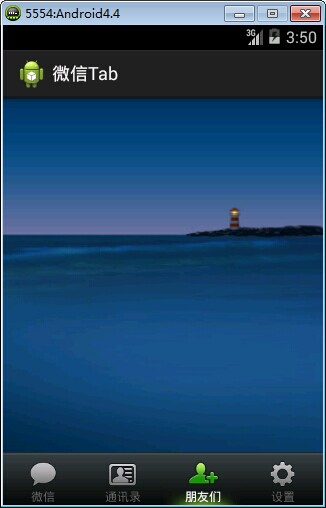
思路:
1、用TabHost+RadioGroup搭建基本布局,以RadioGroup代替TabWidget
2、设置按钮和文字的的样式和selector
3、创建相应的Activity
4、实现按钮和内容切换
布局:
<?xml version="1.0" encoding="utf-8"?>

<TabHost xmlns:android="http://schemas.android.com/apk/res/android"

    android:layout_width="match_parent"

    android:layout_height="match_parent"

    android:id="@android:id/tabhost"

     >

    <LinearLayout

        android:layout_width="match_parent"

        android:layout_height="match_parent"

        android:orientation="vertical"

        >

    <FrameLayout

        android:id="@android:id/tabcontent"

        android:layout_width="match_parent"

        android:layout_height="0dp"

        android:layout_weight="1"

        ></FrameLayout>

    <!-- 隐藏TabWidget -->

<TabWidget

    android:id="@android:id/tabs"

    android:visibility="gone"

    android:layout_width="match_parent"

    android:layout_height="wrap_content"

    >

  </TabWidget>

<!-- 视觉上,用单选按钮替代TabWidget -->

    <RadioGroup

        android:id="@+id/main_radiogroup"

        android:layout_width="match_parent"

        android:layout_height="wrap_content"

        android:background="@drawable/mmfooter_bg"

          android:paddingTop="8dp"

       android:orientation="horizontal"

        >

        <RadioButton

          android:id="@+id/tab_icon_weixin"

          android:checked="true"

          android:textColor="@color/tab_text"

          android:drawableTop="@drawable/tab_weixin"

          android:text="@string/radio1_text"

          style="@style/tab_button_bg"

            />

         <RadioButton

           android:id="@+id/tab_icon_address"

          android:textColor="@color/tab_text"

          android:drawableTop="@drawable/tab_address"

          android:text="@string/radio2_text"

          style="@style/tab_button_bg"

            />

          <RadioButton

          android:id="@+id/tab_icon_friend"

          android:textColor="@color/tab_text"

          android:drawableTop="@drawable/tab_frd"

          android:text="@string/radio3_text"

          style="@style/tab_button_bg"

            />

           <RadioButton

          android:id="@+id/tab_icon_setting"

          android:textColor="@color/tab_text"

          android:drawableTop="@drawable/tab_set"

          android:text="@string/radio4_text"

          style="@style/tab_button_bg"

            />

    </RadioGroup>

</LinearLayout>

</TabHost>
按钮样式:
    <!-- 按钮文字样式 -->

    <style name="tab_text_color">

        <item name="android:textColor">@color/tab_text</item>

        <item name="android:textSize">12dp</item>

        <!-- 从左向右跑马灯效果 -->

        <item name="android:ellipsize">marquee</item>

        <!-- 单行显示 -->

        <item name="android:singleLine">true</item>

    </style>

    <!-- 按钮样式 -->

    <style name="tab_button_bg">

        <item name="android:textAppearance">@style/tab_text_color</item>

          <item name="android:gravity">center</item>

        <item name="android:background">@drawable/tab_bg</item>

        <item name="android:layout_width">0dp</item>

        <item name="android:layout_height">wrap_content</item>

        <item name="android:button">@null</item>

        <item name="android:layout_weight">1</item>

    </style>
按钮图片selector
<?xml version="1.0" encoding="utf-8"?>

<selector xmlns:android="http://schemas.android.com/apk/res/android" >

    <item android:state_enabled="true" android:state_checked="true" android:drawable="@drawable/tab_address_pressed"></item>

 <item android:drawable="@drawable/tab_address_normal"></item>

</selector>
按钮文字selector
<?xml version="1.0" encoding="utf-8"?>

<selector xmlns:android="http://schemas.android.com/apk/res/android">

  <item android:state_checked="true" android:color="@color/white"></item>

  <item android:color="@color/grey"></item>

</selector>
程序:
public class MainActivity extends TabActivity{

    private TabHost tabhost;

    private RadioGroup main_radiogroup;

     private RadioButton tab_icon_weixin, tab_icon_address, tab_icon_friend,tab_icon_setting;

    @Override

    protected void onCreate(Bundle savedInstanceState) {

        super.onCreate(savedInstanceState);

        setContentView(R.layout.demo);

        //获取按钮

        main_radiogroup = (RadioGroup) findViewById(R.id.main_radiogroup);

        tab_icon_weixin = (RadioButton) findViewById(R.id.tab_icon_weixin);

        tab_icon_address = (RadioButton) findViewById(R.id.tab_icon_address);

        tab_icon_friend = (RadioButton) findViewById(R.id.tab_icon_friend);

        tab_icon_setting = (RadioButton) findViewById(R.id.tab_icon_setting);

        //往TabWidget添加Tab

        tabhost = getTabHost();

        tabhost.addTab(tabhost.newTabSpec("tag1").setIndicator("0").setContent(new Intent(this,Activity1.class)));

        tabhost.addTab(tabhost.newTabSpec("tag2").setIndicator("1").setContent(new Intent(this,Activity2.class)));

        tabhost.addTab(tabhost.newTabSpec("tag3").setIndicator("2").setContent(new Intent(this,Activity3.class)));

        tabhost.addTab(tabhost.newTabSpec("tag4").setIndicator("3").setContent(new Intent(this,Activity4.class)));

        //设置监听事件

        checkListener checkradio = new checkListener();

        main_radiogroup.setOnCheckedChangeListener(checkradio);

    }

    //监听类

    public class checkListener implements OnCheckedChangeListener{

        @Override

        public void onCheckedChanged(RadioGroup group, int checkedId) {

            // TODO Auto-generated method stub

            //setCurrentTab 通过标签索引设置当前显示的内容

            //setCurrentTabByTag 通过标签名设置当前显示的内容

            switch(checkedId){

            case R.id.tab_icon_weixin:

                tabhost.setCurrentTab(0);

                //或

                //tabhost.setCurrentTabByTag("tag1");

                break;

            case R.id.tab_icon_address:

                tabhost.setCurrentTab(1);

                break;

            case R.id.tab_icon_friend:

                tabhost.setCurrentTab(2);

                break;

            case R.id.tab_icon_setting:

                tabhost.setCurrentTab(3);

                break;

            }

        }

    }

}
相关的文章:
Android:布局实例之模仿微信Tab的更多相关文章
- [转]Android:布局实例之模仿QQ登录界面
Android:布局实例之模仿QQ登录界面 预览图: 准备: 1.找到模仿对象 QQ登陆界面UI下载>>>>> 2.导入工程 3.查看布局结构和使用控件 其对应效果图分布 ...
- Android:布局实例之模仿QQ登录界面
预览图: 准备: 1.找到模仿对象 QQ登陆界面UI下载>>>>> 2.导入工程 3.查看布局结构和使用控件 其对应效果图分布为 4.分析样式选择器 下拉箭头2种样式:点 ...
- Android:布局实例之模仿京东登录界面
预览图及布局结构参考: 布局: <?xml version="1.0" encoding="utf-8"?> <RelativeLayout ...
- Android Studio精彩案例(三)《模仿微信ViewPage+Fragment实现方式二》
转载本专栏文章,请注明出处,尊重原创 .文章博客地址:道龙的博客 写在前面的话:此专栏是博主在工作之余所写,每一篇文章尽可能写的思路清晰一些,属于博主的"精华"部分,不同于以往专栏 ...
- android本地数据库,微信数据库WCDB for Android 使用实例
android本地数据库,微信数据库WCDB for Android 使用实例 Home · Tencent/wcdb Wikihttps://github.com/Tencent/wcdb/wiki ...
- android actionbar viewpager 实现类微信主界面布局
1 Activity public class MainActivity extends FragmentActivity { private ViewPager pager; private Act ...
- 自定义控件(模仿微信ToggleButton控件)
弄过android开发的都知道,系统有一个默认的ToggleButton,但很多人都觉得他很难看,当然也包括我.如果你感觉他不难看,那你就继续使用系统的吧,这篇文章对你来说是多余的了. 今天来写一个模 ...
- [Android] Android 使用 FragmentTabHost + Fragment 实现 微信 底部菜单
Android 使用 FragmentTabHost + Fragment 实现 微信 底部菜单 利用FragmentTabHost实现底部菜单,在该底部菜单中,包括了4个TabSpec,每个TabS ...
- 【转】 Android常用实例—Alert Dialog的使用
Android常用实例—Alert Dialog的使用 AlertDialog的使用很普遍,在应用中当你想要用户做出“是”或“否”或者其它各式各样的选择时,为了保持在同样的Activity和不改变用户 ...
随机推荐
- eclipse gradle 自动打包
直接在eclipse项目中建立一个文件,文件名为build.gradle.其实还可以用eclipse再项目上面右击,export->Android->Generate Gradle bui ...
- PostgreSQL的 fdw 跨库使用
create extension postgres_fdw; ',dbname 'postgres'); create user mapping for android_market server s ...
- ZOJ-3686 A Simple Tree Problem 线段树
题目链接:http://acm.zju.edu.cn/onlinejudge/showProblem.do?problemCode=3686 题意:给定一颗有根树,每个节点有0和1两种值.有两种操作: ...
- Google Glass应用开发探索
摘要:2012年6月的Google开发者大会上,作者有幸预定到了Google Glass.8个月后,她收邀参加了Google纽约总部举行的Google Glass Foundry开发大赛.在为期两天的 ...
- 【转】jsp页面中jstl标签详解
原文地址: JSLT标签库,是日常开发经常使用的,也是众多标签中性能最好的.把常用的内容,放在这里备份一份,随用随查.尽量做到不用查,就可以随手就可以写出来.这算是Java程序员的基本功吧,一定要扎实 ...
- [iOS微博项目 - 3.3] - 封装网络请求
github: https://github.com/hellovoidworld/HVWWeibo A.封装网络请求 1.需求 为了避免代码冗余和对于AFN框架的多处使用导致耦合性太强,所以把网 ...
- ZOJ 3597 Hit the Target! (线段树扫描线 -- 矩形所能覆盖的最多的点数)
ZOJ 3597 题意是说有n把枪,有m个靶子,每把枪只有一发子弹(也就是说一把枪最多只能打一个靶子), 告诉你第 i 把枪可以打到第j个靶, 现在等概率的出现一个连续的P把枪,在知道这P把枪之后,你 ...
- [网络]远程访问局域网svn服务器[转]
转至:http://8474832.blog.51cto.com/8464832/1555449 打开路由器访问界面 选择转发规则->端口映射-新建 在弹出的界面中填写相应的端口号了内网ip 填 ...
- 特现C语言编程特点的小代码,itoa,数值转换成字符串
#define BASE_MAX (26 + 10) char const* itostr(int x, int base) { /* map 居中, 支技负余数 */ static char con ...
- winform 发布应用程序 提示 “未能注册模块(程序路径)\ieframe.dll”
程序安装的时候出现未能注册模块(程序路径)\ieframe.dll提示 这种情况的出现,是因为引用的shdocvw.dll,目前发现了一个折中的解决方法,在安装程序里面,可以看到ieframe.dll ...