
浅谈Android系统开发中LOG的使用
文章转载至CSDN社区罗升阳的安卓之旅,原文地址:http://blog.csdn.net/luoshengyang/article/details/6581828
在程序开发过程中,LOG是广泛使用的用来记录程序执行过程的机制,它既可以用于程序调试,也可以用于产品运营中的事件记录。在Android系统中,提供了简单、便利的LOG机制,开发人员可以方便地使用。在这一篇文章中,我们简单介绍在Android内核空间和用户空间中LOG的使用和查看方法。
一. 内核开发时LOG的使用。Android内核是基于Linux Kerne 2.36的,因此,Linux Kernel的LOG机制同样适合于Android内核,它就是有名的printk,与C语言的printf齐名。与printf类似,printk提供格式化输入功能,同时,它也具有所有LOG机制的特点--提供日志级别过虑功能。printk提供了8种日志级别(<linux/kernel.h>):
- #define KERN_EMERG "<0>" /* system is unusable */
- #define KERN_ALERT "<1>" /* action must be taken immediately */
- #define KERN_CRIT "<2>" /* critical conditions */
- #deinfe KERN_ERR "<3>" /* error conditions */
- #deinfe KERN_WARNING "<4>" /* warning conditions */
- #deinfe KERN_NOTICE "<5>" /* normal but significant condition */
- #deinfe KERN_INFO "<6>" /* informational */
- #deinfe KERN_DEBUG "<7>" /* debug-level messages */
printk的使用方法:
printk(KERN_ALERT"This is the log printed by printk in linux kernel space.");
KERN_ALERT表示日志级别,后面紧跟着要格式化字符串。
在Android系统中,printk输出的日志信息保存在/proc/kmsg中,要查看/proc/kmsg的内容,参照在Ubuntu上下载、编译和安装Android最新内核源代码(Linux Kernel)一文,在后台中运行模拟器:
USER-NAME@MACHINE-NAME:~/Android$ emulator &
启动adb shell工具:
USER-NAME@MACHINE-NAME:~/Android$ adb shell
查看/proc/kmsg文件:
root@android:/ # cat /proc/kmsg
二. 用户空间程序开发时LOG的使用。Android系统在用户空间中提供了轻量级的logger日志系统,它是在内核中实现的一种设备驱动,与用户空间的logcat工具配合使用能够方便地跟踪调试程序。在Android系统中,分别为C/C++ 和Java语言提供两种不同的logger访问接口。C/C++日志接口一般是在编写硬件抽象层模块或者编写JNI方法时使用,而Java接口一般是在应用层编写APP时使用。
Android系统中的C/C++日志接口是通过宏来使用的。在system/core/include/android/log.h定义了日志的级别:
- /*
- * Android log priority values, in ascending priority order.
- */
- typedef enum android_LogPriority {
- ANDROID_LOG_UNKNOWN = 0,
- ANDROID_LOG_DEFAULT, /* only for SetMinPriority() */
- ANDROID_LOG_VERBOSE,
- ANDROID_LOG_DEBUG,
- ANDROID_LOG_INFO,
- ANDROID_LOG_WARN,
- ANDROID_LOG_ERROR,
- ANDROID_LOG_FATAL,
- ANDROID_LOG_SILENT, /* only for SetMinPriority(); must be last */
- } android_LogPriority;
在system/core/include/cutils/log.h中,定义了对应的宏,如对应于ANDROID_LOG_VERBOSE的宏LOGV:
- /*
- * This is the local tag used for the following simplified
- * logging macros. You can change this preprocessor definition
- * before using the other macros to change the tag.
- */
- #ifndef LOG_TAG
- #define LOG_TAG NULL
- #endif
- /*
- * Simplified macro to send a verbose log message using the current LOG_TAG.
- */
- #ifndef LOGV
- #if LOG_NDEBUG
- #define LOGV(...) ((void)0)
- #else
- #define LOGV(...) ((void)LOG(LOG_VERBOSE, LOG_TAG, __VA_ARGS__))
- #endif
- #endif
- /*
- * Basic log message macro.
- *
- * Example:
- * LOG(LOG_WARN, NULL, "Failed with error %d", errno);
- *
- * The second argument may be NULL or "" to indicate the "global" tag.
- */
- #ifndef LOG
- #define LOG(priority, tag, ...) \
- LOG_PRI(ANDROID_##priority, tag, __VA_ARGS__)
- #endif
- /*
- * Log macro that allows you to specify a number for priority.
- */
- #ifndef LOG_PRI
- #define LOG_PRI(priority, tag, ...) \
- android_printLog(priority, tag, __VA_ARGS__)
- #endif
- /*
- * ================================================================
- *
- * The stuff in the rest of this file should not be used directly.
- */
- #define android_printLog(prio, tag, fmt...) \
- __android_log_print(prio, tag, fmt)
因此,如果要使用C/C++日志接口,只要定义自己的LOG_TAG宏和包含头文件system/core/include/cutils/log.h就可以了:
#define LOG_TAG "MY LOG TAG"
#include <cutils/log.h>
就可以了,例如使用LOGV:
LOGV("This is the log printed by LOGV in android user space.");
再来看Android系统中的Java日志接口。Android系统在Frameworks层中定义了Log接口(frameworks/base/core/java/android/util/Log.java):
- ................................................
- public final class Log {
- ................................................
- /**
- * Priority constant for the println method; use Log.v.
- */
- public static final int VERBOSE = 2;
- /**
- * Priority constant for the println method; use Log.d.
- */
- public static final int DEBUG = 3;
- /**
- * Priority constant for the println method; use Log.i.
- */
- public static final int INFO = 4;
- /**
- * Priority constant for the println method; use Log.w.
- */
- public static final int WARN = 5;
- /**
- * Priority constant for the println method; use Log.e.
- */
- public static final int ERROR = 6;
- /**
- * Priority constant for the println method.
- */
- public static final int ASSERT = 7;
- .....................................................
- public static int v(String tag, String msg) {
- return println_native(LOG_ID_MAIN, VERBOSE, tag, msg);
- }
- public static int v(String tag, String msg, Throwable tr) {
- return println_native(LOG_ID_MAIN, VERBOSE, tag, msg + '\n' + getStackTraceString(tr));
- }
- public static int d(String tag, String msg) {
- return println_native(LOG_ID_MAIN, DEBUG, tag, msg);
- }
- public static int d(String tag, String msg, Throwable tr) {
- return println_native(LOG_ID_MAIN, DEBUG, tag, msg + '\n' + getStackTraceString(tr));
- }
- public static int i(String tag, String msg) {
- return println_native(LOG_ID_MAIN, INFO, tag, msg);
- }
- public static int i(String tag, String msg, Throwable tr) {
- return println_native(LOG_ID_MAIN, INFO, tag, msg + '\n' + getStackTraceString(tr));
- }
- public static int w(String tag, String msg) {
- return println_native(LOG_ID_MAIN, WARN, tag, msg);
- }
- public static int w(String tag, String msg, Throwable tr) {
- return println_native(LOG_ID_MAIN, WARN, tag, msg + '\n' + getStackTraceString(tr));
- }
- public static int w(String tag, Throwable tr) {
- return println_native(LOG_ID_MAIN, WARN, tag, getStackTraceString(tr));
- }
- public static int e(String tag, String msg) {
- return println_native(LOG_ID_MAIN, ERROR, tag, msg);
- }
- public static int e(String tag, String msg, Throwable tr) {
- return println_native(LOG_ID_MAIN, ERROR, tag, msg + '\n' + getStackTraceString(tr));
- }
- ..................................................................
- /**@hide */ public static native int println_native(int bufID,
- int priority, String tag, String msg);
- }
因此,如果要使用Java日志接口,只要在类中定义的LOG_TAG常量和引用android.util.Log就可以了:
private static final String LOG_TAG = "MY_LOG_TAG";
Log.i(LOG_TAG, "This is the log printed by Log.i in android user space.");
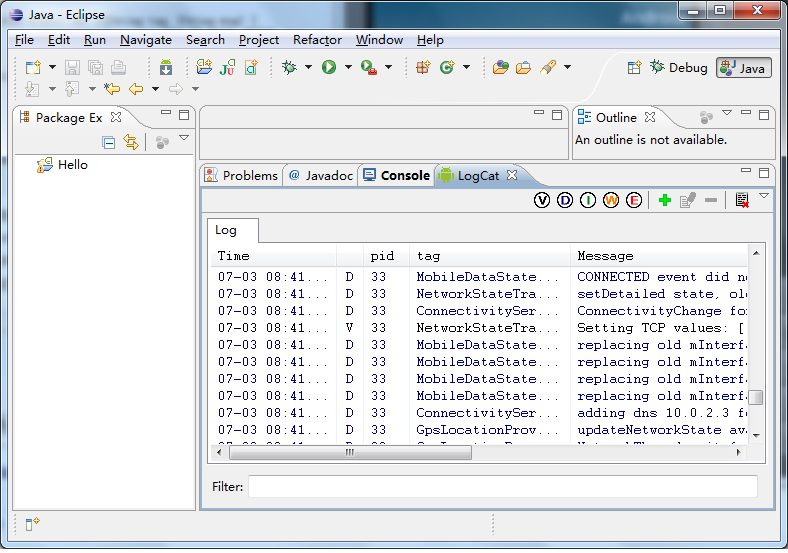
要查看这些LOG的输出,可以配合logcat工具。如果是在Eclipse环境下运行模拟器,并且安装了Android插件,那么,很简单,直接在Eclipse就可以查看了:
如果是在自己编译的Android源代码工程中使用,则在后台中运行模拟器:
USER-NAME@MACHINE-NAME:~/Android$ emulator &
启动adb shell工具:
USER-NAME@MACHINE-NAME:~/Android$ adb shell
使用logcat命令查看日志:
root@android:/ # logcat
这样就可以看到输出的日志了。
老罗的新浪微博:http://weibo.com/shengyangluo,欢迎关注!
浅谈Android系统开发中LOG的使用的更多相关文章
- 浅谈Android系统开发中LOG的使用【转】
本文转载自:http://blog.csdn.net/luoshengyang/article/details/6581828 在程序开发过程中,LOG是广泛使用的用来记录程序执行过程的机制,它既可以 ...
- 浅谈Android系统进程间通信(IPC)机制Binder中的Server和Client获得Service Manager接口之路
文章转载至CSDN社区罗升阳的安卓之旅,原文地址:http://blog.csdn.net/luoshengyang/article/details/6627260 在前面一篇文章浅谈Service ...
- 浅谈Android样式开发之布局优化
引言 今天我们来谈一下Android中布局优化常用的一些手段.官方给出了3种优化方案,分别是</include>.</viewstub>.</merge>标签,下面 ...
- 浅谈Android系统移植、Linux设备驱动
一.Android系统架构 第一层:Linux内核 包括驱动程序,管理内存.进程.电源等资源的程序 第二层:C/C++代码库 包括Linux的.so文件以及嵌入到APK程序中的NDK代码 第三层:An ...
- 浅谈Android系统的图标设计规范
http://homepage.yesky.com/89/11620089.shtml 目前移动平台的竞争日益激烈,友好的用户界面可以帮助提高用户体验满意度,图标Icon是用户界面中一个重要的组成部分 ...
- 浅谈Android移动开发程序员的职业发展之路
现在几乎每个it公司都在开发移动产品,我最早知道Android还是在09年成都某学院上大学的时候,从新闻上知道有这么一家公司,创始人安迪·鲁宾很有名,但安卓到底是做什么的,我并没有关注. 到2010年 ...
- 【Unity游戏开发】浅谈Unity游戏开发中的单元测试
一.单元测试的定义与作用 单元测试定义:单元测试在传统软件开发中是非常重要的工具,它是指对软件中的最小可测试单元进行检查和验证,一般情况下就是对代码中的一个函数去进行验证,检查它的正确性.一个单元测试 ...
- 浅谈在Java开发中的枚举的作用和用法
枚举(enum),是指一个经过排序的.被打包成一个单一实体的项列表.一个枚举的实例可以使用枚举项列表中任意单一项的值.枚举在各个语言当中都有着广泛的应用,通常用来表示诸如颜色.方式.类别.状态等等数目 ...
- 安卓开发_浅谈Android动画(四)
Property动画 概念:属性动画,即通过改变对象属性的动画. 特点:属性动画真正改变了一个UI控件,包括其事件触发焦点的位置 一.重要的动画类及属性值: 1. ValueAnimator 基本属 ...
随机推荐
- Web App 前端构建(纯净版)
asp.net 母版页: <!DOCTYPE html> <html> <head> <meta charset="utf-8" name ...
- WebApi2官网学习记录---Tracing
安装追踪用的包 Install-Package Microsoft.AspNet.WebApi.Tracing Update-Package Microsoft.AspNet.WebApi.WebHo ...
- ORacle 复制表
create table r_register_company as select companyid,companyname,from grdata.r_register_company inser ...
- android码农神器 偷懒工具 android懒人框架 LoonAndroid 3 讲解
LoonAndroid 3.0 Loonandroid是一个注解框架,不涉及任何UI效果,目的是一个功能一个方法,以方法为最小颗粒度对功能进行拆解.把功能傻瓜化,简单化,去掉重复性的代码,隐藏复杂的实 ...
- js中window.print()去除页眉页脚
//jsp打印时去除页眉页页脚 打印前加入下面代码即可 var HKEY_Root,HKEY_Path,HKEY_Key; HKEY_Root="HKEY_CURRENT_USER" ...
- Silverlight 图表下载到Excel文件中
一.Silverlight xaml.cs文件按钮触发方法 1.//下载图表 private void btnDown_Click(object sender, RoutedEventA ...
- performSelector的方法
在此我对performSelector系列方法进行了总结 1. - (id)performSelector:(SEL)aSelector; - (id)performSelector:(SEL)aSe ...
- linus用的是哪个桌面?
- php生成代金券码
<?php/** * @param int $no_of_codes//定义一个int类型的参数 用来确定生成多少个优惠码 * @param array $exclude_codes_array ...
- [1] Tornado Todo Day0
Github地址: day0 初始化数据库: jakeychen@JC:~/Public/tornado_todo$ pwd /home/jakeychen/Public/tornado_todo j ...