
python下的web服务器模块
python下的web服务模块有三种:
BaseHTTPServer: 提供基本的Web服务和处理器类,分别是HTTPServer和BaseHTTPRequestHandler
SimpleHTTPServer: 包含执行GET和HEAD请求的SimpleHTTPRequestHandler类
CGIHTTPServer: 包含处理POST请求和执行CGIHTTPRequestHandler类。
下面是CGIHTTPServer类示例:
 root@u254:~/cp# tree

 .

 |-- cgi-bin

 |   |-- get_info.py

 |   |-- get_info.pyc

 |   `-- hick.py

 `-- http.py

 http.py

 #!/usr/bin/python

 #encoding=utf-8

 #supported by python2.7

 import sys

 from CGIHTTPServer import CGIHTTPRequestHandler

 from BaseHTTPServer import HTTPServer

 server_addr = ('192.168.2.18', 20014)

 httpd = HTTPServer(server_addr, CGIHTTPRequestHandler)

 httpd.serve_forever()

 hick.py

 #!/usr/bin/python

 #encoding=utf-8

 #supported python2.7

 import cgi

 import sys

 form = cgi.FieldStorage()

 name = form["access"].value   #获取get传递的参数

 print "HTTP/1.0 200 OK"

 print "Content-Type:text/html"

 print ""

 print ""

 print "name %s"% name

 print ""
执行效果图如下: 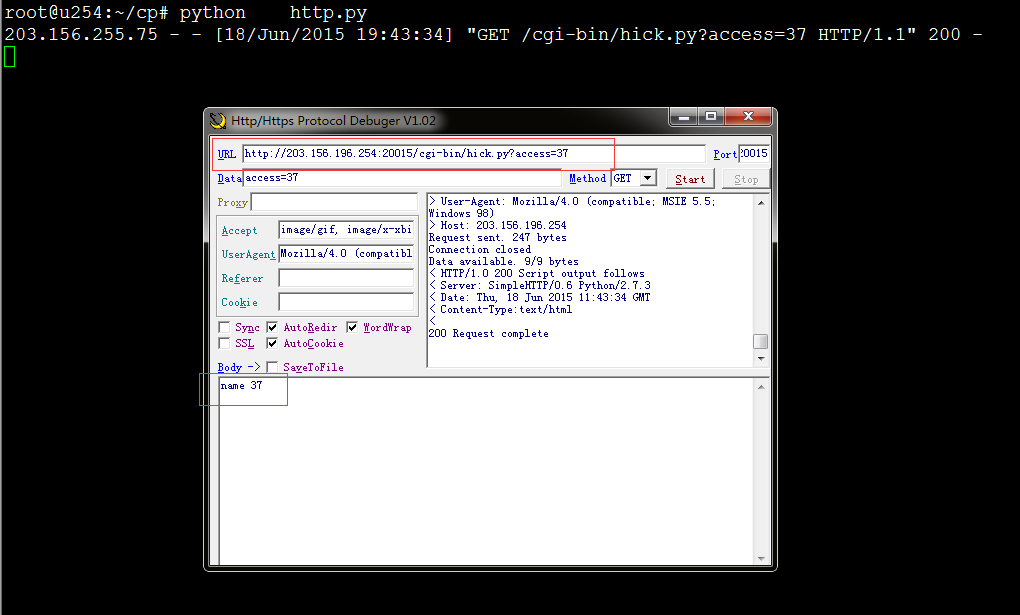
SimpleHTTPServer示例:
 root@u254:~/cp# tree

 .

 |-- get_info.py

 |-- get_info.pyc

 `-- http2.py

 get_info.py如下:

 #!/usr/bin/python

 #encoding=utf-8

 #supported python2.7

 import commands

 import json

 def GetInfo(id):

         cmd = "radosgw-admin -c /etc/ceph/ceph.conf bucket stats  --uid="+ str(id) +" --categories={}"

         #cmd = "radosgw-admin bucket stats  --uid=37 --categories={} --access=radosgw-admin  --access-key=37 --secret=IXJcIub8Zprn7Vu+Tm3VId0LdrnMCfgpZ6sSb9zc"

         dict_t = {}

         content = commands.getoutput(cmd)

         #print content

         if content.find(")") != -1:

                 en_json = json.loads(content.split(')')[1])

         else:

                 en_json = json.loads(content)

         for element in en_json:

                 if "bucket" in element.keys() and "usage" in element.keys():

                         #print element["bucket"]

                         if "rgw.main" in element["usage"].keys() and "size_kb_actual" in element["usage"]["rgw.main"].keys():

                                 #print element["usage"]["rgw.main"]["size_kb_actual"]

                                 dict_t.setdefault(element["bucket"], element["usage"]["rgw.main"]["size_kb_actual"])

                         else:

                                 dict_t.setdefault(element["bucket"], 0)

         #print json.dumps(dict_t)

         return json.dumps(dict_t)

 if __name__ == "__main__":

     GetInfo(37)

 http2.py如下:

 #!/usr/bin/pyton

 #encoding=utf-8

 #supported by python2.7

 #encoding=utf-8

 from BaseHTTPServer import BaseHTTPRequestHandler, HTTPServer

 import io,shutil

 import urllib,time

 import sys

 sys.path.append(r'./')

 import getopt,string

 import get_info

 class MyRequestHandler(BaseHTTPRequestHandler):

     def do_GET(self):

         self.process(2)

     def do_POST(self):

         self.process(1)

     def process(self,type):

         content =""

         if type==1:

             datas = self.rfile.read(int(self.headers['content-length']))

             datas = urllib.unquote(datas).decode("utf-8", 'ignore')

             datas = transDicts(datas)

             if datas.has_key('data'):

                 content = "data:"+datas['data']+"\r\n"

         if '?' in self.path:

             query = urllib.splitquery(self.path)

             action = query[0]

             if query[1]:

                 queryParams = {}

                 for qp in query[1].split('&'):

                     kv = qp.split('=')

                     print kv[1]

                     kv[1] = get_info.GetInfo(kv[1])

                     queryParams[kv[0]] = urllib.unquote(kv[1]).decode("utf-8", 'ignore')

                     #content+= kv[0]+':'+queryParams[kv[0]]+"\r\n"

                     content+= queryParams[kv[0]]+"\r\n"

             enc="UTF-8"

             content = content.encode(enc)

             f = io.BytesIO()

             f.write(content)

             f.seek(0)

             self.send_response(200)

             self.send_header("Content-type", "text/html; charset=%s" % enc)

             self.send_header("Content-Length", str(len(content)))

             self.end_headers()

             shutil.copyfileobj(f,self.wfile)

 def transDicts(params):

     dicts={}

     if len(params)==0:

         return

     params = params.split('&')

     for param in params:

         dicts[param.split('=')[0]]=param.split('=')[1]

     return dicts

 if __name__=='__main__':

    try:

         server = HTTPServer(('203.156.196.254', 20014), MyRequestHandler)

         print 'started httpserver...'

         server.serve_forever()

    except KeyboardInterrupt:

         server.socket.close()

    pass
效果如下: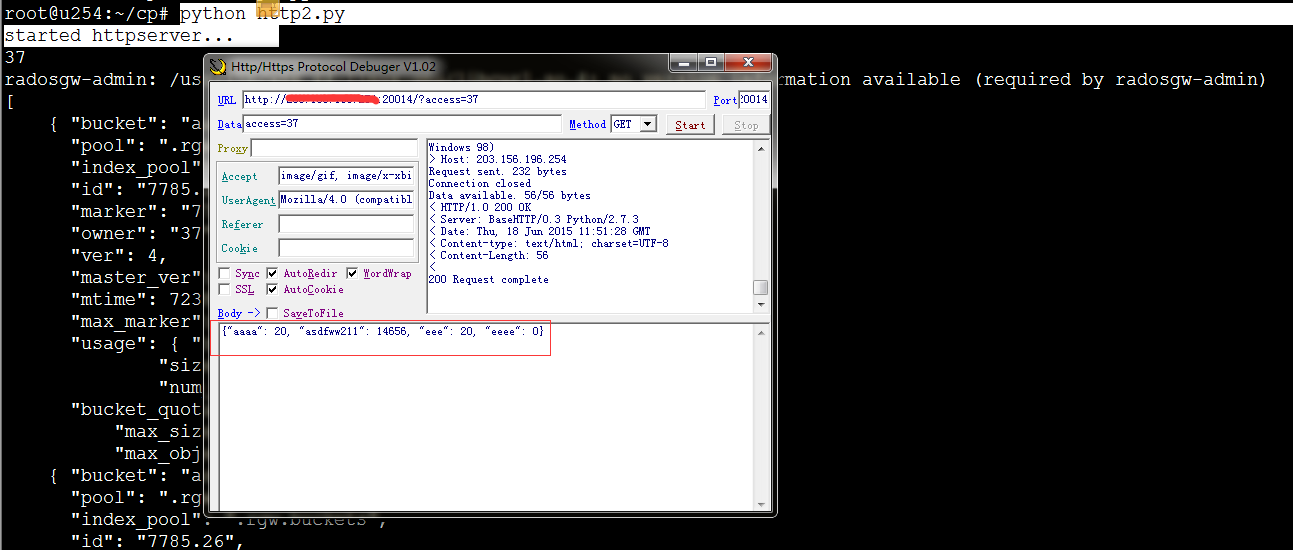
python下的web服务器模块的更多相关文章
- python 启动简单web服务器
有时我们在开发web静态页面时,需要一个web服务器来测试. 这时可以利用python提供的web服务器来实现. 1.在命令行下进入某个目录 2.在该目录下运行命令: python -m Simple ...
- CentOS 6.2下搭建Web服务器
1Centos 6.2下搭建web服务器 如今,Linux在Web应用越来越广,许多企业都采用Linux来搭建Web服务器,这样即节省了购买正版软件的费用,而且还能够提高服务器的安全性. 之前我们介绍 ...
- CentOS 6.3下搭建Web服务器
准备前的工作: 1.修改selinux配置文件(/etc/sysconfig/selinux) 关闭防火墙 (1)把SELINUX=enforcing注释掉 (2)并添加SELINUX=disable ...
- Linux下查看Web服务器当前的并发连接数和TCP连接状态
对于web服务器(Nginx.Apache等)来说,并发连接数是一个比较重要的参数,下面就通过netstat命令和awk来查看web服务器的并发连接数以及TCP连接状态. $ netstat -n | ...
- 外网主机访问虚拟机下的Web服务器_服务器应用_Linux公社-Linux系统门户网站
body{ font-family: "Microsoft YaHei UI","Microsoft YaHei",SimSun,"Segoe UI& ...
- ubuntu 下配置Web服务器
ubuntu 下配置Web服务器 1.切换管理员身份 终端/文本界面输入命令: su 根据提示输入密码 注: 如果不能使用su 点击查看如何启用su2.安装MySQL5 apt-get install ...
- 在Win10下搭建web服务器,使用本机IP不能访问,但是使用localhos或127.0.0.1可以正常访问的解决办法
最近在在Win10下搭建web服务器,发现通过windows自带的浏览器win10 edge浏览器使用本机IP不能放问,但是使用localhos或127.0.0.1可以正常访问, 后来无意发现,使用w ...
- python网络-动态Web服务器案例(30)
一.浏览器请求HTML页面的过程 了解了HTTP协议和HTML文档,其实就明白了一个Web应用的本质就是: 浏览器发送一个HTTP请求: 服务器收到请求,生成一个HTML文档: 服务器把HTML文档作 ...
- 用python快速搭建WEB服务器
cmd下进入你要搞WEB项目的目录 输入↓方代码 python -m SimpleHTTPServer 端口号# 默认是8000 这样就启动了一个简单的WEB服务器
随机推荐
- C#线程(一)
本篇作为自己简要的笔记和整理,自己英语略渣 就不翻译了 参考http://www.albahari.com/threading 这里有翻译的http://www.cnblogs.com/miniwi ...
- C++编程规范之23:头文件应该自给自足
摘要: 各司其责:应该确保所编写的每个头文件都能够独自进行编译,为此需要包含其内容所依赖的所有头文件. 如果一个文件包含某个头文件时,还要包含另一个头文件才能工作,就会增加交流障碍,给头文件的用户增添 ...
- 一次搞懂 Assets Pipeline 转载自http://gogojimmy.net/2012/07/03/understand-assets-pipline/
Assets Pipeline 是 Rails 3.1 一個重要的功能,一直並沒有很去了解其特性,但因為最近都在寫前端的東西在 assets pipeline 的東西上跌跌撞撞了不少次(尤其在 dep ...
- .htaccess Rewrite apache重写和配置
首先: 必须要空间支持 Rewrite 以及对站点目录中有 .htaccess 的文件解析,才有效. 如何让空间支持Rewrite 和 .htaccess 的文件解析呢 往下看 第一步:要找到apac ...
- Symfony命令行
Available commands: help 显示命令的帮助信息 list ...
- Python主要模块和常用方法简览
原文地址:http://blog.csdn.net/hwhjava/article/details/22284399 PY核心模块方法1. os模块: os.remove() #删除文件 os.unl ...
- Jacob
http://www.cnblogs.com/luckyxiaoxuan/archive/2012/06/13/2548331.html http://blog.csdn.net/qingwangyo ...
- 基于Visual C++2013拆解世界五百强面试题--题5-自己实现strstr
请用C语言实现字符串的查找函数strstr, 找到则返回子字符串的地址,没有找到返回为空,请用数组操作与指针操作实现 看到题目想到最简单的方法就是母字符串和子字符串比较,如果不同,将指向母字符串的指针 ...
- docpad建站记录
记一下用docpad建站的过程作为备忘.不定时更新 why docpad wordpress对我来说太过于臃肿,我就想要个代码干净的小站来写东西.想要个markdown为基础的静态站. 比较流行的St ...
- 操蛋的UITableView重用机制
1,背景 你可能会遇见一下情况: 使用UITableView加载数据,比如你的每一个cell上面有一个UITextField,当你在第一个cell的UITextField中写下了内容,开始下滑UITa ...