
centos 7安装es 及异常处理
首先,我们从官网下载zip包:
(官网:https://www.elastic.co/downloads/elasticsearch)
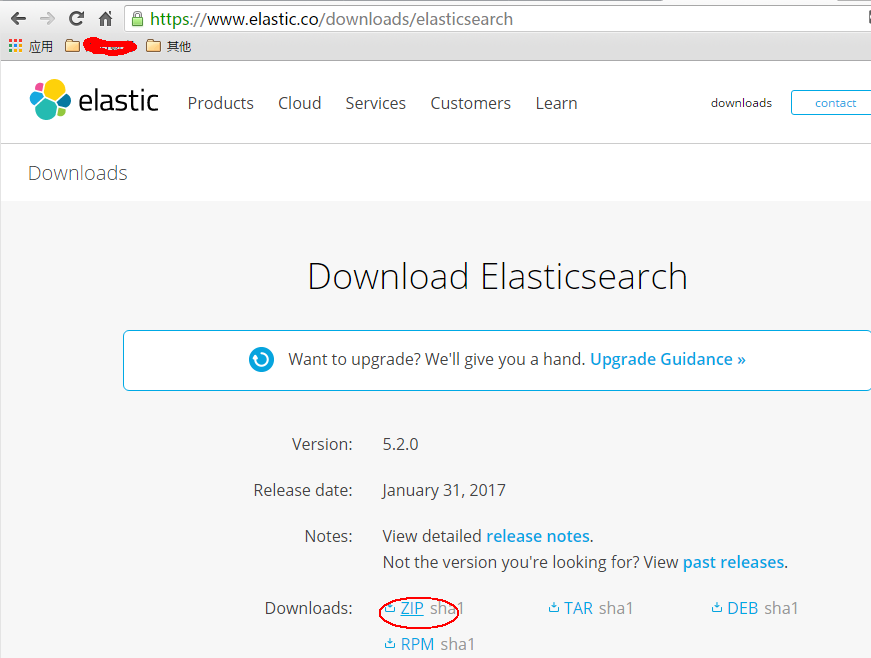
直接使用浏览器下载可能会很慢,我一般会copy下载链接,然后wget下来:
wget https://artifacts.elastic.co/downloads/elasticsearch/elasticsearch-5.2.0.zip
如无意外应该可以安装成功。
接下来就是运行了,这是关键所在,首先我们前往安装目录elasticsearch的安装目录,一般会在:cd /usr/bin/elasticsearch-5.2.0
这个时候如果你直接运行elasticsearch会报以下错误:
执行: bin/elasticsearch
错误信息:
Exception in thread "main" org.elasticsearch.bootstrap.BootstrapException: java.nio.file.NoSuchFileException: /usr/share/elasticsearch/config

Likely root cause: java.nio.file.NoSuchFileException: /usr/share/elasticsearch/config ...
见图:

elasticsearch github上有这个错误的issue(https://github.com/elastic/ansible-elasticsearch/issues/58)
感兴趣的可以看看这个错误的具体原因,我这里主要提供解决方法。
这个错误我觉得主要是因为找不到配置文件,但是如果你直接在安装目录里去启动elasticsearch的话,elasticsearch只会在当前目录找config文件夹,如果安装成service的形式应该是可以找到配置文件,但我没去尝试,后面试试。
问题知道了,我们可以直接把/etc目录下的elasticsearch配置文件copy过来:
cp -r /etc/elasticsearch /usr/share/elasticsearch/config这个时候我们再启动就不会报刚才的错误了,我们再试一遍:bin/elasticsearch
意料之中,这时候会提示以下错误:
[2017-01-17T21:54:48,798][WARN ][o.e.b.ElasticsearchUncaughtExceptionHandler] [] uncaught exception in thread [main]

org.elasticsearch.bootstrap.StartupException: java.lang.RuntimeException: can not run elasticsearch as root

        at org.elasticsearch.bootstrap.Elasticsearch.init(Elasticsearch.java:125) ~[elasticsearch-5.1.2.jar:5.1.2]

        at org.elasticsearch.bootstrap.Elasticsearch.execute(Elasticsearch.java:112) ~[elasticsearch-5.1.2.jar:5.1.2]

        at org.elasticsearch.cli.SettingCommand.execute(SettingCommand.java:54) ~[elasticsearch-5.1.2.jar:5.1.2]

        at org.elasticsearch.cli.Command.mainWithoutErrorHandling(Command.java:122) ~[elasticsearch-5.1.2.jar:5.1.2]

        at org.elasticsearch.cli.Command.main(Command.java:88) ~[elasticsearch-5.1.2.jar:5.1.2]

        at org.elasticsearch.bootstrap.Elasticsearch.main(Elasticsearch.java:89) ~[elasticsearch-5.1.2.jar:5.1.2]

        at org.elasticsearch.bootstrap.Elasticsearch.main(Elasticsearch.java:82) ~[elasticsearch-5.1.2.jar:5.1.2]

Caused by: java.lang.RuntimeException: can not run elasticsearch as root

        at org.elasticsearch.bootstrap.Bootstrap.initializeNatives(Bootstrap.java:100) ~[elasticsearch-5.1.2.jar:5.1.2]

        at org.elasticsearch.bootstrap.Bootstrap.setup(Bootstrap.java:176) ~[elasticsearch-5.1.2.jar:5.1.2]

        at org.elasticsearch.bootstrap.Bootstrap.init(Bootstrap.java:306) ~[elasticsearch-5.1.2.jar:5.1.2]

        at org.elasticsearch.bootstrap.Elasticsearch.init(Elasticsearch.java:121) ~[elasticsearch-5.1.2.jar:5.1.2]

... 6 more这个错误的原因是elasticsearch不允许使用root启动,因此我们要解决这个问题需要新建一个用户来启动elasticsearch(参考:https://my.oschina.net/topeagle/blog/591451?fromerr=mzOr2qzZ)
具体操作如下:
➜  ~ groupadd elsearch

➜  ~ useradd elsearch -g elsearch -p elsearch

➜  ~ cd /usr/share

➜   chown -R elsearch:elsearch elasticsearch

➜  su elsearch
这个时候在这个用户去启动elasticsearch,一般情况下这个时候就能成功起来了,可能还会出现一些错误,如:
hcw-X450VC% ./elasticsearch

2017-01-17 21:03:31,158 main ERROR Could not register mbeans java.security.AccessControlException: access denied ("javax.management.MBeanTrustPermission" "register")

    at java.security.AccessControlContext.checkPermission(AccessControlContext.java:472)

    at java.lang.SecurityManager.checkPermission(SecurityManager.java:585)

    at com.sun.jmx.interceptor.DefaultMBeanServerInterceptor.checkMBeanTrustPermission(DefaultMBeanServerInterceptor.java:1848)

    at com.sun.jmx.interceptor.DefaultMBeanServerInterceptor.registerMBean(DefaultMBeanServerInterceptor.java:322)

    at com.sun.jmx.mbeanserver.JmxMBeanServer.registerMBean(JmxMBeanServer.java:522)

    at org.apache.logging.log4j.core.jmx.Server.register(Server.java:389)

    at org.apache.logging.log4j.core.jmx.Server.reregisterMBeansAfterReconfigure(Server.java:167)

    at org.apache.logging.log4j.core.jmx.Server.reregisterMBeansAfterReconfigure(Server.java:140)

    at org.apache.logging.log4j.core.LoggerContext.setConfiguration(LoggerContext.java:541)

    at org.apache.logging.log4j.core.LoggerContext.start(LoggerContext.java:258)

    at org.apache.logging.log4j.core.impl.Log4jContextFactory.getContext(Log4jContextFactory.java:206)

    at org.apache.logging.log4j.core.config.Configurator.initialize(Configurator.java:220)

    at org.apache.logging.log4j.core.config.Configurator.initialize(Configurator.java:197)

    at org.elasticsearch.common.logging.LogConfigurator.configureStatusLogger(LogConfigurator.java:125)

    at org.elasticsearch.common.logging.LogConfigurator.configureWithoutConfig(LogConfigurator.java:67)

    at org.elasticsearch.cli.Command.main(Command.java:85)

    at org.elasticsearch.bootstrap.Elasticsearch.main(Elasticsearch.java:89)

    at org.elasticsearch.bootstrap.Elasticsearch.main(Elasticsearch.java:82)
这是因为elasticsearch需要读写配置文件,我们需要给予config文件夹权限,上面新建了elsearch用户,elsearch用户不具备读写权限,因此还是会报错,解决方法是切换到管理员账户,赋予权限即可:
sudo -i

chmod -R 775 config
这个时候就可以起来了,来看看效果:

在浏览器查看:

到这里为止,centos 7 安装elasticsearch就完成了
转载请标明本文来源:http://www.cnblogs.com/yswenli/p/6397351.html
更多内容欢迎我的的github:https://github.com/yswenli
如果发现本文有什么问题和任何建议,也随时欢迎交流~
centos 7安装es 及异常处理的更多相关文章
- Linux(centos)安装es(elasticsearch)
前提条件--需要安装jdk环境,不同版本的es所对应的jdk版本要求不同,es6的使用jdk1.8可以 1.下载elasticsearch压缩包 下载地址:https://www.elastic.co ...
- centos7使用docker安装es(elasticsearch)
1.安装docker依赖(已安装可以不用安装) yum install -y docker 2.搜索镜像 docker search elasticsearch 如果出现以下报错 Cannot con ...
- ES系列一、CentOS7安装ES 6.3.1、集成IK分词器
Elasticsearch 6.3.1 地址: wget https://artifacts.elastic.co/downloads/elasticsearch/elasticsearch-6.3. ...
- ElasticSearch | centos7 上安装ES
0 参考博客文章(感谢!!!) [1] https://www.jianshu.com/p/10949f44ce9c 在linux服务器上安装jdk [2] https://www.elastic ...
- NoSql1 在Linux(CentOS)上安装memcached及使用
前言: 今天是初五,生活基本要从过年的节奏中回归到正常的生活了,所以想想也该想想与工作有关的事情了.我之前在工作中会经常使用memcached和redis,但是自己一直没有时间系统的好好看 ...
- 在Ubuntu|CentOS上安装Shutter截图工具及快捷键设置
简介 Shutter前身叫GScrot,它是一款相当棒的截图软件. 通过Shutter,你可以截取包括选定区域.全屏幕.窗口.窗口内的控件甚至网页的图像.通过内置的强大插件机制,你可以在截图后,对图像 ...
- CentOS下安装hadoop
CentOS下安装hadoop 用户配置 添加用户 adduser hadoop passwd hadoop 权限配置 chmod u+w /etc/sudoers vi /etc/sudoers 在 ...
- CentOS下安装使用start-stop-daemon
CentOS下安装使用start-stop-daemon 在centos下下了个自启动的服务器脚本 执行的时候发现找不到start-stop-daemon命令 好吧 执行手动编译一下 加上这个命令 w ...
- CentOS 7 安装 Docker
CentOS 7 安装 Docker 这里介绍 ContOS 7 的安装 docker V1.2+,包括阿里云加速 docker 镜像下载的设置,这对提升使用 docker 体验至关重要.其他系统安装 ...
随机推荐
- PHP的几种排序算法的比较
这里列出了几种PHP的排序算法的时间比较的结果,,希望对大家有所帮助 /* * php 四种排序算法的时间与内置的sort排序比较 * 3000个元素,四种算法的排序所用的时间比较 * 冒泡排序 85 ...
- Solr 按照得分score跟指定字段相乘排序
sort=product([you_field],query($q)) desc
- Android L(5.0)源码之图形与图像处理之简单图片——Bitmap
最近在研究android 5.0的gallery模块,学习了相关的知识点,准备写点博客总结一下,有时间了会补充完整
- IOS开发使用YiRefresh进行刷新
1.将YiRefresh下载后,拖进项目 YiRefresh地址:https://github.com/coderyi/YiRefresh 2.添加两个头文件 #import "YiRefr ...
- 虚拟机联网及远程连接-Linux基础环境命令学习笔记
1.ifconfig命令=ip a命令,查看IP地址 网卡默认名称eth0. Bcast 广播地址2.xshell or secureCRT远程连接 ssh root@地址 xmanager 远程桌面 ...
- css(三)-- 常用属性
css的常用属性包括以下几种: CSS 背景CSS 文本CSS 字体CSS 列表CSS 表格 1.CSS 背景 /*操作背景的属性 */ body{ /*background-color:#CCC; ...
- NewTonJson.Net的使用
1.引用“Newtonsoft.Json” 4.0 版本 2.基础类 using System; using System.Collections.Generic; using System.Linq ...
- Java的进制转换操作(十进制、十六进制、二进制)
2014-05-06 17:34 吴文付 最近由于工作上的需要,遇到进制转换的问题.涉及到的进制主要是 十进制,十六进制,二进制中间的转换. 这里整理一下.具体的计划为:封装一个转换类,一个测试类. ...
- C语言-结构体
C语言中数组是把相同类型的数据类型的变量集中在一起了,而结构体则是把不同类型的变量聚集在一起. 结构体也是一种数据类型,但是它是一种自定义的数据类型,也就是说和使用其他数据类型不一样,我们得先定义这种 ...
- n皇后问题 [随机化算法,拉斯维加斯算法]
问题: 如何能够在 n×n 的国际象棋棋盘上放置八个皇后,使得任何一个皇后都无法直接吃掉其他的皇后?为了达到此目的,任两个皇后都不能处于同一条横行.纵行或斜线上. 分析: 这题常规的解法应该是回溯法, ...