
EditPlus仿Sublime配色方案(三种任你选择)
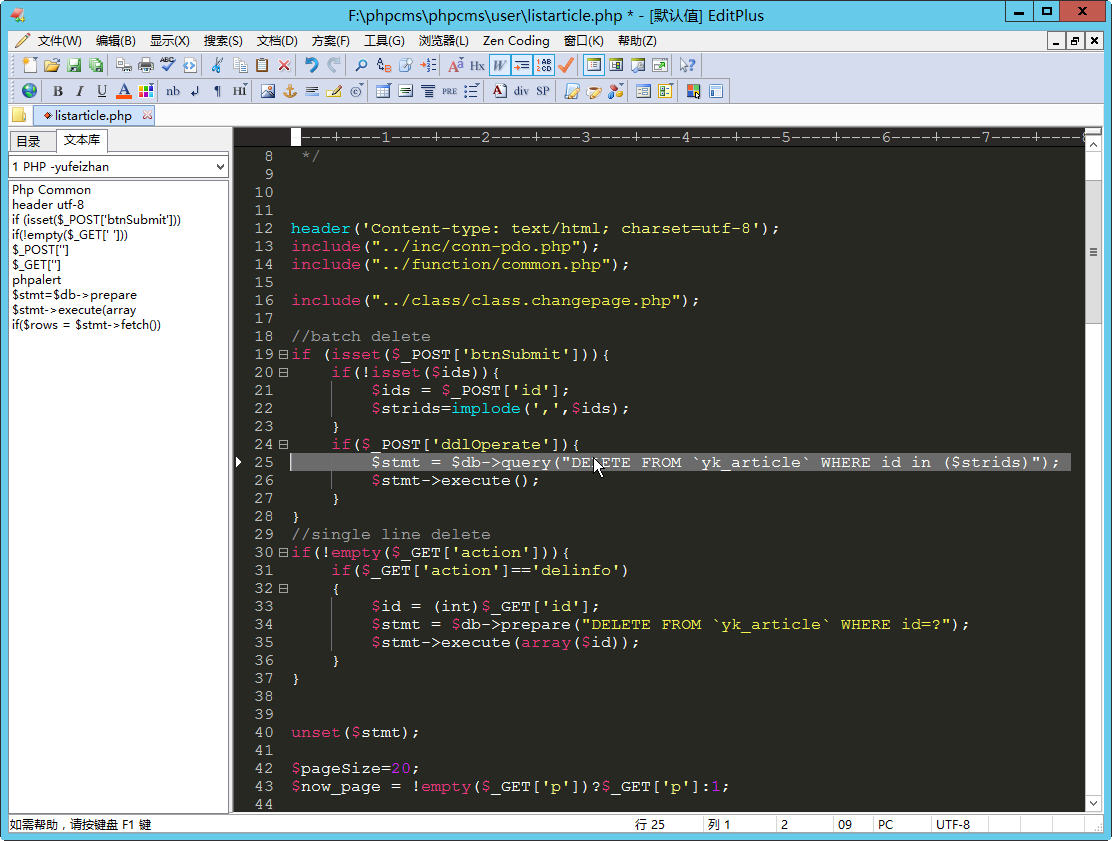
 [Options]

 Placement=2C00000002000000030000000083FFFF0083FFFFFFFFFFFFFFFFFFFFEA000000EE000000D6050000CF030000FF

 Window List=00000000000000000000000000000000FF

 Marker List=00000000000000000000000000000000FF

 Function List=00000000000000000000000000000000FF

 Open Remote=5C020000550100006404000067030000FF

 Expand=00000000000000000000000000000000FF

 Project Pos=00000000000000000000000000000000FF

 Workspace Path=F:\phpcms\phpcms\user\inc

 Cliptext Window=224

 Cliptext Window 2=489

 Output=90

 Output 2=170

 Folding=1

 FindX=586

 FindY=429

 Find=align

 Tab Index=1

 Cliptext=2

 Custom colors=6D6D7200FFFFFF00FFFFFF00FFFFFF00FFFFFF00FFFFFF00FFFFFF00FFFFFF0031282700FFFFFF00FFFFFF00FFFFFF00FFFFFF00FFFFFF00FFFFFF00FFFFFF00FF

 Matching Brace=1

 Indent guide=1

 [Files]

 Encoding=65001

 Backup=0

 Backup Remote=0

 [Fonts]

 Edit Window=F0FFFFFF00000000000000000000000090010000000000000302013143006F007500720069006500720020004E0065007700000000000000000000000000000000000000000000000000000000000000000000000000000000000000FF

 Printer=F4FFFFFF00000000000000000000000090010000000000000000003143006F007500720069006500720020004E0065007700000000000000000000000000000000000000000000000000000000000000000000000000000000000000FF

 Output Window=F4FFFFFF00000000000000000000000090010000000000000000003143006F007500720069006500720020004E0065007700000000000000000000000000000000000000000000000000000000000000000000000000000000000000FF

 Cliptext Window=F4FFFFFF0000000000000000000000009001000000000001000000004D006900630072006F0073006F006600740020005900610048006500690020005500490000000000000000000000000000000000000000000000000000000000FF

 Document Selector=F4FFFFFF0000000000000000000000009001000000000001000000004D006900630072006F0073006F006600740020005900610048006500690020005500490000000000000000000000000000000000000000000000000000000000FF

 Hex Viewer=F4FFFFFF00000000000000000000000090010000000000010000003143006F007500720069006500720020004E0065007700000000000000000000000000000000000000000000000000000000000000000000000000000000000000FF

 Custom 1=F4FFFFFF00000000000000000000000090010000000000000000002241007200690061006C000000720020004E0065007700000000000000000000000000000000000000000000000000000000000000000000000000000000000000FF

 Custom 2=F5FFFFFF000000000000000000000000900100000000000000000022560065007200640061006E00610000004E0065007700000000000000000000000000000000000000000000000000000000000000000000000000000000000000FF

 Custom 3=F4FFFFFF000000000000000000000000900100000000000000000012540069006D006500730020004E0065007700200052006F006D0061006E0000000000000000000000000000000000000000000000000000000000000000000000FF

 Custom 4=F5FFFFFF0000000000000000000000009001000000000000000000224D0053002000530061006E0073002000530065007200690066000000000000000000000000000000000000000000000000000000000000000000000000000000FF

 Custom 5=F3FFFFFF00000000000000000000000090010000000000FF000000315400650072006D0069006E0061006C00000065007700000000000000000000000000000000000000000000000000000000000000000000000000000000000000FF

 [Tool Option]

 Top Selector=1

 [Colors\Text]

 Background=2238503

 Default=0

 Foreground=16777215

 [Colors\Keyword 1]

 Foreground=8272368

 Default=0

 [Colors\Embedded script]

 Foreground=16777215

 Default=0

 [Colors\Keyword 3]

 Foreground=16777215

 Default=0

 [Colors\Keyword 6]

 Foreground=8716287

 Default=0

 [Colors\Keyword 7]

 Foreground=8716287

 Default=0

 [Colors\Keyword 8]

 Foreground=8716287

 Default=0

 [Colors\Keyword 9]

 Foreground=8454143

 Default=0

 [Colors\Keyword 10]

 Foreground=8716287

 Default=0

 [Colors\Quotation]

 Foreground=8454143

 Default=0

 [Colors\Quotation 2]

 Foreground=5107956

 Default=0

 [Colors\Line comment]

 Foreground=10789024

 Default=0

 [Colors\Line number]

 Foreground=12632256

 Background=2238503

 Default=0

 [Colors\Folding mark -]

 Background=2238503

 Default=0

 [Colors\Matching words]

 Default=0

 Background=718314

 [Colors\Keyword 2]

 Foreground=16379142

 Default=0

 [Colors\Folding mark +]

 Background=2238503

 Default=0

 [Colors\Text selection]

 Background=7039851

 Default=0

 [Colors\Number]

 Foreground=16524240

 Default=0

 [Colors\Block comment]

 Foreground=8421504

 Default=0

 [Colors\Keyword 5]

 Foreground=15574913

 Default=0

 [Colors\Ruler]

 Foreground=12632256

 Default=0

 Background=2566187

 [Colors\Cursor indicator]

 Background=16777215

 Default=0

 [Colors\Indent Guide]

 Foreground=7499117

 Default=0
其他:
暖色调配色方案二

 [Colors\Text]

 Foreground=1842204

 Background=15857655

 Default=0

 [Colors\Embedded script]

 Foreground=4274883

 Default=0

 [Colors\Active line]

 Background=15003373

 Default=0

 [Colors\Text selection]

 Background=12421546

 Default=0

 [Colors\Line number]

 Foreground=9937827

 Background=15003373

 Default=0

 [Colors\Ruler]

 Foreground=9937827

 Background=15003373

 Default=0

 [Colors\Cursor indicator]

 Foreground=16777215

 Background=10909770

 Default=0

 [Colors\Tabs and spaces]

 Foreground=2081679

 Default=0

 [Colors\Line break]

 Foreground=2081679

 Default=0

 [Colors\Folding mark -]

 Foreground=15857655

 Background=14732734

 Default=0

 [Colors\Folding mark +]

 Foreground=15857655

 Background=10909770

 Default=0

 [Colors\Keyword 1]

 Foreground=10580030

 Default=0

 [Colors\Keyword 2]

 Foreground=3369880

 Default=0

 [Colors\Keyword 3]

 Foreground=10580030

 Default=0

 [Colors\Keyword 4]

 Foreground=10575277

 Default=0

 [Colors\Keyword 5]

 Foreground=10575277

 Default=0

 [Colors\Keyword 6]

 Foreground=10575277

 Default=0

 [Colors\Keyword 7]

 Foreground=6709465

 Default=0

 [Colors\Line comment]

 Foreground=10179450

 Default=0

 [Colors\Line comment 2]

 Foreground=5223318

 Default=0

 [Colors\Block comment]

 Foreground=5223318

 Default=0

 [Colors\Block comment 2]

 Foreground=5223318

 Default=0

 [Colors\Quotation]

 Foreground=11167890

 Default=0

 [Colors\Quotation 2]

 Foreground=12421546

 Default=0

 [Colors\Number]

 Foreground=6709465

 Default=0

 [Colors\Output window]

 Foreground=14606746

 Background=1842204

 Default=0

 [Colors\Column marker]

 Foreground=15593186

 Default=0

 [Colors\Matching Brace]

 Background=65535

 Default=0

 [Colors\Markers]

 Background=12122874

 Default=0
暗色调配方案三

 [Colors\Text]

 Background=2238503

 Default=0

 Foreground=16777215

 [Colors\Keyword 1]

 Foreground=8272368

 Default=0

 [Colors\Embedded script]

 Foreground=16777215

 Default=0

 [Colors\Keyword 3]

 Foreground=16777215

 Default=0

 [Colors\Keyword 6]

 Foreground=8716287

 Default=0

 [Colors\Keyword 7]

 Foreground=8716287

 Default=0

 [Colors\Keyword 8]

 Foreground=8716287

 Default=0

 [Colors\Keyword 9]

 Foreground=8454143

 Default=0

 [Colors\Keyword 10]

 Foreground=8716287

 Default=0

 [Colors\Quotation]

 Foreground=8454143

 Default=0

 [Colors\Quotation 2]

 Foreground=5107956

 Default=0

 [Colors\Line comment]

 Foreground=10789024

 Default=0

 [Colors\Line number]

 Foreground=12632256

 Background=2238503

 Default=0

 [Colors\Folding mark -]

 Background=2238503

 Default=0

 [Colors\Matching words]

 Default=0

 Background=718314

 [Colors\Keyword 2]

 Foreground=16379142

 Default=0

 [Colors\Folding mark +]

 Background=2238503

 Default=0

 [Colors\Text selection]

 Background=7039851

 Default=0

 [Colors\Number]

 Foreground=16524240

 Default=0

 [Colors\Block comment]

 Foreground=8421504

 Default=0

 [Colors\Keyword 5]

 Foreground=15574913

 Default=0

 [Colors\Ruler]

 Foreground=12632256

 Default=0

 Background=2566187

 [Colors\Cursor indicator]

 Background=16777215

 Default=0

 [Colors\Indent Guide]

 Foreground=7499117

 Default=0
EditPlus仿Sublime配色方案(三种任你选择)的更多相关文章
- pycharm仿sublime配色
1.设置IDE皮肤主题 file->setting->appearance->theme->darcula 2.setting中搜索python,将主题设置成Monokai,然 ...
- PyCharm设置仿sublime配色__Py版本2018.1
Talk is cheap~ Let's do this! 配色效果图: 在网上搜了一大圈,没有能看的一清二楚的,注意本次Pycharm版本是2018.1,如果是别的版本,基本设置也是大同小异~ 看图 ...
- PyCharm设置仿sublime配色__Py版本2018.3.5
效果图: 导出settings 模板为: 1.https://files.cnblogs.com/files/xier/PyCharm_settings.zip 2.https://files.cnb ...
- Day6 三种结构 顺序选择循环!
顺序结构 从上到下依次执行,它是任何算法都离不开的一种基本算法结构. package com.xiaoming.struct;public class ShunXuDemo { public ...
- [转] Bound Service的三种方式(Binder、 Messenger、 AIDL)
首先要明白需要的情景,然后对三种方式进行选择: (一)可以接收Service的信息(获取Service中的方法),但不可以给Service发送信息 (二) 使用Messenger既可以接受Servic ...
- Spring学习(十八)Bean 的三种依赖注入方式介绍
依赖注入:让调用类对某一接口实现类的依赖关系由第三方注入,以移除调用类对某一接口实现类的依赖.接下来将详细的向大家介绍Spring容器支持的三种依赖注入的方式以及具体配置方法:• 属性注入方法• ...
- CAD转DXF怎么转换?教你三种转换方法
CAD图纸在我们日常生活中都是可见到的,因为CAD图纸文件的格式是多样的,在工作中就需要经常将CAD的格式进行转换.那CAD转DXF怎么转换呢?这个问题很多的小伙伴们都遇到过,下面小编就来教大家三种转 ...
- c语言实现基本的数据结构(二) 链表(包括链表的三种简单排序算法)
#include "stdafx.h" #include <stdlib.h> //创建一个节点,data为value,指向NULL Node* Create(int ...
- VMware网络配置三种网络模式(桥接、NAT、Host-only)
VMware网络配置三种网络模式(桥接.NAT.Host-only) 一.虚拟安装后三种网络模式显示 当安装好后,的“虚拟网络编辑器”中也存在三种模式,分别对应:桥接-VMnet0.Host-only ...
随机推荐
- js实现鼠标拖拽div-------Day44
假设去问这样一个问题"你认为鼠标操作简单,还是键盘操作简单",相信会有多数人都会回答鼠标吧,毕竟键盘button那么多,假设手小了或者手法不规范了,太easy出问题了,也对操作的速 ...
- Vijos.1096 津津储蓄计划
见问题: https://vijos.org/p/1096 主题概述 津津的零花钱一直都是自己的管理.每月初的母亲津津300美元,津津将于本月支出预算.而且总是做同样的实际支出与预算. 为了让津津学 ...
- Visual Studio Team Services使用教程--默认团队checkin权限修改
- 怎么样Ubuntu正在使用root账号登录
一个. 因为当你需要 root 权限,使用 sudo 我们将能够做到这一点.假设你真的需要在 Ubuntu 启用 root 帐户的话,这是最好的运行下面的操作: 1.再次设置 root 的passwo ...
- 源码编译安装 MySQL 5.5.x 实践(转)
1.安装cmakeMySQL从5.5版本开始,通过./configure进行编译配置方式已经被取消,取而代之的是cmake工具.因此,我们首先要在系统中源码编译安装cmake工具. # wget ht ...
- UVa 11790 - Murcia's Skyline
称号:给你一个行长度的建设和高度,我们祈求最长的和下降的高度. 分析:dp,最大上升子. 说明:具有长度,不能直接优化队列单调. #include <iostream> #include ...
- Android KK台,联系人列表#集团放置A~Z之前
更改文件ContactLocaleUtils.java两 (Path:packages/contactsprovider/src/com/android/providers/contacts) 1. ...
- cocos2dx 解释二具体的启动过程:内存管理和回调
在上一篇的第二部分中.我们有一句代码待解释的: // Draw the Scene void CCDirector::drawScene(void) { -... //tick before ...
- Javascript学习8 - 脚本化文档(Document对象)
原文:Javascript学习8 - 脚本化文档(Document对象) 每个Web浏览器窗口(或帧)显示一个HTML文档,表示这个窗口的Window对象有一个document属性,它引用了一个Doc ...
- 第2章 简单工厂模式(Sample Factory)
原文 第2章 简单工厂模式(Sample Factory) 一般用到的场景:对象多次被实例引用,切有可能会发生变化 拿我们的简单三层举例子 先定义dal层 1 2 3 4 5 6 7 8 cl ...