
wpf之ListBox横向显示所有ListBoxItem
Xaml:
<Window x:Class="WpfApplication6.MainWindow"

        xmlns="http://schemas.microsoft.com/winfx/2006/xaml/presentation"

        xmlns:x="http://schemas.microsoft.com/winfx/2006/xaml"

        Title="MainWindow" Height="350" Width="525">

    <Grid>

        <ListBox x:Name="lb">

            <ListBox.ItemsPanel>

                <ItemsPanelTemplate>

                    <WrapPanel IsItemsHost="True" />

                </ItemsPanelTemplate>

            </ListBox.ItemsPanel>

            <ListBox.ItemTemplate>

                <DataTemplate>

                    <TextBlock Text="{Binding Path=Name}" Margin="2"/>

                </DataTemplate>

            </ListBox.ItemTemplate>

        </ListBox>

    </Grid>

</Window>
C#:
using System;

using System.Collections.Generic;

using System.Linq;

using System.Text;

using System.Windows;

using System.Windows.Controls;

using System.Windows.Data;

using System.Windows.Documents;

using System.Windows.Input;

using System.Windows.Media;

using System.Windows.Media.Imaging;

using System.Windows.Navigation;

using System.Windows.Shapes;

namespace WpfApplication6

{

    /// <summary>

    /// MainWindow.xaml 的交互逻辑

    /// </summary>

    public partial class MainWindow : Window

    {

        public MainWindow()

        {

            InitializeComponent();

            Person p1 = new Person { Name="张三",Age=};

            Person p2 = new Person { Name = "李四", Age =  };

            Person p3 = new Person { Name = "王五", Age =  };

            List<Person> list = new List<Person>();

            list.Add(p1);

            list.Add(p2);

            list.Add(p3);

            lb.ItemsSource = list;

        }

    }

    public class Person

    {

        private string name;

        public string Name

        {

            get { return name; }

            set { name = value; }

        }

        private int age;

        public int Age

        {

            get { return age; }

            set { age = value; }

        }

    }

}
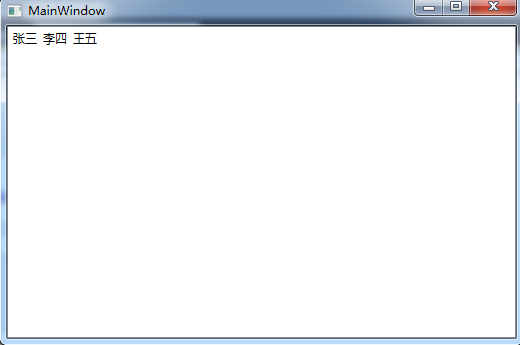
运行效果:
wpf之ListBox横向显示所有ListBoxItem的更多相关文章
- WPF中ListBox的项ListBoxItem被选中的时候Background变化
使用WPF 中ListBox,点击ListBoxItem的时候,自定义它的背景色,曾经在网上找了一些方法, 不是很理想,后来在StackOverflow上找到了,贴出代码和效果图: 效果图:
- WPF MultiSelect模式下ListBox 实现多个ListBoxItem拖拽
WPF 的ListBox不支持很多常见的用户习惯,如在Explorer中用鼠标可以选择多项Item,并且点击已经选择的Item,按住鼠标左键可以将所有已选择Item拖拽到指定的位置.本文简单的实现了这 ...
- WPF ListBox 横向排列
WPF ListBox 横向排列 如果只是单纯的让ListBox可以横向配列,这样很简单,只需要更改ListBox的ItemsPanel模板就可以,例如: <ListBox><L ...
- WPF DataGrid横向显示
前言 利用各种变换,将其水平改向至横向显示. 注意的是要固定好单元格的高宽,或者手动编写style 否者在滚动的时候,会有高宽比例不一样的时候 再其次,要注意datagrid的容器或者datagrid ...
- WPF中ListBox的绑定
WPF中列表式控件派生自ItemsControl类,继承了ItemsSource属性.ItemsSource属性可以接收一个IEnumerable接口派生类的实例作为自己的值(所有可被迭代遍历的集合都 ...
- 转:WPF中ListBox的创建和多种绑定用法
先从最容易的开始演示ListBox控件的创建. Adding ListBox Items下面的代码是向ListBox控件中添加多项ListBoxItem集合.XAML代码如下:<ListBox ...
- WPF图片浏览器(显示大图、小图等)
原文:WPF图片浏览器(显示大图.小图等) 版权声明:本文为博主原创文章,未经博主允许不得转载. https://blog.csdn.net/wangshubo1989/article/details ...
- listbox横向排列
在Listbox中横向显示CheckBox 前台代码 <ListBox Height=" > <StackPanel x:Name="sp" Orien ...
- WPF 自定义ListBox
如题,要实现一个如下的列表,该如何实现? 在设计过程中,会遇到如下问题: 1.ListBox中ListBoxItem的模板设计 2.ListBox中ListBoxItem的模板容器设计 3.List ...
随机推荐
- 分布式缓存-Memcached
分布式缓存出于如下考虑,首先是缓存本身的水平线性扩展问题,其次是缓存大 并发下的本身的性能问题,再次避免缓存的单点故障问题(多副本和副本一致性).分布式缓存的核心技术包括首先是内存本身的管理问题,包括 ...
- [JS思路]运动框架思路
匀速运动的思路一: 1.先清除动画,再加载动画 2.方向dir有正值和负值,可以通过 目标值 > 当前值 往右移动,即正数 目标值 < 当前值 往右移动,即负数 来进行判断:dir = ...
- 【Python@Thread】queue模块-生产者消费者问题
python通过queue模块来提供线程间的通信机制,从而可以让线程分项数据. 个人感觉queue就是管程的概念 一个生产者消费者问题 from random import randint from ...
- javascript基础(一)变量
原文http://pij.robinqu.me/ 预定义的全局变量 arguments encodeURI Infinity Array encodeURIComponent isFinite Boo ...
- POJ 1082 Calendar Game(找规律博弈)
传送门 以下复制自此处:http://www.xuebuyuan.com/2028180.html 博弈论题目可以用寻找必败状态的方法解决. 第一个必败状态是2001.11.04.由此可以推出其他任何 ...
- CF 604B More Cowbell#贪心
(- ̄▽ ̄)-* //把最大单独放,然后第二大的和最小的放一起,第三大的和第二小的放一起 //由此类推,求最大值,即为盒的最小值 #include<iostream> #include&l ...
- 使用JavaScript进行数组去重——一种高效的算法
最近比较忙,没时间更新博客,等忙完这阵子会整理一篇使用AngularJS构建一个中型的单页面应用(SPA)的文章,尽情期待!先占个坑. 数组去重的算法有很多种,以下是一种. 思路如下: 定义一个空的对 ...
- Caffe+Ubuntu14.04+CUDA7.5 环境搭建(新人向)指南
序 本文针对想学习使用caffe框架的纯新手,如果文中有错误欢迎大家指出. 由于我在搭建这个环境的时候参考了许多网上的教程,但是没有截图,所以文中图片大多来源于网络. 本文没有安装matlab的步骤, ...
- javascript动画效果之多物体缓冲运动
这个是通过一个for循环控制的三个li标签,被鼠标触发则会有一个宽度增加和减少的事件 html和css同样写在一起方便察看,这里就是简单的布局,重点在js <!DOCTYPE html> ...
- libPods.a 无法找到的解决方法
http://stackoverflow.com/questions/9863836/library-not-found-for-lpods To be clear for newbies out t ...