
炫酷的CSS3发光搜索表单,附演示和源码
昨天在国外的论坛上逛的时候,看到一篇帖子是求助如何利用CSS3实现发光效果的,网友回复中有一个推荐了一款CSS3发光搜索表单,利用CSS3的动画属性,设置0%和100%时的颜色样式,让其渐变,再配合有明显对比的背景,就能模拟出发光的效果了,我把那个CSS3发光表单下载了下来,先来看一下效果图:
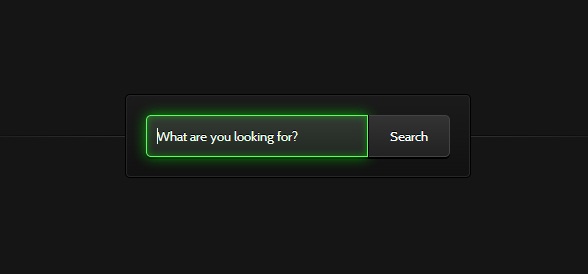
图上的搜索框在被激活的时候会出现闪闪发光的特效。
我们可以在这里查看CSS3发光搜索表单的DEMO演示。
下面我们来一起看看源代码。
HTML代码非常简单,一个文本框和一个提交按钮:
<form action="" method="">

        <input type="search" placeholder="What are you looking for?">

        <button>Search</button>

</form>
然后重点就是CSS3代码了,首先是对搜索框和搜索按钮的样式进行初始化,为了配合背景能出现发光的效果,我们使用了glow动画,我们对它们的样式作了如下设置:
.webdesigntuts-workshop {

    background: #151515;

    height: 100%;

    position: absolute;

    text-align: center;

    width: 100%;

}

.webdesigntuts-workshop:before,

.webdesigntuts-workshop:after {

    content: '';

    display: block;

    height: 1px;

    left: 50%;

    margin: 0 0 0 -400px;

    position: absolute;

    width: 800px;

}

.webdesigntuts-workshop:before {

    background: #444;

    background: -webkit-linear-gradient(left, #151515, #444, #151515);

    background: -moz-linear-gradient(left, #151515, #444, #151515);

    background: -o-linear-gradient(left, #151515, #444, #151515);

    background: -ms-linear-gradient(left, #151515, #444, #151515);

    background: linear-gradient(left, #151515, #444, #151515);

    top: 192px;

}

.webdesigntuts-workshop:after {

    background: #000;

    background: -webkit-linear-gradient(left, #151515, #000, #151515);

    background: -moz-linear-gradient(left, #151515, #000, #151515);

    background: -o-linear-gradient(left, #151515, #000, #151515);

    background: -ms-linear-gradient(left, #151515, #000, #151515);

    background: linear-gradient(left, #151515, #000, #151515);

    top: 191px;

}

.webdesigntuts-workshop form {

    background: #111;

    background: -webkit-linear-gradient(#1b1b1b, #111);

    background: -moz-linear-gradient(#1b1b1b, #111);

    background: -o-linear-gradient(#1b1b1b, #111);

    background: -ms-linear-gradient(#1b1b1b, #111);

    background: linear-gradient(#1b1b1b, #111);

    border: 1px solid #000;

    border-radius: 5px;

    box-shadow: inset 0 0 0 1px #272727;

    display: inline-block;

    font-size: 0px;

    margin: 150px auto 0;

    padding: 20px;

    position: relative;

    z-index:;

}

.webdesigntuts-workshop input {

    background: #222;

    background: -webkit-linear-gradient(#333, #222);

    background: -moz-linear-gradient(#333, #222);

    background: -o-linear-gradient(#333, #222);

    background: -ms-linear-gradient(#333, #222);

    background: linear-gradient(#333, #222);

    border: 1px solid #444;

    border-radius: 5px 0 0 5px;

    box-shadow: 0 2px 0 #000;

    color: #888;

    display: block;

    float: left;

    font-family: 'Cabin', helvetica, arial, sans-serif;

    font-size: 13px;

    font-weight:;

    height: 40px;

    margin:;

    padding: 0 10px;

    text-shadow: 0 -1px 0 #000;

    width: 200px;

}

.ie .webdesigntuts-workshop input {

    line-height: 40px;

}

.webdesigntuts-workshop input::-webkit-input-placeholder {

   color: #888;

}

.webdesigntuts-workshop input:-moz-placeholder {

   color: #888;

}

.webdesigntuts-workshop input:focus {

    -webkit-animation: glow 800ms ease-out infinite alternate;

    -moz-animation: glow 800ms ease-out infinite alternate;

    -o-animation: glow 800ms ease-out infinite alternate;

    -ms-animation: glow 800ms ease-out infinite alternate;

    animation: glow 800ms ease-out infinite alternate;

    background: #222922;

    background: -webkit-linear-gradient(#333933, #222922);

    background: -moz-linear-gradient(#333933, #222922);

    background: -o-linear-gradient(#333933, #222922);

    background: -ms-linear-gradient(#333933, #222922);

    background: linear-gradient(#333933, #222922);

    border-color: #393;

    box-shadow: 0 0 5px rgba(0,255,0,.2), inset 0 0 5px rgba(0,255,0,.1), 0 2px 0 #000;

    color: #efe;

    outline: none;

}

.webdesigntuts-workshop input:focus::-webkit-input-placeholder {

    color: #efe;

}

.webdesigntuts-workshop input:focus:-moz-placeholder {

    color: #efe;

}

.webdesigntuts-workshop button {

    background: #222;

    background: -webkit-linear-gradient(#333, #222);

    background: -moz-linear-gradient(#333, #222);

    background: -o-linear-gradient(#333, #222);

    background: -ms-linear-gradient(#333, #222);

    background: linear-gradient(#333, #222);

    -webkit-box-sizing: content-box;

    -moz-box-sizing: content-box;

    -o-box-sizing: content-box;

    -ms-box-sizing: content-box;

    box-sizing: content-box;

    border: 1px solid #444;

    border-left-color: #000;

    border-radius: 0 5px 5px 0;

    box-shadow: 0 2px 0 #000;

    color: #fff;

    display: block;

    float: left;

    font-family: 'Cabin', helvetica, arial, sans-serif;

    font-size: 13px;

    font-weight:;

    height: 40px;

    line-height: 40px;

    margin:;

    padding:;

    position: relative;

    text-shadow: 0 -1px 0 #000;

    width: 80px;

}

.webdesigntuts-workshop button:hover,

.webdesigntuts-workshop button:focus {

    background: #292929;

    background: -webkit-linear-gradient(#393939, #292929);

    background: -moz-linear-gradient(#393939, #292929);

    background: -o-linear-gradient(#393939, #292929);

    background: -ms-linear-gradient(#393939, #292929);

    background: linear-gradient(#393939, #292929);

    color: #5f5;

    outline: none;

}

.webdesigntuts-workshop button:active {

    background: #292929;

    background: -webkit-linear-gradient(#393939, #292929);

    background: -moz-linear-gradient(#393939, #292929);

    background: -o-linear-gradient(#393939, #292929);

    background: -ms-linear-gradient(#393939, #292929);

    background: linear-gradient(#393939, #292929);

    box-shadow: 0 1px 0 #000, inset 1px 0 1px #222;

    top: 1px;

}
下面是我们定义的glow动画,为了适应不同内核的浏览器,我们分别对其做了如下设置:
@-webkit-keyframes glow {

    0% {

        border-color: #393;

        box-shadow: 0 0 5px rgba(0,255,0,.2), inset 0 0 5px rgba(0,255,0,.1), 0 2px 0 #000;

    }

    100% {

        border-color: #6f6;

        box-shadow: 0 0 20px rgba(0,255,0,.6), inset 0 0 10px rgba(0,255,0,.4), 0 2px 0 #000;

    }

}

@-moz-keyframes glow {

    0% {

        border-color: #393;

        box-shadow: 0 0 5px rgba(0,255,0,.2), inset 0 0 5px rgba(0,255,0,.1), 0 2px 0 #000;

    }

    100% {

        border-color: #6f6;

        box-shadow: 0 0 20px rgba(0,255,0,.6), inset 0 0 10px rgba(0,255,0,.4), 0 2px 0 #000;

    }

}

@-o-keyframes glow {

    0% {

        border-color: #393;

        box-shadow: 0 0 5px rgba(0,255,0,.2), inset 0 0 5px rgba(0,255,0,.1), 0 2px 0 #000;

    }

    100% {

        border-color: #6f6;

        box-shadow: 0 0 20px rgba(0,255,0,.6), inset 0 0 10px rgba(0,255,0,.4), 0 2px 0 #000;

    }

}

@-ms-keyframes glow {

    0% {

        border-color: #393;

        box-shadow: 0 0 5px rgba(0,255,0,.2), inset 0 0 5px rgba(0,255,0,.1), 0 2px 0 #000;

    }

    100% {

        border-color: #6f6;

        box-shadow: 0 0 20px rgba(0,255,0,.6), inset 0 0 10px rgba(0,255,0,.4), 0 2px 0 #000;

    }

}

@keyframes glow {

    0% {

        border-color: #393;

        box-shadow: 0 0 5px rgba(0,255,0,.2), inset 0 0 5px rgba(0,255,0,.1), 0 2px 0 #000;

    }

    100% {

        border-color: #6f6;

        box-shadow: 0 0 20px rgba(0,255,0,.6), inset 0 0 10px rgba(0,255,0,.4), 0 2px 0 #000;

    }

}
最后我们将这个效果的源码打包一份供大家参考学习。下载地址>>
炫酷的CSS3发光搜索表单,附演示和源码的更多相关文章
- 6种炫酷的CSS3按钮边框动画特效
6种炫酷的CSS3按钮边框动画特效Button border animate 用鼠标滑过下面的按钮看看效果! Draw Draw Meet Center Spin Spin Circle Spin T ...
- 炫酷的CSS3抖动样式:CSS Shake
CSS Shake是一个使用CSS3实现的动画样式,使用SASS编写,利用它我们可以实现多种不同样式的抖动效果(如下面的GIF图像): 炫酷的CSS3抖动样式:CSS Shake 这是一个很微小的动画 ...
- 分享7款非常实用的jQuery/CSS3插件演示和源码
上次我们分享了15款效果很酷的最新jQuery/CSS3特效,非常不错,今天要分享7个非常实用的jQuery/CSS3插件演示和源码,一起来看看. 1.jQuery ajax点击地图显示商家网点分布 ...
- 炫酷霸气的HTML5/jQuery应用及源码
也许在5年前,HTML5还是一种很前卫的技术,大家还只是将它当做实验来看待,更别说产品应用了.但是现在HTML5已经非常流行,无论从PC端还是移动端,HTML5都扮演着非常重要的角色.今天我们要分享的 ...
- 7款经典炫酷的HTML5/jQuery动画应用示例及源码
jQuery是一款普遍受前端开发者欢迎的Javascript框架,但是开发者貌似更关注jQuery开发的插件,海量的jQuery插件让前端开发者非常方便.HTML5的加入让jQuery这个家族更加丰富 ...
- 经典炫酷的HTML5/jQuery动画应用示例及源码
jQuery是一款普遍受前端开发者欢迎的Javascript框架,但是开发者貌似更关注jQuery开发的插件,海量的jQuery插件让前端开发者非常方便.HTML5的加入让jQuery这个家族更加丰富 ...
- 利用Bootstrap快速搭建个人响应式主页(附演示+源码)
1.前言 我们每个程序员都渴望搭建自己的技术博客平台与他人进行交流分享,但使用别人的博客模板没有创意.做网站后台的开发人员可能了解前端,可是自己写一个不错的前端还是很费事的.幸好我们有Bootstra ...
- 炫酷的CSS3响应式表单
原创YouTube@ Online Tutorials css代码: * { margin: 0; padding: 0; box-sizing: border-box; font-family: ' ...
- 水印第三版 ~ 变态水印(这次用Magick.NET来实现,附需求分析和源码)
技能 汇总:http://www.cnblogs.com/dunitian/p/4822808.html#skill 以前的水印,只是简单走起,用的是原生态的方法.现在各种变态水印,于是就不再用原生态 ...
随机推荐
- 谁的用户在世界上是  明基决心保时捷设计标准
谈到保时捷.相信非常多人都非常了解,世界名车啊,仅仅有高富帅才玩儿得起.只是,假设由保时捷的设计师来设计一款显示器,水准一流.质地厚道,且价格亲民,你怎么看? 如近期京东上热销的明基G ...
- Qt 3D研究(九):尝试第二边缘检测方法
Qt 3D研究(九):尝试第二边缘检测方法 三维应用程序,通过FBO.将3D图像渲染成纹理,然后对渲染成的纹理进行图像处理,终于显示在屏幕上的.是风格化后的图案.上一次我使用了一种普通的图像处理方法: ...
- 第2周 页_SQL Server 中数据存储的基本单位
原文:第2周 页_SQL Server 中数据存储的基本单位 上周通过探讨SQL Server如何执行一个查询奠定了基础.我也在那里提到页是8kb的缓存.今天我们对页进行进一步集中探讨,从性能调优角度 ...
- WPF 3D:MeshGeometry3D的定义和光照
原文 WPF 3D:MeshGeometry3D的定义和光照 由于WPF计算光照会根据整个平面的方向向量,所以如果在不同面上使用同一个点可能会达到不同的光照效果.让我们用不同的定义Mesh的方法来演示 ...
- T-SQL基础(2) - 单表查询
开窗函数over select orderid, custid, val, SUM(val) over() as totalvalue, SUM(val) over(partition by cust ...
- APK ubuntu下 数字签名
Android系统要求每个Android应用程序必需要经过数字签名才可以安装到系统中,也就是说假设一个Android应用程序没有经过数字签名,是没有办法安装到系统中的! Android通过数字签名来标 ...
- [ACM] hdu 5045 Contest (减少国家Dp)
Contest Problem Description In the ACM International Collegiate Programming Contest, each team consi ...
- POJ 1905-Expanding Rods(二分法+计算几何)
题目地址:POJ 1905 题意:一根某种材料做的直杆被夹在两面墙之间,当他受热时长度变长,就会因两面墙的挤压而向上隆起.长度变化函数为 L'=(1+n*C)*L,给定L,C,n,求向上拱起的高度H. ...
- CSDN 夏令营课程 项目分析
主题如以下: 正确改动后的程序: #include <iostream.h> //using namespace std; class BASE { char c; public: BAS ...
- 我已提取并尝试使用启动脚本(./start navicat)来启动 Navicat Linux 版本号,但没有反应
具体的安装教程,參考这个navicat_for_mysql_10.0.11在linux下的安装,介绍的非常具体 參考这个 :我可否在 64-bit Linux 执行 Navicat? 推荐navica ...