
ExpandableListActivity

main.xml:
<?xml version="1.0" encoding="UTF-8"?>

 <LinearLayout xmlns:android="http://schemas.android.com/apk/res/android"

         android:orientation="vertical"

         android:layout_width="fill_parent"

         android:layout_height="fill_parent"

         >

     <ExpandableListView android:id="@id/android:list"

               android:layout_width="fill_parent"

               android:layout_height="fill_parent"

               android:drawSelectorOnTop="false"/>

     <TextView android:id="@id/android:empty"

               android:layout_width="fill_parent"

               android:layout_height="fill_parent"

               android:text="No data"/>

 </LinearLayout>
group.xml:
<?xml version="1.0" encoding="UTF-8"?>

<LinearLayout xmlns:android="http://schemas.android.com/apk/res/android"

	android:orientation="vertical" android:layout_width="fill_parent"

	android:layout_height="fill_parent"

	>

	<TextView android:id="@+id/groupTo"

		android:layout_width="fill_parent"

		android:layout_height="fill_parent"

		android:paddingLeft="60px"

		android:paddingTop="10px"

		android:paddingBottom="10px"

		android:textSize="26sp"

		android:text="No data" />

</LinearLayout>
child.xml:
<?xml version="1.0" encoding="UTF-8"?>

<LinearLayout xmlns:android="http://schemas.android.com/apk/res/android"

	android:orientation="vertical" android:layout_width="fill_parent"

	android:layout_height="fill_parent">

	<TextView android:id="@+id/childTo"

		android:layout_width="fill_parent"

		android:layout_height="fill_parent"

		android:paddingLeft="50px"

		android:paddingTop="5px"

		android:paddingBottom="5px"

		android:textSize="20sp"

		android:text="No data" />

</LinearLayout>
MainActivity.java:
package mars.expandable;

import java.util.ArrayList;

import java.util.HashMap;

import java.util.List;

import java.util.Map;

import android.app.ExpandableListActivity;

import android.os.Bundle;

import android.widget.SimpleExpandableListAdapter;

/*

 * 创建一个Activity,继承ExpandableListAcitivty

 */

public class MainActivity extends ExpandableListActivity {

	/** Called when the activity is first created. */

	@Override

	public void onCreate(Bundle savedInstanceState) {

		super.onCreate(savedInstanceState);

		setContentView(R.layout.main);

		//定义一个List,该List对象为一级条目提供数据

		List<Map<String, String>> groups = new ArrayList<Map<String, String>>();

		Map<String, String> group1 = new HashMap<String, String>();

		group1.put("group", "group1");

		Map<String, String> group2 = new HashMap<String, String>();

		group2.put("group", "group2");

		groups.add(group1);

		groups.add(group2);

		//定义一个List,该List对象为第一个一级条目提供二级条目的数据

		List<Map<String, String>> child1 = new ArrayList<Map<String, String>>();

		Map<String, String> child1Data1 = new HashMap<String, String>();

		child1Data1.put("child", "child1Data1");

		child1.add(child1Data1);

		Map<String,String> child1Data2 = new HashMap<String,String>();

		child1Data2.put("child", "child1Data2");

		child1.add(child1Data2);

		//定义一个List,该List对象为第二个一级条目提供二级条目的数据

		List<Map<String, String>> child2 = new ArrayList<Map<String, String>>();

		Map<String, String> child2Data = new HashMap<String, String>();

		child2Data.put("child", "child2Data");

		child2.add(child2Data);

		//定义一个List,该List对象用来存储所有的二级条目的数据

		List<List<Map<String, String>>> childs = new ArrayList<List<Map<String, String>>>();

		childs.add(child1);

		childs.add(child2);

		//生成一个SimpleExpandableListAdapter对象

		//1.context

		//2.一级条目的数据

		//3.用来设置一级条目样式的布局文件

		//4.指定一级条目数据的key

		//5.指定一级条目数据显示控件的id

		//6.指定二级条目的数据

		//7.用来设置二级条目样式的布局文件

		//8.指定二级条目数据的key

		//9.指定二级条目数据显示控件的id

		SimpleExpandableListAdapter sela = new SimpleExpandableListAdapter(

				this, groups, R.layout.group, new String[] { "group" },

				new int[] { R.id.groupTo }, childs, R.layout.child,

				new String[] { "child" }, new int[] { R.id.childTo });

		//将SimpleExpandableListAdapter对象设置给当前的ExpandableListActivity

		setListAdapter(sela);

	}

}
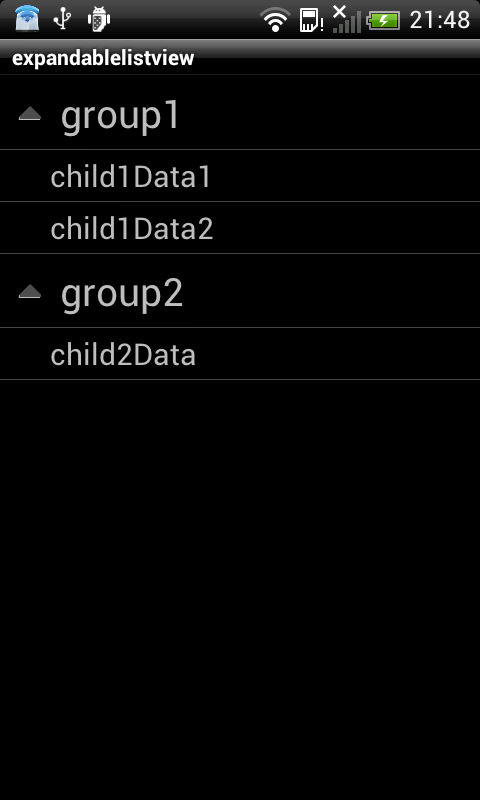
效果如图:
ExpandableListActivity的更多相关文章
- 利用SimpleExpandableListAdapter为ExpandableListActivity提供数据
首先MainActivity继承自ExpandableListActivity,其中的声明如下: setContentView(R.layout.expandmain); //定义一个:List,该L ...
- 仿qq联系人 学习笔记---ExpandableListActivity的使用
[转]原地址 http://blog.163.com/xygzx@126/blog/static/237809502011102010100331/ 效果显示图: 1.布局文件 main.xml(E ...
- android之ExpandableListActivity
MainActivity.java package com.example.mars_2300_expandablelist; import java.util.ArrayList; import j ...
- android ExpandableListActivity的使用
package com.example.keKuoZhanLieBiao; import android.app.ExpandableListActivity; import android.os.B ...
- listActivity和ExpandableListActivity的简单用法
http://www.cnblogs.com/limingblogs/archive/2011/10/09/2204866.html 今天自己简单的总结了listActivity和Expandable ...
- Android ExpandableListActivity的简单介绍及小例子
Android中常常要用到ListView,但也经常要用到ExpandableListView,ListView是显示列表,而ExpandableListView显示的是分类的列表: 下面用一个例子来 ...
- Android :ExpandableListActivity
http://developer.android.com/reference/android/app/ExpandableListActivity.html# public class Expanda ...
- Android ExpandableListActivity
======MainActivity.java===================================== package com.zys.myexpandablelistactivit ...
- ExpandableListActivity的基本使用方法 ,SimpleExpandableListAdapter的基本使用方法
activity_main.xml: <ExpandableListView android:id="@id/android:list" android:layout_wid ...
随机推荐
- 调用webservice服务(通过反射的方式动态调用)
调用 ";//系统类别 var jkxlh = "";//接口序列号 var jkid = "68W05";//接口id string WriteXm ...
- 【SSM】AppFileUtils
11 package com.kikyo.sys.utils; import java.io.File; import java.io.IOException; import java.io.Inpu ...
- jquery 分页 Ajax异步
//使用Ajax异步查询数据 <div class="table-responsive"> <table class="table table-bord ...
- 二分(求l-r中的平方数)
题目描述 多次查询[l,r]范围内的完全平方数个数 定义整数x为完全平方数当且仅当可以找到整数y使得y*y=x 输入描述:第一行一个数n表示查询次数之后n行每行两个数l,r输出描述:对于每个查询,输出 ...
- thymeleaf模板引擎简介
一:thymeleaf 学习笔记---http://www.blogjava.net/bjwulin/articles/395185.html thymeleaf是一个支持html原型的自然引擎,它在 ...
- 【Javaweb】Servlet的xml和注解配置
1.xml <%@ page language="java" contentType="text/html;" %> <!DOCTYPE ht ...
- if 条件的 true / false 及 select 的值
if 条件的 true / false 任何不是 false, undefined, null, 0, NaN 的值,或一个空字符串('')在作为条件语句进行测试时实际返回true,因此您可以简单地使 ...
- maven设置jdk版本
方法一:在maven文件夹下的settings.xml中添加 <profile> <id>jdk-1.8</id> <activation> <a ...
- Unity3D~纹理格式
因为之前自己从来没有好好看过这部分,一直都是用的DXT压缩图片,结果发现原来ios是不支持DXT的, 还不知道我项目那么卡是不是这部分引起的, 但愿是~这样应该就可以解决游戏在ios上只有6.8帧的问 ...
- Ngnix调整
1.隐藏版本号,防止针对版本攻击 http { server_tokens off;2.增加并发连接 2.1 worker_processes :改为CPU核数一致,因为异步IO进程是单 ...