
关于Ocelot和Consul 实现GateWay(网关) 服务注册 负载均衡等方面
Ocelot 路由 请求聚合 服务发现 认证 鉴权 限流熔断 内置负载均衡器
Consul 自动服务发现 健康检查
通过Ocelot搭建API网关 服务注册 负载均衡
1.创建三个空API项目 Api.Gateway(Ocelot网关服务器) Api.ServiceA(资源服务器A) Api.ServiceB(资源服务器B)
2.Api.Gateway项目中 添加Ocelot包 添加Ocelot.Json配置文件 Ocelot服务器端口配成5000
{

  "ReRoutes": [

    {

      //暴露出去的地址

      "UpstreamPathTemplate": "/api/{controller}",

      "UpstreamHttpMethod": [ "Get" ],

      //转发到下面这个地址

      "DownstreamPathTemplate": "/api/{controller}",

      "DownstreamScheme": "http",

      //资源服务器列表

      "DownstreamHostAndPorts": [

        {

          "host": "localhost",

          "port":

        },

        {

          "host": "localhost",

          "port":

        }

      ],

      //决定负载均衡的算法

      "LoadBalancerOptions": {

        "Type": "LeastConnection"

      }

    }

  ],

  //对外暴露的访问地址  也就是Ocelot所在的服务器地址

  "GlobalConfiguration": {

    "BaseUrl": "http://localhost:5000"

  }

}
LeastConnection – 将请求发往最空闲的那个服务器

RoundRobin – 轮流发送

NoLoadBalance – 总是发往第一个请求或者是服务发现
3.项目启动读取Ocelot配置
        public static IWebHostBuilder CreateWebHostBuilder(string[] args) =>

            WebHost.CreateDefaultBuilder(args)

                .ConfigureAppConfiguration((hostingContext, builder) => {

                    builder

                    .SetBasePath(hostingContext.HostingEnvironment.ContentRootPath)

                    .AddJsonFile("Ocelot.json");

                })

                .UseStartup<Startup>();

    }
把Ocelot注册到DI容器
services.AddOcelot();
管道中开启Ocelot
app.UseOcelot().Wait();
4.配置资源服务器 在Ocelot中配置好了 把对应的/api/{controller}地址会进行转发
    [Route("apiservice/[controller]")]

    [ApiController]

    public class ValuesController : ControllerBase

    {

        // GET api/values

        [HttpGet]

        public string Get()

        {

            return "这是A资源服务器API";

        }
5.通过localhost:5000/api/value访问 实现了负载均衡 测试的时候修改了端口或者其他的 最要先把iis对应端口进程关闭 不然可能没有更新过来
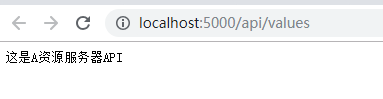

这种做法 如果其中一台服务器挂了 Ocelot没办法知道 还是会转发接口过去 如果新增服务器 就需要修改配置文件 可以通过Ocelot+Consul实现自动服务发现和服务健康监测
*********************************************************************
Ocelot+Consul实现服务发现和健康监测
下载了consul后 就是一个exe文件 通过cmd进入目录 consul agent --dev运行 consul默认ui地址 http://localhost:8500
API项目配置consul 项目启动后 自动被consul发现
1.添加consul Nuget包 启动consul服务
2.在管道中配置
        public void Configure(IApplicationBuilder app, IHostingEnvironment env, IApplicationLifetime lifetime)

        {

            if (env.IsDevelopment())

            {

                app.UseDeveloperExceptionPage();

            }

            //注册项目启动的方法

            lifetime.ApplicationStarted.Register(OnStart);

            //注册项目关闭的方法

            lifetime.ApplicationStarted.Register(OnStopped);

            app.UseMvc();

        }

        private void OnStart()

        {

            var client = new ConsulClient();

            //健康检查

            var httpCheck = new AgentServiceCheck()

            {

                //服务出错一分钟后 会自动移除

                DeregisterCriticalServiceAfter = TimeSpan.FromMinutes(),

                //每10秒发送一次请求到 下面的这个地址 这个地址就是当前API资源的地址

                Interval = TimeSpan.FromSeconds(),

                HTTP = $"http://localhost:5011/HealthCheck"

            };

            var agentReg = new AgentServiceRegistration()

            {

                //这台资源服务的唯一ID

                ID = "JcbServiceA",

                Check = httpCheck,

                Address = "localhost",

                Name = "servicename",

                Port =

            };

            client.Agent.ServiceRegister(agentReg).ConfigureAwait(false);

        }

        //关闭的时候在consul中移除

        private void OnStopped()

        {

            var client = new ConsulClient();

            //根据ID在consul中移除当前服务

            client.Agent.ServiceDeregister("JcbServiceA");

        }
3.启动项目后 进入consul发现 当前项目已经被consul发现 这样就实现了服务的自动发现
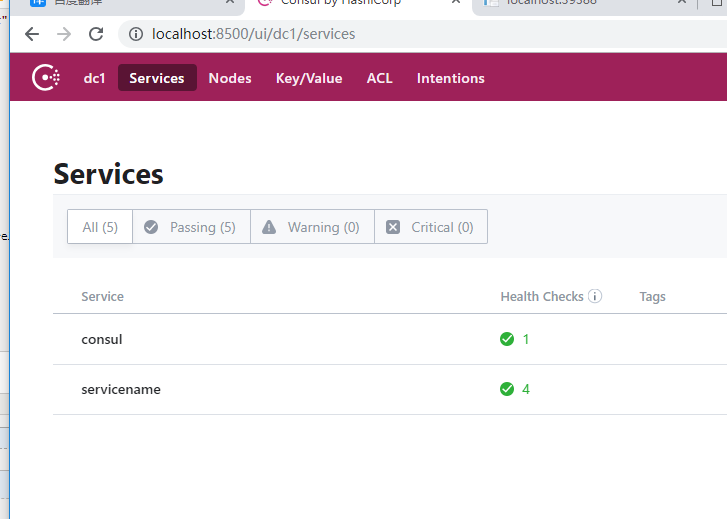
4.然后在把Consul结合到Ocelot中 在Ocelot中安装Ocelot.Provider.Consul 包
在管道中把Consul注册到DI容器
services.AddOcelot().AddConsul();
修改Ocelot.Json配置文件
{

  "ReRoutes": [

    {

      //暴露出去的地址

      "UpstreamPathTemplate": "/api/{controller}",

      "UpstreamHttpMethod": [ "Get" ],

      //转发到下面这个地址

      "DownstreamPathTemplate": "/api/{controller}",

      "DownstreamScheme": "http",

      //资源服务器列表

      //"DownstreamHostAndPorts": [

      //  {

      //    "host": "localhost",

      //    "port": 5011

      //  },

      //  {

      //    "host": "localhost",

      //    "port": 5012

      //  }

      //],

      //决定负载均衡的算法

      "LoadBalancerOptions": {

        "Type": "LeastConnection"

      },

      "ServiceName": "servicename", //服务注册标识, 这个需要和资源API注册的名称相同

      "UseServiceDiscovery": true //启用服务发现

      //"ReRoutesCaseSensitive": false

    }

  ],

  //对外暴露的访问地址  也就是Ocelot所在的服务器地址

  "GlobalConfiguration": {

    "BaseUrl": "http://localhost:5000",

    "ServiceDiscoveryProvider": {

      "Host": "localhost", // Consul Service IP

      "Port": , // Consul Service Port

      //"Type": "PollConsul",

      //"PollingInterval": 100 //健康检查时间端

    }

  }

}
5.这样就实现了动态的服务注册
如果其中一台服务挂了 一分钟后还是连接不上 consul会自动移除这台服务 并且不会再将请求转发到这台服务上 这时候就可以动态的实现服务的新增
注意:在这里通过Consul发现服务的时候
当资源API只有一台 启用和关闭当前资源API Consul都能正常检查到
当资源API有两台的时候 关闭其中一台资源API是正常的 然后在关闭另外一台 Consul的控制台已经检测到这台API连接失败了 但是Localhost:8500界面上显示还是正常的(并且这台关闭的API会一直显示正常) 不清楚为什么
************************
Ocelot +IdentityServer4 在网关实现统一身份验证
1.在Ocelot项目中添加 IdentityServer4.AccessTokenValidation 包
DI容器添加身份验证 这里的authenticationProviderKey 要和Ocelot.Json中的authenticationProviderKey 相同
        public void ConfigureServices(IServiceCollection services)

        {

            var authenticationProviderKey = "finbook";

            services.AddAuthentication()

                .AddIdentityServerAuthentication(authenticationProviderKey, options =>

                {

                    options.Authority = "http://localhost:3000";

                    options.ApiName = "gateway_api";

                    options.SupportedTokens = SupportedTokens.Both;

                    options.ApiSecret = "secret";

                    options.RequireHttpsMetadata = false;

                });

            services.AddOcelot().AddConsul();

            //services.AddMvc().SetCompatibilityVersion(CompatibilityVersion.Version_2_1);

        }
2.修改Ocelot.Json配置文件
      "AuthenticationOptions": {

        //这个名称要和Startup中配置的权限key相同

        "AuthenticationProviderKey": "finbook",

        //允许访问的资源API   在IdentityServer中配置

        "AllowedScopes": [ "gateway_api" ]

      }
https://www.cnblogs.com/weiBlog/p/9833807.html
关于Ocelot和Consul 实现GateWay(网关) 服务注册 负载均衡等方面的更多相关文章
- .net core Ocelot Consul 实现API网关 服务注册 服务发现 负载均衡
大神张善友 分享过一篇 <.NET Core 在腾讯财付通的企业级应用开发实践>里面就是用.net core 和 Ocelot搭建的可扩展的高性能Api网关. Ocelot(http:// ...
- .net core grpc consul 实现服务注册 服务发现 负载均衡(二)
在上一篇 .net core grpc 实现通信(一) 中,我们实现的grpc通信在.net core中的可行性,但要在微服务中真正使用,还缺少 服务注册,服务发现及负载均衡等,本篇我们将在 .net ...
- .Net Core Grpc Consul 实现服务注册 服务发现 负载均衡
本文是基于..net core grpc consul 实现服务注册 服务发现 负载均衡(二)的,很多内容是直接复制过来的,..net core grpc consul 实现服务注册 服务发现 负载均 ...
- Spring Cloud gateway 网关服务二 断言、过滤器
微服务当前这么火爆的程度,如果不能学会一种微服务框架技术.怎么能升职加薪,增加简历的筹码?spring cloud 和 Dubbo 需要单独学习.说没有时间?没有精力?要学俩个框架?而Spring C ...
- Asp.Net Core + Ocelot 网关搭建:负载均衡的配置
前言 上一篇中简单做了一个网关Demo.本篇中也记录一下负载均衡的配置实现. 演示 首先开三个服务,端口分别为 60001,60003,60005,然后分别启动三个服务.接下来在ApiGate ...
- 微服务学习笔记(2)——使用Consul 实现 MagicOnion(GRpc) 服务注册和发现
原文:微服务学习笔记(2)--使用Consul 实现 MagicOnion(GRpc) 服务注册和发现 1.下载打开Consul 笔者是windows下面开发的(也可以使用Docker). 官网下载w ...
- C#使用Consul集群进行服务注册与发现
前言 我个人觉得,中间件的部署与使用是非常难记忆的:也就是说,如果两次使用中间件的时间间隔比较长,那基本上等于要重新学习使用. 所以,我觉得学习中间件的文章,越详细越好:因为,这对作者而言也是一份珍贵 ...
- 搭建服务与负载均衡的客户端-Spring Cloud学习第二天(非原创)
文章大纲 一.Eureka中的核心概念二.Spring RestTemplate详解三.代码实战服务与负载均衡的客户端四.项目源码与参考资料下载五.参考文章 一.Eureka中的核心概念 1. 服务提 ...
- 一起来学Spring Cloud | 第三章:服务消费者 (负载均衡Ribbon)
一.负载均衡的简介: 负载均衡是高可用架构的一个关键组件,主要用来提高性能和可用性,通过负载均衡将流量分发到多个服务器,多服务器能够消除单个服务器的故障,减轻单个服务器的访问压力. 1.服务端负载均衡 ...
随机推荐
- meta 标签汇总
HTML 里 meta常用标签: " class="mathcode" src="https://private.codecogs.com/gif.latex? ...
- Debian下安装中文包和输入法
Debian下安装中文包和输入法 #aptitude install locales(没有aptitude的话可以先安装apt-get insall aptitude ) #dpkg-reconfi ...
- Ajax配合vue+element打造个人专属loading
最近有使用到element组件中的loading,主要是处理后台传输数据太大,页面这边较长时间处于一个白屏,这里使用了一个loading组件,来进行一个优化,当然这只是视觉层面的一个简单优化,如果不用 ...
- php中 "$$" 的详解
php中 $$str 这种写法称为可变变量 有时候使用可变变量名是很方便的.就是说,一个变量的变量名可以动态的设置和使用.一个普通的变量通过声明来设置,例如: <?php $a = " ...
- [转载]DBMS_LOB
1.LOB背景 在现在的系统开发中,需要存储的已不仅仅是简单的文字信息,也包括一些图片.音像资料或者超长的文本,这要求后台数据库具有存储这些数据的能力,Oracle通过提供LOB对象实现了该功能. 2 ...
- pandas的基本功能(一)
第16天pandas的基本功能(一) 灵活的二进制操作 体现在2个方面 支持一维和二维之间的广播 支持缺失值数据处理 四则运算支持广播 +add - sub *mul /div divmod()分区和 ...
- 软件测试实验四----mujava变异测试
1.整个路径结构 2.具体内容 2.1mujava的安装 2.1.1更改CLASSPATH环境变量,使命令行可以找到mujava的路径,方便之后mujava的使用. 2.1.2在系统某一路径下按照格式 ...
- Winform Chart 控件读取datatable后显示图表
private void Button2_Click(object sender, EventArgs e) { DataTable table = new DataTable(); this.cha ...
- TeamCity Agent安装
1 docker安装 docker run -it -e SERVER_URL= \ -v /home/lishan/teamcity/conf:/data/teamcity_agent/conf \ ...
- ios开发蓝图