
搭建一个简单的Eureka程序
Eureka集群主要有三个部分Eureka服务器,服务提供者,服务调用者
简单的来说就是服务提供者将服务注册到Eureka服务器,服务调用者对其服务进行查找调用。
Eureka服务程序的搭建可参考官方文档:http://cloud.spring.io/spring-cloud-static/Dalston.SR5/multi/multi_spring-cloud.html
Eureka架构图:
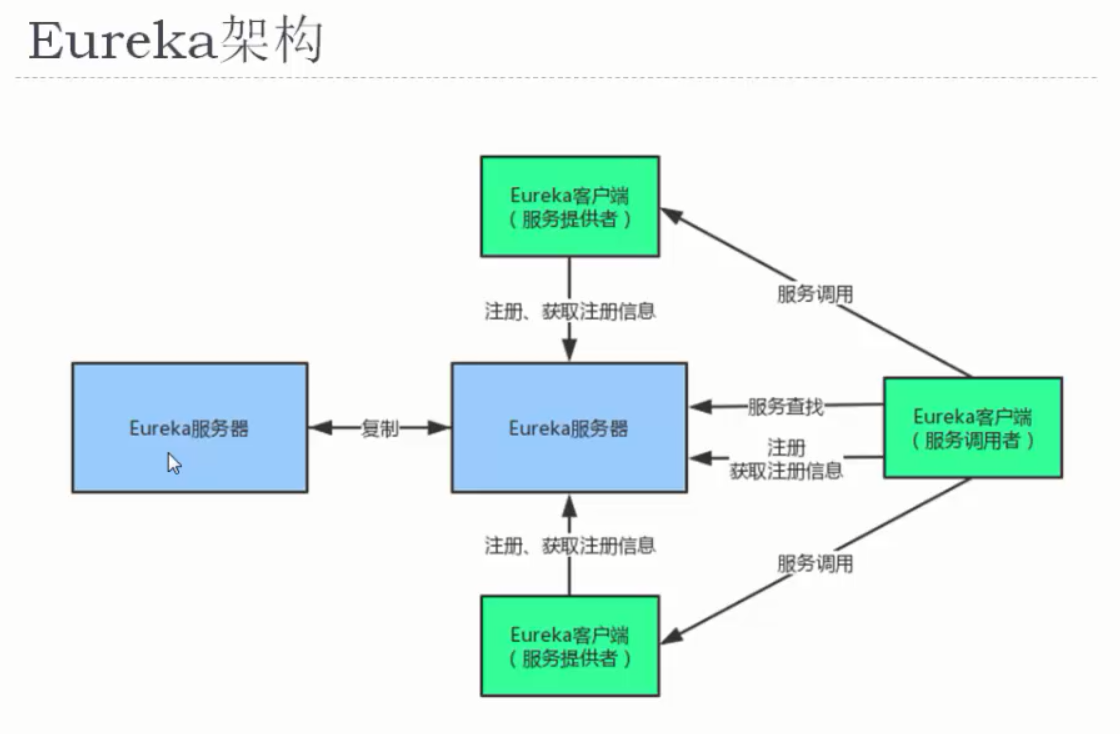
使用IDEA分模块搭建三个工程Eureka服务器(server),服务提供者(police),服务调用者(person)
一.搭建服务器
1.引入maven依赖,使用官方文档中的依赖的结果还是启动不起来,缺少日志相关的依赖,另外自己添加了几个依赖后就OK了
 <dependencyManagement>

    <dependencies>

      <dependency>

        <groupId>org.springframework.cloud</groupId>

        <artifactId>spring-cloud-dependencies</artifactId>

        <version>Dalston.SR5</version>

        <type>pom</type>

        <scope>import</scope>

      </dependency>

    </dependencies>

  </dependencyManagement>

  <dependencies>

    <dependency>

      <groupId>junit</groupId>

      <artifactId>junit</artifactId>

      <version>4.11</version>

      <scope>test</scope>

    </dependency>

    <dependency>

      <groupId>javax.persistence</groupId>

      <artifactId>persistence-api</artifactId>

      <version>1.0</version>

    </dependency>

    <dependency>

      <artifactId>slf4j-api</artifactId>

      <groupId>org.slf4j</groupId>

      <version>1.7.10</version>

    </dependency>

    <dependency>

      <groupId>ch.qos.logback</groupId>

      <artifactId>logback-classic</artifactId>

      <version>1.2.3</version>

      <exclusions>

        <exclusion>

          <artifactId>slf4j-api</artifactId>

          <groupId>org.slf4j</groupId>

        </exclusion>

      </exclusions>

    </dependency>

    <dependency>

      <groupId>ch.qos.logback</groupId>

      <artifactId>logback-core</artifactId>

      <version>1.2.3</version>

    </dependency>

    <dependency>

      <groupId>org.springframework.cloud</groupId>

      <artifactId>spring-cloud-starter-config</artifactId>

    </dependency>

    <dependency>

      <groupId>org.springframework.cloud</groupId>

      <artifactId>spring-cloud-starter-eureka-server</artifactId>

    </dependency>

  </dependencies>
因为Spring cloud集成了很多项目。所以引入spring-cloud-starter-eureka-server就相当于引入了spring-boot-starter-web等,就具有了web容器的功能了。
2.配置yml文件:设置服务器端口以及相关信息(在文档中都可以找到相关配置)
server:

  port: 8761 #更改端口为8761

eureka:

  client:

    register-with-eureka: false #服务器不用注册到其他服务器

    fetch-registry: false #服务器不用去服务器抓取注册信息
3.编写服务启动类,也就是main方法启动spring boot,注意使用@EnableEurekaServer注解
package com.nijunyang;

import org.springframework.boot.autoconfigure.SpringBootApplication;

import org.springframework.boot.builder.SpringApplicationBuilder;

import org.springframework.cloud.netflix.eureka.server.EnableEurekaServer;

@SpringBootApplication

@EnableEurekaServer

public class ServerApp {

    public static void main(String[] args){

        new SpringApplicationBuilder(ServerApp.class).web(true).run(args);

    }

}
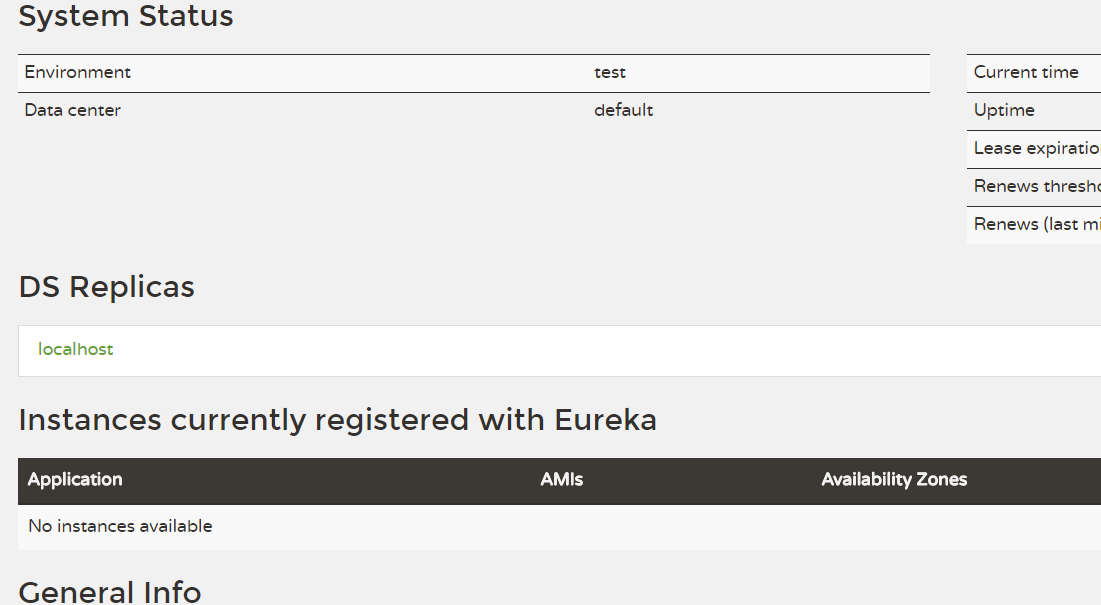
启动之后访问http://localhost:8761/就可以看到Eureka服务器控制台。
二.服务提供者(警察局)
1.maven依赖将服务器的spring-cloud-starter-eureka-server依赖改为spring-cloud-starter-eureka即可
2.yml配置文件:需要将服务提供者注册到Eureka服务器上,服务器的端口设置的8761
server:

  port: 8080

spring:

  application:

    name: first-police  #服务提供者名字

eureka:

  client:

    serviceUrl:

      defaultZone: http://localhost:8761/eureka/  #注册到服务器
3.编写一个实体类police和PoliceController,有人报警则派出一个警察
package com.nijunyang;

import org.springframework.http.MediaType;

import org.springframework.web.bind.annotation.PathVariable;

import org.springframework.web.bind.annotation.RequestMapping;

import org.springframework.web.bind.annotation.RequestMethod;

import org.springframework.web.bind.annotation.RestController;

@RestController

public class PoliceController {

    @RequestMapping(value = "/call/{id}",method = RequestMethod.GET,

    produces = MediaType.APPLICATION_JSON_VALUE)

    public Police call(@PathVariable Integer id){

        Police police = new Police();

        police.setId(id);

        police.setName("zhangsan");

        return police;

    }

}
4.该模块的启动类,main方法启动和服务器的一样 new SpringApplicationBuilder(XXX(启动类类名).class).web(true).run(args);
三.服务调用者(报警)
1.maveny依赖:在服务提供者的基础上再加入负载均衡(后续了解)相关的依赖
<dependency>

            <groupId>org.springframework.cloud</groupId>

            <artifactId>spring-cloud-starter-ribbon</artifactId>

        </dependency>
2.yml配置:同样需要注册到服务器,上面的服务提供者由于没有设置端口所以默认是8080,现在将调用者端口设置8081,否则启动会出错
server:

  port: 8081 #更改端口为8081

spring:

  application:

    name: first-person

eureka:

  client:

    serviceUrl:

      defaultZone: http://localhost:8761/eureka/  #注册到服务器
3.编写PersonController,需要新加@Configuration注解,以及配置RestTemplate,RestTemplate本来是spring-web下面的类用来调用REST服务。本身不具备调用分布式服务的能力,但是被@LoadBalanced修饰后就具有访问分布式服务的能力了(具体涉及负载均衡,后续深入了解)。因为是注册到Eureka服务器的,所以我在内部请求的时候只需要转到相应的服务提供者就可以了:http://first-police/xxx
package com.nijunyang;

import org.springframework.cloud.client.loadbalancer.LoadBalanced;

import org.springframework.context.annotation.Bean;

import org.springframework.context.annotation.Configuration;

import org.springframework.stereotype.Controller;

import org.springframework.web.bind.annotation.GetMapping;

import org.springframework.web.bind.annotation.PathVariable;

import org.springframework.web.bind.annotation.ResponseBody;

import org.springframework.web.client.RestTemplate;

@Controller

@Configuration

public class PersonController {

    @Bean

    @LoadBalanced

    public RestTemplate getRestTemplate(){

        return new RestTemplate();

    }

    @GetMapping(value = "/call/{id}")

    @ResponseBody

    public String call(@PathVariable Integer id){

        RestTemplate restTemplate = getRestTemplate();

        return restTemplate.getForObject("http://first-police/call/" + id ,String.class);

    }

}
4.不多说,启动类编写
依次启动服务,服务提提供者和服务调用者。访问Eureka控制台就可以看到注册进去的first-police和first-person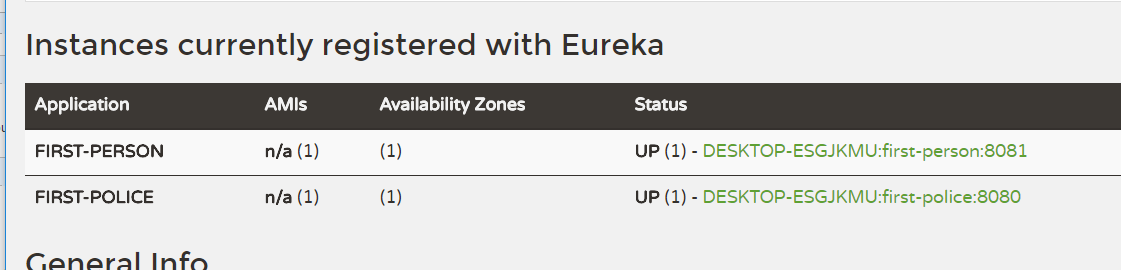
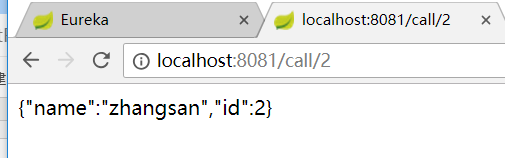
访问http://localhost:8081/call/id,页面就会返回某个police的josn信息
搭建一个简单的Eureka程序的更多相关文章
- 【netty】(2)---搭建一个简单服务器
netty(2)---搭建一个简单服务器 说明:本篇博客是基于学习慕课网有关视频教学.效果:当用户访问:localhost:8088 后 服务器返回 "hello netty"; ...
- Golang学习-第二篇 搭建一个简单的Go Web服务器
序言 由于本人一直从事Web服务器端的程序开发,所以在学习Golang也想从Web这里开始学起,如果对Golang还不太清楚怎么搭建环境的朋友们可以参考我的上一篇文章 Golang的简单介绍及Wind ...
- Prism for WPF 搭建一个简单的模块化开发框架(五)添加聊天、消息模块
原文:Prism for WPF 搭建一个简单的模块化开发框架(五)添加聊天.消息模块 中秋节假期没事继续搞了搞 做了各聊天的模块,需要继续优化 第一步画页面 页面参考https://github.c ...
- 【转】使用webmagic搭建一个简单的爬虫
[转]使用webmagic搭建一个简单的爬虫 刚刚接触爬虫,听说webmagic很不错,于是就了解了一下. webmagic的是一个无须配置.便于二次开发的爬虫框架,它提供简单灵活的API,只需少量代 ...
- (转)微服务_创建一个简单的Eureka注册中心
原文地址:https://www.cnblogs.com/lplshermie/p/9105329.html 微服务和分布式已经成了一种极其普遍的技术,为了跟上时代的步伐,最近开始着手学习Spring ...
- Flink源码分析 - 剖析一个简单的Flink程序
本篇文章首发于头条号Flink程序是如何执行的?通过源码来剖析一个简单的Flink程序,欢迎关注头条号和微信公众号"大数据技术和人工智能"(微信搜索bigdata_ai_tech) ...
- 超详细,新手都能看懂 !使用SpringBoot+Dubbo 搭建一个简单的分布式服务
来自:JavaGuide Github 地址:https://github.com/Snailclimb/springboot-integration-examples 目录: 使用 SpringBo ...
- 使用 SpringBoot+Dubbo 搭建一个简单分布式服务
实战之前,先来看几个重要的概念 开始实战之前,我们先来简单的了解一下这样几个概念:Dubbo.RPC.分布式.由于本文的目的是带大家使用SpringBoot+Dubbo 搭建一个简单的分布式服务,所以 ...
- 创建一个简单的Eureka注册中心
微服务和分布式已经成了一种极其普遍的技术,为了跟上时代的步伐,最近开始着手学习SpringCloud,就从Eureka开始.他们俩就不做介绍了,网上的说明一堆,随便打开一个搜索引擎输入关键字都足够了解 ...
随机推荐
- Win7 IIS配置
一.首先,在开始打开你的控制面板 二.进入到控制面板,选择程序和功能,点击进入 三.在程序与功能中,左菜单栏,打开你的Windows工能 四.在Windows工能中,把你的Internet信息服务中的 ...
- 20175320 2018-2019-2 《Java程序设计》第8周学习总结
20175320 2018-2019-2 <Java程序设计>第8周学习总结 教材学习内容总结 本周学习了教材的第十五章的内容,在这章中介绍了泛型和集合框架,着重讲了泛型类的概念,并介绍了 ...
- 这样,可以在firefox播放flash了
<object classid="clsid:D27CDB6E-AE6D-11cf-96B8-444553540000" width="62" heigh ...
- 长连接锁服务优化实践 C10K问题 nodejs的内部构造 limits.conf文件修改 sysctl.conf文件修改
小结: 1. 当文件句柄数目超过 10 之后,epoll 性能将优于 select 和 poll:当文件句柄数目达到 10K 的时候,epoll 已经超过 select 和 poll 两个数量级. 2 ...
- WEB日期控件
http://www.cnblogs.com/jiangbei/p/7270788.html 日期控件——my97 <div class="form-group"> ...
- Postgres数据库维护
1.全自动备份 需要在备份机上也安装postgres(最好同一个版本) 在postgres目录下建立密码保存文件(明码保存,所以保密很重要),如果不建立,则因为每次备份都要输入密码,不能进行自动备份 ...
- 2018-2019-2 《网络对抗技术》Exp0 Kali安装 Week1 20165225
2018-2019-2 <网络对抗技术>Exp0 Kali安装 Week1 20165225 - 上Kali官网选择Kali Linux 64 bit的torrent,用迅雷解压即可 安装 ...
- Linux netfilter 学习笔记
https://blog.csdn.net/lickylin/article/details/33321905
- Eclipse集成Hadoop插件
一.Eclipse集成Hadoop插件 1.在这之前我们需要配置真机上的hadoop环境变量 注:在解压tar包的时候普通解压会出现缺文件的现象,所以在这里我们需要用管理员的方式启动我们的解压软件(我 ...
- spring-data-mongodb中的MongoTemplate与MongoRepository
springboot添加maven依赖 <dependency> <groupId>org.springframework.boot</groupId> <a ...