
Prism for WPF 搭建一个简单的模块化开发框架(五)添加聊天、消息模块
原文:Prism for WPF 搭建一个简单的模块化开发框架(五)添加聊天、消息模块
中秋节假期没事继续搞了搞
做了各聊天的模块,需要继续优化
第一步画页面
页面参考https://github.com/yanchao891012/WPF_WeChat/tree/master/WeChat.NET仿微信的页面
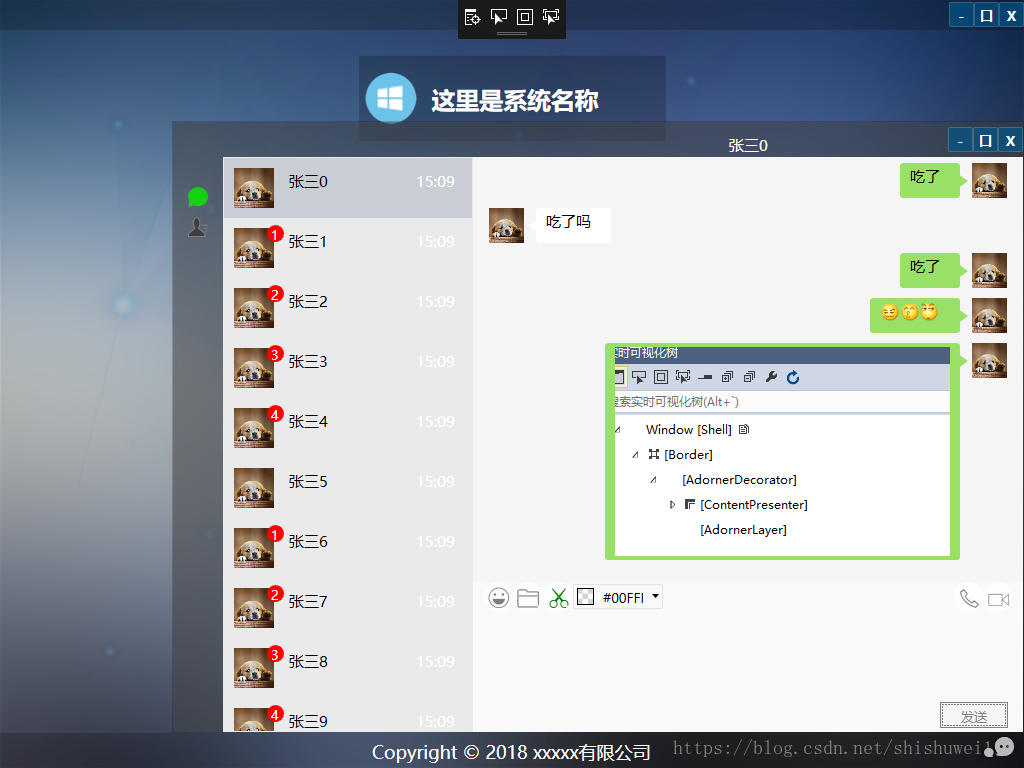
加了截图发送图片
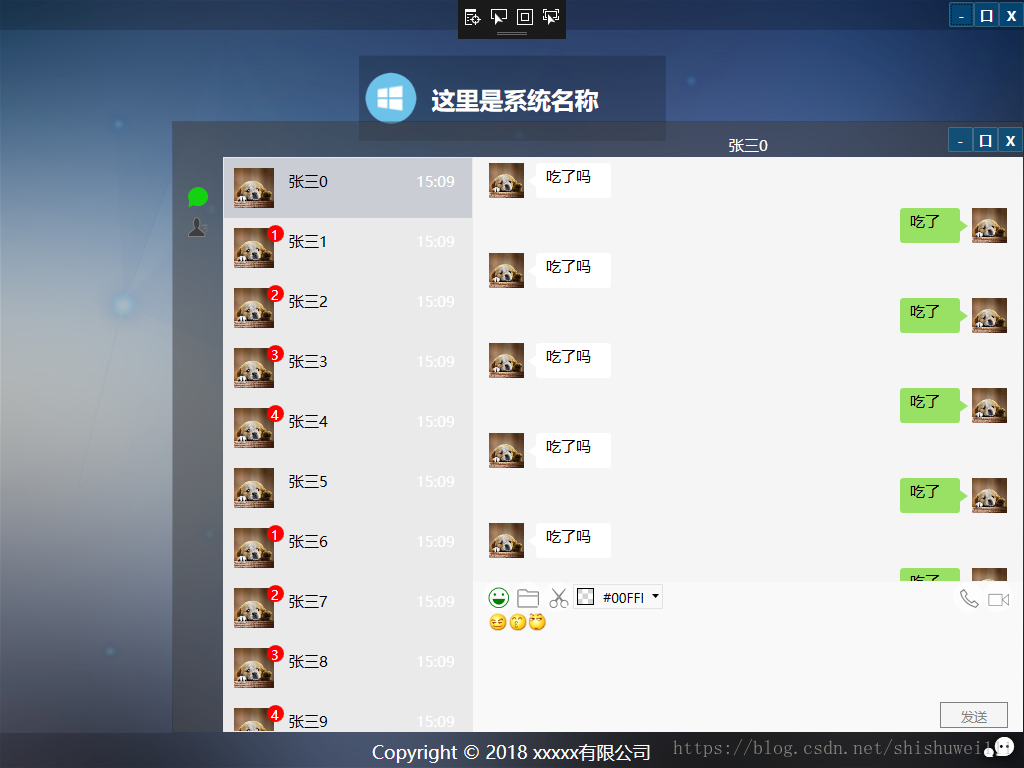
效果这样,点击右下角图标显示,可以拖动位置、隐藏、最大化(请忽略工具条里的颜色选择器,做的颜色选择器在这里试试,没啥意义)
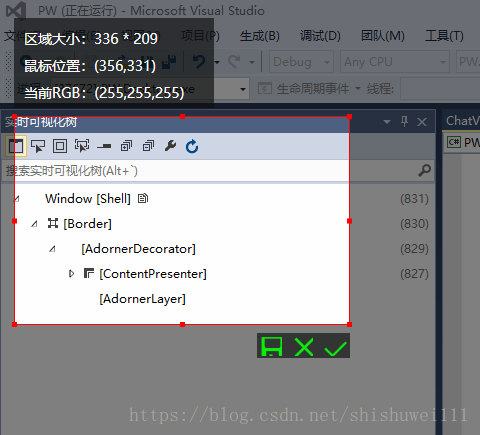
截图大概这样
发送消息
截图代码也是网上找的,做了些改动,不记得是哪里了,有需要的可以找我要,这里就不贴了
页面画好了下面就要些服务端了
第二步 socket服务
写的比较简单
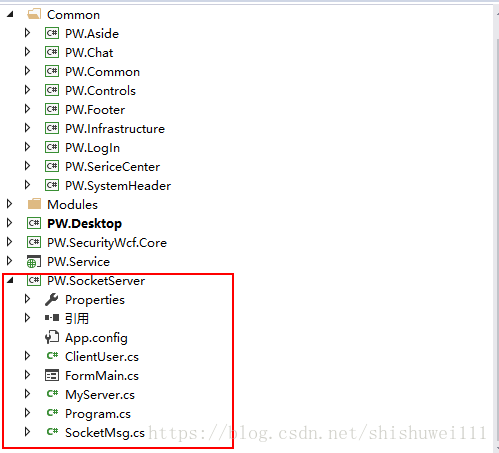
直接贴代码把,这个自己写的随便拿去用
程序入口
Program.cs
using System;

using System.Collections;

using System.Collections.Generic;

using System.IO;

using System.Linq;

using System.Net;

using System.Net.Sockets;

using System.Text;

using System.Threading;

using System.Threading.Tasks;

using System.Web.Script.Serialization;

using System.Windows.Forms;

namespace PW.SocketServer

{

    static class Program

    {

        static MyServer myServer = null;

        /// <summary>

        /// 应用程序的主入口点。

        /// </summary>

        [STAThread]

        static void Main()

        {

            //Application.EnableVisualStyles();

            //Application.SetCompatibleTextRenderingDefault(false);

            myServer = MyServer.GetInstance();

            //myServer.ReceivedMsg = new MyServer.ReceivedMsgHandler(socketClient_ReceivedMsg);

            //Application.Run(new FormMain());

            FormMain main = null;

            new Thread((ThreadStart)delegate

            {

                main = new FormMain();

                Application.Run(main);

            }).Start();

            myServer.BeginServer();

            Console.ReadLine();

        }

    }

}
在启动服务的时候,同时启动的一个窗口,用来测试的
MyServer.cs
using System;
using System.Collections;
using System.Collections.Generic;
using System.IO;
using System.Linq;
using System.Net;
using System.Net.Sockets;
using System.Text;
using System.Threading;
using System.Threading.Tasks;
using System.Windows.Forms;
namespace PW.SocketServer
{
public class MyServer
{
Thread threadWatch = null;// 负责监听客户端的线程
Socket socketWatch = null;// 负责监听客户端的套接字
Dictionary<String, ClientUser> clientList = null;
Int32 con_msg_length = 10240;
private static MyServer uniqueInstance;
public delegate void ReceivedMsgHandler(string msg);
public ReceivedMsgHandler ReceivedMsg;//自定义事件
public delegate void ClientChangeHandler(ClientUser client, Dictionary<String, ClientUser> clientList);
public ClientChangeHandler ClientAdd;//自定义事件
public ClientChangeHandler ClientRemove;//自定义事件
/// <summary>
/// 获取单例
/// </summary>
/// <returns></returns>
public static MyServer GetInstance()
{
// 如果类的实例不存在则创建,否则直接返回
if (uniqueInstance == null)
{
uniqueInstance = new MyServer();
}
return uniqueInstance;
}
private MyServer()
{
try
{
string ServerIP = System.Configuration.ConfigurationManager.AppSettings["ServerIP"].ToString();
string ServerPort = System.Configuration.ConfigurationManager.AppSettings["ServerPort"].ToString();
con_msg_length = Int32.Parse(System.Configuration.ConfigurationManager.AppSettings["MsgLength"].ToString());
IPAddress ip = null;
if (string.IsNullOrEmpty(ServerIP))
{
ip = IPAddress.Any;//创建IP//Any 字段等效于以点分隔的四部分表示法格式的 0.0.0.0 这个IP地址,实际是一个广播地址。//对于SOCKET而言,使用 any ,表示,侦听本机的所有IP地址的对应的端口(本机可能有多个IP或只有一个IP)
}
else
{
ip = IPAddress.Parse(ServerIP);//监听指定ip
}
IPEndPoint point = new IPEndPoint(ip, Convert.ToInt32(ServerPort));//创建终结点(EndPoint)
clientList = new Dictionary<string, ClientUser>();
// 定义一个套接字用于监听客户端发来的消息,包含三个参数(ipv4寻址协议,流式连接,tcp协议)
socketWatch = new Socket(AddressFamily.InterNetwork, SocketType.Stream, ProtocolType.Tcp);
// 监听绑定的网路节点
socketWatch.Bind(point);
// 将套接字的监听队列长度设置限制为0,0表示无限
socketWatch.Listen(0);
// 创建一个监听线程
threadWatch = new Thread(WatchConnecting);
threadWatch.IsBackground = true;
}
catch (Exception ex)
{
WriteTxtLog(ex.Message);
}
}
public void BeginServer()
{
try
{
threadWatch.Start();
AppendText("成功启动监听!");
}
catch (Exception ex)
{
WriteTxtLog(ex.Message);
}
}
/// <summary>
/// 监听客户端发来的请求
/// </summary>
private void WatchConnecting()
{
//持续不断监听客户端发来的请求
while (true)
{
try
{
Socket clientSocket = socketWatch.Accept();
byte[] recMsg = new byte[con_msg_length];
if (clientSocket != null && clientSocket.Connected)
{
int length = clientSocket.Receive(recMsg);
string msg = "";
if (length > 0)
{
//将机器接受到的字节数组转换为人可以读懂的字符串
msg = Encoding.UTF8.GetString(recMsg, 0, length);
}
AppendText("==[" + msg + "]==" + DateTime.Now.ToString("yyyy-MM-dd HH:mm:ss") + "\r\n");
SocketMsg smsg = new SocketMsg();
try
{
smsg.setAllParametersJsonStr(msg);
}
catch
{
}
Hashtable param = smsg.getAllParameters();
ClientUser cu = new ClientUser();
cu.ClientSocket = clientSocket;
IPEndPoint ip = (IPEndPoint)clientSocket.RemoteEndPoint;
cu.CliIp = ip.Address.ToString();
cu.CliPort = ip.Port.ToString();
cu.LoginTime = DateTime.Now.ToString("yyyy-MM-dd HH:mm:ss");
AppendText("客户端连接!" + cu.CliIp + ":" + cu.CliPort + "\r\n");
string userno = "";
if (param != null && param.Count > 0)
{
userno = param["UserNo"].ToString();
cu.UserNo = userno;
cu.UserName = param["UserName"].ToString();
}
if (!clientList.ContainsKey(userno))
{
clientList.Add(userno, cu);
if (ClientAdd != null)
{
ClientAdd(cu, clientList);
}
}
else
{
if (ClientRemove != null)
{
ClientRemove(clientList[userno], clientList);
}
clientList.Remove(userno);
clientList.Add(userno, cu);
if (ClientAdd != null)
{
ClientAdd(cu, clientList);
}
}
AppendText("客户端连接成功!" + msg + "\r\n");
// 创建一个通信线程
ParameterizedThreadStart pts = new ParameterizedThreadStart(acceptMsg);
Thread thr = new Thread(pts);
thr.IsBackground = true;
thr.Start(clientSocket);
}
}
catch (Exception ex)
{
WriteTxtLog(ex.Message);
}
}
}
/// <summary>
/// 接收客户端发来的消息
/// </summary>
/// <param name="socket">客户端套接字对象</param>
private void acceptMsg(object socket)
{
Socket socketServer = socket as Socket;
while (true)
{
try
{
//创建一个内存缓冲区 其大小为1024*1024字节 即1M
byte[] recMsg = new byte[con_msg_length];
//将接收到的信息存入到内存缓冲区,并返回其字节数组的长度
int length = socketServer.Receive(recMsg);
//将机器接受到的字节数组转换为人可以读懂的字符串
if (length > 0)
{
try
{
string msg = Encoding.UTF8.GetString(recMsg, 0, length);
AppendText("==[" + msg + "]==" + DateTime.Now.ToString("yyyy-MM-dd HH:mm:ss") + "\r\n");
SocketMsg smsg = new SocketMsg();
try
{
smsg.setAllParametersJsonStr(msg);
}
catch
{
}
Hashtable param = smsg.getAllParameters();
if (param != null && param.Count > 0)
{
AppendText("客户端(" + DateTime.Now.ToString("yyyy-MM-dd HH:mm:ss") + "):" + smsg.ConvertJson2Str(param["msgContent"]) + "\r\n");
string usernos = param["UserNo"] == null ? "" : param["UserNo"].ToString();
string[] nos = usernos.Split(',');
if (nos != null && nos.Length > 0)
{
//转发消息到目标客户端
foreach (string no in nos)
{
if (clientList.ContainsKey(no) && clientList[no].ClientSocket != socketServer)
{
serverSendMsg(clientList[no].ClientSocket, smsg.ConvertJson2Str(param["msgContent"]));
}
}
}
}
}
catch (Exception exx)
{
AppendText("" + exx.Message + "(" + DateTime.Now.ToString("yyyy-MM-dd HH:mm:ss") + "):\r\n");
}
}
else
{
string clin = "";
foreach (string key in clientList.Keys)
{
if (clientList[key].ClientSocket == socketServer)
{
clin = "userno:" + clientList[key].UserNo + " name:" + clientList[key].UserName + " ip:" + clientList[key].CliIp;
if (ClientRemove != null)
{
ClientRemove(clientList[key], clientList);
}
clientList.Remove(key);
break;
}
}
AppendText("客户端[" + clin + "]断开(" + DateTime.Now.ToString("yyyy-MM-dd HH:mm:ss") + "):\r\n");
socketServer.Disconnect(true);
socketServer.Close();
break;
}
}
catch (Exception ex)
{
string clin = "";
foreach (string key in clientList.Keys)
{
if (clientList[key].ClientSocket == socketServer)
{
clin = "userno:" + clientList[key].UserNo + " name:" + clientList[key].UserName + " ip:" + clientList[key].CliIp;
if (ClientRemove != null)
{
ClientRemove(clientList[key], clientList);
}
clientList.Remove(key);
break;
}
}
AppendText("客户端[" + clin + "]断开(" + DateTime.Now.ToString("yyyy-MM-dd HH:mm:ss") + "):\r\n");
socketServer.Disconnect(true);
socketServer.Close();
break;
}
}
}
/// <summary>
/// 发送消息到客户端
/// </summary>
/// <param name="msg"></param>
public void serverSendMsg(Socket clientSocket, string msg)
{
try
{
byte[] sendMsg = Encoding.UTF8.GetBytes(msg);
clientSocket.Send(sendMsg);
AppendText("服务端(" + DateTime.Now.ToString("yyyy-MM-dd HH:mm:ss") + "):" + msg + "\r\n");
}
catch (Exception ex)
{
WriteTxtLog(ex.Message);
}
}
private void AppendText(String theContent)
{
Console.WriteLine(theContent);
WriteTxtLog(theContent);
}
private void WriteTxtLog(String theContent)
{
try
{
String theFileName = DateTime.Now.ToString("yyyyMMdd") + ".txt";
String theFilePath = Application.StartupPath + "\\MsgLog\\";
String theFullName = theFilePath + theFileName;
//判断文件夹是否存在
if (Directory.Exists(theFilePath) == false)//如果不存在就创建file文件夹
{
Directory.CreateDirectory(theFilePath);
}
StreamWriter sw = null;
//判断文件是否存在
if (File.Exists(theFullName))
{
sw = File.AppendText(theFullName);
}
else
{
sw = File.CreateText(theFullName);//创建该文件
}
//导出传盘文件
//开始写入
sw.WriteLine(theContent);
//关闭流
sw.Close();
}
catch (Exception ex)
{
}
}
public Dictionary<String, ClientUser> getClient()
{
return clientList;
}
}
}
SocketMsg.cs
using System;

using System.Collections.Generic;

using System.Collections;

using System.Linq;

using System.Text;

using System.Web.Script.Serialization;

namespace PW.SocketServer

{

    public class SocketMsg

    {

        /// <summary>

        /// 请求的参数

        /// </summary>

        protected Hashtable parameters;

        /// <summary>

        /// 获取参数值

        /// </summary>

        /// <param name="parameter">参数名</param>

        /// <returns></returns>

        public string getParameter(string parameter)

        {

            string s = (string)parameters[parameter];

            return (null == s) ? "" : s;

        }

        /// <summary>

        /// 设置参数值

        /// </summary>

        /// <param name="parameter">参数名</param>

        /// <param name="parameterValue">参数值</param>

        public void setParameter(string parameter, string parameterValue)

        {

            if (parameter != null && parameter != "")

            {

                if (parameters.Contains(parameter))

                {

                    parameters.Remove(parameter);

                }

                parameters.Add(parameter, parameterValue);

            }

        }

        /// <summary>

        /// 获取所有参数

        /// </summary>

        /// <returns></returns>

        public Hashtable getAllParameters()

        {

            return this.parameters;

        }

        /// <summary>

        /// 获取所有参数Json

        /// </summary>

        /// <returns></returns>

        public String getAllParametersJsonStr()

        {

            JavaScriptSerializer jsser = new JavaScriptSerializer();

            String jsonStr = jsser.Serialize(this.parameters);

            return jsonStr;

        }

        /// <summary>

        /// 获取所有参数Json

        /// </summary>

        /// <returns></returns>

        public void setAllParametersJsonStr(String jsonStr)

        {

            JavaScriptSerializer jsser = new JavaScriptSerializer();

            parameters = jsser.Deserialize<Hashtable>(jsonStr);

        }

        /// <summary>

        ///

        /// </summary>

        /// <returns></returns>

        public String ConvertJson2Str(object json)

        {

            try

            {

                JavaScriptSerializer jsser = new JavaScriptSerializer();

                String jsonStr = jsser.Serialize(json);

                return jsonStr;

            }

            catch

            {

                return json.ToString();

            }

        }

    }

}
ClientUser.cs
using System;

using System.Collections.Generic;

using System.Linq;

using System.Net.Sockets;

using System.Text;

using System.Threading.Tasks;

namespace PW.SocketServer

{

    public class ClientUser

    {

        public string UserNo { get; set; }

        public string UserName { get; set; }

        public string LoginTime { get; set; }

        public string CliIp { get; set; }

        public string CliPort { get; set; }

        public Socket ClientSocket { get; set; }

    }

}
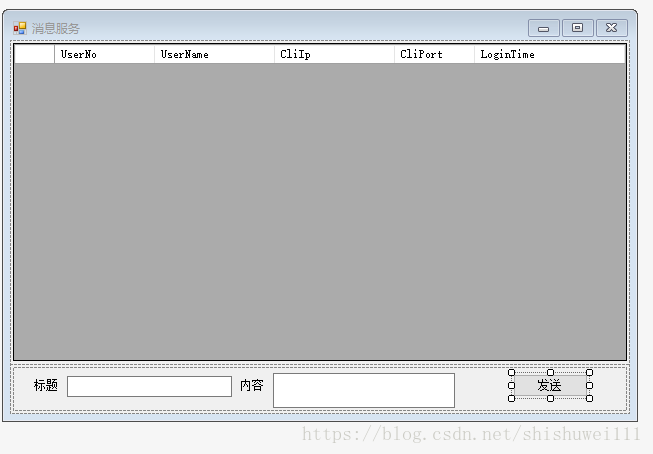
不太会贴form代码
来个截图,就是来显示一下在线人员,和像指定的人发个消息,myserver,那里留的有口儿,这里只是用
cs代码
FormMain.cs
using System;

using System.Collections.Generic;

using System.Linq;

using System.Windows.Forms;

using System.IO;

namespace PW.SocketServer

{

    public partial class FormMain : Form

    {

        MyServer myServer = null;

        public FormMain()

        {

            myServer = MyServer.GetInstance();

            myServer.ClientAdd = new MyServer.ClientChangeHandler(myServer_ClientAdd);

            myServer.ClientRemove = new MyServer.ClientChangeHandler(myServer_ClientRemove);

            InitializeComponent();

            //关闭对文本框的非法线程操作检查

            TextBox.CheckForIllegalCrossThreadCalls = false;

            DataGridView.CheckForIllegalCrossThreadCalls = false;

        }

        void myServer_ClientAdd(ClientUser client, Dictionary<String, ClientUser> clientList)

        {

            LoadGrid();

        }

        void myServer_ClientRemove(ClientUser client, Dictionary<String, ClientUser> clientList)

        {

            LoadGrid();

        }

        private void FormMain_Load(object sender, EventArgs e)

        {

        }

        private void LoadGrid()

        {

            try

            {

                dataGridView1.Rows.Clear();

                Dictionary<String, ClientUser> tmps = myServer.getClient();

                foreach (ClientUser cu in tmps.Values)

                {

                    dataGridView1.Rows.Add(1);

                    dataGridView1.Rows[dataGridView1.Rows.Count - 1].Cells["UserNo"].Value = cu.UserNo;

                    dataGridView1.Rows[dataGridView1.Rows.Count - 1].Cells["UserName"].Value = cu.UserName;

                    dataGridView1.Rows[dataGridView1.Rows.Count - 1].Cells["CliIp"].Value = cu.CliIp;

                    dataGridView1.Rows[dataGridView1.Rows.Count - 1].Cells["CliPort"].Value = cu.CliPort;

                    dataGridView1.Rows[dataGridView1.Rows.Count - 1].Cells["LoginTime"].Value = cu.LoginTime;

                }

            }

            catch (Exception ex)

            {

            }

        }

        private void button1_Click(object sender, EventArgs e)

        {

            if(dataGridView1.SelectedRows.Count>0)

            {

                string msg = "{title:'" + txtTitle.Text + "',content:'" + txtContent.Text + "'}";

                Dictionary<String, ClientUser> tmps = myServer.getClient();

                try

                {

                    foreach (DataGridViewRow row in dataGridView1.SelectedRows)

                    {

                        if (tmps.ContainsKey(row.Cells["UserNo"].Value.ToString()))

                        {

                            myServer.serverSendMsg(tmps[row.Cells["UserNo"].Value.ToString()].ClientSocket, msg);

                        }

                    }

                }

                catch

                {

                    foreach (DataGridViewRow row in dataGridView1.SelectedRows)

                    {

                        var query = tmps.SingleOrDefault(p => p.Value.CliIp == row.Cells["CliIp"].Value.ToString());

                        if (query.Value != null)

                        {

                            myServer.serverSendMsg(query.Value.ClientSocket, msg);

                        }

                    }

                }

            }

        }

        private void AppendText(String theContent)

        {

            Console.WriteLine(theContent);

            WriteTxtLog(theContent);

        }

        private void WriteTxtLog(String theContent)

        {

            try

            {

                String theFileName = DateTime.Now.ToString("yyyyMMdd") + ".txt";

                String theFilePath = Application.StartupPath + "\\MsgLog\\";

                String theFullName = theFilePath + theFileName;

                //判断文件夹是否存在

                if (Directory.Exists(theFilePath) == false)//如果不存在就创建file文件夹

                {

                    Directory.CreateDirectory(theFilePath);

                }

                StreamWriter sw = null;

                //判断文件是否存在

                if (File.Exists(theFullName))

                {

                    sw = File.AppendText(theFullName);

                }

                else

                {

                    sw = File.CreateText(theFullName);//创建该文件

                }

                //导出传盘文件

                //开始写入

                sw.WriteLine(theContent);

                //关闭流

                sw.Close();

            }

            catch (Exception ex)

            {

            }

        }

    }

}
配置文件--比较简单
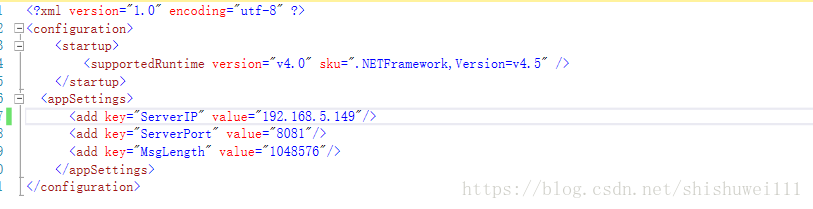
到这里一个简单的socket已经写好了,写的比较i简单,可能不太稳定,本来想用之前用java写的那套服务呢,想想最后还是用C#写了
第三步 连通前后台
主要就是一个类
SocketClient.cs
using System;

using System.Collections.Generic;

using System.Linq;

using System.Text;

using System.Net.Sockets;

using System.Threading;

using System.Net;

namespace PW.Infrastructure

{

    public class SocketClient

    {

        private static SocketClient uniqueInstance;

        // 创建一个客户端套接字

        Socket clientSocket = null;

        // 创建一个监听服务端的线程

        Thread threadServer = null;

        string start_msg = "";

        public delegate void ReceivedMsgHandler(string msg);

        public ReceivedMsgHandler ReceivedMsg;//自定义事件

        private SocketClient()

        {

            try

            {

                start_msg = "{UserNo:'" + GlobalData.UserName + "',UserName:'" + GlobalData.NickName + "'}";

            }

            catch(Exception ex)

            {

                WriteTxtLog(ex.Message);

            }

        }

        /// <summary>

        /// 获取单例

        /// </summary>

        /// <returns></returns>

        public static SocketClient GetInstance()

        {

            // 如果类的实例不存在则创建,否则直接返回

            if (uniqueInstance == null)

            {

                uniqueInstance = new SocketClient();

            }

            return uniqueInstance;

        }

        public void BeginConnect()

        {

            try

            {

                clientSocket = new Socket(AddressFamily.InterNetwork, SocketType.Stream, ProtocolType.Tcp);

                IPAddress ip = IPAddress.Parse(GlobalData.SocketIP);

                clientSocket.BeginConnect(ip, GlobalData.SocketPort, (args) =>

                {

                    if (args.IsCompleted)   //判断该异步操作是否执行完毕

                    {

                        Byte[] bytesSend = new Byte[GlobalData.SocketMsgSize];

                        bytesSend = Encoding.UTF8.GetBytes(start_msg);  //用户名,这里是刚刚连接上时需要传过去

                        if (clientSocket != null && clientSocket.Connected)

                        {

                            clientSocket.Send(bytesSend);

                            WriteTxtLog("链接成功(" + GetCurrentTime() + "):\r\n");

                            // 创建一个线程监听服务端发来的消息

                            threadServer = new Thread(recMsg);

                            threadServer.IsBackground = true;

                            threadServer.Start();

                        }

                        else

                        {

                            WriteTxtLog("服务器未开启(" + GetCurrentTime() + "):\r\n");

                            // 创建一个线程监听服务端发来的消息

                            threadServer = new Thread(recMsg);

                            threadServer.IsBackground = true;

                            threadServer.Start();

                        }

                    }

                }, null);

            }

            catch (Exception ex)

            {

                WriteTxtLog(ex.Message);

            }

        }

        /// <summary>

        ///  接收服务端发来的消息

        /// </summary>

        private void recMsg()

        {

            while (true) //持续监听服务端发来的消息

            {

                //定义一个1M的内存缓冲区 用于临时性存储接收到的信息

                byte[] arrRecMsg = new byte[GlobalData.SocketMsgSize];

                int length = 0;

                try

                {

                    //将客户端套接字接收到的数据存入内存缓冲区, 并获取其长度

                    length = clientSocket.Receive(arrRecMsg);

                    //将套接字获取到的字节数组转换为人可以看懂的字符串

                    string strRecMsg = Encoding.UTF8.GetString(arrRecMsg, 0, length);

                    if (ReceivedMsg != null)

                    {

                        ReceivedMsg(strRecMsg);

                    }

                    //将发送的信息追加到聊天内容文本框中

                    WriteTxtLog("服务端(" + GetCurrentTime() + "):" + strRecMsg + "\r\n");

                }

                catch(Exception ex)

                {

                    WriteTxtLog("" + ex.Message+ ":\r\n");

                    WriteTxtLog("服务器已关闭(" + GetCurrentTime() + "):\r\n");

                    //重连

                    Thread.Sleep(10 * 1000);

                    if (!clientSocket.Connected)

                    {

                        clientSocket = new Socket(AddressFamily.InterNetwork, SocketType.Stream, ProtocolType.Tcp);

                        clientSocket.BeginConnect(IPAddress.Parse(GlobalData.SocketIP), GlobalData.SocketPort, (args) =>

                        {

                            if (args.IsCompleted)   //判断该异步操作是否执行完毕

                            {

                                Byte[] bytesSend = new Byte[GlobalData.SocketMsgSize];

                                bytesSend = Encoding.UTF8.GetBytes(start_msg);  //用户名,这里是刚刚连接上时需要传过去

                                if (clientSocket != null && clientSocket.Connected)

                                {

                                    clientSocket.Send(bytesSend);

                                    WriteTxtLog("重连链接成功(" + GetCurrentTime() + "):\r\n");

                                }

                                else

                                {

                                    WriteTxtLog("重连失败服务器已关闭(" + GetCurrentTime() + "):\r\n");

                                }

                            }

                        }, null);

                    }

                }

            }

        }

        /// <summary>

        /// 发送消息到服务端

        /// </summary>

        /// <param name="msg"></param>

        public void SendMsg(string title, string content, string userno)

        {

            try

            {

                string msg = "{title:'" + title + "',content:'" + content + "'}";

                //userno:"001,002,003"

                if (string.IsNullOrEmpty(userno))

                {

                    userno = "0";

                }

                string msgcon = "{msgType:'msg',msgContent:'" + msg + "',UserNo:'" + userno + "'}";

                clientSendMsg(msgcon);

            }

            catch (Exception ex)

            {

                WriteTxtLog(ex.Message);

            }

        }

        public void CloseConnect()

        {

            try

            {

                if (clientSocket != null)

                    clientSocket.Close();

                if (threadServer != null && threadServer.IsAlive)

                {

                    threadServer.Abort();

                }

                clientSocket = null;

                threadServer = null;

            }

            catch (Exception ex)

            {

                WriteTxtLog(ex.Message);

            }

        }

        /// <summary>

        /// 发送消息到服务端

        /// </summary>

        /// <param name="msg"></param>

        public void clientSendMsg(string msg)

        {

            byte[] sendMsg = Encoding.UTF8.GetBytes(msg);

            clientSocket.Send(sendMsg);

            WriteTxtLog("客户端(" + GetCurrentTime() + "):" + msg + "\r\n");

        }

        /// <summary>

        /// 获取当前系统时间的方法

        /// </summary>

        /// <returns>当前时间</returns>

        private DateTime GetCurrentTime()

        {

            DateTime currentTime = new DateTime();

            currentTime = DateTime.Now;

            return currentTime;

        }

        public static void WriteTxtLog(String theContent)

        {

            try

            {

                //String theFileName = DateTime.Now.ToString("yyyyMMdd") + ".txt";

                //String theFilePath = Application.StartupPath +"\\MsgLog\\";

                //String theFullName = theFilePath + theFileName;

                ////判断文件夹是否存在

                //if (Directory.Exists(theFilePath) == false)//如果不存在就创建file文件夹

                //{

                //    Directory.CreateDirectory(theFilePath);

                //}

                //StreamWriter sw = null;

                ////判断文件是否存在

                //if (File.Exists(theFullName))

                //{

                //    sw = File.AppendText(theFullName);

                //}

                //else

                //{

                //    sw = File.CreateText(theFullName);//创建该文件

                //}

                ////导出传盘文件

                ////开始写入

                //sw.WriteLine(theContent);

                ////关闭流

                //sw.Close();

            }

            catch (Exception ex)

            {

            }

        }

    }

}
用的话就就是在登录系统后连接服务器
SocketClient socketClient = null;
socketClient = SocketClient.GetInstance();
//socketClient.ReceivedMsg = new SocketClient.ReceivedMsgHandler(socketClient_ReceivedMsg);
socketClient.BeginConnect();
发送消息
SocketClient sc = SocketClient.GetInstance();
sc.SendMsg("test", msg.Msg,this._userName);
聊天接收消息
SocketClient socketClient = SocketClient.GetInstance();
socketClient.ReceivedMsg = new SocketClient.ReceivedMsgHandler(socketClient_ReceivedMsg);
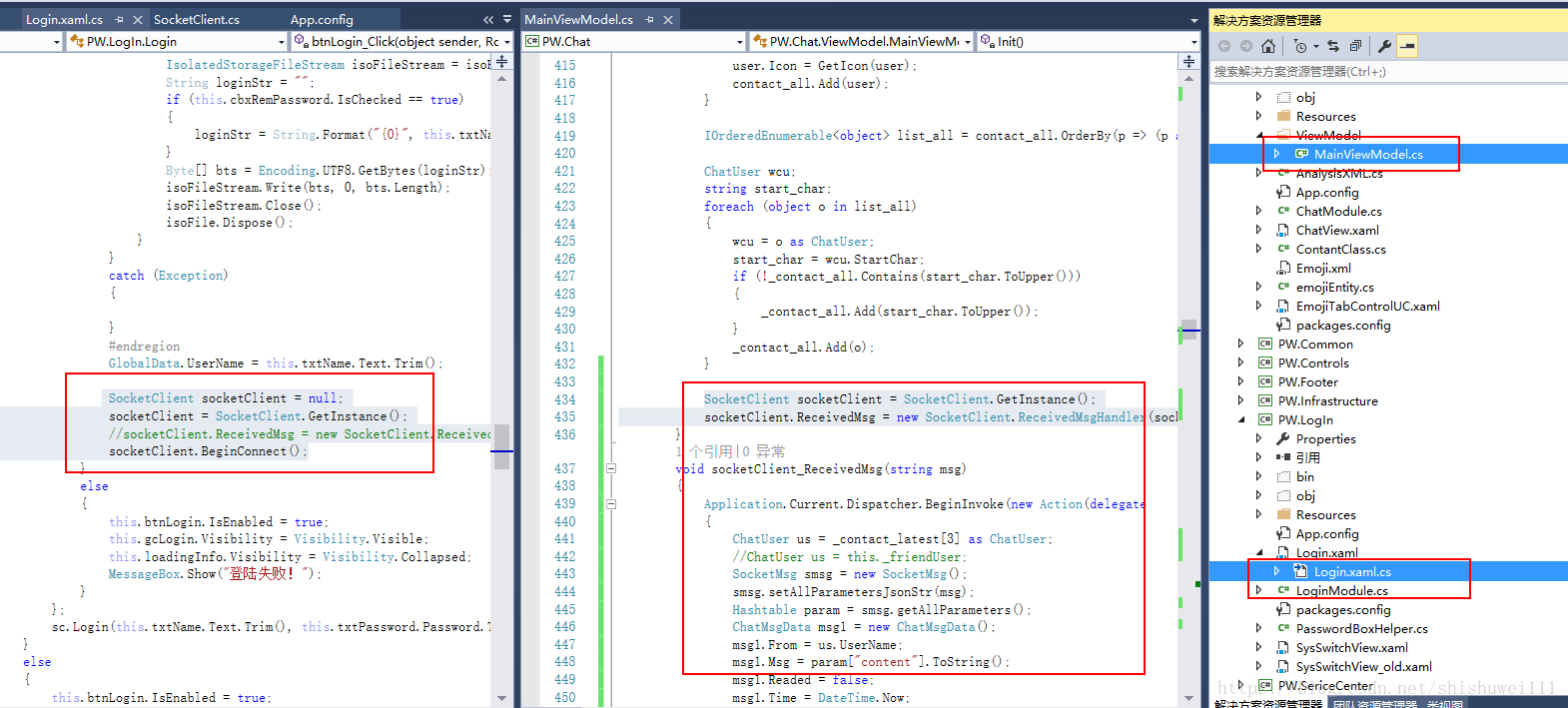
这里是在聊天的模块接口socket的消息,这是一个比较懒的写法,按说把应该把消息统一接收,然后用prism的模块之间的通信机制来实现聊天模块的消息接收,因为现在SocketClient是一个单例,你在一个模块设置ReceivedMsg之后,另一个模块设置的ReceivedMsg应该就无效了,,,,这里实际用的话不能像我这样写,,,,后续我也会改掉
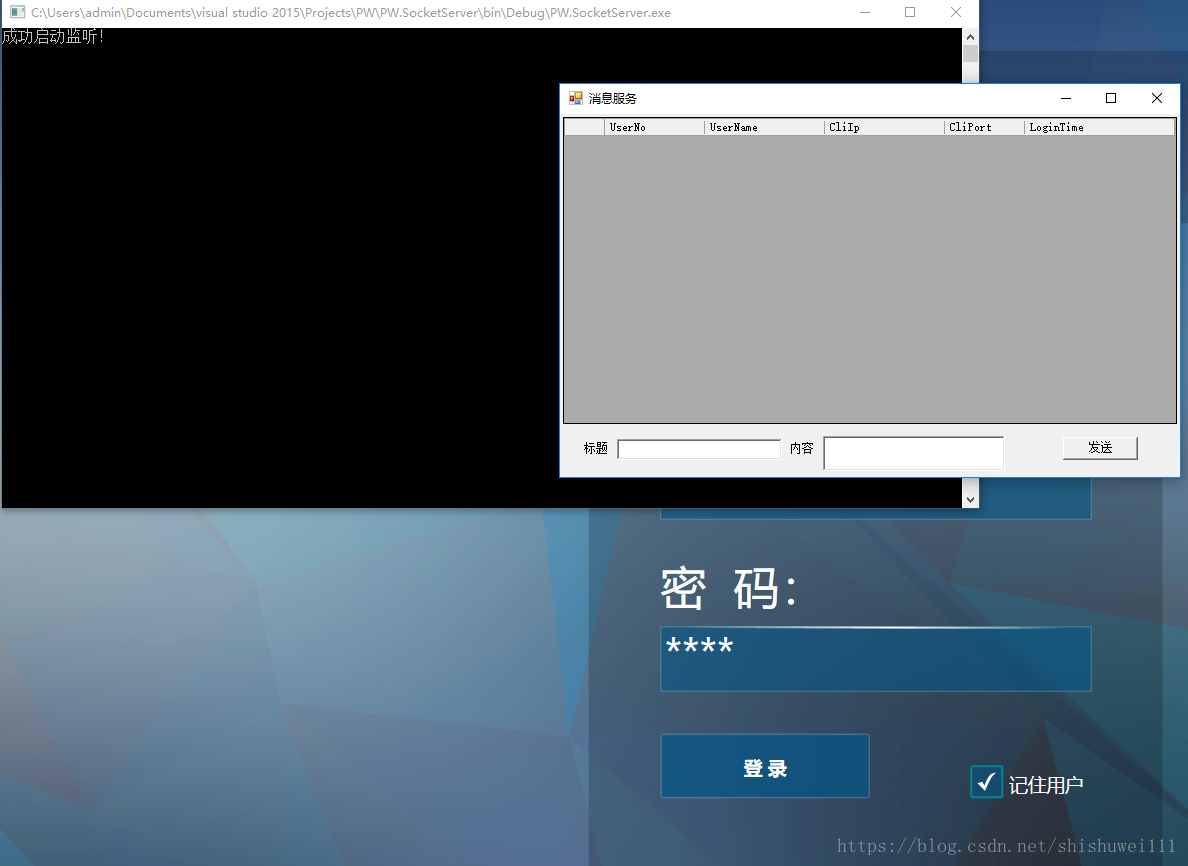
然后看一下测试结果
未登录状态
登录成功后
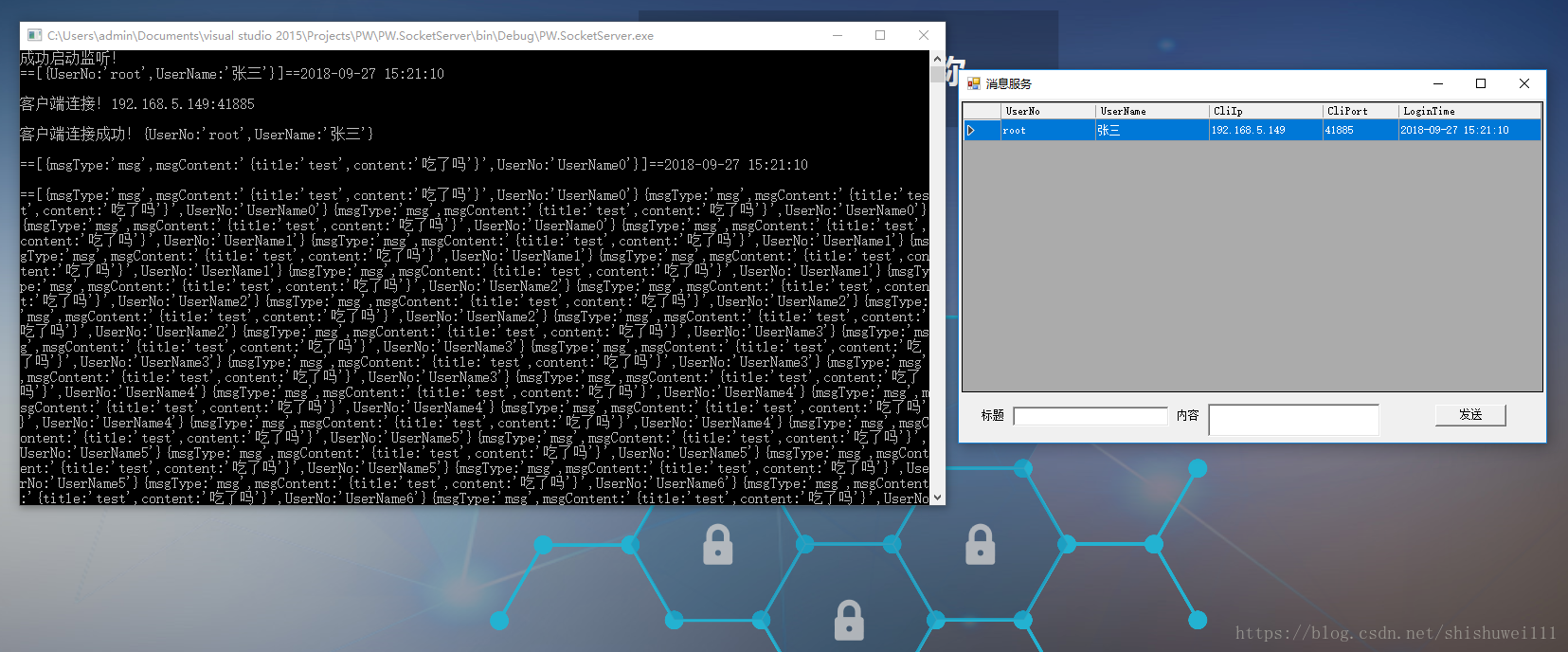
这些吃了吗。。。。都是代码写死的调用发消息的接口,可以忽略
然后手动发一个消息看看
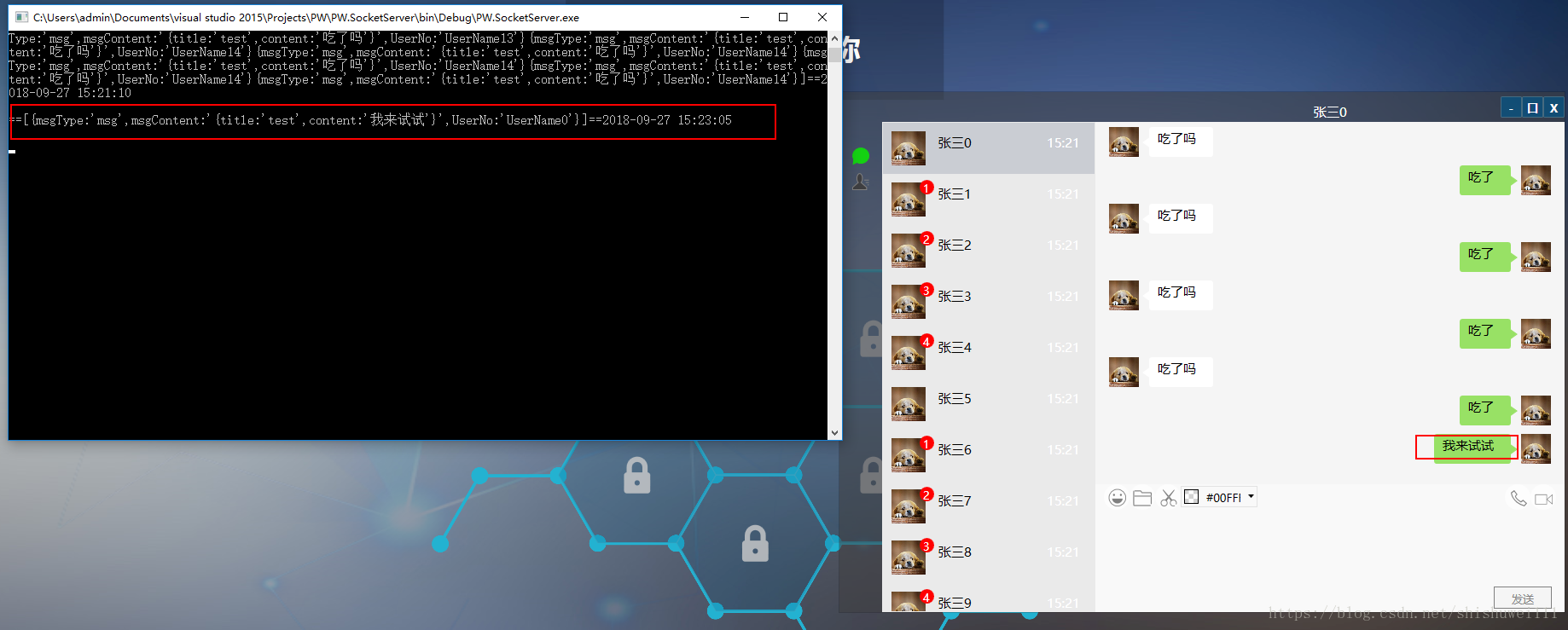
没问题,可以发送成功,没有启动多个客户端,只是能看到服务端收到了消息
再看看表情消息
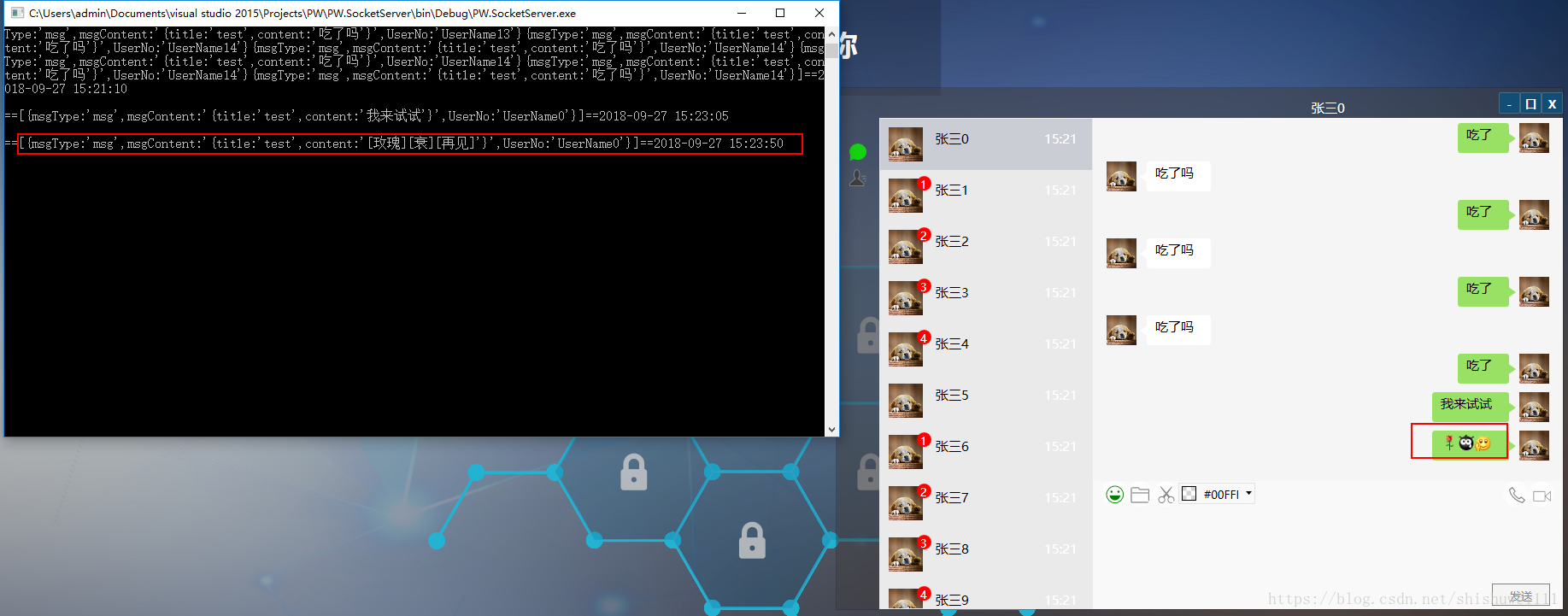
也可以
然后试试接收消息
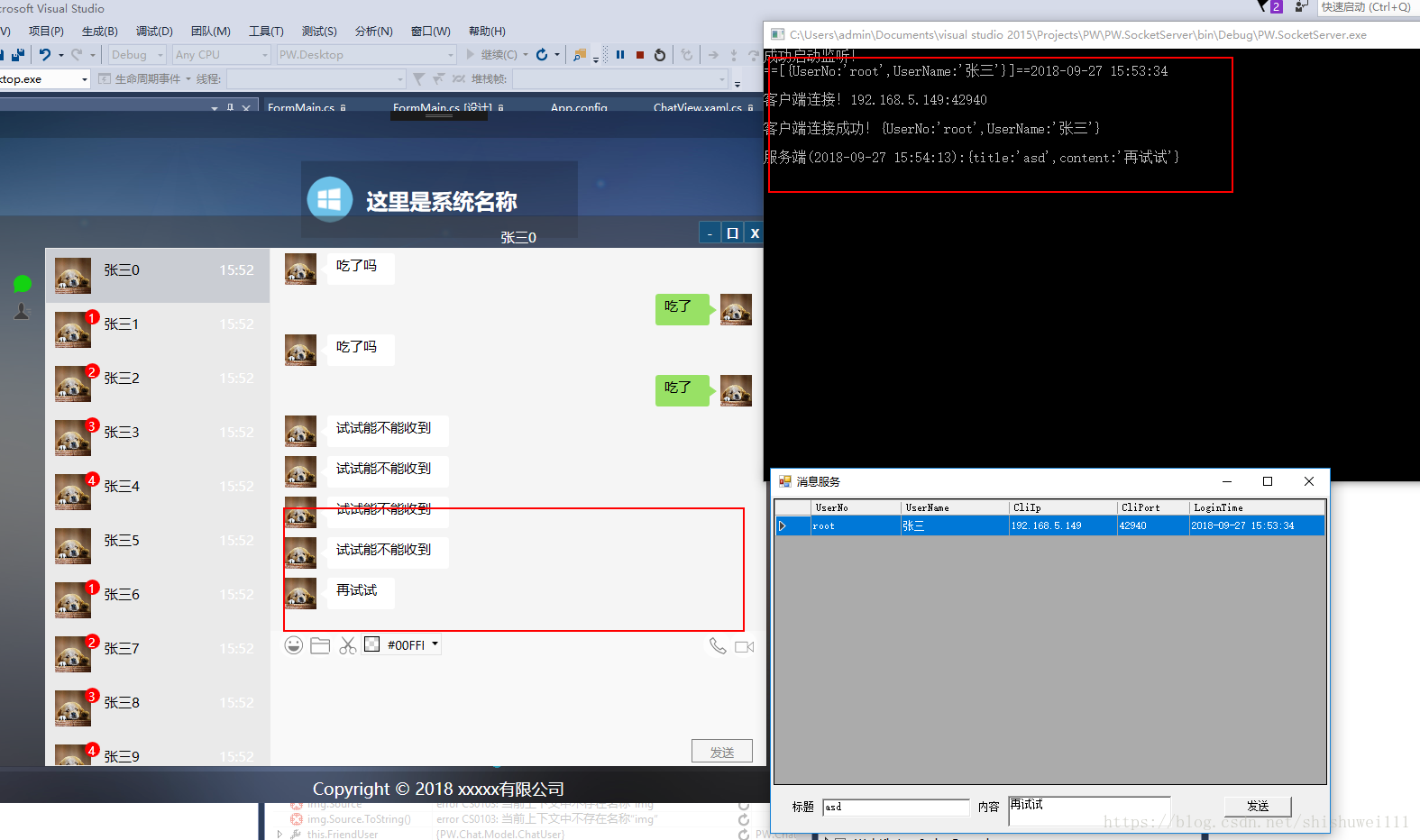
没问题
然后试试左侧的消息数量
先点击一边把之前的都去掉
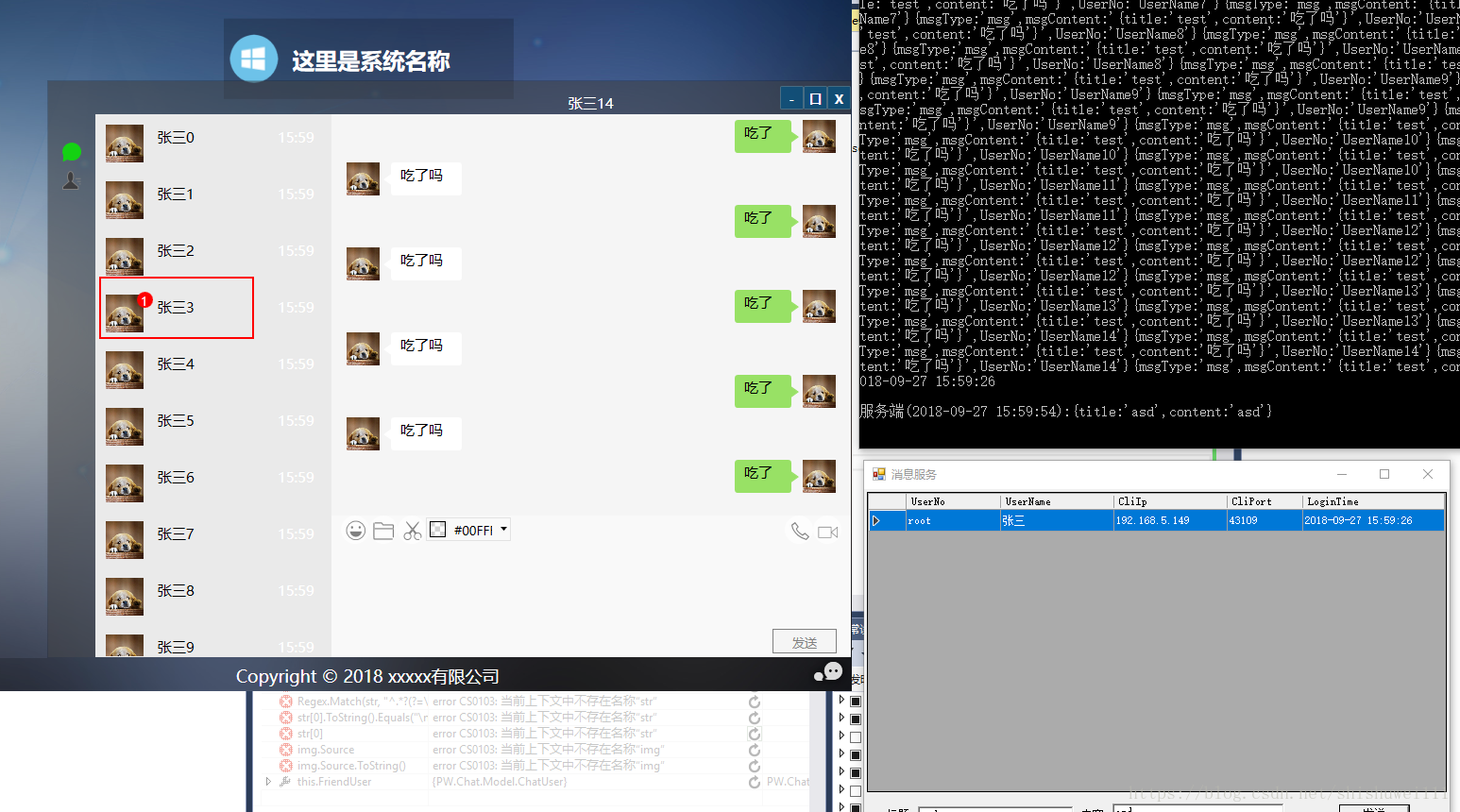
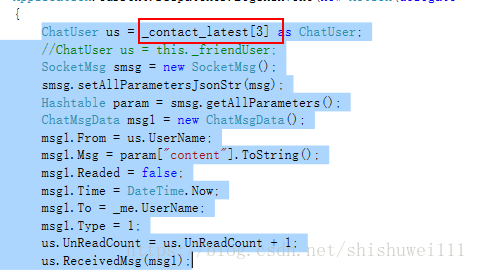
这里因为是测试,直接代码指定的是张三3发来的消息
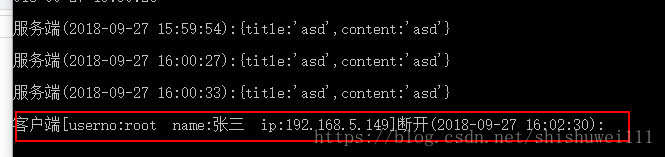
然后关闭程序看服务端
基本的功能都实现了,后续就是不断的完善了
Prism for WPF 搭建一个简单的模块化开发框架(五)添加聊天、消息模块的更多相关文章
- Prism for WPF 搭建一个简单的模块化开发框架 (一个节点)
原文:Prism for WPF 搭建一个简单的模块化开发框架 (一个节点) 这里我就只贴图不贴代码了,看看这个节点之前的效果 觉得做的好的地方可以范之前的文章看看 有好的建议也可以说说 填充数据 ...
- Prism for WPF 搭建一个简单的模块化开发框架(六)隐藏菜单、导航
原文:Prism for WPF 搭建一个简单的模块化开发框架(六)隐藏菜单.导航 这个实际上是在聊天之前做的,一起写了,也不分先后了 看一下效果图,上面是模块主导航,左侧是模块内菜单,现在加一下隐藏 ...
- Prism for WPF 搭建一个简单的模块化开发框架(四)异步调用WCF服务、WCF消息头添加安全验证Token
原文:Prism for WPF 搭建一个简单的模块化开发框架(四)异步调用WCF服务.WCF消息头添加安全验证Token 为什么选择wcf? 因为好像wcf和wpf就是哥俩,,, 为什么选择异步 ...
- Prism for WPF 搭建一个简单的模块化开发框架(三) 给TreeView加样式做成菜单
原文:Prism for WPF 搭建一个简单的模块化开发框架(三) 给TreeView加样式做成菜单 昨天晚上把TreeView的样式做了一下,今天给TreeView绑了数据,实现了切换页面功能 上 ...
- Prism for WPF 搭建一个简单的模块化开发框架(二)
原文:Prism for WPF 搭建一个简单的模块化开发框架(二) 今天又有时间了,再改改,加了一些控件全局的样式 样式代码 <ResourceDictionary xmlns="h ...
- Prism for WPF 搭建一个简单的模块化开发框架(一)
原文:Prism for WPF 搭建一个简单的模块化开发框架(一) 最近闲来无事又想搞搞WPF..... 做个框架吧,可能又是半途而废....总是坚持不下来 不废话了, 先看一下工程结构 布局大概是 ...
- 用express搭建一个简单的博客系统
转自:https://blog.csdn.net/qq_29721837/article/details/62055603 Express 简介 Express 是一个简洁而灵活的 node.js W ...
- 从零开始搭建一个简单的基于webpack的vue开发环境
原文地址:https://segmentfault.com/a/1190000012789253?utm_source=tag-newest 从零开始搭建一个简单的基于webpack的react开发环 ...
- 用nodejs搭建一个简单的服务器
使用nodejs搭建一个简单的服务器 nodejs优点:性能高(读写文件) 数据操作能力强 官网:www.nodejs.org 验证是否安装成功:cmd命令行中输入node -v 如果显示版本号表示安 ...
随机推荐
- July 09th 2017 Week 28th Sunday
He that boasts of his own knowledge proclaims ignorance. 夸耀知识实乃无知. Honestly speaking, I don't agree ...
- 小技巧:Mac下Metasploit渗透Oracle环境的搭建
Metasploit是一款开源的安全漏洞检测工具,可以帮助安全和IT专业人士识别安全性问题,验证漏洞的缓解措施,并管理专家驱动的安全性进行评估,提供真正的安全风险情报.这些功能包括智能开发,密码审计, ...
- Microsoft Visual C++ 2005 Redistributable 无法卸载问题解决办法
今日遇到一个问题,Microsoft Visual C++ 2005 Redistributable 无法卸载,弹出的对话框如下所示: 试了一些网上的方法,比如下载vcredist_x86.exe,解 ...
- libevent使用event_new和不使用的两种方法
写两个简单的demo,对照一下各自的方法 #include <sys/types.h> #include <event2/event-config.h> #include &l ...
- 使用Fragment填充ViewPager
在上一篇文章中,讲解了使用PagerAdapter作为适配器时的ViewPager的使用方法.然后在实际项目中更多的使用Fragment作为页卡,因为实际开发中每一个页卡要复杂的多.而使用Fragme ...
- 【转】2013 PHP技术峰会《Bug Free的PHP开发实践分享》摘录
要想代码写的好,前提配置做的好 error_reporting = E_ALL | E_STRICT display_errors = 测试机设置为 On,生产机设置为 Off display_s ...
- docker-3-常用命令(下)
importance 1.启动守护式容器 docker run -d 容器名 使用镜像centos:latest以后台模式启动一个容器 docker run -d centos 问题:然后do ...
- 转发forward和重定向redirect的区别
本质区别:转发只发送一次请求,重定向发送两次请求. 转发: request.getRequestDispatcher("/HiServlet").forward(request,r ...
- Dropbox的CEO在MIT的毕业演讲
这是我今天看到的一个演讲,个人觉得和乔老大在斯坦佛的毕业演讲有异曲同工之妙,我也觉得对工科的我们很有启发意义,就此转载,希望与君共勉. 编者注:本篇文章基于Drew Houston 在 MIT 毕业典 ...
- [转]asp.net Request、Response 响应在此上下文中不可用
这个问题一般是在页面中使用了Respons.Write()方法,虽然是继承了System.Web.UI.Page.但System.Web.UI.Page下的Response只有在asp.net页面里才 ...