
Unity资源内存管理--webstream控制
一 使用前提
1,需要使用资源热更新
2,使用Assetbundle资源热更(AssetBundle是产生webstream的元凶)
二 为什么要用AssetBundle
AssetBundle本质上就是一个压缩算法,只不过比起zip等一些压缩多了一些信息,比如平台信息(Ios,android),依赖信息等,既然是压缩,那就很好理解了,AssetBundle就是为了减少包体的大小的。Assets/Resources目录其实也是一样的
三 怎么生成AssetBundle
using UnityEditor;

using UnityEngine;

using System.Collections.Generic;

using System.Linq;

public class PushAndPop

{

    [MenuItem("Build/test")]

    static void Test()

    {

        string path1 ="Assets/Resources/UI1.prefab";

        List<string> deps1 = GetDepends(path1);

        Execute(path1, deps1);

        string path2 = "Assets/Resources/UI2.prefab";

        List<string> deps2 = GetDepends(path2);

        Execute(path2, deps2);

    }

    //获取path的依赖资源路径

    static List<string> GetDepends(string path)

    {

        List<string> deps = AssetDatabase.GetDependencies(new string[] { path }).ToList<string>();

        return deps;

    }

    //打包资源path成AssetBundle

    static void Execute(string path, List<string> deps)

    {

        string SavePath = Application.streamingAssetsPath + "/";

        BuildAssetBundleOptions buildOp = BuildAssetBundleOptions.CollectDependencies | BuildAssetBundleOptions.CompleteAssets

            | BuildAssetBundleOptions.DeterministicAssetBundle;

        //先打包依赖

        BuildPipeline.PushAssetDependencies();

        string bundleName = "";

        foreach (var dep in deps)

        {

            Debug.Log(dep);

            string ext = System.IO.Path.GetExtension(dep);

            if (ext == ".png" || ext==".shader" || ext==".FBX" || ext==".ttf")

            {

                Object sharedAsset = AssetDatabase.LoadMainAssetAtPath(dep);

                bundleName = sharedAsset.name.Replace('/', '_') + ext.Replace('.','_');

                BuildPipeline.BuildAssetBundle(sharedAsset, null, SavePath + bundleName + ".assetbundle", buildOp, BuildTarget.StandaloneWindows);

            }

        }

        //再打包主资源

        BuildPipeline.PushAssetDependencies();

        Object mainAsset = AssetDatabase.LoadMainAssetAtPath(path);

        bundleName = mainAsset.name.Replace('/', '_');

        BuildPipeline.BuildAssetBundle(mainAsset, null, SavePath + mainAsset.name + ".assetbundle", buildOp, BuildTarget.StandaloneWindows);

        BuildPipeline.PopAssetDependencies();

        BuildPipeline.PopAssetDependencies();

        AssetDatabase.Refresh();

    }

}
实例代码把Resources目录下的UI1和UI2打成了AssetBundle,并把他们放到了StreamingAssets目录,如下
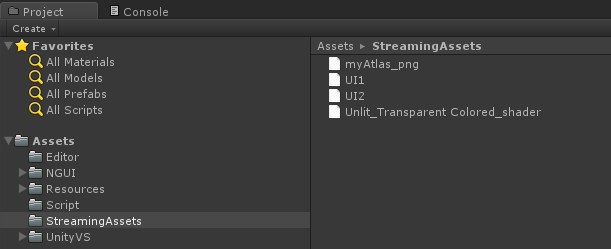
其中myAtlas_png和Unlit_Transparent Colored_shader是UI1和UI2的依赖资源
四 加载AssetBundle并且实例化资源
加载要先依赖再主资源
using UnityEngine;

using System.Collections;

using System.Collections.Generic;

public class AssetLoad : MonoBehaviour

{

    void OnGUI()

    {

        //依赖加载按钮

        if (GUI.Button(new Rect(0f, 30f, 100f, 20f), "Load Share Res"))

        {

            StartCoroutine(Load(@"file://" + Application.streamingAssetsPath + "/myAtlas_png.assetbundle"));

            StartCoroutine(Load(@"file://" + Application.streamingAssetsPath + "/Unlit_Transparent Colored_shader.assetbundle"));

        }

        if (GUI.Button(new Rect(0f, 60f, 100f, 20f), "Load UI1"))

        {

            StartCoroutine(LoadAndInstantiate(@"file://"+Application.streamingAssetsPath + "/UI1.assetbundle"));

        }

        if (GUI.Button(new Rect(0f, 90f, 100f, 20f), "Load UI2"))

        {

            StartCoroutine(LoadAndInstantiate(@"file://" + Application.streamingAssetsPath + "/UI2.assetbundle"));

        }

    }

    // 加载

    IEnumerator Load(string url)

    {

        WWW www = new WWW(url);

        yield return www;

        AssetBundle ab = www.assetBundle;

        //Object obj = ab.mainAsset;

        ab.LoadAll();

        Debug.Log("load" + url);

    }

    // 加载并实例化

    IEnumerator LoadAndInstantiate(string url)

    {

        WWW www = new WWW(url);

        yield return www;

        if (!System.String.IsNullOrEmpty(www.error))

        {

            Debug.Log(www.error);

        }

        else

        {

            Object main = www.assetBundle.mainAsset;

            GameObject.Instantiate(main);

        }

    }

}
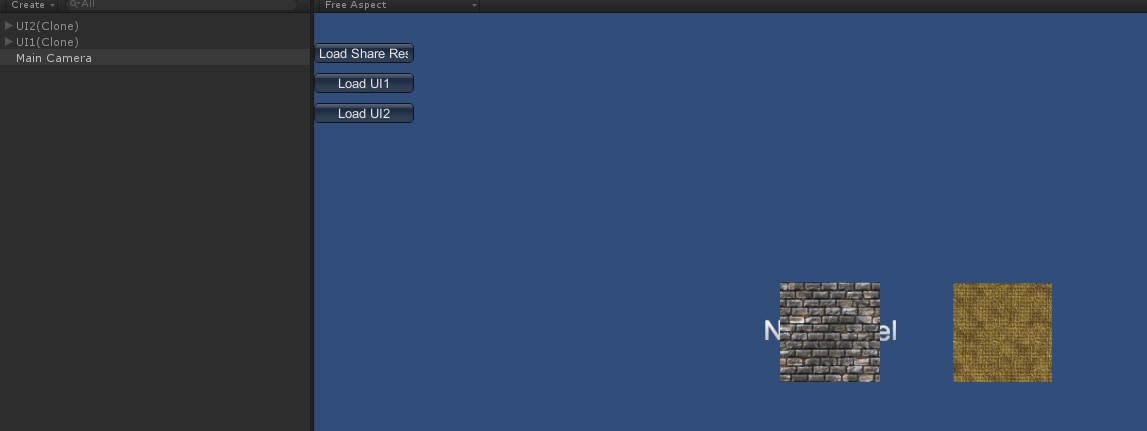
实例用www从StreamingAssets目录加载资源,加载完成后
五 AssetBundle的内存占用
我们先看看加进来的AssetBudle都使用了哪些内存,点击unity的菜单栏Window->Profiler,打开如下窗口
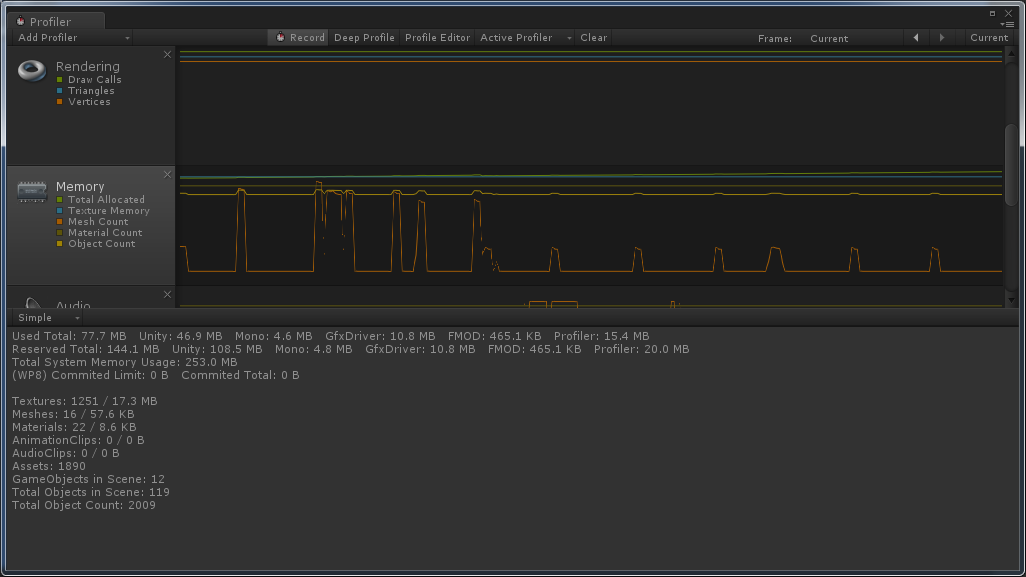
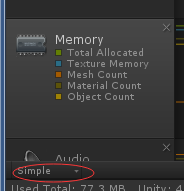
点击到Memory那一栏,在点击Simple旁边的下三角,选择Detailed
点击other,看到下面有一栏WebStream

这就是我们加进来的4个AssetBundle的占用的内存,后面带有各自占用内存
但是还没完,我们点开Assets这一栏
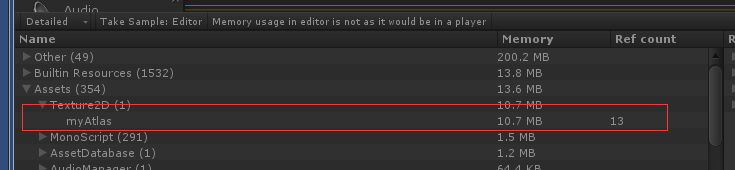
我们看到Texture2D下面有一张我们用到的图片,Shader下面也有

那么问题来了,为什么加进来的AssetBundle占有两处内存(WebStream和Asset),其实也很好理解,我们上面知道AssetBundle和压缩一样,这就好比我们在网站下载了一个zip的压缩文件,如果我们不解压是看不了里面的内容的,这就相当于WebStream下面的内存,Unity是识别不了的。这时候你用压缩软件把zip文件解压了,并且把文件解压在另外的目录,这个解压的操作和unity的ab.loadAll()操作是一样一样的,有木有,有木有,加载出来的Asset资源,Unity就能识别了。
六 AssetBundle内存释放
上面我们说过AssetBundle的内存占用分为WebStream和Asset,那么他们分别是怎么释放的,在什么时候释放,这是个问题
首先,我们释放WebStream的内存,调用ab.Unload(false)函数,可以释放AssetBundle的WebStream的内存
修改Load函数
    // 加载

    List<AssetBundle> ablist = new List<AssetBundle>();

    IEnumerator Load(string url)

    {

        WWW www = new WWW(url);

        yield return www;

        AssetBundle ab = www.assetBundle;

        //Object obj = ab.mainAsset;

        ab.LoadAll();

        //缓存ab

        ablist.Add(ab);

        Debug.Log("load" + url);

    }

    // 加载并实例化

    IEnumerator LoadAndInstantiate(string url)

    {

        WWW www = new WWW(url);

        yield return www;

        if (!System.String.IsNullOrEmpty(www.error))

        {

            Debug.Log(www.error);

        }

        else

        {

            Object main = www.assetBundle.mainAsset;

            GameObject.Instantiate(main);

        }

        //释放WebStream

        foreach(var ab in ablist)

        {

            if(ab != null)

            {

                ab.Unload(false);

            }

        }

    }
运行我们在看看

只剩下两个ui主资源的Webstream了,把他俩的ab加入释放列表,也是可以释放的。
unload(false)释放了Webstream的内存,我们再看看怎么释放Asset的内存,就是类似Texture2D下的图片内存等
释放Asset的内存使用Resources.UnloadAsset(obj) obj就是LoadAll加载出来的资源
我们再次修改我们的加载函数
    // 加载

    List<AssetBundle> ablist = new List<AssetBundle>();

    List<Object> objlist = new List<Object>();

    IEnumerator Load(string url)

    {

        WWW www = new WWW(url);

        yield return www;

        AssetBundle ab = www.assetBundle;

        //Object obj = ab.mainAsset;

        Object[] objs = ab.LoadAll();

        //缓存ab

        ablist.Add(ab);

        objlist.AddRange(objs.ToList<Object>());

        Debug.Log("load" + url);

    }
添加一个按钮作为释放的操作
        if(GUI.Button(new Rect(0f, 120f, 100f, 20f), "Unload"))

        {

            foreach (var obj in objlist)

            {

                Resources.UnloadAsset(obj);

            }

        }
当点击Unload的时候释放了png和shader的Asset内存,我们发现UI也不可见了,所以这个释放操作是在所有引用到这个依赖的GameObject都Destroy的时候调用的,不然会出现资源丢失的情况
七 WebStream的释放时机
我们知道Webstream是用unlaod(false)释放的,但是我们发现,如果UI1和UI2都引用了png,当你实例化UI1后释放png的Webstream,在实例化UI2就不成功了,因为UI2依赖png,所以Webstream和Asset内存一样,也要在所有引用到这个依赖的GameObject都Destroy的时候才能释放。
最后修改的代码如下
using UnityEngine;

using System.Collections;

using System.Collections.Generic;

using System.Linq;

public class AssetLoad : MonoBehaviour

{

    void OnGUI()

    {

        //依赖加载按钮

        if (GUI.Button(new Rect(0f, 30f, 100f, 20f), "Load Share Res"))

        {

            StartCoroutine(Load(@"file://" + Application.streamingAssetsPath + "/myAtlas_png.assetbundle"));

            StartCoroutine(Load(@"file://" + Application.streamingAssetsPath + "/Unlit_Transparent Colored_shader.assetbundle"));

        }

        if (GUI.Button(new Rect(0f, 60f, 100f, 20f), "Load UI1"))

        {

            StartCoroutine(LoadAndInstantiate(@"file://"+Application.streamingAssetsPath + "/UI1.assetbundle"));

        }

        if (GUI.Button(new Rect(0f, 90f, 100f, 20f), "Load UI2"))

        {

            StartCoroutine(LoadAndInstantiate(@"file://" + Application.streamingAssetsPath + "/UI2.assetbundle"));

        }

        if (GUI.Button(new Rect(0f, 120f, 100f, 20f), "Detroy"))

        {

            GameObject go = GameObject.Find("UI1(Clone)");

            GameObject.Destroy(go);

            go = GameObject.Find("UI2(Clone)");

            GameObject.Destroy(go);

        }

         if (GUI.Button(new Rect(0f, 150f, 100f, 20f), "Unload"))

        {

            //释放WebStream

            foreach (var ab in ablist)

            {

                if (ab != null)

                {

                    ab.Unload(false);

                }

            }

            //释放Asset

            foreach (var obj in objlist)

            {

                Resources.UnloadAsset(obj);

            }

        }

    }

    // 加载

    List<AssetBundle> ablist = new List<AssetBundle>();

    List<Object> objlist = new List<Object>();

    IEnumerator Load(string url)

    {

        WWW www = new WWW(url);

        yield return www;

        AssetBundle ab = www.assetBundle;

        //Object obj = ab.mainAsset;

        Object[] objs = ab.LoadAll();

        //缓存ab

        ablist.Add(ab);

        objlist.AddRange(objs.ToList<Object>());

        Debug.Log("load" + url);

    }

    // 加载并实例化

    IEnumerator LoadAndInstantiate(string url)

    {

        WWW www = new WWW(url);

        yield return www;

        if (!System.String.IsNullOrEmpty(www.error))

        {

            Debug.Log(www.error);

        }

        else

        {

            AssetBundle ab = www.assetBundle;

            ablist.Add(ab);

            Object main = ab.mainAsset;

            GameObject.Instantiate(main);

        }

    }

}
八 游戏项目中的内存解决方案
一般在游戏中,游戏资源很多,依赖关系很更复杂,有可能一个png有很多个GameObject引用,如果不及时的释放没有引用的资源,游戏很可能因为内存不足变得卡顿,甚至闪退,
一个很好的办法就是关联主资源和所有实例化的GameObject,并且给主资源引用的依赖计数,每当有一个主资源引用到依赖,依赖引用计数就+1,每当实例化一个GameObject,主资源的计数+1,当删除一个GamObject的时候,主资源计数-1,当主资源计数为0,主资源依赖计数分别-1,如果依赖的计数为0,释放这个依赖的Webstream和Asset内存。
Unity资源内存管理--webstream控制的更多相关文章
- 从Profile中窥探Unity的内存管理
刨根问底U3D---从Profile中窥探Unity的内存管理 这篇文章包含哪些内容 这篇文章从Unity的Profile组件入手,来探讨一下Unity在开发环境和正式环境中的内存使用发面的一些区别, ...
- 刨根问底U3D---从Profile中窥探Unity的内存管理
这篇文章包含哪些内容 这篇文章从Unity的Profile组件入手,来探讨一下Unity在开发环境和正式环境中的内存使用发面的一些区别, 并且给出了最好控制内存的方法(我想你已经知道了...Prefa ...
- Unity游戏开发中的内存管理_资料
内存是手游的硬伤——Unity游戏Mono内存管理及泄漏http://wetest.qq.com/lab/view/135.html 深入浅出再谈Unity内存泄漏http://wetest.qq.c ...
- 【转载】Unity 优雅地管理资源,减少占用内存,优化游戏
转自:星辰的<Unity3D占用内存太大的解决方法> 最近网友通过网站搜索Unity3D在手机及其他平台下占用内存太大. 这里写下关于Unity3D对于内存的管理与优化. Unity3D ...
- [转]全面理解Unity加载和内存管理
[转]全面理解Unity加载和内存管理 最近一直在和这些内容纠缠,把心得和大家共享一下: Unity里有两种动态加载机制:一是Resources.Load,一是通过AssetBundle,其实两者本质 ...
- Unity 全面理解加载和内存管理
最近一直在和这些内容纠缠,把心得和大家共享一下: Unity里有两种动态加载机制:一是Resources.Load,一是通过AssetBundle,其实两者本质上我理解没有什么区别.Resources ...
- Unity 3D中的内存管理
本文欢迎转载,但烦请保留此行出处信息:http://www.onevcat.com/2012/11/memory-in-unity3d/ Unity3D在内存占用上一直被人诟病,特别是对于面向移动设备 ...
- Unity动态加载和内存管理(三合一)
原址:http://game.ceeger.com/forum/read.php?tid=4394#info 最近一直在和这些内容纠缠,把心得和大家共享一下: Unity里有两种动态加载机制:一是Re ...
- 理解Unity加载和内存管理
转自:http://game.ceeger.com/forum/read.php?tid=4394#info Unity里有两种动态加载机制:一是Resources.Load,一是通过AssetBun ...
随机推荐
- 使用 pm2 优雅的部署 node 程序
使用 pm2 优雅的部署 node 程序 # 启动并监控名字为 XXX 的 npm run start:dev 命令 pm2 start npm --watch --name XXX -- run s ...
- linux 添加环境变量
You have to edit three files to set a permanent environment variable as follow: ~/.bashrc When you o ...
- CocoaPods 中删除不需要的第三方
1...打开Podfile 找到不需要的类库,直接删除 2...打开终端cd到当前项目的根目录下重新执行pod install --verbose --no-repo-update命令(更新一下) ...
- 改变选择文字的color及background-color
在一些特殊的网站中,常常会有着一些新奇的体验,在阅读网页的时候相信许多人都会和我一样有着一个习惯,把一些文字选中然后进行阅读,或者时要复制粘贴的时候选择文字对吧.然而无论是在ie,chrome,fir ...
- OpenGL.Qt532.cube
1.官方的例子(安装好代源码的Qt532就有该例子) E:\Project_Qt532\Official_Examples\opengl\cube E:\Project_Qt532\Official_ ...
- [原][杂谈]如果人类的末日:"天网"出现
本文由南水之源在2019年3月21日发布,转载需声明原作者 本文仅为一次基于科技发展与科幻小说的幻想,如果天网真的出现,请不要参考这篇逻辑破败的推论. 参考: 天网(Skynet),是电影<终结 ...
- C# Selenium 破解腾讯滑动验证
什么是Selenium? WebDriver是主流Web应用自动化测试框架,具有清晰面向对象 API,能以最佳的方式与浏览器进行交互. 支持的浏览器: Mozilla Firefox Google C ...
- 使用js写简易的倒计时
步骤 1.获取span标签2.获取现在的时间戳 3.获取未来的时间戳 4.将未来时间戳减去现在的时间戳等于相差的秒数 5.输出到页面 直接上代码 <span name="os" ...
- 菜鸡学C语言之真心话大冒险
题目描述 Leslie非常喜欢真心话大冒险的游戏.这一次游戏的规则有些不同.每个人都有自己的真心话,一开始每个人也都只知道自己的真心话.每一轮每个人都告诉指定的一个人他所知道的所有真心话,那么Lesl ...
- expect使用
expect时用与提供自动交互的工具.比如如果想要用ssh登陆服务器,每次都输入密码你觉得麻烦,那你就可以使用expect来做自动交互,这样的话就不用每次都输入密码了. 先看例子: #!/usr/bi ...