
mybatis源码解析之Configuration加载(三)
概述
上一篇我们主要分析了下<environments>标签下面,transactionManager的配置,上问最后还有个遗留问题:就是在设置事物管理器的时候有个autocommit的变量的初始值是在哪边处理的呢?今天我们就来解答一下。
<environments>的dataSource分析
   private void environmentsElement(XNode context) throws Exception {

     if (context != null) {

       if (environment == null) {

         environment = context.getStringAttribute("default");

       }

       for (XNode child : context.getChildren()) {

         String id = child.getStringAttribute("id");

         if (isSpecifiedEnvironment(id)) {

           TransactionFactory txFactory = transactionManagerElement(child.evalNode("transactionManager"));

           DataSourceFactory dsFactory = dataSourceElement(child.evalNode("dataSource"));

           DataSource dataSource = dsFactory.getDataSource();

           Environment.Builder environmentBuilder = new Environment.Builder(id)

               .transactionFactory(txFactory)

               .dataSource(dataSource);

           configuration.setEnvironment(environmentBuilder.build());

         }

       }

     }

   }
上一篇我们分析了黄色部分的,今天我们来分析下红色部分的,我们照旧先来看下configuation.xml中这部分的配置:
     <environments default="development">

         <environment id="development">

             <transactionManager type="JDBC" />

             <dataSource type="POOLED">

                 <property name="driver" value="${driveClass}" />

                 <property name="url" value="${url}" />

                 <property name="username" value="${userName}" />

                 <property name="password" value="${password}" />

             </dataSource>

         </environment>

     </environments>
这边4到9行就是配置的datasource的相关信息,我们来看下上面标红的第九行代码,跟进去之后,解析代码如下:
   private DataSourceFactory dataSourceElement(XNode context) throws Exception {

     if (context != null) {

       String type = context.getStringAttribute("type");

       Properties props = context.getChildrenAsProperties();

       DataSourceFactory factory = (DataSourceFactory) resolveClass(type).newInstance();

       factory.setProperties(props);

       return factory;

     }

     throw new BuilderException("Environment declaration requires a DataSourceFactory.");

   }
第3行代码,根据上面配置文件中的type来确定数据源的类型,第4行,再获取连接数据源的一些必要属性配置,看下第5行代码:
   protected Class<?> resolveClass(String alias) {

     if (alias == null) {

       return null;

     }

     try {

       return resolveAlias(alias);

     } catch (Exception e) {

       throw new BuilderException("Error resolving class. Cause: " + e, e);

     }

   }

   protected Class<?> resolveAlias(String alias) {

     return typeAliasRegistry.resolveAlias(alias);

   }
可以看出,跟前面实例化事物管理器一样,也是从typeAliasRegistry中根据type去获取,然后实例化,我上面配置的是pooled,这边最终实例化的应该是PooledDataSourceFactory这个数据源工厂,其实这边的配置不止这一个,还有JNDI,UNPOOLED,分别对应于JndiDataSourceFactory,UnpooledDataSourceFactory,这些也都是在Configuration.class中加载好的,
     typeAliasRegistry.registerAlias("JNDI", JndiDataSourceFactory.class);

     typeAliasRegistry.registerAlias("POOLED", PooledDataSourceFactory.class);

     typeAliasRegistry.registerAlias("UNPOOLED", UnpooledDataSourceFactory.class);
我们依次来介绍下,先看下目录结构:
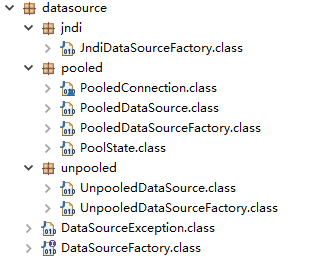
可以看到,DataSourceFactory是数据源工厂接口,主要有如下两个方法:
 public interface DataSourceFactory {

   void setProperties(Properties props);

   DataSource getDataSource();

 }
第3行代码,是用来设置数据源的相关属性,一般是在初始化完成之后进行,第5行代码,是获取数据源对象的方法。
这个接口有两个实现类,JndiDataSourceFactory和UnpooledDataSourceFactory,另外一个PooledDataSourceFactory其实是继承于UnpooledDataSourceFactory。
UnpooledDataSourceFactory
UnpooledDataSourceFactory主要用来创建UnpooledDataSource对象,代码如下:
 public class UnpooledDataSourceFactory implements DataSourceFactory {

   private static final String DRIVER_PROPERTY_PREFIX = "driver.";

   private static final int DRIVER_PROPERTY_PREFIX_LENGTH = DRIVER_PROPERTY_PREFIX.length();

   protected DataSource dataSource;

   public UnpooledDataSourceFactory() {

     this.dataSource = new UnpooledDataSource();

   }

   @Override

   public void setProperties(Properties properties) {

     Properties driverProperties = new Properties();

     MetaObject metaDataSource = SystemMetaObject.forObject(dataSource);

     for (Object key : properties.keySet()) {

       String propertyName = (String) key;

       if (propertyName.startsWith(DRIVER_PROPERTY_PREFIX)) {

         String value = properties.getProperty(propertyName);

         driverProperties.setProperty(propertyName.substring(DRIVER_PROPERTY_PREFIX_LENGTH), value);

       } else if (metaDataSource.hasSetter(propertyName)) {

         String value = (String) properties.get(propertyName);

         Object convertedValue = convertValue(metaDataSource, propertyName, value);

         metaDataSource.setValue(propertyName, convertedValue);

       } else {

         throw new DataSourceException("Unknown DataSource property: " + propertyName);

       }

     }

     if (driverProperties.size() > 0) {

       metaDataSource.setValue("driverProperties", driverProperties);

     }

   }

   @Override

   public DataSource getDataSource() {

     return dataSource;

   }

   private Object convertValue(MetaObject metaDataSource, String propertyName, String value) {

     Object convertedValue = value;

     Class<?> targetType = metaDataSource.getSetterType(propertyName);

     if (targetType == Integer.class || targetType == int.class) {

       convertedValue = Integer.valueOf(value);

     } else if (targetType == Long.class || targetType == long.class) {

       convertedValue = Long.valueOf(value);

     } else if (targetType == Boolean.class || targetType == boolean.class) {

       convertedValue = Boolean.valueOf(value);

     }

     return convertedValue;

   }

 }
第8到10行代码,在构造方法中初始化UnpooledDataSource对象,并在getDataSource方法中返回UnpooledDataSource对象,在setProperties方法中完成对UnpooledDataSource对象的相关配置。我们看下setProperties方法大致流程如下:
1.创建datasource对应的MetaObject
2.遍历properties集合,这个集合中存放了数据源需要的信息,也是我们配置在configuration.xml的property
3.判断key值是否以“driver.”开头,以这个开头的是驱动类信息,保存至driverProperties中
4.不是以“driver.”开头属性,先判断在MetaObject(其实就是UnpooledDataSource)中是否有对应的set方法,没有,则抛出异常
5.有的话,现获取属性值,根据MetaObject中返回值进行类型进行类型转换,主要针对Integer,Long,Boolean
6.设置MetaObject中driverProperties的属性值,也就是datasource的属性值。
PooledDataSourceFactory
PooledDataSourceFactory 主要用来创建 PooledDataSource 对象,它继承了 UnpooledDataSource 类,设置 DataSource 参数的方法复用UnpooledDataSource 中的 setProperties 方法,只是数据源返回的是 PooledDataSource 对象而已。
 public class PooledDataSourceFactory extends UnpooledDataSourceFactory {

   public PooledDataSourceFactory() {

     this.dataSource = new PooledDataSource();

   }

 }
初始化PooledDataSourceFactory这个类时,会在构造方法中初始化PooledDataSource对象,后续getDataSource方法中返回的也就是这个对象。
JndiDataSourceFactory
JndiDataSourceFactory 依赖 JNDI 服务器中获取用户配置的 DataSource,这里暂时不看。
下面我们就来看看具体的数据源是怎么实现的,
UnpooledDataSource
UnpooledDataSource 不使用连接池来创建数据库连接,每次获取数据库连接时都会创建一个新的连接进行返回;
 public class UnpooledDataSource implements DataSource {

   private ClassLoader driverClassLoader;  // 加载 Driver 类的类加载器

   private Properties driverProperties;  // 数据库连接驱动的相关配置

   private static Map<String, Driver> registeredDrivers = new ConcurrentHashMap<String, Driver>(); // 缓存所有已注册的数据库连接驱动

   private String driver;

   private String url;

   private String username;

   private String password;

   private Boolean autoCommit; // 是否自动提交

   private Integer defaultTransactionIsolationLevel; // 事物的隔离级别

   static {

     Enumeration<Driver> drivers = DriverManager.getDrivers(); // 从DriverManager中获取已注册的驱动信息

     while (drivers.hasMoreElements()) {

       Driver driver = drivers.nextElement();

       registeredDrivers.put(driver.getClass().getName(), driver); // 将已注册的驱动信息保存至registeredDrivers中

     }

   }
接下来看一下,实现DataSource的两个获取连接的方法:
   @Override

   public Connection getConnection() throws SQLException {

     return doGetConnection(username, password); // 根据properties中设置的属性类来获取连接

   }

   @Override

   public Connection getConnection(String username, String password) throws SQLException {

     return doGetConnection(username, password);

   }
可以看出最终调用的都是doGetConnection(username, password)方法,具体如下:
   private Connection doGetConnection(String username, String password) throws SQLException {

     Properties props = new Properties();

     if (driverProperties != null) {

       props.putAll(driverProperties); // 设置数据库连接驱动的相关配置属性

     }

     if (username != null) {

       props.setProperty("user", username); // 设置用户名

     }

     if (password != null) {

       props.setProperty("password", password); // 设置密码

     }

     return doGetConnection(props);

   }

   private Connection doGetConnection(Properties properties) throws SQLException {

     initializeDriver(); // 初始化数据库驱动

     Connection connection = DriverManager.getConnection(url, properties); // 通过 DriverManager 来获取一个数据库连接

     configureConnection(connection); // 配置数据库连接的 autoCommit 和隔离级别

     return connection;

   }

   private synchronized void initializeDriver() throws SQLException {

     if (!registeredDrivers.containsKey(driver)) { // 当前的驱动还有注册过,进行注册

       Class<?> driverType;

       try {

         if (driverClassLoader != null) {

           driverType = Class.forName(driver, true, driverClassLoader);

         } else {

           driverType = Resources.classForName(driver);

         }

         Driver driverInstance = (Driver)driverType.newInstance();  // 创建驱动对象实例

         DriverManager.registerDriver(new DriverProxy(driverInstance)); // 往DriverManager中注册驱动

         registeredDrivers.put(driver, driverInstance); // 在registerDrivers中记录加载过的驱动

       } catch (Exception e) {

         throw new SQLException("Error setting driver on UnpooledDataSource. Cause: " + e);

       }

     }

   }

   // 设置数据库连接的 autoCommit 和隔离级别

   private void configureConnection(Connection conn) throws SQLException {

     if (autoCommit != null && autoCommit != conn.getAutoCommit()) {

       conn.setAutoCommit(autoCommit); // 上一篇文章最后的问题答案就在这边

     }

     if (defaultTransactionIsolationLevel != null) {

       conn.setTransactionIsolation(defaultTransactionIsolationLevel);

     }

   }
以上代码就是 UnpooledDataSource 类的主要实现逻辑,每次获取连接都是从数据库新创建一个连接进行返回,又因为,数据库连接的创建是一个耗时的操作,且数据库连接是非常珍贵的资源,如果每次获取连接都创建一个,则可能会造成系统的瓶颈,拖垮响应速度等,这时就需要数据库连接池了,Mybatis 也提供了自己数据库连接池的实现,就是 PooledDataSource 类。
PooledDataSource
这个类说真的,还是比较复杂的,我也是研究了有一会儿的,它内部创建数据库连接时基于我们上面介绍的UnpooledDataSource,但是呢,PooledDataSource并不会像UnpooledDataSource那样去管理数据库连接,而是通过PoolConnection来实现对于连接的管理,当然,既然是连接池,就有相关的状态,这边通过PoolState来管理连接池的状态,下面我们就来一次介绍下:
PoolConnection
代码如下,最明显的就是这个实现了InvocationHandler接口,说明它是一个代理类,那他肯定就会实现invoke接口。
 class PooledConnection implements InvocationHandler {

   private static final String CLOSE = "close";   // 判断是否是close方法

   private static final Class<?>[] IFACES = new Class<?>[] { Connection.class };

   private int hashCode = 0;


   private PooledDataSource dataSource;  // 当前PoolConnection是属于哪个PooldataSource的

   private Connection realConnection;    // 真正的数据库连接

   private Connection proxyConnection;   // 数据库连接的代理对象

   private long checkoutTimestamp;       // 从连接池中取出该连接的时间戳

   private long createdTimestamp;        // 该连接创建的时间戳

   private long lastUsedTimestamp;       // 该连接最后一次被使用的时间戳

   private int connectionTypeCode;       // 用于标识该连接所在的连接池,由URL+username+password 计算出来的hash值

   private boolean valid;                // 代理连接是否有效

   public PooledConnection(Connection connection, PooledDataSource dataSource) {

     this.hashCode = connection.hashCode();

     this.realConnection = connection;

     this.dataSource = dataSource;

     this.createdTimestamp = System.currentTimeMillis();

     this.lastUsedTimestamp = System.currentTimeMillis();

     this.valid = true;

     this.proxyConnection = (Connection) Proxy.newProxyInstance(Connection.class.getClassLoader(), IFACES, this);

   }

    // 废弃连接

   public void invalidate() {

     valid = false;

   }

      // 判断连接是否有效
      1.根据valid
          2.向数据库中发送检测测试的SQL,查看真正的连接还是否有效

   public boolean isValid() {

     return valid && realConnection != null && dataSource.pingConnection(this);

   }
上面这几个方法就是PoolConnection的构造方法,初始化相关类变量,判断连接是否有效及废弃连接的方法。下面我们再来看下invoke方法:
   public Object invoke(Object proxy, Method method, Object[] args) throws Throwable {

     String methodName = method.getName();

     if (CLOSE.hashCode() == methodName.hashCode() && CLOSE.equals(methodName)) { // 判断是不是close方法,如果是,将连接放回到连接池中,下次继续获取使用

       dataSource.pushConnection(this);

       return null;

     } else {

       try {

         if (!Object.class.equals(method.getDeclaringClass())) { // 不是close方法,执行真正的数据库连接执行

           // issue #579 toString() should never fail

           // throw an SQLException instead of a Runtime

           checkConnection();  // 检查连接是否有效

         }

         return method.invoke(realConnection, args);

       } catch (Throwable t) {

         throw ExceptionUtil.unwrapThrowable(t);

       }

     }

   }
这个方法主要就是通过代理判断是不是close方法,是的的话并不是这届关闭,而是将其放回连接池中,供下次使用。
PoolState
这个类主要用来管理连接池的一些状态,没有
 public class PoolState {

   protected PooledDataSource dataSource; // 该poolstate属于哪个pooleddatasource

   protected final List<PooledConnection> idleConnections = new ArrayList<PooledConnection>(); // 来用存放空闲的 pooledConnection 连接

   protected final List<PooledConnection> activeConnections = new ArrayList<PooledConnection>(); // 用来存放活跃的 PooledConnection 连接

   protected long requestCount = 0; // 请求数据库连接的次数

   protected long accumulatedRequestTime = 0; // 获取连接的累计时间

   protected long accumulatedCheckoutTime = 0; // 所有连接的累计从获取连接到归还连接的时长

   protected long claimedOverdueConnectionCount = 0; // 连接超时的连接个数

   protected long accumulatedCheckoutTimeOfOverdueConnections = 0; // 累计超时时间

   protected long accumulatedWaitTime = 0; // 累计等待时间

   protected long hadToWaitCount = 0; // 等待次数

   protected long badConnectionCount = 0; // 无效连接数
PooledDataSource
PooledDataSource 它是一个简单的,同步的,线程安全的数据库连接池,它使用UnpooledDataSource 来创建数据库连接,使用PooledConnection来管理数据库中的连接,使用PoolState来管理连接池的状态。下面我们就来一起看下这个类,首先看下相关的类变量:
 public class PooledDataSource implements DataSource {

   private final PoolState state = new PoolState(this); // 当前连接池的状态

   private final UnpooledDataSource dataSource; // 用来创建真正的数据库连接对象

   // OPTIONAL CONFIGURATION FIELDS

   protected int poolMaximumActiveConnections = 10; // 最大活跃连接数 默认值 10

   protected int poolMaximumIdleConnections = 5; // 最大空闲连接数 默认值 5

   protected int poolMaximumCheckoutTime = 20000; // 最大获取连接的时长 默认值 20000

   protected int poolTimeToWait = 20000; // 获取连接时,最大的等待时长 默认值 20000

   protected String poolPingQuery = "NO PING QUERY SET"; // 检测连接是否可用时的测试sql

   protected boolean poolPingEnabled; // 是否允许发送测试sql

   protected int poolPingConnectionsNotUsedFor; // 当连接超过 poolPingConnectionsNotUsedFor 毫秒未使用时,会发送一次测试 SQL 语句,测试连接是否正常

   private int expectedConnectionTypeCode; // 用来标识当前的连接池,是 url+username+password 的 hash 值
下面我们来看下从数据库获取连接的实现:
   public Connection getConnection(String username, String password) throws SQLException {

     return popConnection(username, password).getProxyConnection(); // 这边最终拿到的连接时代理的连接,不是真正的数据库连接

   }

   private PooledConnection popConnection(String username, String password) throws SQLException {

     boolean countedWait = false;

     PooledConnection conn = null; // pooledConnection对象

     long t = System.currentTimeMillis();

     int localBadConnectionCount = 0; // 无效的连接个数

     while (conn == null) { // pooledConnection代理对象为空

       synchronized (state) { // 加锁操作

         if (!state.idleConnections.isEmpty()) { // 判断当前idleConnection中是否存在空闲连接

           // Pool has available connection

           conn = state.idleConnections.remove(0); // 存在,则获取第一个连接

           if (log.isDebugEnabled()) {

             log.debug("Checked out connection " + conn.getRealHashCode() + " from pool.");

           }

         } else { // 不存在空闲连接,作如下判断

           // Pool does not have available connection

           if (state.activeConnections.size() < poolMaximumActiveConnections) { // 如果连接池的活跃连接数小于最大活跃连接数

             // Can create new connection

             conn = new PooledConnection(dataSource.getConnection(), this); // 创建一个数据库连接代理对象,创建新的连接

             if (log.isDebugEnabled()) {

               log.debug("Created connection " + conn.getRealHashCode() + ".");

             }

           } else { // 如果连接池的活跃连接数大于等于最大活跃连接数,不能创建新的连接

             // Cannot create new connection

             PooledConnection oldestActiveConnection = state.activeConnections.get(0); // 获取最先创建的那个连接

             long longestCheckoutTime = oldestActiveConnection.getCheckoutTime(); // 获取它的连接时长,用来判断是否连接超时

             if (longestCheckoutTime > poolMaximumCheckoutTime) { // 如果该连接的已经超时

               // Can claim overdue connection   // 统计相应的数据

               state.claimedOverdueConnectionCount++;

               state.accumulatedCheckoutTimeOfOverdueConnections += longestCheckoutTime;

               state.accumulatedCheckoutTime += longestCheckoutTime;

               state.activeConnections.remove(oldestActiveConnection);  // 将超时连接移出activeConnections

               if (!oldestActiveConnection.getRealConnection().getAutoCommit()) { // 如果该连接没有设置自动提交

                 try {

                   oldestActiveConnection.getRealConnection().rollback(); // 回滚操作

                 } catch (SQLException e) {

                   log.debug("Bad connection. Could not roll back");

                 }

               }

               conn = new PooledConnection(oldestActiveConnection.getRealConnection(), this); // 创建新的数据库代理对象,用的原来的数据库连接,并没有创建新的连接

               conn.setCreatedTimestamp(oldestActiveConnection.getCreatedTimestamp());

               conn.setLastUsedTimestamp(oldestActiveConnection.getLastUsedTimestamp());

               oldestActiveConnection.invalidate(); // 设置该超时的代理连接对象无效

               if (log.isDebugEnabled()) {

                 log.debug("Claimed overdue connection " + conn.getRealHashCode() + ".");

               }

             } else { // 如果没有连接超时,那就必须等待

               // Must wait

               try {

                 if (!countedWait) {

                   state.hadToWaitCount++; // 获取连接等待次数增加

                   countedWait = true;

                 }

                 if (log.isDebugEnabled()) {

                   log.debug("Waiting as long as " + poolTimeToWait + " milliseconds for connection.");

                 }

                 long wt = System.currentTimeMillis();

                 state.wait(poolTimeToWait); // 阻塞等待,后续如果有连接归还,会唤醒这个阻塞的等待线程

                 state.accumulatedWaitTime += System.currentTimeMillis() - wt; // 统计时间

               } catch (InterruptedException e) {

                 break; // 中断退出

               }

             }

           }

         }

         if (conn != null) { // 获取到了代理连接对象

           if (conn.isValid()) { // 判断对象是否有效 -- 代理对象是否有效,发送测试Sql测试连接

             if (!conn.getRealConnection().getAutoCommit()) { // 代理对象无效,没有设置自动提交的话

               conn.getRealConnection().rollback(); // 执行回滚操作

             }

             conn.setConnectionTypeCode(assembleConnectionTypeCode(dataSource.getUrl(), username, password)); // 设置此代理连接的标识

             conn.setCheckoutTimestamp(System.currentTimeMillis());

             conn.setLastUsedTimestamp(System.currentTimeMillis());

             state.activeConnections.add(conn); // 将此连接放入activeConnection中

             state.requestCount++;

             state.accumulatedRequestTime += System.currentTimeMillis() - t;

           } else { // 代理对象无效

             if (log.isDebugEnabled()) {

               log.debug("A bad connection (" + conn.getRealHashCode() + ") was returned from the pool, getting another connection.");

             } // 统计数据

             state.badConnectionCount++;

             localBadConnectionCount++;

             conn = null;

             if (localBadConnectionCount > (poolMaximumIdleConnections + 3)) { // 无效连接超过最大空闲连接3个,抛出异常

               if (log.isDebugEnabled()) {

                 log.debug("PooledDataSource: Could not get a good connection to the database.");

               }

               throw new SQLException("PooledDataSource: Could not get a good connection to the database.");

             }

           }

         }

       }

     }

     if (conn == null) { // 没有获取到,抛出异常

       if (log.isDebugEnabled()) {

         log.debug("PooledDataSource: Unknown severe error condition.  The connection pool returned a null connection.");

       }

       throw new SQLException("PooledDataSource: Unknown severe error condition.  The connection pool returned a null connection.");

     }

     return conn;

   }
上面的方法中有一个isValid方法,判断连接是否有效,我们来看一下:
   public boolean isValid() {

     return valid && realConnection != null && dataSource.pingConnection(this);

   }
先判断代理连接对象是否有效,然后调用pingConnection方法尝试调用数据库,执行测试sql,看下pingConnection方法:
   protected boolean pingConnection(PooledConnection conn) {

     boolean result = true;

     try {

       result = !conn.getRealConnection().isClosed(); // 检测真实的数据库连接是否已关闭

     } catch (SQLException e) {

       if (log.isDebugEnabled()) { // 抛出异常的话,将连接设置为已关闭,直接返回

         log.debug("Connection " + conn.getRealHashCode() + " is BAD: " + e.getMessage());

       }

       result = false;

     }

     if (result) { // 没有关闭的话

       if (poolPingEnabled) { // 判断是否允许发送测试sql

         if (poolPingConnectionsNotUsedFor >= 0 && conn.getTimeElapsedSinceLastUse() > poolPingConnectionsNotUsedFor) {// 允许发送测试sql,并且该连接超过设定时间未使用

           try {

             if (log.isDebugEnabled()) {

               log.debug("Testing connection " + conn.getRealHashCode() + " ...");

             }

             Connection realConn = conn.getRealConnection(); // 这边几行代码就是通过连接去发送测试sql

             Statement statement = realConn.createStatement();

             ResultSet rs = statement.executeQuery(poolPingQuery);

             rs.close();

             statement.close();

             if (!realConn.getAutoCommit()) {

               realConn.rollback();

             }

             result = true; // 执行测试sql成功,返回true

             if (log.isDebugEnabled()) {

               log.debug("Connection " + conn.getRealHashCode() + " is GOOD!");

             }

           } catch (Exception e) { // 捕获到异常,返回false

             log.warn("Execution of ping query '" + poolPingQuery + "' failed: " + e.getMessage());

             try {

               conn.getRealConnection().close();

             } catch (Exception e2) {

               //ignore

             }

             result = false;

             if (log.isDebugEnabled()) {

               log.debug("Connection " + conn.getRealHashCode() + " is BAD: " + e.getMessage());

             }

           }

         }

       }

     }

     return result;

   }
上面讲了获取数据库连接的方法,当然就有归还数据库连接的方法,这个方法是在连接关闭的时候通过代理调用的,pushConnection方法如下:
   protected void pushConnection(PooledConnection conn) throws SQLException {

     synchronized (state) { // 加锁操作
      // 从活跃连接list中移除这个连接代理

       state.activeConnections.remove(conn);
      // 连接代理是否有效

       if (conn.isValid()) {
        // 连接代理有效,判断当前空闲连接list的数量是否小于最大值,并且 当前连接代理是属于当前的连接池

         if (state.idleConnections.size() < poolMaximumIdleConnections && conn.getConnectionTypeCode() == expectedConnectionTypeCode) {
        // 统计使用的时间

           state.accumulatedCheckoutTime += conn.getCheckoutTime();

           if (!conn.getRealConnection().getAutoCommit()) {
        // 没有设置自动提交的话,执行回滚操作

             conn.getRealConnection().rollback();

           }
        // 使用原来的数据库连接创建新的连接代理

           PooledConnection newConn = new PooledConnection(conn.getRealConnection(), this);
        // 将新建的连接代理放入空闲列表list

           state.idleConnections.add(newConn);
        // 设置创建时间戳

           newConn.setCreatedTimestamp(conn.getCreatedTimestamp());
        // 设置上一次使用的时间戳

           newConn.setLastUsedTimestamp(conn.getLastUsedTimestamp());
        // 将原来的连接代理置为失效

           conn.invalidate();

           if (log.isDebugEnabled()) {

             log.debug("Returned connection " + newConn.getRealHashCode() + " to pool.");

           }
        // 唤醒所有等待线程

           state.notifyAll();

         } else {
        // 当前连接池的空闲连接已经达到最大值了
        // 统计使用时间

           state.accumulatedCheckoutTime += conn.getCheckoutTime();

           if (!conn.getRealConnection().getAutoCommit()) {
        // 没有设置自动提交的话,执行回滚操作

             conn.getRealConnection().rollback();

           }
        // 空闲列表放不下,只好将连接关闭

           conn.getRealConnection().close();

           if (log.isDebugEnabled()) {

             log.debug("Closed connection " + conn.getRealHashCode() + ".");

           }
        // 将连接代理置为失效

           conn.invalidate();

         }

       } else {

         if (log.isDebugEnabled()) {

           log.debug("A bad connection (" + conn.getRealHashCode() + ") attempted to return to the pool, discarding connection.");

         }
       // 统计无效连接个数

         state.badConnectionCount++;

       }

     }

   }
可以看出归还连接的时候,如果空闲连接池里面还有位置,则把连接放进去,如果没有位置,则关闭连接。
我们再看回PooldataSource这个类,这里面有很多的set方法,都是去设置当前datasource相关属性,像驱动加载,url,用户名,密码,是否自动提交,事物隔离级别,驱动加载属性,最大活跃连接数,最大空闲连接数,连接超时时间,获取连接等待时间,测试连接的sql,是否允许发送测试sql,需要发送测试sql的未使用时间等,这些方法里面都有一个这样的方法,forceCloseAll(),我们来看一下:
   public void forceCloseAll() {
    // 这也是个同步方法

     synchronized (state) {
     // 记录当前连接池的标志

       expectedConnectionTypeCode = assembleConnectionTypeCode(dataSource.getUrl(), dataSource.getUsername(), dataSource.getPassword());
     // 这个for循环用来关闭活跃List中的连接

       for (int i = state.activeConnections.size(); i > 0; i--) {

         try {
        // 获取一个数据库连接代理

           PooledConnection conn = state.activeConnections.remove(i - 1);
        // 将代理置为无效

           conn.invalidate();

       // 从代理中获取真正的连接

           Connection realConn = conn.getRealConnection();
        // 没有设置自动提交的,执行回滚操作

           if (!realConn.getAutoCommit()) {

             realConn.rollback();

           }
        // 关闭连接

           realConn.close();

         } catch (Exception e) {

           // ignore

         }

       }
     // 这个循环用来关闭空闲List中的连接

       for (int i = state.idleConnections.size(); i > 0; i--) {

         try {

           PooledConnection conn = state.idleConnections.remove(i - 1);

           conn.invalidate();

           Connection realConn = conn.getRealConnection();

           if (!realConn.getAutoCommit()) {

             realConn.rollback();

           }

           realConn.close();

         } catch (Exception e) {

           // ignore

         }

       }

     }

     if (log.isDebugEnabled()) {

       log.debug("PooledDataSource forcefully closed/removed all connections.");

     }

   }
可以看出来,这个方法的主要作用就是把两个list中的连接全部关闭掉,为什么呢?因为之前修改了数据源的属性,需要重新加载。
总结
关于datasource这块的内容是看完了,也看了好几天,大致总结下:
1.mybatis自带的数据源有三种类型, 池型,非池型,外部数据源
2.对于非池型的数据源,每次都回去回去连接,只适合于比较简单的,小型的工作场景,对于池型的数据源,是我们现在用的比较多的,当然现在也有很多的第三方数据源可以使用,具体流程就不回顾了。
mybatis源码解析之Configuration加载(三)的更多相关文章
- mybatis源码解析之Configuration加载(四)
概述 上一篇文章,我们主要讲了datasource的相关内容,那么<environments>标签下的内容就看的差不多了,今天就来看一下在拿到transationManager和datas ...
- mybatis源码解析之Configuration加载(五)
概述 前面几篇文章主要看了mybatis配置文件configuation.xml中<setting>,<environments>标签的加载,接下来看一下mapper标签的解析 ...
- mybatis源码解析之Configuration加载(二)
概述 上一篇我们讲了configuation.xml中几个标签的解析,例如<properties>,<typeAlises>,<settings>等,今天我们来介绍 ...
- mybatis源码解析之Configuration加载(一)
概要 上一篇,我们主要搭建了一个简单的环境,这边我们主要来分析下mybatis是如何来加载它的配置文件Configuration.xml的. 分析 public class App { public ...
- 【MyBatis源码分析】Configuration加载(下篇)
元素设置 继续MyBatis的Configuration加载源码分析: private void parseConfiguration(XNode root) { try { Properties s ...
- 【MyBatis源码分析】Configuration加载(上篇)
config.xml解析为org.w3c.dom.Document 本文首先来简单看一下MyBatis中将config.xml解析为org.w3c.dom.Document的流程,代码为上文的这部分: ...
- webpack4.X源码解析之懒加载
本文针对Webpack懒加载构建和加载的原理,对构建后的源码进行分析. 一.准备工作 首先,init之后创建一个简单的webpack基本的配置,在src目录下创建两个js文件(一个主入口文件和一个非主 ...
- Spring源码解析-配置文件的加载
spring是一个很有名的java开源框架,作为一名javaer还是有必要了解spring的设计原理和机制,beans.core.context作为spring的三个核心组件.而三个组件中最重要的就是 ...
- Mybatis源码学习之资源加载(六)
类加载器简介 Java虚拟机中的类加载器(ClassLoader)负责加载来自文件系统.网络或其他来源的类文件.Java虚拟机中的类加载器默认使用的是双亲委派模式,如图所示,其中有三种默认使用的类加载 ...
随机推荐
- 【TYVJ 1056】能量项链
[题目链接]传送门 [题解大意] 这题好水,可我还是调了一会,以下为调试中出现过的错误: 1.更新取值时弄清楚区间范围是[l,k][k+1,r]还是[l,k][k,r] 2.对于环形处理时左端点的取值 ...
- 理解bootstrap的列偏移offset 和 推拉push/pull的区别?
参考: http://www.cnblogs.com/jnslove/p/5430481.html & https://blog.csdn.net/hly_coder/article/deta ...
- redux&&createStore
const createStore = (reducer,presetState, enhancer) => { if (typeof presetState === "functio ...
- python from entry to abandon4
python from entry to abandon系列的收官之作 本篇博客将会介绍<简明Python教程>的最后四章内容.并在最后附上对于本书的个人评价和下阶段自学Python ...
- 论文笔记:Learning Attribute-Specific Representations for Visual Tracking
Learning Attribute-Specific Representations for Visual Tracking AAAI-2019 Paper:http://faculty.ucmer ...
- bootstrap table 前后端分页(超级简单)
前端分页:数据库查询所有的数据,在前端进行分页 后端分页:每次只查询当前页面加载所需要的那几条数据 下载bootstrap 下载bootstrap table jquery谁都有,不说了 项目结构:T ...
- WEB前端基础知识点
因为要告知浏览器的解析器用什么文档标准解析这个文档,所以在文档的开头要写上文档类型声明,H5的文档类型声明要比H4文档类型声明简洁的多.因为H5不基于SGML(标准通用标记语言),所以不需要对DTD文 ...
- 记一次IIS发布网站导致系统时常跳入登录页面的问题解决
服务器:winserver2012R2 iis 发布网站后,正常浏览网页,时常跳到登录页面,第一反应session过期,因为登录信息都存在session,但session 都是默认配置过期时间为20分 ...
- Java问题解决:使用maven install 和 package时出错
今天在idea中使用maven install 和 package时出现以下问题: [WARNING] The POM for org.apache.maven.plugins:maven-compi ...
- 第 10 章 容器监控 - 081 - Weave Scope 多主机监控
除了监控容器,Weave Scope 还可以监控 Docker Host 点击顶部 HOSTS 菜单项,地图将显示当前 host. 与容器类似,点击该 host 图标将显示详细信息 host 当前的资 ...