
Spring Cloud 快速入门
Spring Cloud快速入门
代码地址:
https://gitee.com/gloryxu/spring-cloud-test
EureKa:服务注册中心
添加依赖
     <dependency>

            <groupId>org.springframework.cloud</groupId>

            <artifactId>spring-cloud-starter-netflix-eureka-server</artifactId>

        </dependency>
开启Eureka Server
@EnableEurekaServer

@SpringBootApplication

public class EurekaApplication {

    public static void main(String[] args) {

        SpringApplication.run(EurekaApplication.class, args);

    }

}
配置
#设置tomcat服务端口号

server.port=

# 本地调试环境下关闭自我保护机制

eureka.server.enable-self-preservation=false

# 清理间隔时间,单位为毫秒

eureka.server.eviction-interval-timer-in-ms=

#设置服务名称

spring.application.name=eureka-service

eureka.instance.hostname=localhost

#注册中心不需要注册自己

eureka.client.register-with-eureka=false

#注册中心不需要去发现服务

eureka.client.fetch-registry=false

#设置服务注册中心的URL

eureka.client.serviceUrl.defaultZone=http://${eureka.instance.hostname}:${server.port}/eureka
启动成功

2.创建一个服务提供者
添加依赖
<dependency>

            <groupId>org.springframework.cloud</groupId>

            <artifactId>spring-cloud-starter-netflix-eureka-client</artifactId>

        </dependency>
@EnableDiscoveryClient // 声明这是一个Eureka Client

@SpringBootApplication

public class Server1Application {

    public static void main(String[] args) {

        SpringApplication.run(Server1Application.class, args);

    }

}
添加配置
server.port=

#设置服务名

spring.application.name=hello-service

#设置服务注册中心的URL,本服务要向该服务注册中心注册自己

eureka.client.serviceUrl.defaultZone=http://localhost:8101/eureka
添加Controller
@RestController

public class HelloController {

    Logger logger = LoggerFactory.getLogger(HelloController.class);

    @RequestMapping("/hello")

    public String hello() {

        return "hello";

    }

}
启动注册成功


3.创建一个消费者
添加依赖
    <dependency>

            <groupId>org.springframework.cloud</groupId>

            <artifactId>spring-cloud-starter-netflix-eureka-client</artifactId>

        </dependency>

        <dependency>

            <groupId>org.springframework.cloud</groupId>

            <artifactId>spring-cloud-starter-openfeign</artifactId>

        </dependency>
LoadBalanced 方式可实现负载均衡
@EnableFeignClients

@EnableDiscoveryClient

@SpringBootApplication

public class ConsumerApplication {

    @Bean

    @LoadBalanced

    public RestTemplate restTemplate() {

        return new RestTemplate();

    }

    public static void main(String[] args) {

        SpringApplication.run(ConsumerApplication.class, args);

    }

}
添加配置
server.port=

spring.application.name=hello-consumer

eureka.client.serviceUrl.defaultZone=http://localhost:8101/eureka/
声明Feign方式 ,value为注册的服务名
@FeignClient(value = "hello-service")

public interface HelloService {

    @RequestMapping(value = "/hello")

    String hello();

}
以下以两种方式调用服务提供者,一种是以Rest方式,另一种以Feign方式
@RestController

public class ConsumerController {

    Logger logger = LoggerFactory.getLogger(ConsumerController.class);

    @Autowired

    private RestTemplate restTemplate;

    @Autowired

    HelloService helloService;

    @GetMapping("/getserver")

    public String getserver() {

        String xx=restTemplate.getForObject("http://hello-service/hello", String.class);

        return "consumer finish result:"+xx;

    }

    @GetMapping("/gettest")

    public String gettest(){

        return helloService.hello();

    }

}
启动


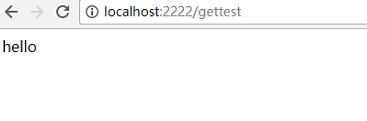
4.创建Zuul路由
添加依赖
<dependency>

            <groupId>org.springframework.cloud</groupId>

            <artifactId>spring-cloud-starter-netflix-eureka-client</artifactId>

        </dependency>

        <dependency>

            <groupId>org.springframework.cloud</groupId>

            <artifactId>spring-cloud-starter-netflix-zuul</artifactId>

        </dependency>
加入注解,以便注册到注册中心
@EnableZuulProxy

@SpringBootApplication

public class ZuulApplication {

    public static void main(String[] args) {

        SpringApplication.run(ZuulApplication.class, args);

    }

}
配置路由,以下是以服务的方式调用
spring.application.name=eureka-zuul

server.port=

zuul.routes.hello-service.path=/hello-service/**

zuul.routes.hello-service.serviceId=hello-service

eureka.client.serviceUrl.defaultZone=http://localhost:8101/eureka/
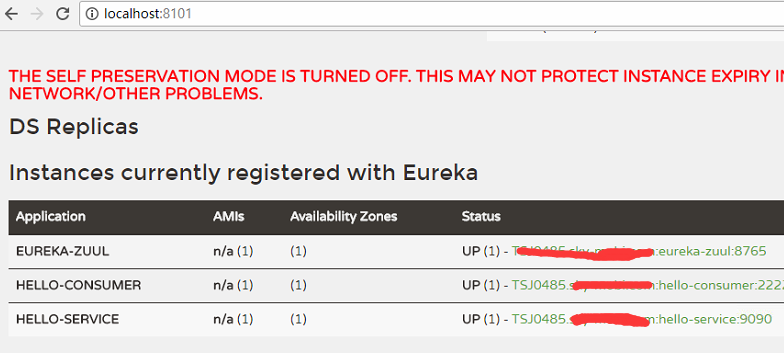
启动 注册成功,调用成功

Spring Cloud 快速入门的更多相关文章
- spring boot入门教程——Spring Boot快速入门指南
Spring Boot已成为当今最流行的微服务开发框架,本文是如何使用Spring Boot快速开始Web微服务开发的指南,我们将使创建一个可运行的包含内嵌Web容器(默认使用的是Tomcat)的可运 ...
- Spring Boot 快速入门
Spring Boot 快速入门 http://blog.csdn.net/xiaoyu411502/article/details/47864969 今天给大家介绍一下Spring Boot MVC ...
- Spring Boot快速入门(二):http请求
原文地址:https://lierabbit.cn/articles/4 一.准备 postman:一个接口测试工具 创建一个新工程 选择web 不会的请看Spring Boot快速入门(一):Hel ...
- Spring Cloud Gateway入门
1.什么是Spring Cloud GatewaySpring Cloud Gateway是Spring官方基于Spring 5.0,Spring Boot 2.0和Project Reactor等技 ...
- Spring Cloud Alibaba入门实战之nacos(一)
Spring Cloud Alibaba入门实战之nacos(一) 前情介绍 Spring Cloud Alibaba 是阿里巴巴提供的新一代的微服务解决方案,相信会有越来越多采用微服务架构的公司 ...
- Spring Cloud 从入门到精通
Spring Cloud 是一套完整的微服务解决方案,基于 Spring Boot 框架,准确的说,它不是一个框架,而是一个大的容器,它将市面上较好的微服务框架集成进来,从而简化了开发者的代码量. 本 ...
- 主流微服务一站式解决方案Spring Cloud Alibaba入门看这篇就足够了
学习路线 **本人博客网站 **IT小神 www.itxiaoshen.com 生态概述 架构演进 什么是微服务 https://martinfowler.com/microservices/ Mic ...
- Spring Cloud Ribbon入门
一.简介 Spring Cloud Ribbon是一个基于Http和TCP的客户端负载均衡工具,它是基于Netflix Ribbon实现的.它不像服务注册中心.配置中心.API网关那样独立部署,但是它 ...
- Spring Boot 快速入门 史上最简单
1.Spring Boot 概述 Spring Boot 是所有基于 Spring 开发的项目的起点.Spring Boot 的设计是为了让你尽可能快的跑起来 Spring 应用程序并且尽可能减少你的 ...
随机推荐
- 【集训队互测2015】Robot
题目描述 http://uoj.ac/problem/88 题解 维护两颗线段树,维护最大值和最小值,因为每次只有单点查询,所以可以直接在区间插入线段就可以了. 注意卡常,不要写STL,用链表把同类修 ...
- yii2 使用指定数据库执行createCommand
Yii::$app->dbName->createCommand($sql)->queryAll(); 指定dbName数据库配置
- 【Linux】配置SSH Key到GitHub/GitLab
Linux配置SSH Key到GitHub/GitLab 准备工作 首先检查下本机是否已经安装了SSH,在终端输入ssh即可: 如果没有安装进行yum安装 # yum -y install opens ...
- 织梦dede如何获取图集调用第一张图片完美解决方法【5.7sp2版本】
制作产品图集多图效果的时候,常常需要获取图集第一张图片的功能,假设获取的是缩略图,那么缩略图不够大的情况下,第一展示效果就会很差,下面来介绍下如何获取调用织梦图集第一张图片的方法: 首先在 inclu ...
- Xcode10 不能导入头文件(导入头文件不提示)
连接地址:https://blog.csdn.net/wyz670083956/article/details/87774705 xcode10可能是:Project Settings
- Mongodb分片集群技术+用户验证
随着数据量持续增多,后续迟早会出现一台机器硬件瓶颈问题的.而mongodb主打的就是海量数据架构,“分片”就用这个来解决这个问题. 从图中可以看到有四个组件:mongos.config server. ...
- HTML 重定向 页面跳转
通过响应头重定向 响应状态 301 和 302 可以指定重定向URL, 推荐使用302 FOUND HttpServletResponse. static final int SC_MOVED_TEM ...
- Axis2 WebService客户端Axis2调用
第一RPC方式,不生成客户端代码 第二,document方式,不生成客户端代码 第三,用wsdl2java工具,生成客户端方式调用 package samples.quickstart.client; ...
- Redis实战阅读笔记——第二章(redis重构web)
在性能的要求下,如何用redis重构已有的已有的部分,其实整个例子背后的思路挺好的.在应用缓存的过程中,还有一指标个需要考虑,读写比.
- sqlyog连接mysql8.0
1.本人安装的是mysql8.0社区版,安装包名称:mysql-installer-community-8.0.12.0.msi,可自行到官网下载. 2.安装完成后用sqlyog连接数据库出现密码乱码 ...