
Harbor修改暴露端口
把原来的端口映射改成1180
一 修改docker-compose.yml
[root@topcheer ~]# cat /mnt/harbor/docker-compose.yml
version: '2.3'
services:
log:
image: goharbor/harbor-log:v1.8.0
container_name: harbor-log
restart: always
dns_search: .
cap_drop:
- ALL
cap_add:
- CHOWN
- DAC_OVERRIDE
- SETGID
- SETUID
volumes:
- /var/log/harbor/:/var/log/docker/:z
- ./common/config/log/:/etc/logrotate.d/:z
ports:
- 127.0.0.1:1514:10514
networks:
- harbor
registry:
image: goharbor/registry-photon:v2.7.1-patch-2819-v1.8.0
container_name: registry
restart: always
cap_drop:
- ALL
cap_add:
- CHOWN
- SETGID
- SETUID
volumes:
- /data/registry:/storage:z
- ./common/config/registry/:/etc/registry/:z
- type: bind
source: /data/secret/registry/root.crt
target: /etc/registry/root.crt
networks:
- harbor
dns_search: .
depends_on:
- log
logging:
driver: "syslog"
options:
syslog-address: "tcp://127.0.0.1:1514"
tag: "registry"
registryctl:
image: goharbor/harbor-registryctl:v1.8.0
container_name: registryctl
env_file:
- ./common/config/registryctl/env
restart: always
cap_drop:
- ALL
cap_add:
- CHOWN
- SETGID
- SETUID
volumes:
- /data/registry:/storage:z
- ./common/config/registry/:/etc/registry/:z
- type: bind
source: ./common/config/registryctl/config.yml
target: /etc/registryctl/config.yml
networks:
- harbor
dns_search: .
depends_on:
- log
logging:
driver: "syslog"
options:
syslog-address: "tcp://127.0.0.1:1514"
tag: "registryctl"
postgresql:
image: goharbor/harbor-db:v1.8.0
container_name: harbor-db
restart: always
cap_drop:
- ALL
cap_add:
- CHOWN
- DAC_OVERRIDE
- SETGID
- SETUID
volumes:
- /data/database:/var/lib/postgresql/data:z
networks:
harbor:
dns_search: .
env_file:
- ./common/config/db/env
depends_on:
- log
logging:
driver: "syslog"
options:
syslog-address: "tcp://127.0.0.1:1514"
tag: "postgresql"
core:
image: goharbor/harbor-core:v1.8.0
container_name: harbor-core
env_file:
- ./common/config/core/env
restart: always
cap_drop:
- ALL
cap_add:
- SETGID
- SETUID
volumes:
- /data/ca_download/:/etc/core/ca/:z
- /data/psc/:/etc/core/token/:z
- /data/:/data/:z
- ./common/config/core/certificates/:/etc/core/certificates/:z
- type: bind
source: ./common/config/core/app.conf
target: /etc/core/app.conf
- type: bind
source: /data/secret/core/private_key.pem
target: /etc/core/private_key.pem
- type: bind
source: /data/secret/keys/secretkey
target: /etc/core/key
networks:
harbor:
dns_search: .
depends_on:
- log
- registry
logging:
driver: "syslog"
options:
syslog-address: "tcp://127.0.0.1:1514"
tag: "core"
portal:
image: goharbor/harbor-portal:v1.8.0
container_name: harbor-portal
restart: always
cap_drop:
- ALL
cap_add:
- CHOWN
- SETGID
- SETUID
- NET_BIND_SERVICE
networks:
- harbor
dns_search: .
depends_on:
- log
- core
logging:
driver: "syslog"
options:
syslog-address: "tcp://127.0.0.1:1514"
tag: "portal"
jobservice:
image: goharbor/harbor-jobservice:v1.8.0
container_name: harbor-jobservice
env_file:
- ./common/config/jobservice/env
restart: always
cap_drop:
- ALL
cap_add:
- CHOWN
- SETGID
- SETUID
volumes:
- /data/job_logs:/var/log/jobs:z
- type: bind
source: ./common/config/jobservice/config.yml
target: /etc/jobservice/config.yml
networks:
- harbor
dns_search: .
depends_on:
- redis
- core
logging:
driver: "syslog"
options:
syslog-address: "tcp://127.0.0.1:1514"
tag: "jobservice"
redis:
image: goharbor/redis-photon:v1.8.0
container_name: redis
restart: always
cap_drop:
- ALL
cap_add:
- CHOWN
- SETGID
- SETUID
volumes:
- /data/redis:/var/lib/redis
networks:
harbor:
dns_search: .
depends_on:
- log
logging:
driver: "syslog"
options:
syslog-address: "tcp://127.0.0.1:1514"
tag: "redis"
proxy:
image: goharbor/nginx-photon:v1.8.0
container_name: nginx
restart: always
cap_drop:
- ALL
cap_add:
- CHOWN
- SETGID
- SETUID
- NET_BIND_SERVICE
volumes:
- ./common/config/nginx:/etc/nginx:z
networks:
- harbor
dns_search: .
ports:
- 1180:80
depends_on:
- postgresql
- registry
- core
- portal
- log
logging:
driver: "syslog"
options:
syslog-address: "tcp://127.0.0.1:1514"
tag: "proxy"
networks:
harbor:
external: false
[root@topcheer ~]#
二 修改config.yml
[root@topcheer ~]# cat /mnt/harbor/common/config/registry/config.yml

version: 0.1

log:

  level: info

  fields:

    service: registry

storage:

  cache:

    layerinfo: redis

  filesystem:

    rootdirectory: /storage

  maintenance:

    uploadpurging:

      enabled: false

  delete:

    enabled: true

redis:

  addr: redis:6379

  password:

  db: 1

http:

  addr: :5000

  secret: placeholder

  debug:

    addr: localhost:5001

auth:

  token:

    issuer: harbor-token-issuer

    realm: http://192.168.180.105:1180/service/token

    rootcertbundle: /etc/registry/root.crt

    service: harbor-registry

validation:

  disabled: true

notifications:

  endpoints:

  - name: harbor

    disabled: false

    url: http://core:8080/service/notifications

    timeout: 3000ms

    threshold: 5

    backoff: 1s

compatibility:

  schema1:

    enabled: true[root@topcheer ~]#
三 修改harbor.yml
[root@topcheer ~]# cat /mnt/harbor/harbor.yml
# Configuration file of Harbor
# The IP address or hostname to access admin UI and registry service.
# DO NOT use localhost or 127.0.0.1, because Harbor needs to be accessed by external clients.
hostname: 192.168.180.105
# http related config
http:
# port for http, default is 80. If https enabled, this port will redirect to https port
port: 1180
# https related config
# https:
# # https port for harbor, default is 443
# port: 443
# # The path of cert and key files for nginx
# certificate: /your/certificate/path
# private_key: /your/private/key/path
# Uncomment external_url if you want to enable external proxy
# And when it enabled the hostname will no longer used
# external_url: https://reg.mydomain.com:8433
# The initial password of Harbor admin
# It only works in first time to install harbor
# Remember Change the admin password from UI after launching Harbor.
harbor_admin_password: Harbor12345
# Harbor DB configuration
database:
# The password for the root user of Harbor DB. Change this before any production use.
password: root123
# The default data volume
data_volume: /data
四 修改daemon.json
[root@topcheer ~]# cat /etc/docker/daemon.json

{

  "insecure-registries":[

    "192.168.180.105:1180"

  ]

}

[root@topcheer ~]#
五 重启docker
systemctl daemon-reload

systemctl restart docker
六 重启harbor(修改配置)
[root@topcheer harbor]# docker-compose down

Stopping harbor-log ... done

Removing nginx             ... done

Removing harbor-portal     ... done

Removing harbor-jobservice ... done

Removing harbor-core       ... done

Removing redis             ... done

Removing registry          ... done

Removing registryctl       ... done

Removing harbor-db         ... done

Removing harbor-log        ... done

Removing network harbor_harbor

[root@topcheer harbor]# ./prepare

prepare base dir is set to /mnt/harbor

Clearing the configuration file: /config/log/logrotate.conf

Clearing the configuration file: /config/nginx/nginx.conf

Clearing the configuration file: /config/core/env

Clearing the configuration file: /config/core/app.conf

Clearing the configuration file: /config/registry/root.crt

Clearing the configuration file: /config/registry/config.yml

Clearing the configuration file: /config/registryctl/env

Clearing the configuration file: /config/registryctl/config.yml

Clearing the configuration file: /config/db/env

Clearing the configuration file: /config/jobservice/env

Clearing the configuration file: /config/jobservice/config.yml

Generated configuration file: /config/log/logrotate.conf

Generated configuration file: /config/nginx/nginx.conf

Generated configuration file: /config/core/env

Generated configuration file: /config/core/app.conf

Generated configuration file: /config/registry/config.yml

Generated configuration file: /config/registryctl/env

Generated configuration file: /config/db/env

Generated configuration file: /config/jobservice/env

Generated configuration file: /config/jobservice/config.yml

loaded secret from file: /secret/keys/secretkey

Generated configuration file: /compose_location/docker-compose.yml

Clean up the input dir

[root@topcheer harbor]# docker-compose up -d

Creating network "harbor_harbor" with the default driver

Creating harbor-log ... done

Creating harbor-db   ... done

Creating redis       ... done

Creating registry    ... done

Creating registryctl ... done

Creating harbor-core ... done

Creating harbor-jobservice ... done

Creating harbor-portal     ... done

Creating nginx             ... done

[root@topcheer harbor]# docker ps -a

CONTAINER ID        IMAGE                                               COMMAND                  CREATED             STATUS                             PORTS
参考的官方文档
Reconfigure Harbor
To reconfigure Harbor, stop the existing Harbor instance and update harbor.yml. Then run prepare script to populate the configuration. Finally re-create and start the Harbor instance.
$ sudo docker-compose down -v
$ vim harbor.yml
$ sudo prepare
$ sudo docker-compose up -d
正常的关闭开启
Managing Harbor Lifecycle
You can use docker-compose to manage the lifecycle of Harbor. Some useful commands are listed below. You must run the commands in the same directory as docker-compose.yml.
Stop Harbor:
$ sudo docker-compose stop
Stopping nginx              ... done
Stopping harbor-portal      ... done
Stopping harbor-jobservice  ... done
Stopping harbor-core        ... done
Stopping registry           ... done
Stopping redis              ... done
Stopping registryctl        ... done
Stopping harbor-db          ... done
Stopping harbor-log         ... done
Restart Harbor after Stopping:
$ sudo docker-compose start
Starting log         ... done
Starting registry    ... done
Starting registryctl ... done
Starting postgresql  ... done
Starting core        ... done
Starting portal      ... done
Starting redis       ... done
Starting jobservice  ... done
Starting proxy       ... done
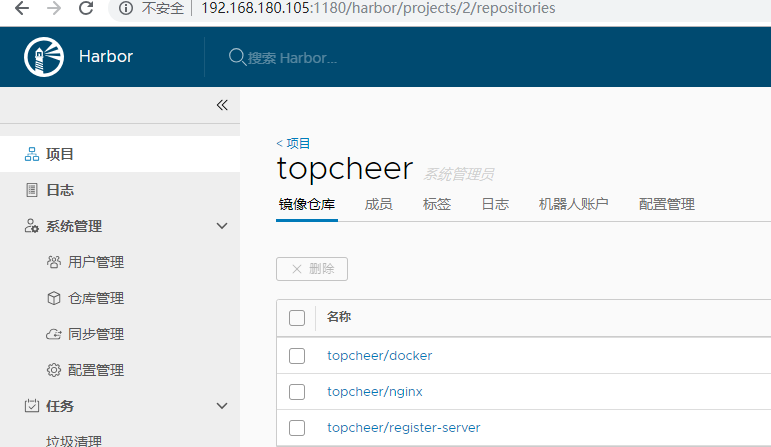
七 查看
Harbor修改暴露端口的更多相关文章
- centos6.5 ssh安全优化,修改默认端口名,禁止root远程登录
一.修改默认端口号 第一步: vi /etc/sysconfig/iptables 添加修改后的端口号的配置 -A INPUT -p tcp -m state --state NEW -m tcp - ...
- ECS修改默认端口22及限制root登录
首先要创建一个用户,用系统默认的www用户也可以(这里不介绍如何创建用户) 接下来要修改www的密码: passwd www 执行此命令后会让你输入两次密码.这样就设置好了. 然后进入: vi /et ...
- 在Linux上安装多Jboss个需要修改的端口
如果在一台机器上部署了多个jboss server,需要修改相关端口以避免端口冲突.目前确认需要修改的配置如下一.vi $JBOSS_HOME/server/default/conf/jboss-se ...
- centos修改ssh端口
1.编辑防火墙配置:vi /etc/sysconfig/iptables防火墙增加新端口2222-A INPUT -m state --state NEW -m tcp -p tcp --dport ...
- Linux修改SSH端口和禁止Root远程登陆
Linux修改ssh端口22 vi /etc/ssh/ssh_config vi /etc/ssh/sshd_config 然后修改为port 8888 以root身份service sshd res ...
- CentOSv6.8 修改防火墙配置、修改SSH端口
查看防火墙目前使用状况: service iptables status 修改防火墙配置: vi /etc/sysconfig/iptables 重启防火墙,让刚才修改的配置生效: service i ...
- Oracle之 11gR2 RAC 修改监听器端口号的步骤
Oracle 11gR2 RAC 修改监听器端口号的步骤 说明:192.168.188.181 为public ip1192.168.188.182 为public ip2192.168.188.18 ...
- was修改控制台端口教程
这里我控制台启用了https所以修改WC_adminhost_secure,如果要修改控制台http的端口那么修改WC_adminhost (要修改应用的访问端口,则http--修改WC_defaul ...
- linux修改ssh端口 以及禁止root远程登录 (实验机 CentOs)
把ssh默认远程连接端口修改为3333 1.编辑防火墙配置: vi /etc/sysconfig/iptables 防火墙新增端口3333,方法如下: -A INPUT -m state --stat ...
随机推荐
- vi, Java, Ant, Junit自学报告 - 实训week1
vi, Java, Ant, Junit自学报告 2017软件工程实训 15331023 陈康怡 vi Vi是linux系统的标准文本编辑器,采用指令的方式进行操作,此处仅记录部分常用的指令. vi模 ...
- 抓取某高校附近共享单车位置,并使用web方式展示过去几天的位置变化
效果如图 使用了高德地图API:https://lbs.amap.com/api/javascript-api/example/marker/massmarks js代码如下: function Ma ...
- 第一章:Java语言概述与环境开发
1.计算机高级语言按程序的执行方式可以分为编译型和解释型两种: 2.JAVA程序的执行过程必须经过先编译后解释两个步骤: 3.JAVA语言里负责执行字节码文件的是JAVA虚拟机 (Java Virtu ...
- SSM003/构建Maven单模块项目(二)
一.Controller基础代码(mooc) 1.UserController.java /** *springmvc1-2:返回jsp页面 * 请求URL: /user/getUserById?us ...
- sql中的isnull
ISNULL 使用指定的替换值替换 NULL. 语法ISNULL ( check_expression , replacement_value ) 参数check_expression 将被检查是否为 ...
- 无法打开内核设备"\\.\Global\vmx86":系统找不到指定的文件. 是否在安装 VMwareWorksation 后重新引到 ? 问题解决
节前正常使用的工作环境, 过完春节后, 上班第一天就不正常工作了, 难不成机器也要放假休息, 虚拟机打不开了, 没办法办公可是不行的. 上网查原因, 解决问题. 上网看了很多关于此问题的解决办法, 很 ...
- [Python3 填坑] 012 字典的遍历在 Python2 与 Python3 中区别
目录 1. print( 坑的信息 ) 2. 开始填坑 2.1 Python2 中字典的遍历 2.2 Python3 中字典的遍历 2.3 结论 1. print( 坑的信息 ) 挖坑时间:2019/ ...
- 洛谷P2460 [SDOI2007]科比的比赛(题解)(贪心+搜索)
科比的比赛(题解)(贪心+搜索) 标签:算法--贪心 阅读体验:https://zybuluo.com/Junlier/note/1301158 贪心+搜索 洛谷题目:P2460 [SDOI2007] ...
- StringBuffer 和 StringBuilder 总结
StringBuffer 和 StringBuilder 介绍 大多数情况下, StringBuffer 的速度要比 String 快: StringBuilder 要比StringBuffer快:S ...
- C#设计模式:职责链模式(Chain of Responsibility)
一,什么是职责链模式(Chain of Responsibility) 职责链模式是一种行为模式,为解除请求的发送者和接收者之间的耦合,而使多个对象都有机会处理这个请求.将这些对象连接成一条链,并沿着 ...