
qt嵌入式html和本地c++通信方式
前沿:我们在做qt项目的时候,通常会把某个html网页直接显示到应用程序中。比如绘图。直接把html形式的图标嵌入到应用程序中
但是我们需要把数据从后台c++端传到html端,实现显示。qt实现了相关的方法
程序运行截图
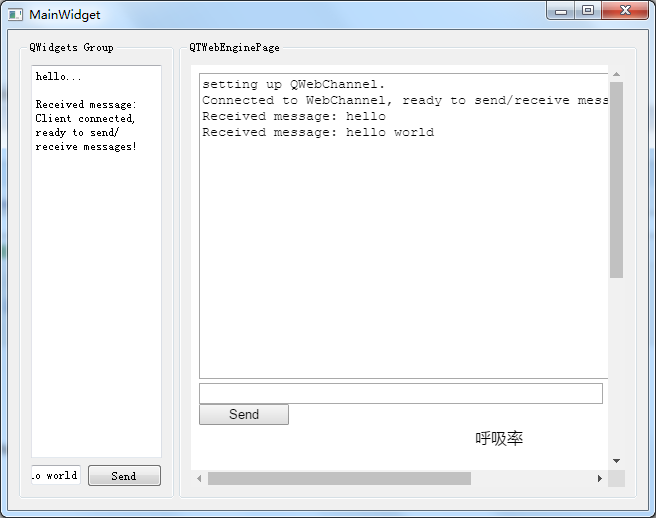
一。先看客户端js代码
<script type="text/javascript" src="./qwebchannel.js"></script>
<script type="text/javascript">
//BEGIN SETUP
function output(message) {
var output = document.getElementById("output");
output.innerHTML = output.innerHTML + message + "\n";
}
window.onload = function () {
output("setting up QWebChannel.");
new QWebChannel(qt.webChannelTransport, function (channel) {
// make dialog object accessible globally
var content = channel.objects.content;
document.getElementById("send").onclick = function () {
var input = document.getElementById("input");
var text = input.value;
if (!text) {
return;
}
output("Sent message: " + text);
input.value = "";
content.receiveText(text); //该方法实际是调用的后台的slot,后端c++通过slot来接收数据。客户端向后台发数据
}
content.sendText.connect(function (message) { //sendText是后台发送数据的信号signal,该方法实现把后端c++信号signal,与html页面function链接起来,实现后台向前段发送数据。c++端信号与html端的slot链接起来
output("Received message: " + message);
});
content.receiveText("Client connected, ready to send/receive messages!");
output("Connected to WebChannel, ready to send/receive messages!");
});
}
//END SETUP
</script>
二,后台客户端
1.document实现方式
class Document : public QObject
{
Q_OBJECT
Q_PROPERTY(QString text MEMBER s_text NOTIFY sendText)
public:
explicit Document(QObject *parent = nullptr) : QObject(parent) {}
void setSendTextText(const QString &text);
void setUi(Ui::MainWidget *ui);
public slots:
void receiveText(const QString &r_text);
signals:
void sendText(const QString &text); //这两个是重点,一个slot一个signal分别用于接收和发送数据,注意和前端js代码的对应
private:
void displayMessage(const QString &message);
QString s_text;
QString recieve_text;
Ui::MainWidget *mainUi;
};
document.cpp文件
/****************************************************************************
**
** Copyright (C) 2015 The Qt Company Ltd.
** Contact: http://www.qt.io/licensing/
**
** This file is part of the demonstration applications of the Qt Toolkit.
**
** $QT_BEGIN_LICENSE:LGPL$
** Commercial License Usage
** Licensees holding valid commercial Qt licenses may use this file in
** accordance with the commercial license agreement provided with the
** Software or, alternatively, in accordance with the terms contained in
** a written agreement between you and The Qt Company. For licensing terms
** and conditions see http://www.qt.io/terms-conditions. For further
** information use the contact form at http://www.qt.io/contact-us.
**
** GNU Lesser General Public License Usage
** Alternatively, this file may be used under the terms of the GNU Lesser
** General Public License version 2.1 as published by the Free Software
** Foundation and appearing in the file LICENSE.LGPL included in the
** packaging of this file. Please review the following information to
** ensure the GNU Lesser General Public License version 2.1 requirements
** will be met: http://www.gnu.org/licenses/old-licenses/lgpl-2.1.html.
**
** As a special exception, The Qt Company gives you certain additional
** rights. These rights are described in The Qt Company LGPL Exception
** version 1.1, included in the file LGPL_EXCEPTION.txt in this package.
**
** GNU General Public License Usage
** Alternatively, this file may be used under the terms of the GNU
** General Public License version 3.0 as published by the Free Software
** Foundation and appearing in the file LICENSE.GPL included in the
** packaging of this file. Please review the following information to
** ensure the GNU General Public License version 3.0 requirements will be
** met: http://www.gnu.org/copyleft/gpl.html.
**
**
** $QT_END_LICENSE$
**
****************************************************************************/
#include "document.h"
void Document::setSendTextText(const QString &text) //向html页面发送数据
{
s_text = text;
emit sendText(s_text);
}
void Document::displayMessage(const QString &message)//接收来自html页面的数据
{
mainUi->editor->appendPlainText(message);
}
/*!
This slot is invoked from the HTML client side and the text displayed on the server side.
*/
void Document::receiveText(const QString &r_text)
{
displayMessage(QObject::tr("Received message: %1").arg(r_text));
}
void Document::setUi(Ui::MainWidget *ui)
{
mainUi = ui;
}
二,使用document文件并创建webchannel
MainWidget::MainWidget(QWidget *parent) :
QWidget(parent),
ui(new Ui::MainWidget)
{
ui->setupUi(this);
// PreviewPage *page = new PreviewPage(this);
// ui->preview->setPage(page);
m_content.setUi(ui);
QWebChannel *channel = new QWebChannel(this);
channel->registerObject(QStringLiteral("content"), &m_content);
//page->setWebChannel(channel);
ui->preview->page()->setWebChannel(channel);
ui->preview->setUrl(QUrl("qrc:/HelloWorld2.html"));
//ui->preview->setUrl(QUrl("qrc:/index.html"));
ui->editor->setPlainText("hello...\n");
}
这边是后端界面的ui文件,通过上述代码就是实现了c++端document类与客户端html通信。
详细的实例代码大家可以到一下链接下载:http://download.csdn.net/download/soft_123456/10115764有任何问题欢迎及时联系我活着留言
qt嵌入式html和本地c++通信方式的更多相关文章
- 转:Qt 嵌入式开发环境搭建
地址: http://www.cnblogs.com/lishixian/articles/3013897.html 作者:lsx_007 这里主要是记录了自己在搭建嵌入式开发环境时阅 ...
- ubuntu 12.04 下搭接Qt 嵌入式开发环境
1.安装前的准备工作 (1)有ubuntu12.04 的系统镜像(也可以其他linux 如Fedorea9),都是安装好的 (2)虚拟机VMWare 或 VirtualBox ,两者都可以,都是安装好 ...
- Qt基于FFmpeg播放本地 H.264(H264)文件(灿哥哥的博客)
最近在弄H264的硬件编解码,基于DM3730,但是为了调试方便,在小红帽上用FFmpeg实现了H264的软件编解码.现在弄了一个Windows的例子,给需要的同学参考一下,如果大家觉得有帮助,可以小 ...
- Qt嵌入式开发环境搭建
一.Qt版本介绍 按照不同的图形界面来划分,分为四个版本: 1.Win32版:适用于windows平台 2.X11版:适用于各种X系统的Linux和Unix平台 3.Mac版:适用于苹果的MacOS ...
- Qt、Qte与Qtopia(Qt嵌入式的发展历程)
Qt的授权是分为两条线,商业版和开源版.如果使用商业版的Qt,那么开发出的程序可以是私有的和商业的:如果使用的是开源版的Qt,由于其使用的是GPL协议,那么可发出的程序也必须是GPL的.不过自从qt ...
- Qt(QtWebEngine)加载本地网页跨域问题的总结
目录 1. 概述 2. 详论 2.1. 传参 2.2. JS module 3. 建议 4. 参考 1. 概述 浏览器直接加载本地网页的时候,如果网页涉及到加载本地资源(如图片),会出现跨域的问题.Q ...
- 用Qt开发Web和本地混合的应用
QtWebkit 模块使得Qt widget能够通过HTML的object标签嵌入到web页面中,并通过JavaScript代码进行访问,而Qt对象也能相应的访问web页面元素. 将Qt对象插入到we ...
- qt webengineview 加载本地资源方式
一.如果把资源添加到本地资源qrc库里了,请使用 ui->preview->setUrl(QUrl("qrc:/HelloWorld2.html")): 二.如果没有现 ...
- 开篇-QT完全手册
嵌入式工具Qt的安装与使用 摘要 Qt是Trolltech公司的一个产品.Trolltech是挪威的一家软件公司,主要开 发两种产品:一种是跨平台应用程序界面框架:另外一种就是提供给做嵌入式Linux ...
随机推荐
- python 安装-ERROR---Unable to find vcvarsall.bat
系统配置:Windows10 x64, Visual Studio 2017, Python2.7.1 报错信息:error: Unable to find vcvarsall.bat 报错原因:在生 ...
- 图解数据库中的join操作
1.所有的join都从cross join衍生而来 2.所有join图示 转自Say NO to Venn Diagrams When Explaining JOINs
- 两个html之间进行传值,如何进行?
function turnto(){ var getval=document.getElementById("text").value; turngetval=escape(get ...
- HANA LOG日志过大处理办法
http://www.fenxiangzhe.net/archives/50 在SAP HANA 运维过程我们经常遇到因前期HANA LOG模式未设置成OVERWIRTE或者日志备份时间设置过长导致日 ...
- 有关二次离线和 Yuno loves sqrt technology II
二次离线 前置技能 莫队 修改查询 \(O(\sqrt n )-O(1)\) 平衡 概念 考虑朴素莫队离线询问,过程中维护信息从 \([l,r]\) 扩展为 \([l\pm 1,r\pm 1]\) , ...
- navivate 下载
https://www.jianshu.com/p/5f693b4c9468?mType=Group
- Javadoc常见的标记和含义
1.@param 方法参数的说明 2.@return 对 方法返回值的说明 3.@throws 方法抛出异常的描述 4.@version模块的版本号 5.see参数转向 6.@deprecated标记 ...
- Python学习之==>数组(二)
1.切片 # 切片:是list取值的一种方式 nums = ['段佳琳','陈伟良','王占宇','李波','韶钢'] print(nums[1:3]) # 顾头不顾尾,不包含后面下标的元素 prin ...
- delphi中 formclose的事件 action:=cafree form:=nil分别是什么意思?
MDI子窗体关闭时用到的(以下摘自Delphi的帮助)caNone The form is not allowed to close, so nothing happens.caHide The ...
- 使用 Unity* 进行并行处理的一种方法
本文展示如何使用 Unity* 对游戏进行并行处理,以及如何使用游戏引擎执行与游戏相关的物理.在这个领域内,现实感是成功的一个重要标志.为了模拟真实世界,许多动作需要同时发生,这需要并行处理.创建两个 ...