
S5PV210刷机
一. 刷机初识
1.1. 什么是刷机
a. 刷机就是通过各种手段把相应镜像烧录到设备中,让设备可以运行起来。常见的刷机如:安卓刷机,QT刷机
1.2. S5PV210刷机镜像
1.2.1. 刷安卓所需要的镜像
a. uboot镜像: uboot.bin
b. linux kernel镜像:zImage-android
c. android rom镜像: x210.img
1.2.2. 刷QT4.8 所需要的镜像
a. uboot镜像: uboot.bin
b. linux kernel镜像: zImage-qt
c. rootfs镜像:rootfs_qt4.ext3
1.3. 刷机过程使用到的工具
1.3.1. 烧录uboot所需要的工具
1.3.1. 使用SD卡烧录ubbot
a. 方式一:在windows中用刷卡工具去制作启动SD卡,刷卡工具 x210_Fusing_Tool
b. 方式二:在linux中用dd命令烧录uboot
1.3.1. 使用USB烧录uboot
a. 方式一:在window下使用dnw软件进行下载uboot.bin
b. 方式二:在linux下使用dnw工具进行下载uboot.bin
1.3.2. uboot启动后烧录全部镜像到flash中
1.3.1. 使用fastboot烧录
1.3.1.1. 使用fastboot烧录android4.0.4镜像
a. fastboot flash bootloader android4.0\uboot.bin 烧uboot
b. fastboot flash kernel android4.0\zImage-android 烧linux kernel
c. fastboot flash system android4.0\x210.img 烧android rom
1.3.1.2. 使用fastboot烧录linux+QT镜像
a. fastboot flash bootloader linuxQT\uboot.bin 烧uboot
b. fastboot flash kernel linuxQT\zImage-qt 烧linux kernel
c. fastboot flash system linuxQT\rootfs_qt4.ext3 烧rootfs
二. 烧录实践
2.1. 烧录uboot
2.1.1. 使用x210_Fusing_Tool烧录uboot
a. 最好使用管理员启动软件
b. 烧录效果如下:

2.2. 在linux中用dd命令烧录uboot
2.2.1. 将uboot_sd_fusing相关文件放到uboot源码下
2.2.1. 制作过程如下
root@ubuntu:~/x210_porting/uboot-jiuding/sd_fusing# ls

C110-EVT1-mkbl1.c   Makefile    sd_fusing2.sh

c110.signedBL1_bin  sd_fdisk.c  sd_fusing.sh

root@ubuntu:~/x210_porting/uboot-jiuding/sd_fusing# make

gcc -o    mkbl1 C110-EVT1-mkbl1.c

gcc -o    sd_fdisk sd_fdisk.c

root@ubuntu:~/x210_porting/uboot-jiuding/sd_fusing# ./sd_fusing.sh /dev/sdb

/dev/sdb reader is identified.

make sd card partition

./sd_fdisk /dev/sdb

+ records in

+ records out

 bytes ( B) copied, 0.00835414 s, 61.3 kB/s

mkfs.vfat -F  /dev/sdb1

mkfs.fat 3.0. (--)

BL1 fusing

+ records in

+ records out

 bytes (8.2 kB) copied, 0.195566 s, 41.9 kB/s

u-boot fusing

dd: writing to ‘/dev/sdb’: Input/output error

+ records in

+ records out

 bytes ( kB) copied, 30.7411 s, 1.0 kB/s

U-boot image is fused successfully.

Eject SD card and insert it again.

root@ubuntu:~/x210_porting/uboot-jiuding/sd_fusing#
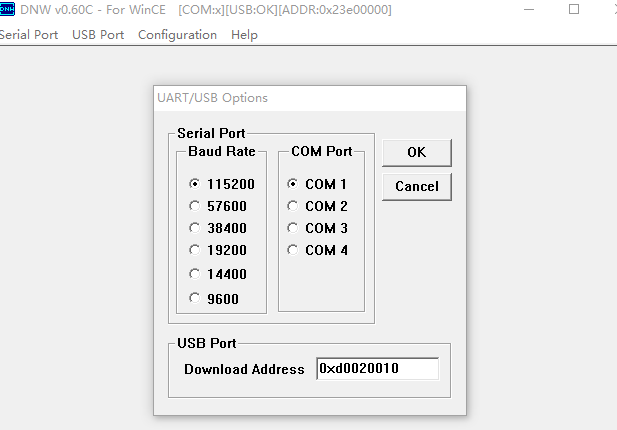
2.3. 在window下使用dnw烧录
2.3.1. 刷机分2步:
a. 第一步刷x210_usb.bin,地址是0xd0020010;
b. 第二步刷uboot.bin,刷机地址是0x23e00000
2.4. linux 使用dnw工具烧录uboot
2.4.1. 源码包获取,编译和安装
2.4.2. 成功连接后现象:
a. Windows下设备管理器没了;
b. ls /dev/secbulk0 设备节点自动出现
2.4.3. dnw进行下载uboot.bin
a. dnw -a 0xd0020010 x210_usb.bin
b. dnw -a 0x23e00000 uboot.bin
三. 使用fastboot烧录镜像到flash
3.1. 在uboot中对flash进行分区
3.1.1. 分区命令fdisk -c 0
x210 #

x210 # fdisk -c

fdisk is completed

partion #    size(MB)     block start #    block count    partition_Id

                                              0x83

                                             0x83

                                            0x83

                                          0x83

x210 #
3.2. uboot的参数中bootcmd和bootargs
x210 # print

baudrate=

ethaddr=::5c::0a:5b

gatewayip=192.168.1.1

ipaddr=192.168.1.20

netmask=255.255.255.0

serverip=192.168.1.141

bootdelay=

bootcmd=tftp 0x30008000 zImage;bootm 0x30008000

bootargs=root=/dev/nfs nfsroot=192.168.1.141:/root/x210_porting/rootfs/rootfs ip=192.168.1.20:192.168.1.141:192.168.1.1:

Environment size: / bytes

x210 # set bootcmd 'movi read kernel 30008000; bootm 30008000'

x210 # set bootargs console=ttySAC2, root=/dev/mmcblk0p2 rw init=/linuxrc rootfstype=ext3

x210 # saveenv

Saving Environment to SMDK bootable device...

done

x210 # print

baudrate=

ethaddr=::5c::0a:5b

gatewayip=192.168.1.1

ipaddr=192.168.1.20

netmask=255.255.255.0

serverip=192.168.1.141

bootdelay=

bootcmd=movi read kernel ; bootm

bootargs=console=ttySAC2, root=/dev/mmcblk0p2 rw init=/linuxrc rootfstype=ext3

Environment size: / bytes

x210 #
3.3. uboot进入fastboot
x210 # fastboot

[Partition table on MoviNAND]

ptn  name='bootloader' start=0x0 len=N/A (use hard-coded info. (cmd: movi))

ptn  name='kernel' start=N/A len=N/A (use hard-coded info. (cmd: movi))

ptn  name='ramdisk' start=N/A len=0x300000(~3072KB) (use hard-coded info. (cmd: movi))

ptn  name='config' start=0xAECC00 len=0x1028DC00(~264759KB)

ptn  name='system' start=0x10D7A800 len=0x1028DC00(~264759KB)

ptn  name='cache' start=0x21008400 len=0x65F7000(~104412KB)

ptn  name='userdata' start=0x275FF400 len=0xC0C6FC00(~3158463KB)
3.4. windown fastboot软件使用
3.4.1. 相关命令使用
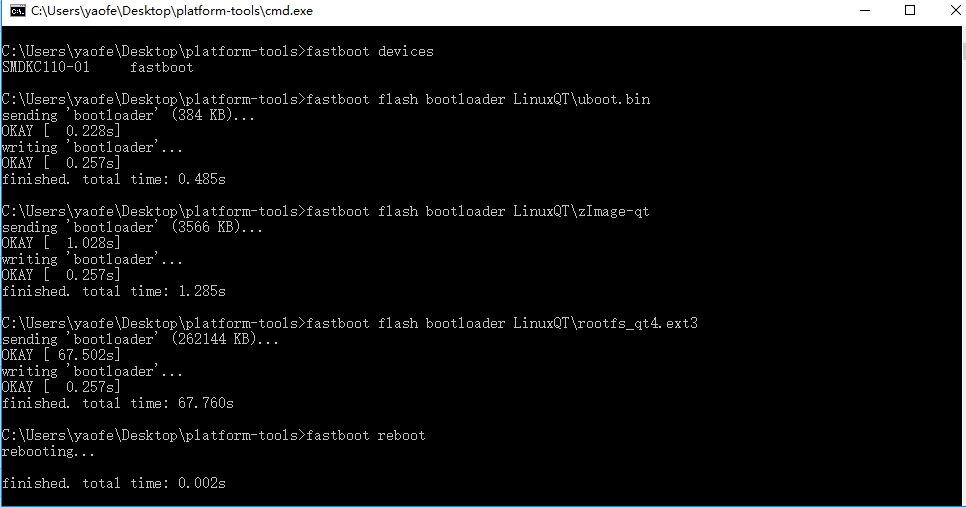
3.4.1.1. fastboot devices 命令用来查看当前连接的设备。(我们开发板看到的是:SMDKC110-01)
C:\Users\yaofe\Desktop\platform-tools>fastboot devices

SMDKC110-     fastboot

C:\Users\yaofe\Desktop\platform-tools>
3.4.1.2. fastboot flash xxx 命令用来烧录的
a. fastboot flash bootloader LinuxQT\uboot.bin 烧uboot
b. fastboot flash kernel LinuxQT\zImage-qt 烧linux kernel
c. fastboot flash system LinuxQT\rootfs_qt4.ext3 烧rootfs
C:\Users\yaofe\Desktop\platform-tools>fastboot flash bootloader LinuxQT\uboot.bin

sending 'bootloader' ( KB)...

OKAY [  .228s]

writing 'bootloader'...

OKAY [  .257s]

finished. total time: .485s

C:\Users\yaofe\Desktop\platform-tools>fastboot flash bootloader LinuxQT\zImage-qt

sending 'bootloader' ( KB)...

OKAY [  .028s]

writing 'bootloader'...

OKAY [  .257s]

finished. total time: .285s

C:\Users\yaofe\Desktop\platform-tools>fastboot flash bootloader LinuxQT\rootfs_qt4.ext3

sending 'bootloader' ( KB)...

OKAY [ .502s]

writing 'bootloader'...

OKAY [  .257s]

finished. total time: .760s
3.4.1.3. fastboot reboot 命令用来重启系统
C:\Users\yaofe\Desktop\platform-tools>fastboot reboot

rebooting...

finished. total time: .002s
S5PV210刷机的更多相关文章
- S5PV210开发板刷机(SD卡uboot、串口+USB-OTG刷机方法)
一.介绍 九鼎的S5PV210开发板,在出厂前已经默认刷了Android4.0系统.如果需要刷其它的系统或者是由于系统问题无法启动时,就需要对板子刷机. 其实,刷机是对210开发板的一个基础学习,目的 ...
- 用 S5PV210 学习 Linux (一) 刷机(一)
简介: 习惯了 用 keil 或者 IAR 一键下载 (烧写) 代码,S5PV210 貌似就不能这么简单用 仿真器的 方式 下载代码了,因此 学习 S5PV210 的第一步就是 学习怎么下载代码,下 ...
- 红米2A高配刷机记录
2014816 机型:红米2A高配版 设备型号:2014816 CPU:高通 线刷:fastboot平台 http://192.168.7.118/MesReports/Reports/Cutting ...
- andriod刷机
有句古话叫常在河边走,难免会翻船.对于经常刷机的Android刷友来说,难免会碰到刷机失败损坏recovery程序乃至手机无法启动的情况,也就是传说中的手机变砖块.不过刷机失败手机变砖并不是世界末日, ...
- 安卓刷机--fastboot线刷
首先需要下载fastboot.exe,copy到system32文件夹下. 对于安卓系统的智能手机,同时按住开机键和音量减键,或手机连上电脑,输入adb reboot bootloader进入fast ...
- Android刷机教程
我的机器是Nexus 5 一. 安装驱动 如何进入fastboot模式 1. 拔掉数据线,将手机关机 2. 关机后同时按住[音量减小键]和[开关机键]即可进入Fastboot模式 开启usb调试 - ...
- Redmi Note3 hennessy 刷机过程记录
本文只是凭记忆,记录大致的步骤,提供线索. 准备 刷机包和supersu刷机包,到xiaomi.eu上下载, 如果是稳定版可能有锁bootloader,需要到下载解锁软件.开发版无锁 刷入recove ...
- Sony Z1 flashtool 刷机笔记
第一次硬刷,(相较于recovery的卡刷)差点变成无限重启..记录一些关键步骤: 1 unlock bootloader http://developer.sonymobile.com/unlock ...
- 记一次酷派尚锋Y75刷机
昨天因为手机卡的原因,我的同学帮他的同学刷机,听他说是用刷机精灵线刷的rom包,但是刷机失败了,就来找我把弄好,他是个半吊子水平,刚接触这个东西,也是运气不好,什么刷机失败的问题都让他遇上了,刷了几个 ...
随机推荐
- springboot 集成oss
集成aliyun oss 结构如下: pom.xml <dependency> <groupId>org.springframework.boot</groupId> ...
- List常用操作 - List.FindAll / List.Sort
List常用操作 (1) 筛选List中符合条件的项目 var list = FormControlList.FindAll(delegate (FormControlModel obj) { ret ...
- iOS - 图片的显示模式
- mybatis添加数据时返回主键 insert 返回主键值
insert 返回主键值 useGeneratedKeys=“true” parameterType=“USer” keyProperty=“id”, <insert id="inse ...
- WEB上传一个文件夹
在Web应用系统开发中,文件上传和下载功能是非常常用的功能,今天来讲一下JavaWeb中的文件上传和下载功能的实现. 先说下要求: PC端全平台支持,要求支持Windows,Mac,Linux 支持所 ...
- redis过期策略设置
中6中过期策略的具体方式. redis 中的默认的过期策略是volatile-lru .设置方式 可以通过命令直接设置 config set maxmemory-policy volatile-lru ...
- Python_021(内置方法讲解二)
一.内置方法二 1.__del__方法: a:构造方法:创建一个空间, 析构方法;释放一个空间; b:触发del的情况:Python解释器的垃圾回收机制,和遇到 del 对象名 c:析构方法的思想: ...
- BigDecimal保留两位小数,或指定精确的位数
public static void main(String[] args) { BigDecimal t1 = new BigDecimal("3.15289"); BigDec ...
- SQL字串截取函数编写及应用
SQL里面一种用来截取字符串的方法,用的是表函数实现字符串截取并应用的SQL操作语句中. .截取字符串表函数 ALTER FUNCTION [dbo].[SplitToTable] ( -- Add ...
- Xcode工程文件pbxproj
Xcode工程文件pbxproj Xcode会去读Project.pbxproj文件,把pbxproj转成plist文件,看起根目录结构 rootObject:指向的是我们的工程对象.(对应一个24个 ...