
Zabbix--04 自定义模版、web监控
一、自定义模版
1.创建模版
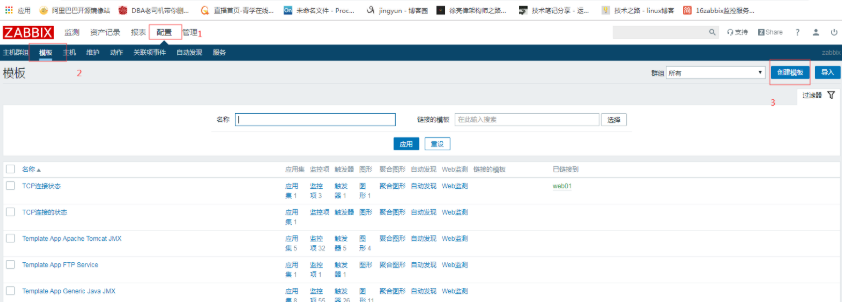
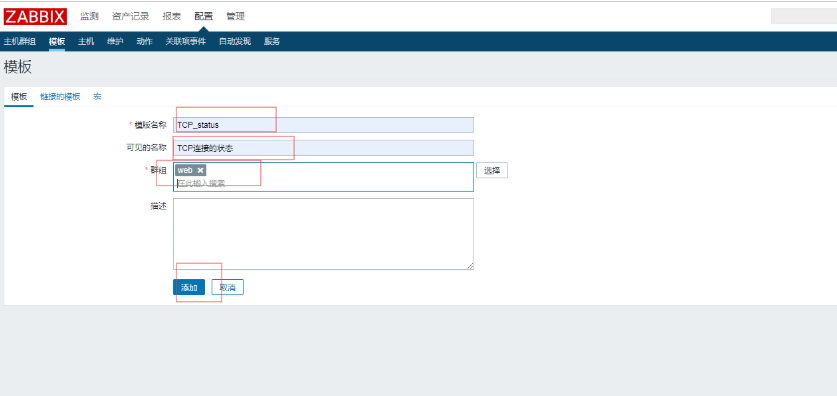
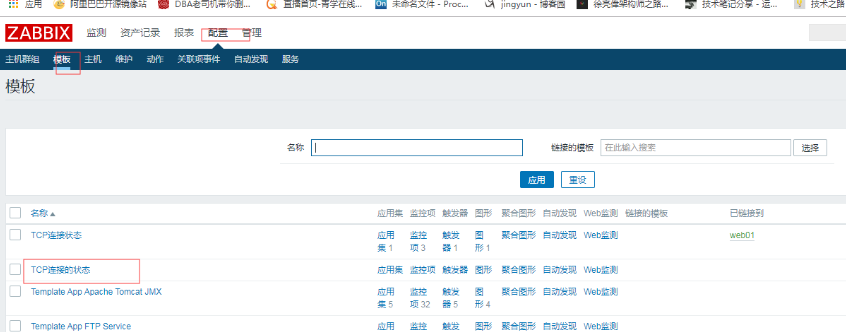
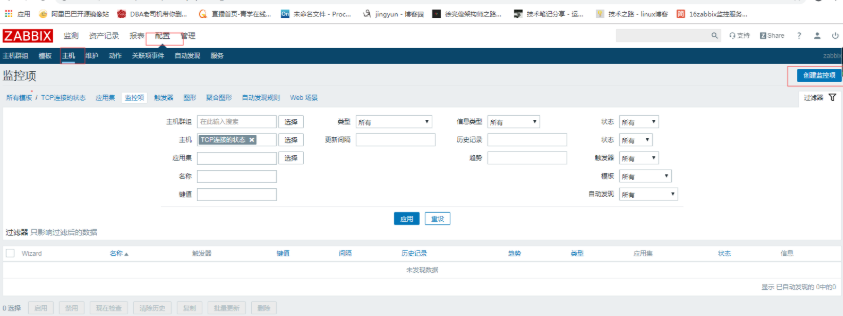
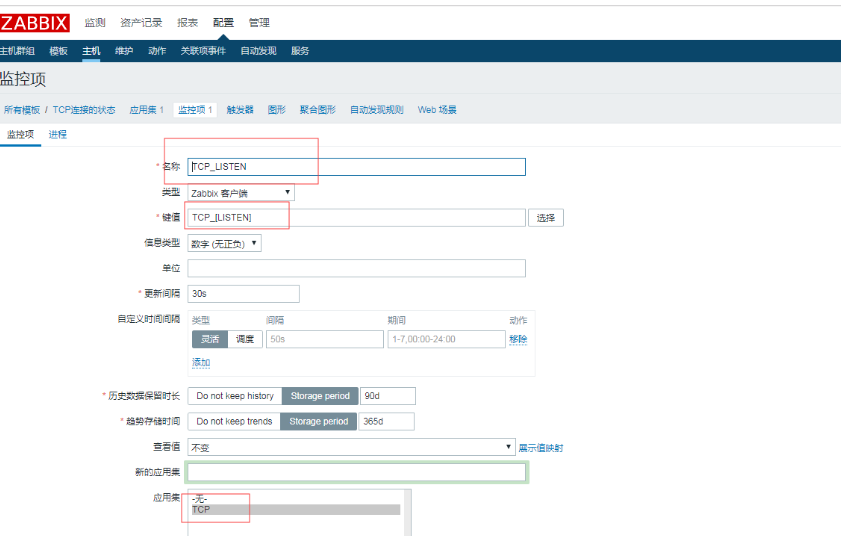
1.1克隆出三台

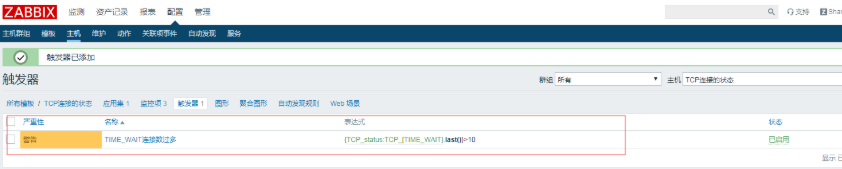
1.2直接创建好触发器
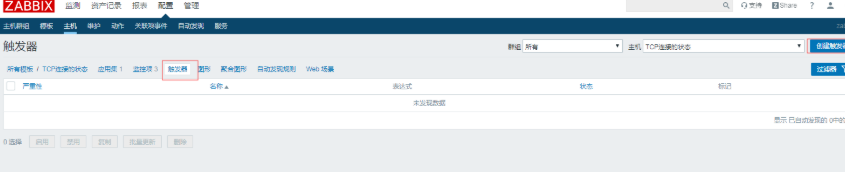
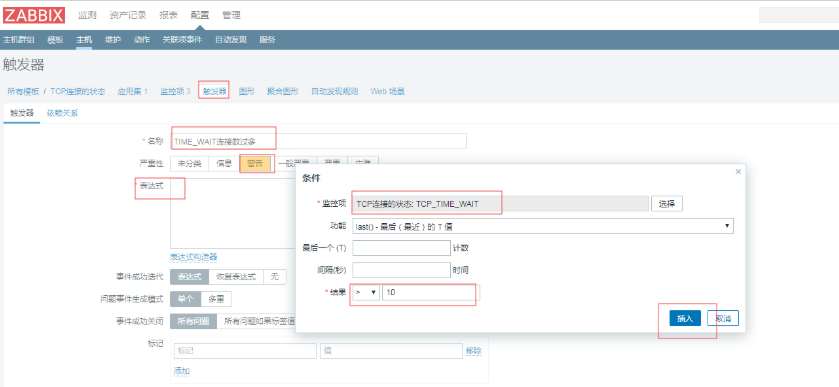
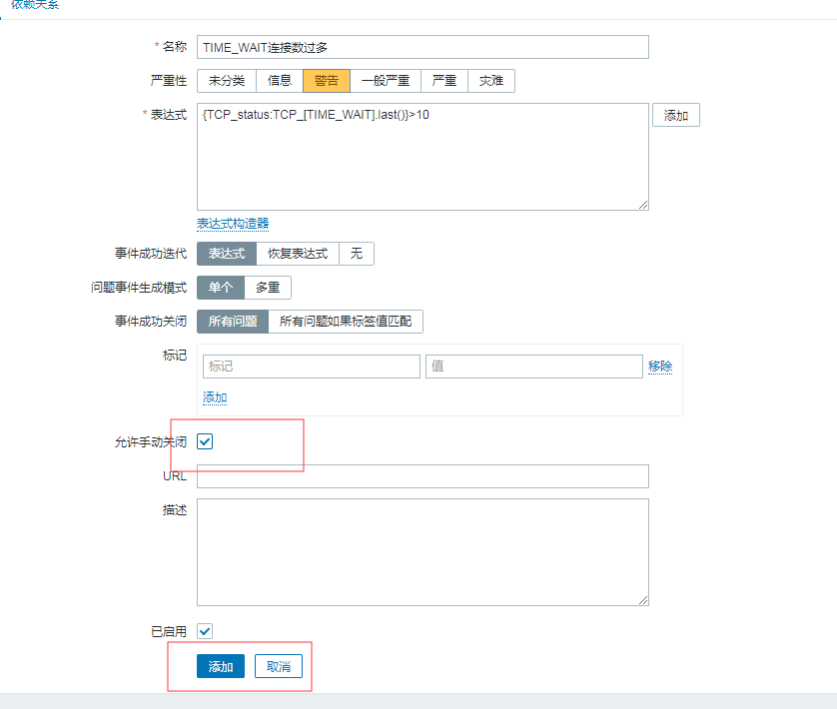
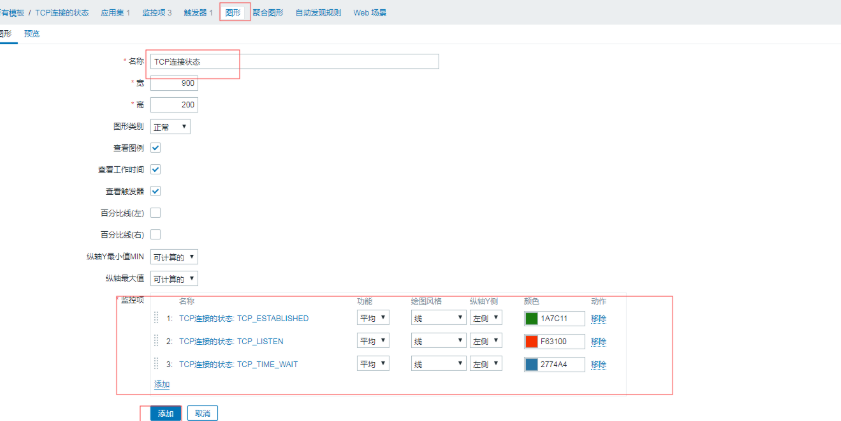
1.3创建图形
模版创建好,再次创建主机就可直接选择用
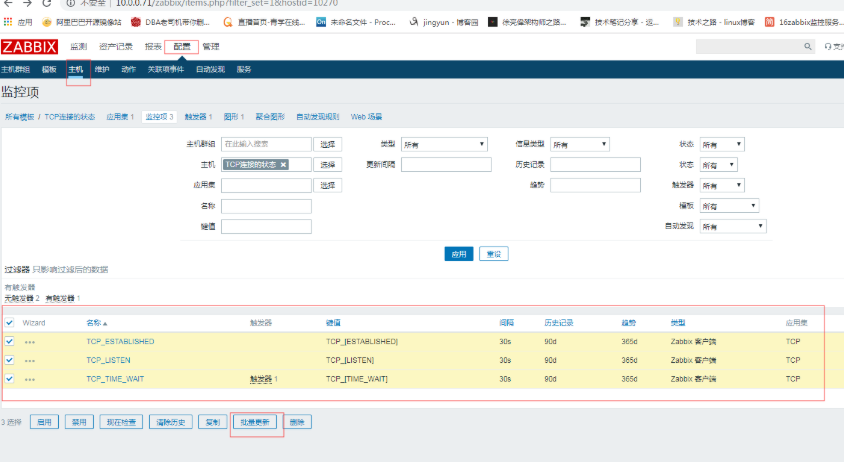
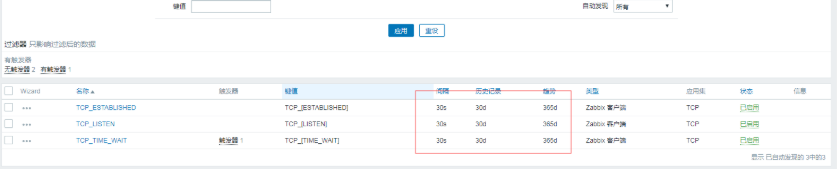
修改模版,可全部生效
例如:把时间修改成30天

2.导出模版
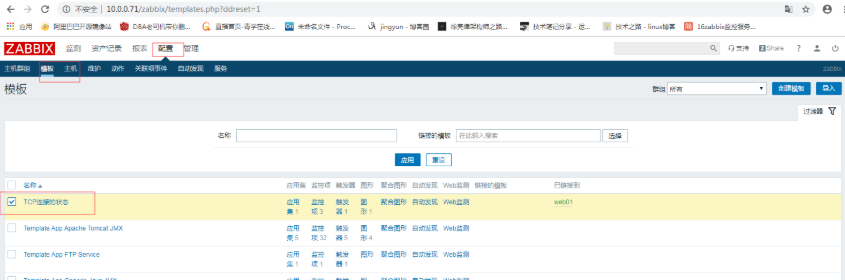

3.监控TCP11种状态
编写zabbix配置文件
[root@web01 /etc/zabbix/zabbix_agentd.d]# cat zbx_tcp.conf

UserParameter=ESTABLISHED,netstat -ant|grep  -c 'ESTABLISHED'

UserParameter=SYN_SENT,netstat -ant|grep  -c 'SYN_SENT'

UserParameter=SYN_RECV,netstat -ant|grep  -c 'SYN_RECV'

UserParameter=FIN_WAIT1,netstat -ant|grep  -c 'FIN_WAIT1'

UserParameter=FIN_WAIT2,netstat -ant|grep  -c 'FIN_WAIT2'

UserParameter=TIME_WAIT,netstat -ant|grep  -c 'TIME_WAIT'

UserParameter=CLOSE,netstat -ant|grep  -c 'CLOSE'

UserParameter=CLOSE_WAIT,netstat -ant|grep  -c 'CLOSE_WAIT'

UserParameter=LAST_ACK,netstat -ant|grep  -c 'LAST_ACK'

UserParameter=LISTEN,netstat -ant|grep  -c 'LISTEN'

UserParameter=CLOSING,netstat -ant|grep  -c 'CLOSING'
3.2.重启zabbix-agent
[root@web01 ~]# systemctl restart zabbix-agent.service
3.3.测试监控项
使用zabbix-get命令测试
[root@m01 ~]# yum install zabbix-get.x86_64 -y

[root@m01 ~]# zabbix_get -s 10.0.1.7 -k ESTABLISHED

2

[root@m01 ~]# zabbix_get -s 10.0.1.7 -k LISTEN

12
4.导入模版文件
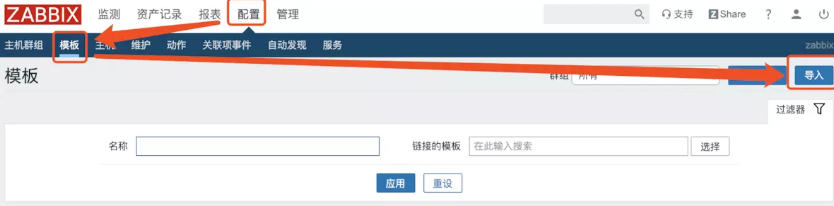
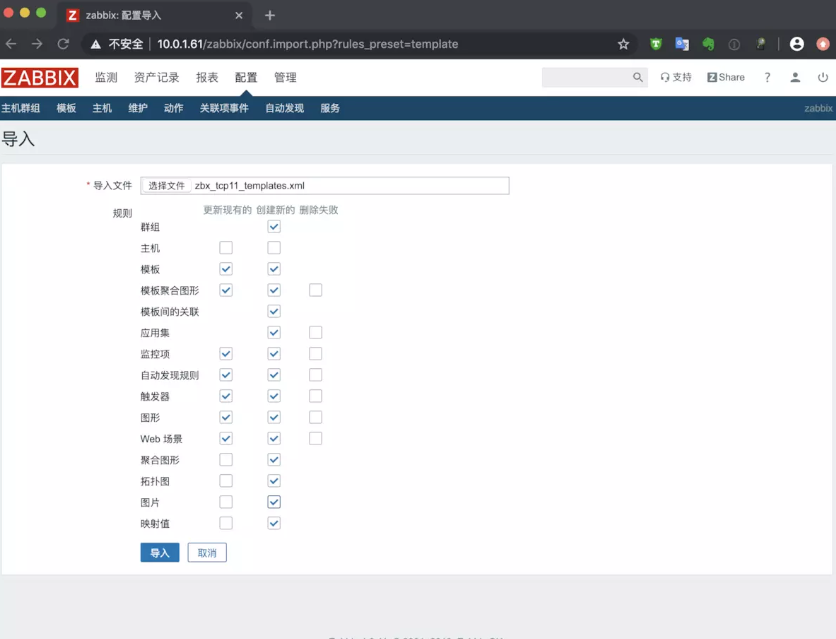
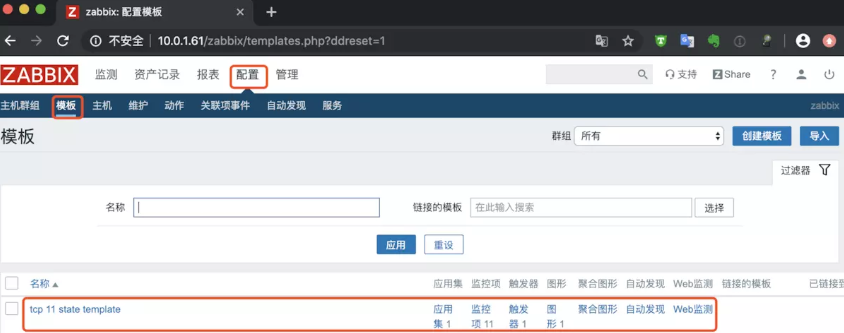
5.主机关联模版文件


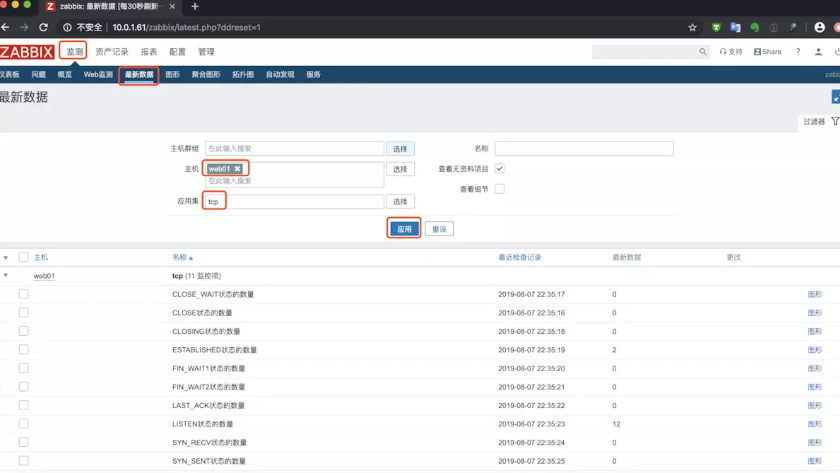
6.查看最新数据
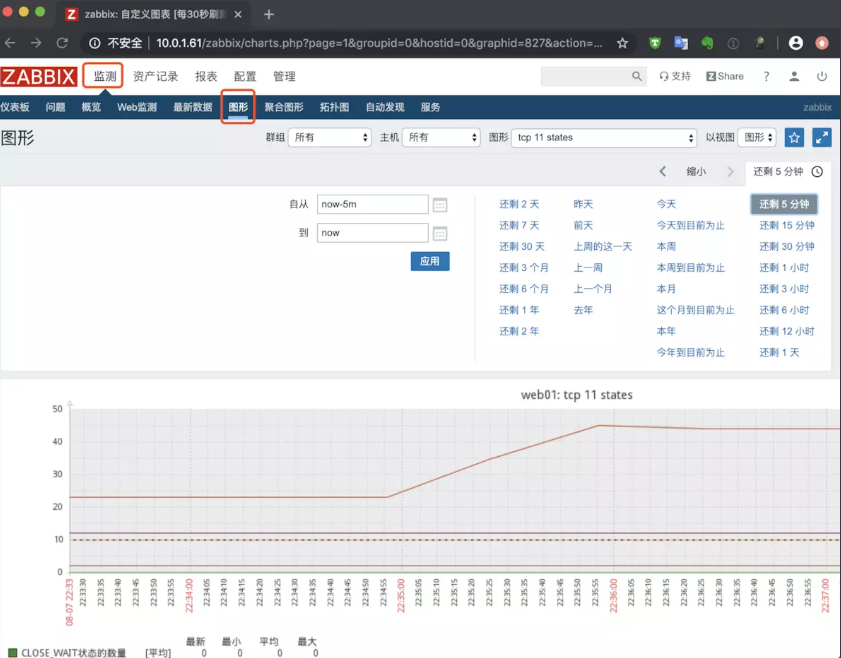
7.查看图形
二、自定义模版监控nginx状态
1.开启监控页面并访问测试
[root@web01 ~]# cat /etc/nginx/conf.d/status.conf

server {

   listen 80;

   server_name localhost;

   location /nginx_status {

       stub_status on;

       access_log off;

   }

}

[root@web01 ~]# curl 127.0.0.1/nginx_status/

Active connections: 1

server accepts handled requests

 6 6 6

Reading: 0 Writing: 1 Waiting: 0
2.准备nginx监控状态脚本
[root@web01 /etc/zabbix/zabbix_agentd.d]# cat nginx_monitor.sh

#!/bin/bash

NGINX_COMMAND=$1

CACHEFILE="/tmp/nginx_status.txt"

CMD="/usr/bin/curl http://127.0.0.1/nginx_status/"

if [ ! -f $CACHEFILE  ];then

   $CMD >$CACHEFILE 2>/dev/null

fi

# Check and run the script

TIMEFLM=`stat -c %Y $CACHEFILE`

TIMENOW=`date +%s`

if [ `expr $TIMENOW - $TIMEFLM` -gt 60 ]; then

    rm -f $CACHEFILE

fi

if [ ! -f $CACHEFILE  ];then

   $CMD >$CACHEFILE 2>/dev/null

fi

nginx_active(){

         grep 'Active' $CACHEFILE| awk '{print $NF}'

         exit 0;

}

nginx_reading(){

         grep 'Reading' $CACHEFILE| awk '{print $2}'

         exit 0;

}

nginx_writing(){

         grep 'Writing' $CACHEFILE | awk '{print $4}'

         exit 0;

}

nginx_waiting(){

         grep 'Waiting' $CACHEFILE| awk '{print $6}'

         exit 0;

}

nginx_accepts(){

         awk NR==3 $CACHEFILE| awk '{print $1}'

         exit 0;

}

nginx_handled(){

         awk NR==3 $CACHEFILE| awk '{print $2}'

         exit 0;

}

nginx_requests(){

         awk NR==3 $CACHEFILE| awk '{print $3}'

         exit 0;

}

case $NGINX_COMMAND in

    active)

        nginx_active;

        ;;

    reading)

        nginx_reading;

        ;;

    writing)

        nginx_writing;

        ;;

    waiting)

        nginx_waiting;

        ;;

    accepts)

        nginx_accepts;

        ;;

    handled)

        nginx_handled;

        ;;

    requests)

        nginx_requests;

        ;;

    *)

echo 'Invalid credentials';

exit 2;

esac
3.编写zabbix监控配置文件
[root@web01 ~]# cat /etc/zabbix/zabbix_agentd.d/nginx_status.conf

UserParameter=nginx_status[*],/bin/bash /etc/zabbix/zabbix_agentd.d/nginx_monitor.sh $1

[root@web01 ~]# systemctl restart zabbix-agent.service
4.使用zabbix_get取值
[root@m01 ~]# zabbix_get -s 10.0.1.7 -k nginx_status[accepts]

7
5.导入模版

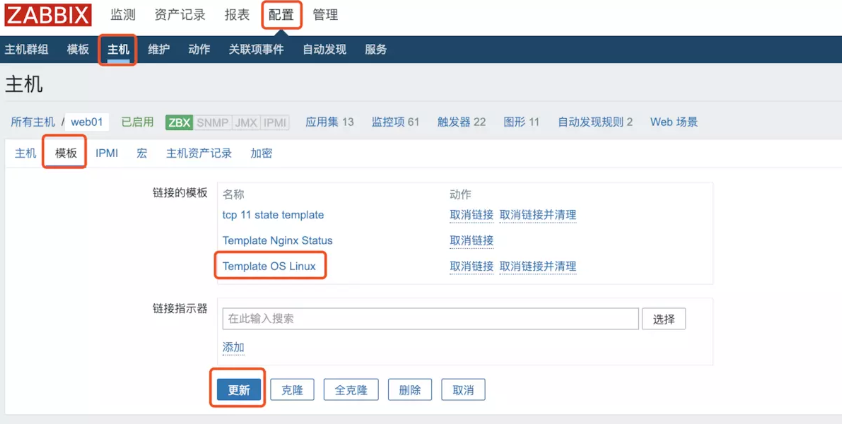
6.链接模版
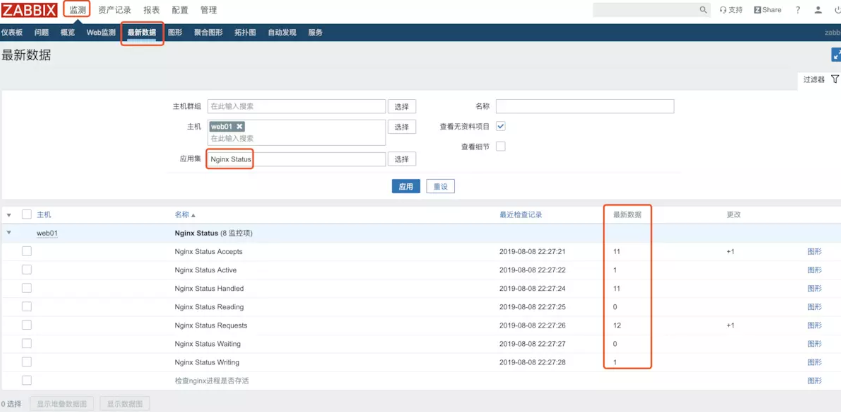
7.查看数据
三、自定义模版监控php状态
1.开启监控页面
[root@web01 ~]# tail -1 /etc/php-fpm.d/www.conf

pm.status_path = /php_status

[root@web01 ~]# cat /etc/nginx/conf.d/status.conf

server {

   listen 80;

   server_name localhost;

   location /nginx_status {

       stub_status on;

       access_log off;

   }

   location /php_status {

       fastcgi_pass 127.0.0.1:9000;

       fastcgi_index index.php;

       fastcgi_param SCRIPT_FILENAME html$fastcgi_script_name;

       include fastcgi_params;

   }

}

[root@web01 ~]# nginx -t

nginx: the configuration file /etc/nginx/nginx.conf syntax is ok

nginx: configuration file /etc/nginx/nginx.conf test is successful

[root@web01 ~]# systemctl restart nginx.service php-fpm.service
2.访问测试
[root@web01 ~]# curl 127.0.0.1/php_status

pool:                 www

process manager:      dynamic

start time:           08/Aug/2019:22:31:27 +0800

start since:          37

accepted conn:        1

listen queue:         0

max listen queue:     0

listen queue len:     128

idle processes:       4

active processes:     1

total processes:      5

max active processes: 1

max children reached: 0

slow requests:        0
3.准备访问脚本
[root@web01 ~]# cat /etc/zabbix/zabbix_agentd.d/fpm.sh

#!/bin/bash

##################################

# Zabbix monitoring script

#

# php-fpm:

#  - anything available via FPM status page

#

##################################

# Contact:

#  vincent.viallet@gmail.com

##################################

# ChangeLog:

#  20100922     VV      initial creation

##################################

# Zabbix requested parameter

ZBX_REQ_DATA="$1"

ZBX_REQ_DATA_URL="$2"

# Nginx defaults

NGINX_STATUS_DEFAULT_URL="http://localhost/fpm/status"

WGET_BIN="/usr/bin/wget"

#

# Error handling:

#  - need to be displayable in Zabbix (avoid NOT_SUPPORTED)

#  - items need to be of type "float" (allow negative + float)

#

ERROR_NO_ACCESS_FILE="-0.91"

ERROR_NO_ACCESS="-0.92"

ERROR_WRONG_PARAM="-0.93"

ERROR_DATA="-0.94" # either can not connect /   bad host / bad port

# Handle host and port if non-default

if [ ! -z "$ZBX_REQ_DATA_URL" ]; then

  URL="$ZBX_REQ_DATA_URL"

else

  URL="$NGINX_STATUS_DEFAULT_URL"

fi

# save the nginx stats in a variable for future parsing

NGINX_STATS=$($WGET_BIN -q $URL -O - 2>/dev/null)

# error during retrieve

if [ $? -ne 0 -o -z "$NGINX_STATS" ]; then

  echo $ERROR_DATA

  exit 1

fi

#

# Extract data from nginx stats

#

#RESULT=$(echo "$NGINX_STATS" | awk 'print $0;match($0, "^'"$ZBX_REQ_DATA"':[[:space:]]+(.*)", a) { print a[1] }')

#RESULT=$(echo "$NGINX_STATS" | grep "$ZBX_REQ_DATA" | awk -F : '{print $2}')

RESULT=$(echo "$NGINX_STATS" | awk -F : "{if(\$1==\"$ZBX_REQ_DATA\") print \$2}")

if [ $? -ne 0 -o -z "$RESULT" ]; then

    echo $ERROR_WRONG_PARAM

    exit 1

fi

echo $RESULT

exit 0

[root@web01 ~]# bash /etc/zabbix/zabbix_agentd.d/fpm.sh "total processes" http://127.0.0.1/php_status

5
4.准备zabbix配置文件
[root@web01 ~]# cat /etc/zabbix/zabbix_agentd.d/fpm.conf

UserParameter=php-fpm[*],/etc/zabbix/zabbix_agentd.d/fpm.sh "$1" "$2"

[root@web01 ~]# systemctl restart zabbix-agent.service
4.使用zabbix_get取值
[root@m01 ~]# zabbix_get -s 10.0.1.7 -k php-fpm["total processes",http://127.0.0.1/php_status]

5
5.导入模版
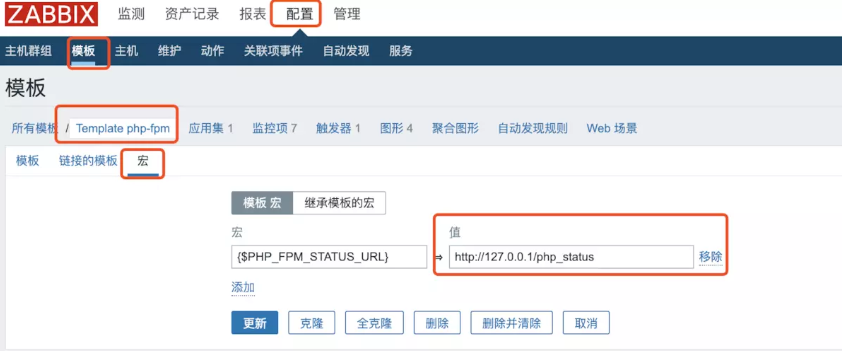
导入之后需要修改一下模版里的宏配置
四、WEB监控
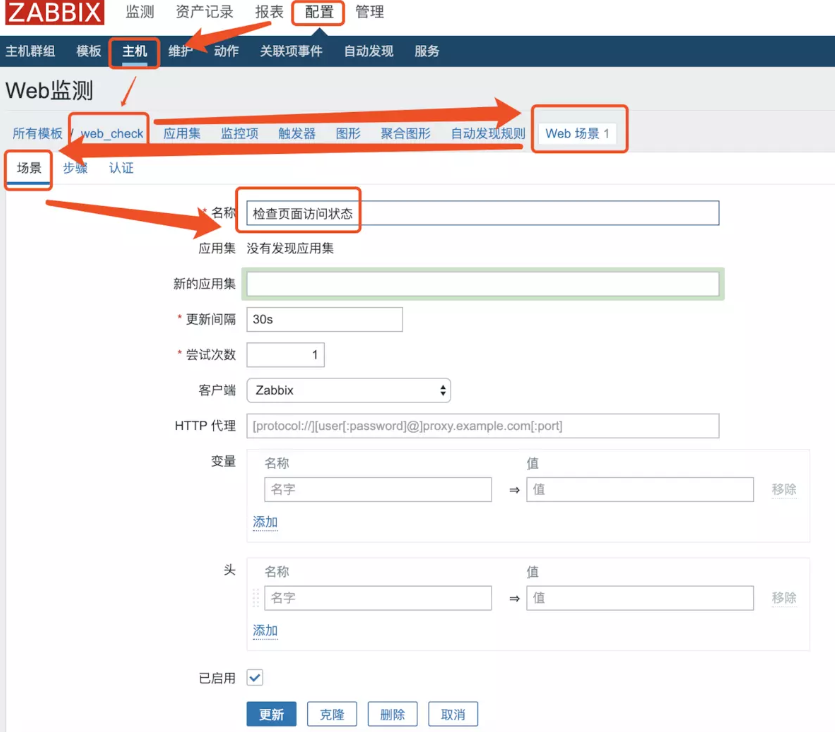
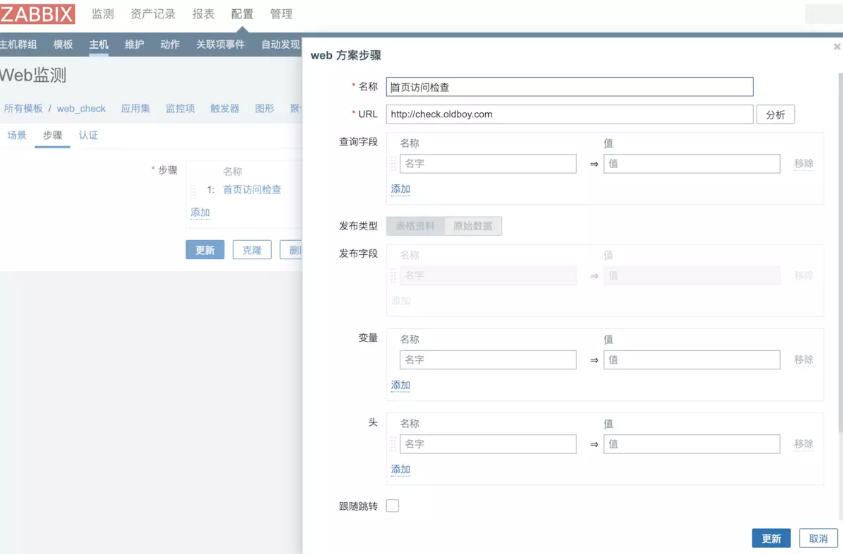
需求,监控页面状态码

创建触发器
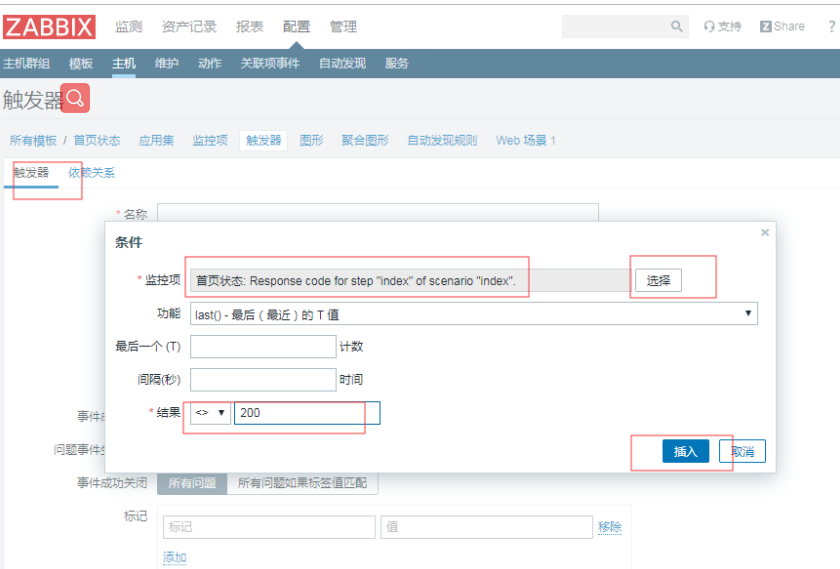
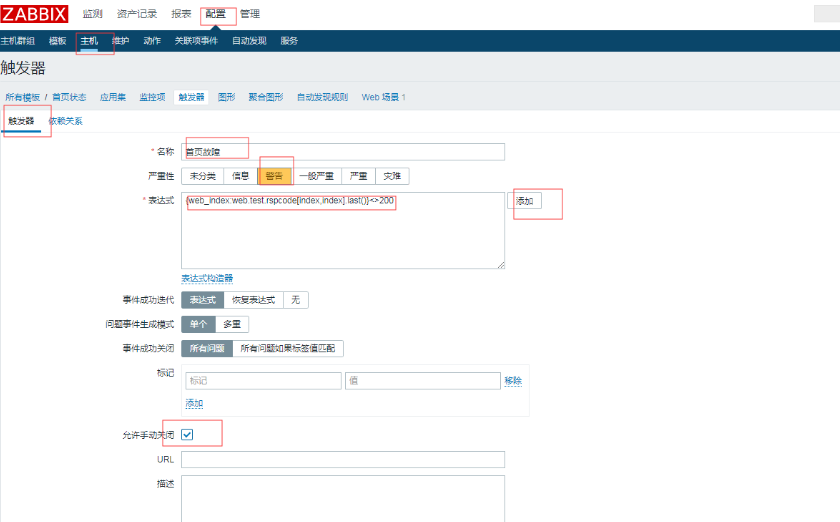
停掉服务时

启动服务

五、故障记录总结
故障1
故障现象:
提示zabbix-server is not running

报错日志:
 34983:20190807:202215.171 database is down: reconnecting in 10 seconds

 34983:20190807:202225.172 [Z3001] connection to database 'zabbix' failed: [1045] Access denied for user 'zabbix'@'localhost' (using password: NO)
故障原因:
zabbix-server的配置文件里配有配置数据库密码
故障解决:
添加正确的数据库账号密码信息
[root@m01 ~]# grep "^DB" /etc/zabbix/zabbix_server.conf

DBHost=localhost

DBName=zabbix

DBUser=zabbix

DBPassword=zabbix
故障2
故障现象:微信报警失败
报错日志:
[root@m01 ~]# tail -f /var/log/zabbix/zabbix_server.log

Problem name: TIME_WAIT过多

Host: web01

Severity: Average

Original problem ID: 51

'": Traceback (most recent call last):

  File "/usr/lib/zabbix/alertscripts/weixin.py", line 7, in <module>

    import requests

ImportError: No module named requests
问题原因:
缺少模块 requests
问题解决:
安装缺失的依赖包
[root@m01 ~]# yum install python-pip

[root@m01 ~]# pip install --upgrade pip

[root@m01 ~]# pip install requests
故障3
故障现象:
在server端使用zabbix_get命令测试键值命令时提示警告
[root@m01 ~]# zabbix_get -s 10.0.1.7 -k ESTABLISHED

(Not all processes could be identified, non-owned process info

 will not be shown, you would have to be root to see it all.)

2
问题原因:
zabbix_agent是以普通用户zabbix运行的,而普通用户执行netstat -antp时会有警告,网上查找发现只要不是用p参数就可以以普通用户运行
解决方案:
监控脚本里的命令修改为netstat -ant
Zabbix--04 自定义模版、web监控的更多相关文章
- 分布式系统监视zabbix讲解五之web监控--技术流ken
Web 监控 概况 你可以使用 Zabbix 检查几个网站可用性方面. 如果要使用 Web 检测功能,必须在 编译Zabbix 的时候加入 cURL(libcurl) 的支持. 要使用 Web 监控, ...
- 分布式系统监视zabbix讲解五之web监控
Web 监控 概况 你可以使用 Zabbix 检查几个网站可用性方面. 如果要使用 Web 检测功能,必须在 编译Zabbix 的时候加入 cURL(libcurl) 的支持. 要使用 Web 监控, ...
- zabbix使用自定义key进行监控
我的zabbix-server是安装在另一台虚拟机上的,用来监控下图中的这台虚拟机 先修改zabbix的客户端配置文件,增加UserParameter那行,这里我只是用来测试,所以就随便起了一个名为p ...
- (39)zabbix snmp自定义OID nginx监控实例
为什么要自定义OID? 前面的文章已经讲过zabbix如何使用snmp监控服务器,但是他有一个很明显的局限性:只能监控定义好的OID项目 假如我们想知道nginx进程是否在运行?在没有zabbix a ...
- zabbix之 自定义内存使用率监控报警
配置zabbix当内存剩余不足15%的时候触发报警 zabbix默认的剩余内存报警:Average Lack of available memory on server {HOST.NAME}{T ...
- Zabbix 添加 WEB 监控
添加 WEB Monitorings Web Monitoring是用来监控web程序的,可以监控到web程序的下载速度.返回码及响应时间,还支持把一组连续的web动作作为一个整体来监控. 下面我们以 ...
- Zabbix设置自定义监控
[zabbix]自定义监控项key值 说明: zabbix自带的默认模版里包括了很多监控项,有时候为了满足业务需求,需要根据自己的监控项目自定义监控项,这里介绍一种自定义监控项的方式. 1,首先编 ...
- 【转载】【zabbix】自定义监控项key值
[转载]https://www.cnblogs.com/zhenglisai/p/6547402.html [zabbix]自定义监控项key值 说明: zabbix自带的默认模版里包括了很多监控 ...
- 19 Zabbix web监控实例
点击返回:自学Zabbix之路 点击返回:自学Zabbix4.0之路 点击返回:自学zabbix集锦 9 Zabbix web监控实例 通过前面的介绍你已经了解Web scenario的配置,下面我们 ...
随机推荐
- Found duplicate classes/resources
很可能是多个三方依赖重复了,依赖个插件,这个插件能查找出依赖关系, duplicate-finder-maven-plugin 使用命令显示 mvn dependency:tree [INFO] \- ...
- 和他人一起管理GitHub仓库
和他人一起管理 GitHub 仓库方法 打开一个项目的仓库 同意好之后在项目中要添加 README.md 文件(重要) 要让别人也可以使用 master 主线 在上传代码前,一定要使用 git 指令 ...
- MySql 使用递归函数时遇到的级联删除问题
以下两段SQL的写法看似相同,结果效果却是不同的 写法A: DELETE OM_ORGANIZATION, OM_POSITION FROM OM_ORGANIZATION LEFT JOIN OM_ ...
- pwa 总结
概述 前几天了解并按照官方文档,成功实现了一个小型的 pwa demo,现在把总结记录下来,供以后开发时参考,相信对其他人也有用. pwa pwa 包括很多内容,我这里只介绍一部分,因为比如 Push ...
- nacos 发布配置
server 保留 2 份配置文件,一份在 mysql,一份在本地磁盘,同时在内存中缓存配置文件的 md5 值.当客户端获取配置时,server 直接返回本地磁盘文件,使用的是 sendFile ap ...
- 阶段3 1.Mybatis_11.Mybatis的缓存_6 Mybatis中的一级缓存
Mybatis中的一级缓存和二级缓存 一级缓存: 它指的是Mybatis中SqlSession对象的缓存. 当我们执行查询之后,查询的结 ...
- 阶段3 1.Mybatis_09.Mybatis的多表操作_7 mybatis多对多准备角色表的实体类和映射配置
创建Role表和user_role表 DROP TABLE IF EXISTS `role`; CREATE TABLE `role` ( `ID` int(11) NOT NULL COMMENT ...
- Centos 安装 FTP
安装教程: 基于 CentOS 搭建 FTP 文件服务 搭建完成后,使用windows文件夹访问FTP报错,请确保输入的文件名是否正确,并且您有权访问此文件. 先确认ftp服务正常 修改: 设 ...
- 【Linux-驱动】驱动策略----自旋锁
自旋锁 自旋锁最多只能被一个内核任务持有.要是锁未被持有,请求它的内核任务便会立即得到它并继续执行.如果一个内核任务试图请求一个已经被别的内核任务持有的自旋锁,那么CPU就会一直尽心循环---旋转-- ...
- CF573E Bear and Bowling
题目 我们设\(f_{i,j}\)表示前\(i\)个数中选\(j\)个的最大值. 那么显然有\(f_{i,j}=max(f_{i-1,j},f_{i-1,j-1}+j*a_i)\). 这个东西我们首先 ...