
如何创建Maven项目和Spring IOC例子
把如何创建Maven项目和创建Spring IOC的例子分享给大家,希望能对大家有帮助!
我的博客地址:https://www.cnblogs.com/themysteryofhackers/p/12006785.html
更新时间:2019-12-08
一、创建Maven项目
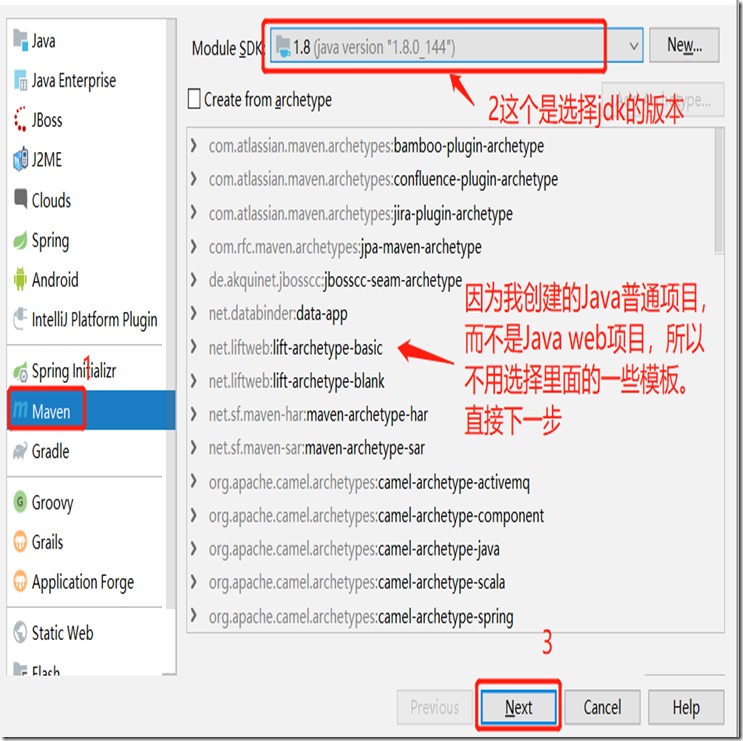
我用的是Intellij IDEA开发工具创建Maven项目的,打开该软件后,直接点击file --->project,如下图所示,
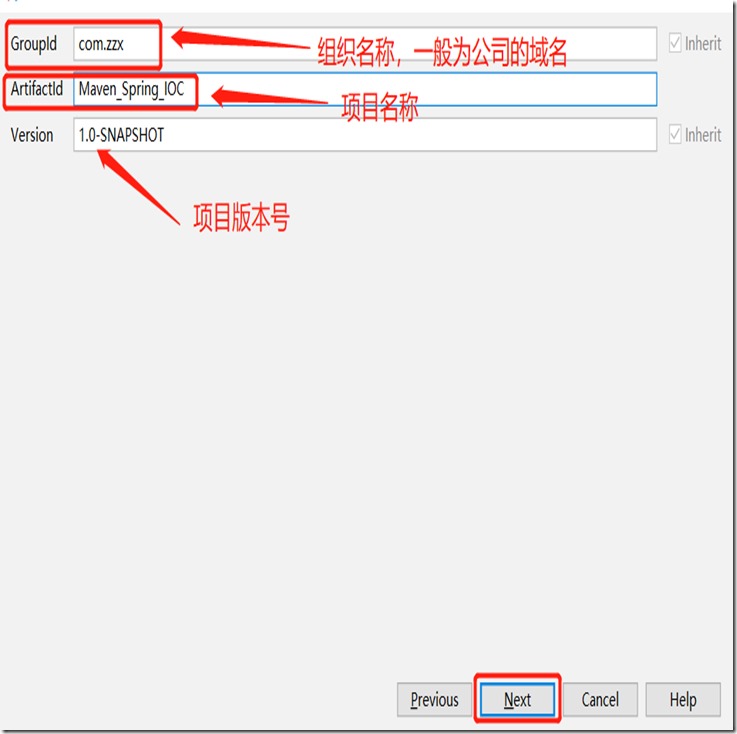
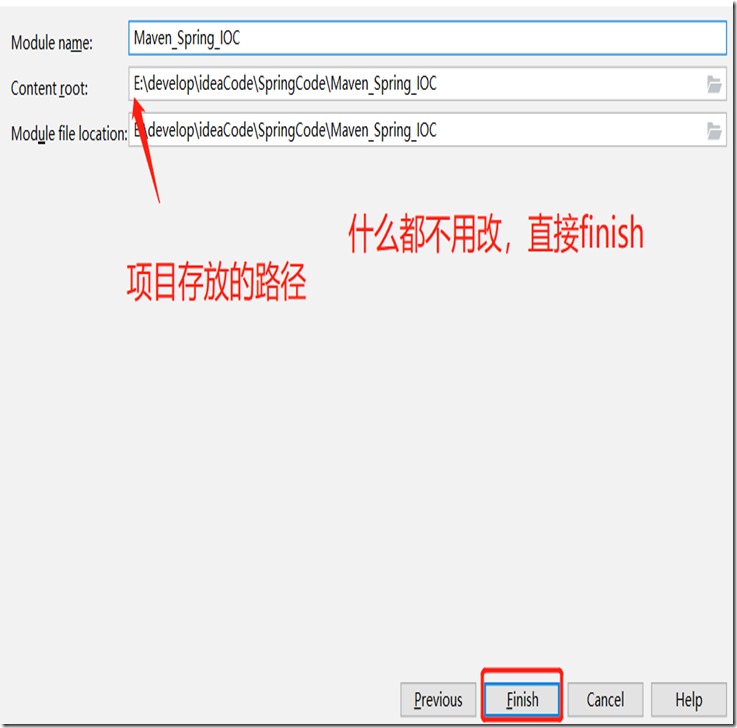
然后就直接跟着我的图片的步骤往下走。
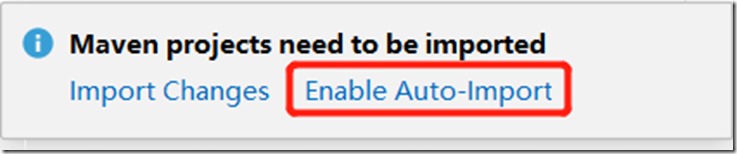
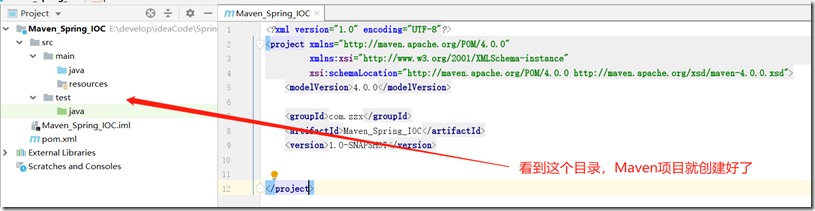
到了这一个就创建好了Maven项目了,然后开发工具会在右下角提示下图的信息,直接点击自动导入就好。
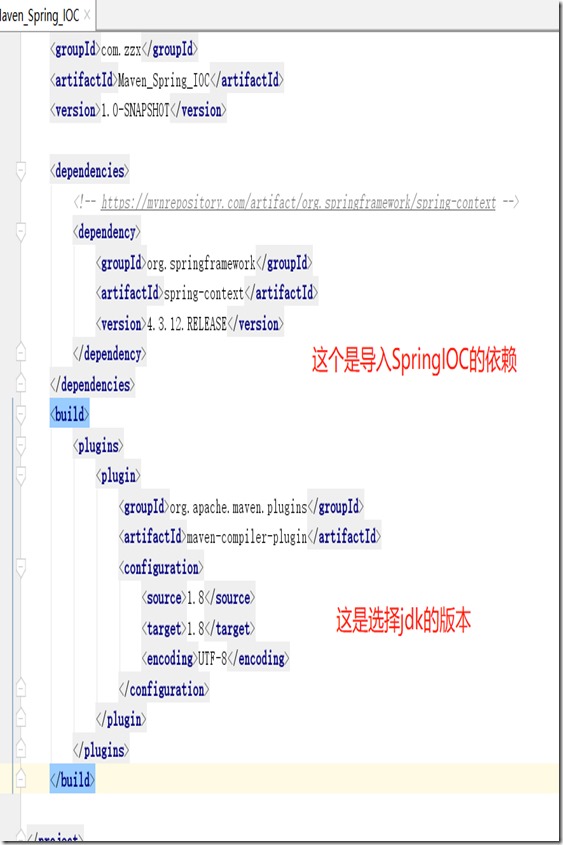
然后就导入Spring IOC的项目依赖,可以去这个网站查找Maven依赖查找。然后在pom.xml文件先导入下面的依赖。
 <dependencies>

        <!-- https://mvnrepository.com/artifact/org.springframework/spring-context -->

        <dependency>

            <groupId>org.springframework</groupId>

            <artifactId>spring-context</artifactId>

            <version>4.3.12.RELEASE</version>

        </dependency>

        <dependency>

            <groupId>junit</groupId>

            <artifactId>junit</artifactId>

            <version>4.12</version>

            <scope>test</scope>

        </dependency>

    </dependencies>

    <build>

        <plugins>

            <plugin>

                <groupId>org.apache.maven.plugins</groupId>

                <artifactId>maven-compiler-plugin</artifactId>

                <configuration>

                    <source>1.8</source>

                    <target>1.8</target>

                    <encoding>UTF-8</encoding>

                </configuration>

            </plugin>

        </plugins>

    </build>
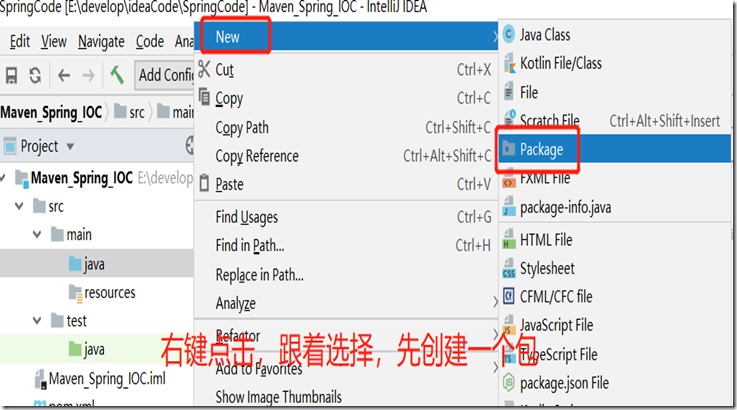
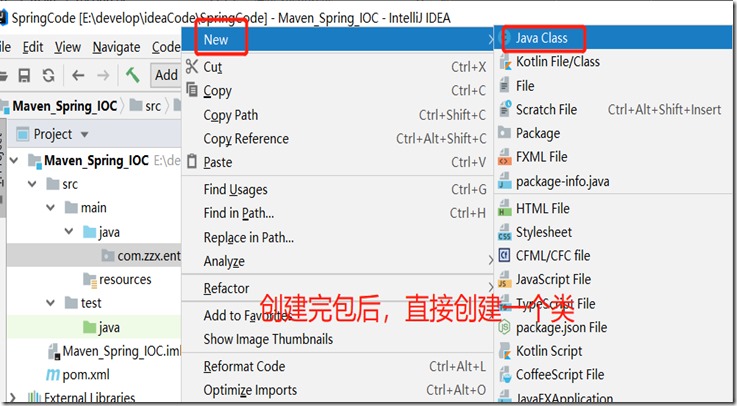
导入依赖后就创建包,创建包是为了更好的去管理Java类,创建好包之后就直接创建类,创建包和类的命名遵从Java命名规范即可。
创建好Student类后,然后在resources文件夹里面直接创建applicationContext.xml文件,最后在test下的java下创建一个包,在创建一个测试类,具体代码如下:
Student.java
package com.zzx.entity;public class Student {
private Integer id;
private String name;
private Integer age;
private Integer sex;
private String address;
public Integer getId() {
return id;
}
public void setId(Integer id) {
this.id = id;
}
public String getName() {
return name;
}
public void setName(String name) {
this.name = name;
}
public Integer getAge() {
return age;
}
public void setAge(Integer age) {
this.age = age;
}
public Integer getSex() {
return sex;
}
public void setSex(Integer sex) {
this.sex = sex;
}
public String getAddress() {
return address;
}
public void setAddress(String address) {
this.address = address;
}
@Override
public String toString() {
return "Student{" +
"id=" + id +
", name='" + name + '\'' +
", age=" + age +
", sex=" + sex +
", address='" + address + '\'' +
'}';
}
}applicationContext.xml
<?xml version="1.0" encoding="UTF-8"?>
<beans xmlns:xsi="http://www.w3.org/2001/XMLSchema-instance"
xmlns="http://www.springframework.org/schema/beans"
xmlns:context="http://www.springframework.org/schema/context"
xsi:schemaLocation="http://www.springframework.org/schema/beans http://www.springframework.org/schema/beans/spring-beans.xsd http://www.springframework.org/schema/context http://www.springframework.org/schema/context/spring-context.xsd ">
<!-- 把一个对象放进Spring容器 -->
<bean name="s1" class="com.zzx.entity.Student">
<property name="id" value="1"></property>
<property name="name" value="小红"></property>
<property name="age" value="18"></property>
<property name="sex" value="2"></property>
<property name="address" value="中国"></property>
</bean>
<!-- 把另一个对象也放到spring容器中,对象的名字不能重复,否则运行会报错 -->
<!-- 用property设置对象的属性,那该对象要有setter方法,还要有一个无参数的构造方法 -->
<bean name="s2" class="com.zzx.entity.Student">
<property name="id" value="2"></property>
<property name="name" value="小白"></property>
<property name="age" value="16"></property>
<property name="sex" value="1"></property>
<property name="address" value="中国"></property>
</bean>
</beans>Test01.java
package com.zzx.ioc;import com.zzx.entity.Student;
import org.junit.Test;
import org.springframework.context.support.ClassPathXmlApplicationContext;public class Test01 {
@Test
public void studentTest(){
ClassPathXmlApplicationContext applicationContext = new ClassPathXmlApplicationContext("applicationContext.xml");
Student s1 = applicationContext.getBean("s1", Student.class);
Student s2 = applicationContext.getBean("s2", Student.class);
System.out.println(s1);
System.out.println(s2);
}}
最后,直接运行程序,这样一个简单的Spring IOC结合Maven的项目就完成了。
结尾
我是一个Java程序员,一个向往技术的小白,以后我会陆续将自己学习到的Java或者其他的知识会以博客的形式分享出来,希望能对大家有帮助。
喜欢小编的就给我一个关注吧!
如果有哪些问题、有哪些不妥或者侵犯到您的权益的地方,可以联系我,我马上修改。

如何创建Maven项目和Spring IOC例子的更多相关文章
- spring 学习(一):使用 intellijIDEA 创建 maven 工程进行 Spring ioc 测试
spring学习(一):使用 intellijIDEA 创建 maven 工程进行 Spring ioc 测试 ioc 概念 控制反转(Inversion of Control,缩写为IOC),是面向 ...
- 通过idea创建Maven项目整合Spring+spring mvc+mybatis
创建项目 File→new→project 然后就不断next直到项目面板出来 设置文件夹 注意:这里我个人习惯,在java下还建了ssm文件夹,然后再cont ...
- sts创建maven项目 引入spring,报错
症状: Missing artifact org.springframework:spring-core:jar:5.0.0.RC3 原因: 在引入之前没有设置spring版本号 和spring ur ...
- IDEA一步步创建Maven管理的Spring入门程序
目前,做Java开发的很多人都在使用IDEA了,而有些人也选择用Eclipse,我这里介绍一下IDEA一步步创建Maven项目的步骤,并创建一个Spring的入门程序(Java项目,非Web项目),讲 ...
- IDEA下创建Maven项目,并整合使用Spring、Spring MVC、Mybatis框架
项目创建 本项目使用的是IDEA 2016创建. 首先电脑安装Maven,接着打开IDEA新建一个project,选择Maven,选择图中所选项,下一步. 填写好GroupId和ArtifactId, ...
- eclipse 创建maven 项目 动态web工程完整示例
需求表均同springmvc案例 此处只是使用maven 注意,以下所有需要建立在你的eclipse等已经集成配置好了maven了,说白了就是新建项目的时候已经可以找到maven了 没有的话需要安装m ...
- eclipse 创建maven 项目 动态web工程完整示例 maven 整合springmvc整合mybatis
接上一篇: eclipse 创建maven 项目 动态web工程完整示例 eclipse maven工程自动添加依赖设置 maven工程可以在线搜索依赖的jar包,还是非常方便的 但是有的时候可能还需 ...
- 【MAVEN】如何在Eclipse中创建MAVEN项目
目录结构: contents structure [+] 1,Maven简介 2,Maven安装 2.1,下载Maven 2.2,配置环境变量 2.3,测试 3,Maven仓库 3.1,Maven仓库 ...
- 创建Maven项目出错
有时候创建maven项目的时候会出错,例如在创建Spring cloud 2 项目的时候,会出现org.apache.maven.archiver.MavenArchiver.getManifest( ...
随机推荐
- HDU1010 --- Tempter of the Bone(dfs+剪枝)
小明做了一个很久很久的梦,醒来后他竟发现自己和朋友在一个摇摇欲坠的大棋盘上,他们必须得想尽一切办法逃离这里.经过长时间的打探,小明发现,自己所在的棋盘格子上有个机关,上面写着“你只有一次机会,出发后t ...
- day30 NFS服务器概述
02. NFS存储服务概念介绍 NFS是Network File System的缩写,中文意思是网络文件共享系统, 它的主要功能是通过网络(一般是局域网)让不同的主机系统之间可以共享文件或目录 存储服 ...
- [JSOI2016]最佳团体 DFS序/树形DP
题目 洛谷 P4322 [JSOI2016]最佳团体 Description 茜茜的舞蹈团队一共有\(N\)名候选人,这些候选人从\(1\)到\(N\)编号.方便起见,茜茜的编号是\(0\)号.每个候 ...
- SQL With As的用法
WITH AS,也叫子查询部分(subquery factoring),可以定义一个SQL片断,该SQL片断会被整个SQL语句用到.可以使SQL语句的可读性更高,也可以在UNION ALL的不同部分, ...
- 最近手机价格全线暴跌真的只是因为5G要来了吗?
等等党,是一群数量颇大的消费群体.他们的消费习性是绝不买刚上市的新品,而是一直等.等到他们认为产品的价格已经跌无可跌,或者性价比十足的时候再出手.不得不说,与早买早享受的尝鲜消费群体相比,等等党代表了 ...
- C#中字节数组byte[]和字符串string类型的相互转换
C#中字节数组byte[]和字符串string类型的相互转换: string转byte[]: byte[] byteArray = System.Text.Encoding.Default.GetBy ...
- Elasticsearch系列---倒排索引原理与分词器
概要 本篇主要讲解倒排索引的基本原理以及ES常用的几种分词器介绍. 倒排索引的建立过程 倒排索引是搜索引擎中常见的索引方法,用来存储在全文搜索下某个单词在一个文档中存储位置的映射.通过倒排索引,我们输 ...
- python UI自动化生成BeautifulReport测试报告并保存截图
前面已经写过利用BeautifulReport生成测试报告,那么接下来讲讲如何在测试报告里面保存截图 首先需要在测试用例中定义一个截图的方法: # 截图方法 """ os ...
- wamp配置本地多站点。
' 进入C:\wamp64\wamp64\bin\apache\apache2.4.37\conf\http.conf 首先确保httpd-vhosts.conf扩展文件引入进来了,部分版本默认是不引 ...
- 杭电ACM 1713 相遇周期
相遇周期 Time Limit: 1000/1000 MS (Java/Others) Memory Limit: 32768/32768 K (Java/Others)Total Submis ...