
pytest文档32-allure描述用例详细讲解
前言
pytest+allure是最完美的结合了,关于allure的使用,本篇做一个总结。
allure报告可以很多详细的信息描述测试用例,包括epic、feature、story、title、issue、testcase、severity等
环境准备
- python 3.6
- pytest 4.5.0
- allure-pytest 2.8.6
allure用例描述
| 使用方法 | 参数值 | 参数说明 |
|---|---|---|
| @allure.epic() | epic描述 | 敏捷里面的概念,定义史诗,往下是feature |
| @allure.feature() | 模块名称 | 功能点的描述,往下是story |
| @allure.story() | 用户故事 | 用户故事,往下是title |
| @allure.title(用例的标题) | 用例的标题 | 重命名html报告名称 |
| @allure.testcase() | 测试用例的链接地址 | 对应功能测试用例系统里面的case |
| @allure.issue() | 缺陷 | 对应缺陷管理系统里面的链接 |
| @allure.description() | 用例描述 | 测试用例的描述 |
| @allure.step() | 操作步骤 | 测试用例的步骤 |
| @allure.severity() | 用例等级 | blocker,critical,normal,minor,trivial |
| @allure.link() | 链接 | 定义一个链接,在测试报告展现 |
| @allure.attachment() | 附件 | 报告添加附件 |
测试案例
pytest结合allure测试用例
import pytest

import allure

# 作者:上海-悠悠 qq交流群:874033608

@pytest.fixture(scope="session")

def login_fixture():

    print("前置条件:登录")

@allure.step("步骤1")

def step_1():

    print("操作步骤---------------1")

@allure.step("步骤2")

def step_2():

    print("操作步骤---------------2")

@allure.step("步骤3")

def step_3():

    print("操作步骤---------------3")

@allure.epic("epic对大Story的一个描述性标签")

@allure.feature("测试模块")

class TestDemoAllure():

    @allure.testcase("http://49.235.x.x:8080/zentao/testcase-view-6-1.html")

    @allure.issue("http://49.235.x.x:8080/zentao/bug-view-1.html")

    @allure.title("用例的标题")

    @allure.story("用户故事:1")

    @allure.severity("critical")

    def test_case_1(self, login_fixture):

        '''case description:作者:上海-悠悠 qq交流群:874033608

        1.点文章分类导航标签 -跳转编辑页面

        2.编辑页面输入,分类名称,如:上海-悠悠-可以输入

        3.点保存按钮保存成功

        '''

        step_1()

        step_2()

    @allure.story("用户故事:2")

    def test_case_2(self, login_fixture):

        print("测试用例1")

        step_1()

        step_3()

@allure.epic("epic对大Story的一个描述性标签")

@allure.feature("模块2")

class TestDemo2():

    @allure.story("用户故事:3")

    def test_case_3(self, login_fixture):

        print("测试用例1")

        step_1()

    @allure.story("用户故事:4")

    def test_case_4(self, login_fixture):

        print("测试用例1")

        step_3()
报告展示
cd到用例目录执行用例生成allure报告
pytest --alluredir ./report/allure
allure serve ./report/allure
报告展示内容
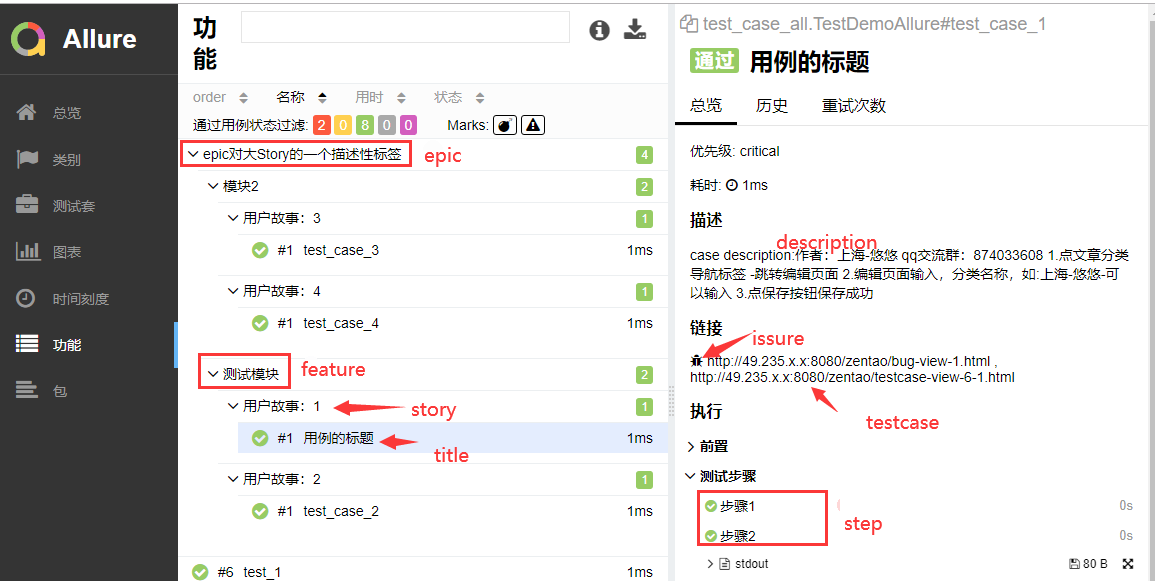
命令行参数
pytest运行用例的时候可以加上allure标记用例的参数
--allure-severities=SEVERITIES_SET

                        Comma-separated list of severity names. Tests only

                        with these severities will be run. Possible values

                        are: blocker, critical, normal, minor, trivial.

--allure-epics=EPICS_SET

                        Comma-separated list of epic names. Run tests that

                        have at least one of the specified feature labels.

--allure-features=FEATURES_SET

                        Comma-separated list of feature names. Run tests that

                        have at least one of the specified feature labels.

--allure-stories=STORIES_SET

                        Comma-separated list of story names. Run tests that

                        have at least one of the specified story labels.

--allure-link-pattern=LINK_TYPE:LINK_PATTERN

                        Url pattern for link type. Allows short links in test,

                        like 'issue-1'. Text will be formatted to full url

                        with python str.format().
选择运行你要执行epic的用例
pytest --alluredir ./report/allure --allure-epics=epic对大Story的一个描述性标签
选择运行你要执行features的用例
pytest --alluredir ./report/allure --allure-features=模块2
选择运行你要执行features的用例
pytest --alluredir ./report/allure --allure-stories="用户故事:1"
关于allure的使用基本上就是这些了
pytest文档32-allure描述用例详细讲解的更多相关文章
- 【自动化基础】allure描述用例详细讲解及实战
前言 allure可以输出非常精美的测试报告,也可以和pytest进行完美结合,不仅可以渲染页面,还可以控制用例的执行.下面就对allure的使用进行一个详细的介绍和总结. 需要准备的环境: pyth ...
- pytest文档3-pytest+Allure+jenkins+邮箱发送
前言: 虽然网上有很多邮件配置的文章,但还是想自己写一下配置的过程,因为在中间也碰到了不同坑.按照这个文档配置的话,99%都可以成功. 一.jenkins 配置邮箱 1.打开jenkins后进入点 ...
- pytest文档40-pytest.ini配置用例查找规则(面试题)
前言 面试题:pytest如何执行不是test开头的用例?如执行 xxx_*.py这种文件的用例. pytest.ini 配置文件可以修改用例的匹配规则. pytest命令行参数 cmd打开输入pyt ...
- pytest文档2-pytest+Allure+jenkins+邮箱发送
前言: 上一章节讲解了tomcat+jenkins的环境搭建,这一章节主要讲一下Allure报告在jenkins上的配置 步骤: 1.新建一个item 2.输入项目的名称,选择自由风格,点击保存 3. ...
- pytest文档28-重复执行用例(pytest-repeat)
前言 平常在做功能测试的时候,经常会遇到某个模块不稳定,偶然会出现一些bug,对于这种问题我们会针对此用例反复执行多次,最终复现出问题来. 自动化运行用例时候,也会出现偶然的bug,可以针对单个用例, ...
- pytest文档47-allure报告添加用例失败截图
前言 使用 selenium 做 web 自动化的时候,很多小伙伴希望用例失败的时候能截图,把异常截图展示到allure报告里面. pytest 有个很好的钩子函数 pytest_runtest_ma ...
- pytest文档33-Hooks函数获取用例执行结果(pytest_runtest_makereport)
前言 pytest提供的很多钩子(Hooks)方法方便我们对测试用例框架进行二次开发,可以根据自己的需求进行改造. 先学习下pytest_runtest_makereport这个钩子方法,可以更清晰的 ...
- pytest文档1-pytest+Allure+jenkins+邮箱发送
前言: 1.pytest+allure是目前很多公司使用较多的一种报告样式,因为它更详细,各种指标更直观(简单的说就是看着更高大上,更能装X). 环境准备: 1.Windows10 2.Allure ...
- pytest文档12-skip跳过用例
前言 pytest.mark.skip可以标记无法在某些平台上运行的测试功能,或者您希望失败的测试功能 skip意味着只有在满足某些条件时才希望测试通过,否则pytest应该跳过运行测试. 常见示例是 ...
随机推荐
- kaggle实战之 bag of words meet bag of poopcorn
由于编辑器总是崩溃,我只能直接把代码贴上了. import numpy #first step import pandas as pd import numpy as np # Read data f ...
- .NET异步编程之APM模式
目录 1.AMP模式简介 2.使用BeginInvoke实现异步委托 3.原始线程怎么知道新线程已经运行完毕 4.使用AsyncCallback委托实现回调模式 5.源代码下载 shanzm-2020 ...
- Django项目在Linux服务器上部署和躺过的坑
引言 在各方的推荐下,领导让我在测试环境部署之前开发的测试数据预报平台.那么问题来了,既然要在服务器上部署, 就需要准备: 1.linux服务器配置 2.linux安装python环境搭建与配置 3. ...
- 为什么建议使用Guid结构体做为数据库及排序时的主键
在.net2.0中,Guid结构体表示一个全局唯一标识符,是一个在生成时就可以肯定为全世界唯一的16字节值.Guid在数据库中通常可以作为各种排序的主键.比如 public class Company ...
- overflow:hidden;zoom:1;外框自适应 [转]
在排页面时,碰到了,外框里的元素用fluid 布局,外框的高度不能适应的问题,查了一下资料,发现了博友的一篇文章,解决了这个问题,现在分享给大家. 解释不到位的请大牛补充~~~~~~ 高度自适应: h ...
- Codeforces Round #617 (Div. 3) D. Fight with Monsters
D : Fight with Monsters 题目大意 : 有一组数,每个值对应着一个怪物的 hp 值,现在有两个人,一个自己一个对手,每个人有一个攻击值, 两个人轮流攻击怪物,如果是自己将怪物先打 ...
- urllib 模块 - module urllib
urllib 模块 - urllib module 获取 web 页面, html = urllib.request.urlopen("http://www.zzyzz.top/" ...
- 终于成功部署 Kubernetes HPA 基于 QPS 进行自动伸缩
昨天晚上通过压测验证了 HPA 部署成功了. 所使用的 HPA 配置文件如下: apiVersion: autoscaling/v2beta2 kind: HorizontalPodAutoscale ...
- Nginx 主要应用场景
前言 本文只针对 Nginx 在不加载第三方模块的情况能处理哪些事情,由于第三方模块太多所以也介绍不完,当然本文本身也可能介绍的不完整,毕竟只是我个人使用过和了解到过得.所以还请见谅,同时欢迎留言交流 ...
- 【转载】IPSec-Tools配置
来源:https://blog.csdn.net/zt698/article/details/4811604 1 介绍从Linux 2.6内核开始,内核就自身带有IPSec模块,配合IPS ...