
iOS开发inputView和inputAccessoryView
1、简介
起初看到这两个属性是在UIResponder中,只是可读的:
@property (nullable, nonatomic, readonly, strong) __kindof UIView *inputView NS_AVAILABLE_IOS(3_2);

@property (nullable, nonatomic, readonly, strong) __kindof UIView *inputAccessoryView NS_AVAILABLE_IOS(3_2);
后来在UITextField和UITextView中也有,是可读可写的:
@property (nullable, readwrite, strong) UIView *inputView;

@property (nullable, readwrite, strong) UIView *inputAccessoryView;
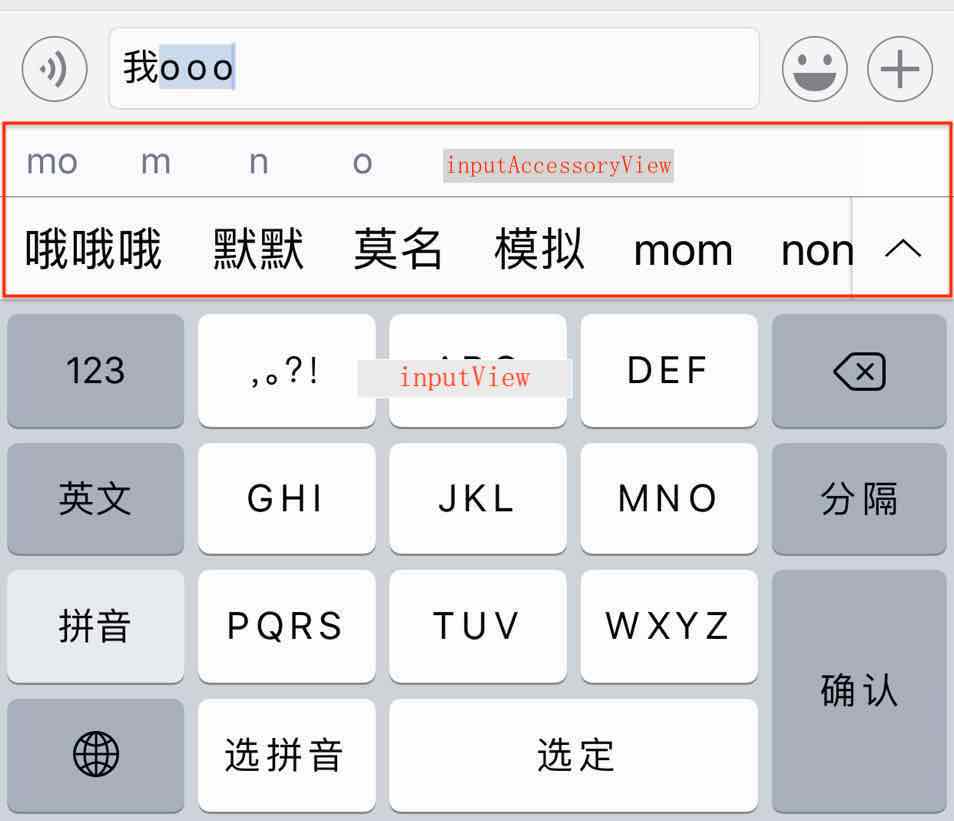
用一张输入法的图片简单说明一下这两个属性:
inputAccessoryView:附件视图,就是上面汉子和拼音
inputView:就是下面的按键输入法
最上面的输入框:之前作法——监听键盘的通知,获取键盘高度处理输入框位置;
现在——是否可以把输入框放入到附件视图inputAccessoryView?只是一种想法,后期我会自己试试 勿喷!
2、自定义inputAccessoryView和inputView
2.1、直接赋值UITextField的这两个属性
    UIToolbar *toolBar = [[UIToolbar alloc]initWithFrame:CGRectMake(, , , )];

    UIBarButtonItem *right = [[UIBarButtonItem alloc]initWithBarButtonSystemItem:UIBarButtonSystemItemDone target:self action:@selector(endEdi:)];

    UIBarButtonItem *right2 = [[UIBarButtonItem alloc]initWithBarButtonSystemItem:UIBarButtonSystemItemCancel target:self action:@selector(endEdi:)];

    toolBar.items = [NSArray arrayWithObjects:right,right2,right,right,right,right,right, nil];

    self.inputTextField.inputAccessoryView = toolBar;

    UIView *inputView = [[UIView alloc] initWithFrame:CGRectMake(, , , )];

    UIImageView *igView = [[UIImageView alloc] initWithFrame:CGRectMake(, , self.view.bounds.size.width, )];

    igView.image = [UIImage imageNamed:@"pic2.png"];

    [inputView addSubview:igView];

    inputView.backgroundColor = [UIColor greenColor];

    self.inputTextField.inputView =inputView;
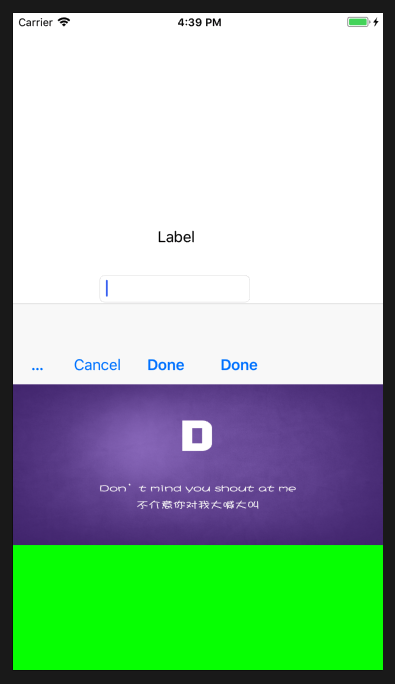
- 设置坐标时只有高度才能起到约束,x、y、weight设置也不会有作用;
- 整个弹出视图的高度是inputView.height+inputAccessoryView.height,而且附件视图会紧贴inputView视图上面;
- inputView和inputAccessoryView的子视图需要有详细坐标约束;
- UIToolbar继承UIView,常用于附件视图上,作点击事件处理;
2.2、自定义控件的这两个属性
往往会用这两个属性来自定义键盘,其实可以自定义许多底部的弹出框!
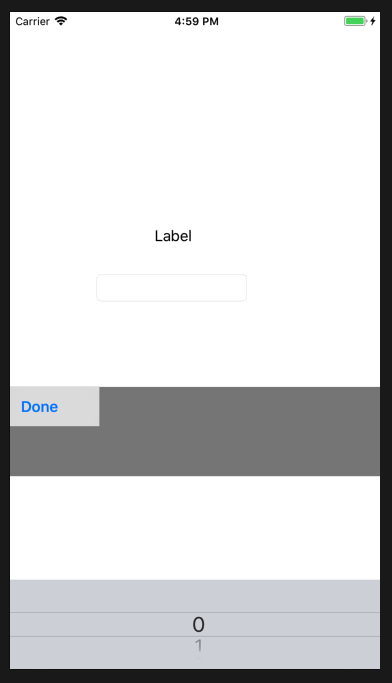
由于UIResponder有这两个属性,所有大多数视图可以重写这个两个属性,以UILabel为例:
@interface MenuLabel()<UIPickerViewDelegate,UIPickerViewDataSource>

{

    UIToolbar *_inputAccessoryView;

    UIPickerView    *_inputView;

}

@end

@implementation MenuLabel

- (instancetype)initWithFrame:(CGRect)frame{

    if (self = [super initWithFrame:frame]) {

        [self setUI];

    }

    return self;

}

- (void)awakeFromNib{

    [super awakeFromNib];

    self.multipleTouchEnabled = YES;

    [self setUI];

}

- (void)setUI{

    self.userInteractionEnabled = YES;

    UITapGestureRecognizer *tap =[[UITapGestureRecognizer alloc] initWithTarget:self action:@selector(tapGes:)];

    [self addGestureRecognizer:tap];

}

- (void)tapGes:(UITapGestureRecognizer *)ges{

    [self becomeFirstResponder];

}

-(UIView *)inputAccessoryView{

    if(!_inputAccessoryView)

    {

        UIView *view = [[UIView alloc] initWithFrame:CGRectMake(, , , )];

        view.backgroundColor = [UIColor grayColor];

        UIToolbar *toolBar = [[UIToolbar alloc]init];

        toolBar.frame = CGRectMake(, , , );

        UIBarButtonItem *right = [[UIBarButtonItem alloc]initWithBarButtonSystemItem:UIBarButtonSystemItemDone target:self action:@selector(dodo)];

        toolBar.items = [NSArray arrayWithObject:right];

        [view addSubview:toolBar];

        return view;

    }

    return _inputAccessoryView;

}

-(UIPickerView *)inputView{

    if(!_inputView)

    {

        UIPickerView *  pickView = [[UIPickerView alloc]init];

        pickView.delegate =self;

        pickView.dataSource = self;

        pickView.showsSelectionIndicator = YES;

        return pickView;

    }

    return _inputView;

}

-(void)dodo{

    [self resignFirstResponder];

}

- (NSInteger)numberOfComponentsInPickerView:(UIPickerView *)pickerView{

    return ;

}

- (NSString *)pickerView:(UIPickerView *)pickerView titleForRow:(NSInteger)row forComponent:(NSInteger)component{

    return [NSString stringWithFormat:@"%ld",row];

}

- (NSInteger)pickerView:(UIPickerView *)pickerView numberOfRowsInComponent:(NSInteger)component{

    return ;

}

- (void)pickerView:(UIPickerView *)pickerView didSelectRow:(NSInteger)row inComponent:(NSInteger)component {

    self.text =[NSString stringWithFormat:@"%ld",row];

}

- (BOOL)canBecomeFirstResponder{

    return YES;

}

@end
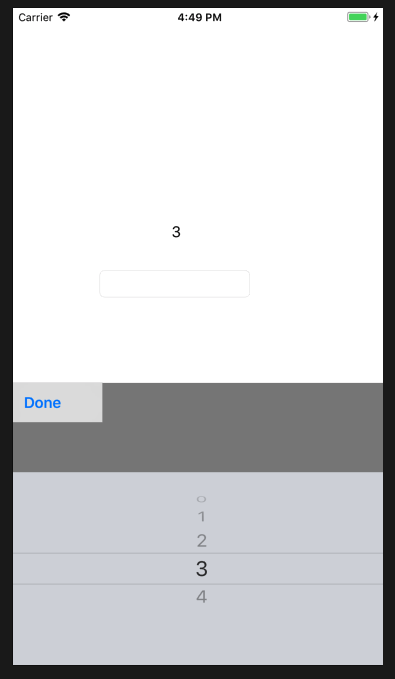
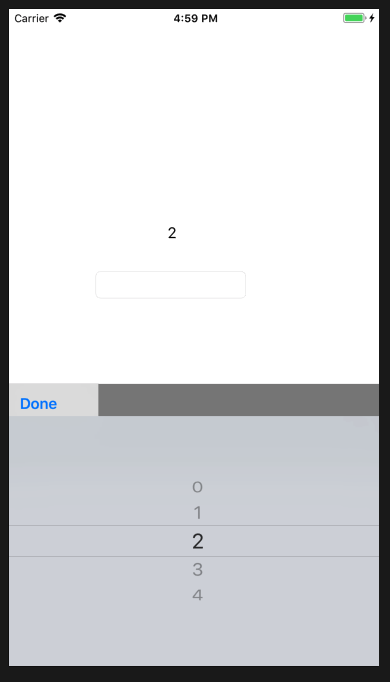
- 要设置 self.userInteractionEnabled = YES;重写- (BOOL)canBecomeFirstResponder{ return YES; } 方法;
- 这种方法附件的高度可以修改,但是底部并不会随inputView高度改变而变化,是固定的;
- inputView不设置坐标,会自适应展示,由于系统inputView高度固定,也不知道不同版本会不会变化,所以就不设置自定义视图inputView的高度 过高会覆盖附件,过低会覆盖不全;
- 附件的子视图需要详细坐标约束;
iOS开发inputView和inputAccessoryView的更多相关文章
- iOS开发小技巧--iOS键盘 inputView 和 inputAccessoryView
iOS键盘 inputView 和 inputAccessoryView 1.inputAccessoryView UITextFields和UITextViews有一个inputAccessoryV ...
- IOS开发基础知识碎片-导航
1:IOS开发基础知识--碎片1 a:NSString与NSInteger的互换 b:Objective-c中集合里面不能存放基础类型,比如int string float等,只能把它们转化成对象才可 ...
- iOS开发之微信聊天工具栏的封装
之前山寨了一个新浪微博(iOS开发之山寨版新浪微博小结),这几天就山寨个微信吧.之前已经把微信的视图结构简单的拖了一下(IOS开发之微信山寨版),今天就开始给微信加上具体的实现功能,那么就先从微信的聊 ...
- iOS开发之自定义表情键盘(组件封装与自动布局)
下面的东西是编写自定义的表情键盘,话不多说,开门见山吧!下面主要用到的知识有MVC, iOS开发中的自动布局,自定义组件的封装与使用,Block回调,CoreData的使用.有的小伙伴可能会问写一个自 ...
- iOS开发UI篇—Date Picker和UITool Bar控件简单介绍
iOS开发UI篇—Date Picker和UITool Bar控件简单介绍 一.Date Picker控件 1.简单介绍: Date Picker显示时间的控件 有默认宽高,不用设置数据源和代理 如何 ...
- iOS开发之五:常用控件--UITextField的使用
UITextField 是iOS开发中用的非常多的一种控件,主要是供用户输入单行信息的.下面来详细介绍UITextField. 1.常用属性 <span style="font-siz ...
- iOS开发之新浪微博山寨版代码优化
之前发表过一篇博客“IOS开发之新浪围脖”,在编写代码的时候太偏重功能的实现了,写完基本功能后看着代码有些别扭,特别是用到的四种cell的类,重复代码有点多,所以今天花点时间把代码重构一下.为了减少代 ...
- 【Swift】iOS开发历险记(二)
前言 这个系列主要是一些开发中遇到的坑记录分享,有助于初学者跨过这些坑,攒够 7 条发一篇. 声明 欢迎转载,但请保留文章原始出处:) 博客园:http://www.cnblogs.com 农民伯 ...
- 让你快速了解并掌握如何进行iOS开发技能
首先你要花点时间针对objective-c语言的学习:毕竟这个是iOS开发的基础(你也可以尝试用Swift,但此项目只是针对OC),编程套路其实都是差不多,多写多想多实践:关于环境的搭建就不在本文进行 ...
随机推荐
- Shiro学习(13)RememberMe
Shiro提供了记住我(RememberMe)的功能,比如访问如淘宝等一些网站时,关闭了浏览器下次再打开时还是能记住你是谁,下次访问时无需再登录即可访问,基本流程如下: 1.首先在登录页面选中Reme ...
- 【Dart学习】-- Dart之异常处理
概述: Dart2的异常与Java是非常类似的.Dart2的异常是Exception或者Error(包括它们的子类)的类型,甚至可以是非Exception或者Error类,也可以抛出,但是不建议这么使 ...
- 4-基于DoG的特征检测子(SIFT:稳定性好,实时性差)
opencv实现 详细原理:https://blog.csdn.net/u010440456/article/details/81483145
- XMPP的总体架构和Jabber ID
通常XMPP的架构用C/S来实现,但是也并不是强制的,Client和Server,Server和Server之间通过TCP连接来通信. 架构的简单示意图如下: C1-----S1----S2----C ...
- Hibernate 和 JPA 注解
转载请注明:Hibernate 和 JPA 注解 | 言曌博客 1.@Entity(name="EntityName") 必须, name为可选,对应数据库中一的个表 2.@Tab ...
- jQuery 封装的ajax
jquery封装的ajax 具体操作: $.get(url [,data] [,fn回调函数] [, dataType]); data:给服务器传递的数据,请求字符串 .json对象 都可以设 ...
- 正则化:L0 vs L1 vs L2
原文地址:https://www.jianshu.com/p/e5c9a9fc84d4 为什么正则化可以缓解过拟合? 过拟合时,拟合函数的系数往往非常大.过大的权重会导致模型过多地学习到某些数据的个性 ...
- 深入理解JAVA虚拟机原理之垃圾回收器机制(一)
更多Android高级架构进阶视频学习请点击:https://space.bilibili.com/474380680 对于程序计数器.虚拟机栈.本地方法栈这三个部分而言,其生命周期与相关线程有关,随 ...
- 2019年Pandas官方用户调研
import pandas as pd import seaborn as sns import matplotlib.pyplot as plt %matplotlib inline plt.rcP ...
- 从内部重启python脚本
我有一个基于python的GTK应用程序,可以加载几个模块.它是从(linux)终端运行的,如下所示: ./myscript.py --some-flag setting 用户可以从程序中下载(使用G ...