
Android常用布局属性解析 -- Layout_weight
Layout_weight是Android开发中一个比较常用的布局属性,在面试中也经常被问到.下面通过实例彻底搞懂Layout_weight的用法.
先看下面的布局代码:
<?xml version="1.0" encoding="utf-8"?>

<LinearLayout xmlns:android="http://schemas.android.com/apk/res/android"

              android:orientation="horizontal"

              android:layout_width="match_parent"

              android:layout_height="match_parent">

    <TextView

        android:layout_width="0dp"

        android:layout_height="48dp"

        android:layout_weight="1"

        android:background="#44ff0000"

        android:gravity="center"

        android:text="111111111111"/>

    <TextView

        android:layout_width="0dp"

        android:layout_height="48dp"

        android:layout_weight="2"

        android:background="#4400ff00"

        android:gravity="center"

        android:text="2"/>

    <TextView

        android:layout_width="0dp"

        android:layout_height="48dp"

        android:layout_weight="3"

        android:background="#440000ff"

        android:gravity="center"

        android:text="3"/>

</LinearLayout>
在水平方向的线性布局中,有三个TextView,layout_width都是0dp,layout_weight分别为1,2,3,所以这三个TextView应该按1:2:3的比例分布,
显示效果:
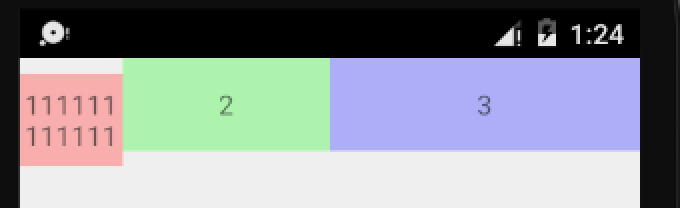
可以看到,虽然三个TextView是按1:2:3的比例进行分布的,但是第一个TextView却没有和另外两个对齐,这是为什么呢?
仔细看就能发现,虽然三个TextView不是对齐的,但是第一行的文本是对齐的.

我们只需将LinearLayout的baselineAligned属性设置为false即可,baselineAligned表示是否以文本基准线对齐.
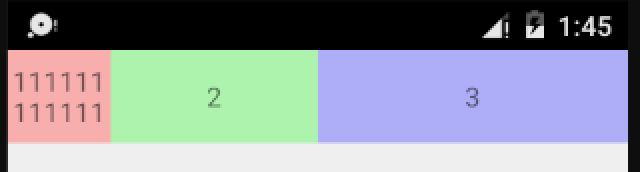
这只是对layout_weight属性最基本的用法.假如把第一个TextView的layout_width该为wrap_content,会出现什么情况呢?
<?xml version="1.0" encoding="utf-8"?>

<LinearLayout xmlns:android="http://schemas.android.com/apk/res/android"

              android:orientation="horizontal"

              android:layout_width="match_parent"

              android:layout_height="match_parent"

              android:baselineAligned="false">

    <TextView

        android:layout_width="wrap_content"

        android:layout_height="48dp"

        android:layout_weight="1"

        android:background="#44ff0000"

        android:gravity="center"

        android:text="111111111111"/>

    <TextView

        android:layout_width="0dp"

        android:layout_height="48dp"

        android:layout_weight="2"

        android:background="#4400ff00"

        android:gravity="center"

        android:text="2"/>

    <TextView

        android:layout_width="0dp"

        android:layout_height="48dp"

        android:layout_weight="3"

        android:background="#440000ff"

        android:gravity="center"

        android:text="3"/>

</LinearLayout>
看下效果:
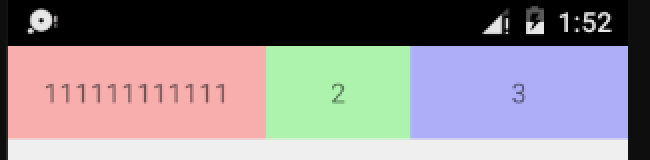
发现三个TextView并没有再按照1:2:3的比例进行分配.其实,layout_weight属性是先按控件声明的尺寸进行分配,然后将剩余的尺寸按layout_weight的比例进行分配.
设屏幕总宽度为sum,第一个TextView声明的尺寸为x,那么,
第一个TextView的宽度为: x + (sum - x) * 1/6
第二个TextView的宽度为: (sum - x) * 2/6
第三个TextView的宽度为: (sum - x) * 3/6
为了证实这个结论,接下来继续修改布局,将三个TextView的layout_width都设置为match_parent,把layout_weight分别设置为1,2,2
<?xml version="1.0" encoding="utf-8"?>

<LinearLayout xmlns:android="http://schemas.android.com/apk/res/android"

              android:orientation="horizontal"

              android:layout_width="match_parent"

              android:layout_height="match_parent"

              android:baselineAligned="false">

    <TextView

        android:layout_width="match_parent"

        android:layout_height="48dp"

        android:layout_weight="1"

        android:background="#44ff0000"

        android:gravity="center"

        android:text="111111111111"/>

    <TextView

        android:layout_width="match_parent"

        android:layout_height="48dp"

        android:layout_weight="2"

        android:background="#4400ff00"

        android:gravity="center"

        android:text="2"/>

    <TextView

        android:layout_width="match_parent"

        android:layout_height="48dp"

        android:layout_weight="2"

        android:background="#440000ff"

        android:gravity="center"

        android:text="3"/>

</LinearLayout>
先看下效果:
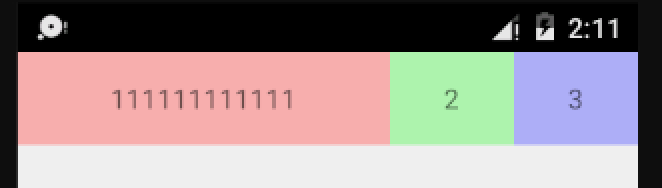
看到这个结果可能会感到很诧异,第一个TextView的layout_weight明明比其它两个的小,为什么宽度却比它们大呢?
我们按刚才得出的结论算一下.
依然设屏幕总宽度为sum,由于这三个TextView声明的尺寸都是match_parent,也就是sum,那么,
第一个TextView的宽度为: sum + (sum - 3*sum) * 1/5 = sum*3/5
第二个TextView的宽度为: sum + (sum - 3*sum) * 2/5 = sum*1/5
第三个TextView的宽度为: sum + (sum - 3*sum) * 2/5 = sum*1/5
三个TextView的宽度比例为 3:1:1,所以我们的结论是正确的.
需要注意的是,我们结论所说的剩余的尺寸可能是负的,如 sum - 3*sum,
另外,通过最后这个例子可以看出,并不是layout_weight越大,宽度越大.
Android常用布局属性解析 -- Layout_weight的更多相关文章
- Android常用布局和控件
一.Android常用布局属性 1. LinearLayout的特有属性 android:orientation:设置布局排列方式 android:layout_weight:设置所占布局的权重 ...
- Android开发工程师文集-Fragment,适配器,轮播图,ScrollView,Gallery 图片浏览器,Android常用布局样式
Android开发工程师文集-Fragment,适配器,轮播图,ScrollView,Gallery 图片浏览器,Android常用布局样式 Fragment FragmentManager frag ...
- 【深入篇】Android常用布局方式简介
LinearLayout 线性布局是程序中最常见的布局方式.一般分为水平线性布局和竖直线性布局,通过android.orientation属性可以设置线性布局的方向. 在布局中操作颜色时,要用的是十六 ...
- Android之布局属性
1) 布局的相关属性 ① android:layout_weight="1.0",layout_weight 用于给一个线性布局中的诸多视图重要度赋值.所有的视图都有一个layou ...
- Android layout 布局 属性详解
第一类:属性值 true或者 false android:layout_centerHrizontal 水平居中 android:layout_centerVertical ...
- Android layout布局属性、标签属性总结大全
RelativeLayout 第一类:属性值为true可false android:layout_centerHrizontal 水平居中 android:layout_centerVe ...
- android layout 布局属性
控件属性: android属性 Android功能强大,界面华丽,但是众多的布局属性就害苦了开发者,下面这篇文章结合了网上不少资料, 第一类:属性值为true或false android:layout ...
- android layout布局属性
参考:http://blog.csdn.net/msmile_my/article/details/9018775 第一类:属性值 true或者 false android:lay ...
- 五十六、SAP中LVC表格的常用布局属性LVC_S_LAYO
一.LVC_S_LAYO为表格常用的布局属性,包括网格线,宽度自适应,隐藏主键等 二.我们来对比使用前和使用后的表格,这个原始布局风格的表格 三.这个是设置了相关属性的表格
随机推荐
- Selenium实战总结(webwiew下拉框定位)
基于常见的两种下拉框的展示形式: 1.点击弹出下拉框: 2.鼠标移动弹出下拉框(move_to_element) 实例一[鼠标点击弹出的下拉框]: e.g百度首页的设置--高级搜索--时间: 导包: ...
- 旅行家的预算(NOIP1999&水题测试2017082301)
题目链接:旅行家的预算 这题还可以,不算太水. 这题贪心即可. 我们采取如下动作: 如果在装满油的情况下能到达的范围内,没有加油站,则无解. 如果在装满油的情况下能到达的范围内,油价最低的加油站的油价 ...
- 微信小程序组件的使用
1.在page同级目录下新建components文件夹,然后新建目录test,新建组件test 2.新建在page目录下新建目录,然后新建page页面.注意:每新建一个页面,都要修改app.json文 ...
- TCP/IP协议(4):网络层
网络层上有IP.ICMP.IGMP等协议. 1.IP地址 在OSI模型中,三层网络层负责IP地址,IP数据报帧头中的源地址和目的地址就是指IP地址.IPV4类型IP地址为32位4个字节,IPV6类型I ...
- openstack网络基本概念(转)
OpenStack的Neutron能够管理OpenStack环境中的虚拟 网络基础设施(VNI).和物理网络基础设施(PNI). OpenStack的Neutron同意租户创建虚拟网络拓扑结构.包括的 ...
- C# 编码标准(一)
一直想写一个自己用的代码标准,经过一段时间的优秀开源源码的观察和看其他人写的标准,感觉好的代码给人感觉就是舒服,也非常重要.所以把它们记录归纳总结,以备以后忘记,另外平时写代码的时候可以拿来参考下.下 ...
- BZOJ 2005 [Noi2010]能量采集 (数学+容斥 或 莫比乌斯反演)
2005: [Noi2010]能量采集 Time Limit: 10 Sec Memory Limit: 552 MBSubmit: 4493 Solved: 2695[Submit][Statu ...
- Day1-python基础-变量常量
不积跬步无以至千里 补充上一节字符串的内容: 字符串格式化输出: name = input("name>>") print("My name is %s&qu ...
- .net 打开Excel文档并转为DataTable
/// <summary> /// 打开Excel文档并转为DataTable /// </summary> /// <returns></returns&g ...
- 【王者荣耀之IT大神版】比赛制度说明(匹配赛、排位赛、赏金赛)
匹配赛(30分钟): 所得金币=6金币/分钟 经验(挂机:玩手机超过30秒): 名次 经验值 胜利条件 失败条件 1 5 提前10min 超出1min 2 4 提前8min 超出3min 3 4 提前 ...