参考链接:https://github.com/StackExchange/dapper-dot-net
Dapper - a simple object mapper for .Net
Dapper is a single file you can drop in to your project that will extend your IDbConnection interface.
It provides 3 helpers:
Dapper 只有一个文件,你可以把它放入你的项目,它扩展IDbConnection 接口,提供了三个帮助扩展方法。
1 Execute a query and map the results to a strongly typed List
( 执行一个查询,并且映射结果到一个强类型列表)
Note: all extension methods assume the connection is already open, they will fail if the connection is closed.
注意,所有的扩展方法假定连接已经打开,如果连接没打开,执行将失败。
public static IEnumerable<T> Query<T>(this IDbConnection cnn, string sql, object param = null, SqlTransaction transaction = null, bool buffered = true)
.csharpcode, .csharpcode pre
{
font-size: small;
color: black;
font-family: consolas, "Courier New", courier, monospace;
background-color: #ffffff;
/*white-space: pre;*/
}
.csharpcode pre { margin: 0em; }
.csharpcode .rem { color: #008000; }
.csharpcode .kwrd { color: #0000ff; }
.csharpcode .str { color: #006080; }
.csharpcode .op { color: #0000c0; }
.csharpcode .preproc { color: #cc6633; }
.csharpcode .asp { background-color: #ffff00; }
.csharpcode .html { color: #800000; }
.csharpcode .attr { color: #ff0000; }
.csharpcode .alt
{
background-color: #f4f4f4;
width: 100%;
margin: 0em;
}
.csharpcode .lnum { color: #606060; }
|
使用示例:
public class Dog

{

    public int? Age { get; set; }

    public Guid Id { get; set; }

    public string Name { get; set; }

    public float? Weight { get; set; }

    public int IgnoredProperty { get { return 1; } }

}

var guid = Guid.NewGuid();

var dog = connection.Query<Dog>("select Age = @Age, Id = @Id", new { Age = (int?)null, Id = guid });

dog.Count()

    .IsEqualTo(1);

dog.First().Age

    .IsNull();

dog.First().Id

    .IsEqualTo(guid);
.csharpcode, .csharpcode pre
{
font-size: small;
color: black;
font-family: consolas, "Courier New", courier, monospace;
background-color: #ffffff;
/*white-space: pre;*/
}
.csharpcode pre { margin: 0em; }
.csharpcode .rem { color: #008000; }
.csharpcode .kwrd { color: #0000ff; }
.csharpcode .str { color: #006080; }
.csharpcode .op { color: #0000c0; }
.csharpcode .preproc { color: #cc6633; }
.csharpcode .asp { background-color: #ffff00; }
.csharpcode .html { color: #800000; }
.csharpcode .attr { color: #ff0000; }
.csharpcode .alt
{
background-color: #f4f4f4;
width: 100%;
margin: 0em;
}
.csharpcode .lnum { color: #606060; }
|
2 Execute a query and map it to a list of dynamic objects
(执行一个查询,并且映射结果到动态对象列表)
public static IEnumerable<dynamic> Query (this IDbConnection cnn, string sql, object param = null, SqlTransaction transaction = null, bool buffered = true)
.csharpcode, .csharpcode pre
{
font-size: small;
color: black;
font-family: consolas, "Courier New", courier, monospace;
background-color: #ffffff;
/*white-space: pre;*/
}
.csharpcode pre { margin: 0em; }
.csharpcode .rem { color: #008000; }
.csharpcode .kwrd { color: #0000ff; }
.csharpcode .str { color: #006080; }
.csharpcode .op { color: #0000c0; }
.csharpcode .preproc { color: #cc6633; }
.csharpcode .asp { background-color: #ffff00; }
.csharpcode .html { color: #800000; }
.csharpcode .attr { color: #ff0000; }
.csharpcode .alt
{
background-color: #f4f4f4;
width: 100%;
margin: 0em;
}
.csharpcode .lnum { color: #606060; }
|
使用示例:
var rows = connection.Query("select 1 A, 2 B union all select 3, 4");

// 验证结果

((int)rows[0].A)

   .IsEqualTo(1);

((int)rows[0].B)

   .IsEqualTo(2);

((int)rows[1].A)

   .IsEqualTo(3);

((int)rows[1].B)

    .IsEqualTo(4);
.csharpcode, .csharpcode pre
{
font-size: small;
color: black;
font-family: consolas, "Courier New", courier, monospace;
background-color: #ffffff;
/*white-space: pre;*/
}
.csharpcode pre { margin: 0em; }
.csharpcode .rem { color: #008000; }
.csharpcode .kwrd { color: #0000ff; }
.csharpcode .str { color: #006080; }
.csharpcode .op { color: #0000c0; }
.csharpcode .preproc { color: #cc6633; }
.csharpcode .asp { background-color: #ffff00; }
.csharpcode .html { color: #800000; }
.csharpcode .attr { color: #ff0000; }
.csharpcode .alt
{
background-color: #f4f4f4;
width: 100%;
margin: 0em;
}
.csharpcode .lnum { color: #606060; }
|
查询结果:

3 Execute a Command that returns no results
执行命令,返回无结果(这里根据实例,认为是返回受影响行数)
public static int Execute(this IDbConnection cnn, string sql, object param = null, SqlTransaction transaction = null)
.csharpcode, .csharpcode pre
{
font-size: small;
color: black;
font-family: consolas, "Courier New", courier, monospace;
background-color: #ffffff;
/*white-space: pre;*/
}
.csharpcode pre { margin: 0em; }
.csharpcode .rem { color: #008000; }
.csharpcode .kwrd { color: #0000ff; }
.csharpcode .str { color: #006080; }
.csharpcode .op { color: #0000c0; }
.csharpcode .preproc { color: #cc6633; }
.csharpcode .asp { background-color: #ffff00; }
.csharpcode .html { color: #800000; }
.csharpcode .attr { color: #ff0000; }
.csharpcode .alt
{
background-color: #f4f4f4;
width: 100%;
margin: 0em;
}
.csharpcode .lnum { color: #606060; }
|
使用示例:
connection.Execute(@"

  set nocount on

  create table #t(i int)

  set nocount off

  insert #t

  select @a a union all select @b

  set nocount on

  drop table #t", new {a=1, b=2 })

   .IsEqualTo(2);
.csharpcode, .csharpcode pre
{
font-size: small;
color: black;
font-family: consolas, "Courier New", courier, monospace;
background-color: #ffffff;
/*white-space: pre;*/
}
.csharpcode pre { margin: 0em; }
.csharpcode .rem { color: #008000; }
.csharpcode .kwrd { color: #0000ff; }
.csharpcode .str { color: #006080; }
.csharpcode .op { color: #0000c0; }
.csharpcode .preproc { color: #cc6633; }
.csharpcode .asp { background-color: #ffff00; }
.csharpcode .html { color: #800000; }
.csharpcode .attr { color: #ff0000; }
.csharpcode .alt
{
background-color: #f4f4f4;
width: 100%;
margin: 0em;
}
.csharpcode .lnum { color: #606060; }
|
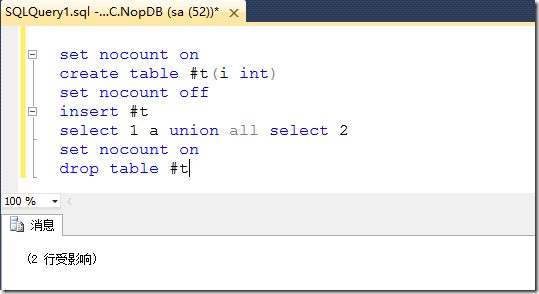
命令执行结果:
Execute a Command multiple times
执行命令多次 (批量操作)。
The same signature also allows you to conveniently and efficiently execute a command multiple times (for example to bulk-load data)
这个签名方法也允许你方便地,高效地执行命令多次(例如,大容量负载数据)
使用示例:
connection.Execute(@"insert MyTable(colA, colB) values (@a, @b)",

    new[] { new { a=1, b=1 }, new { a=2, b=2 }, new { a=3, b=3 } }

  ).IsEqualTo(3);

 // 3 rows inserted: "1,1", "2,2" and "3,3"
.csharpcode, .csharpcode pre
{
font-size: small;
color: black;
font-family: consolas, "Courier New", courier, monospace;
background-color: #ffffff;
/*white-space: pre;*/
}
.csharpcode pre { margin: 0em; }
.csharpcode .rem { color: #008000; }
.csharpcode .kwrd { color: #0000ff; }
.csharpcode .str { color: #006080; }
.csharpcode .op { color: #0000c0; }
.csharpcode .preproc { color: #cc6633; }
.csharpcode .asp { background-color: #ffff00; }
.csharpcode .html { color: #800000; }
.csharpcode .attr { color: #ff0000; }
.csharpcode .alt
{
background-color: #f4f4f4;
width: 100%;
margin: 0em;
}
.csharpcode .lnum { color: #606060; }
|
This works for any parameter that implements IEnumerable for some T.
任何实现了IEnumerable 接口的参数 泛型T都 可以运行。(如果是集合参数,object param 必须是实现 IEnumerable接口)
4 Performance (性能)
A key feature of Dapper is performance. The following metrics show how long it takes to execute 500 SELECT statements against a DB and map the data returned to objects.
Dapper 的一个关键特性就是性能,下面的指标显示了执行500个查询语句,并且映射数据到返回对象上需要花费多长时间。
The performance tests are broken in to 3 lists: 性能测试 带入3个列表
- POCO serialization for frameworks that support pulling static typed objects from the DB. Using raw SQL.
- Dynamic serialization for frameworks that support returning dynamic lists of objects.
- Typical framework usage. Often typical framework usage differs from the optimal usage performance wise. Often it will not involve writing SQL.
1)Performance of SELECT mapping over 500 iterations - POCO serialization
| Method |
Duration |
Remarks |
Hand coded (using a SqlDataReader) |
47ms |
Can be faster |
Dapper ExecuteMapperQuery |
49ms |
| ServiceStack.OrmLite (QueryById) |
50ms |
| PetaPoco |
52ms |
| BLToolkit |
80ms |
| SubSonic CodingHorror |
107ms |
| NHibernate SQL |
104ms |
Linq 2 SQL ExecuteQuery |
181ms |
Entity framework ExecuteStoreQuery |
631ms |
2) Performance of SELECT mapping over 500 iterations - dynamic serialization
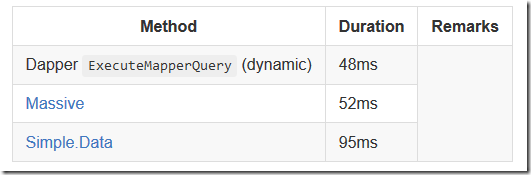
3) Performance of SELECT mapping over 500 iterations - typical usage

5 Parameterized queries 参数化查询
Parameters are passed in as anonymous classes. This allow you to name your parameters easily and gives you the ability to simply cut-and-paste SQL snippets and run them in Query analyzer.
参数被当做匿名类传入,这允许你命名你的参数更容易,给予你能简单粘贴拷贝sql 片段 并且 在查询分析器中运行的能力。
new {A = 1, B = "b"} // A will be mapped to the param @A, B to the param @B
.csharpcode, .csharpcode pre
{
font-size: small;
color: black;
font-family: consolas, "Courier New", courier, monospace;
background-color: #ffffff;
/*white-space: pre;*/
}
.csharpcode pre { margin: 0em; }
.csharpcode .rem { color: #008000; }
.csharpcode .kwrd { color: #0000ff; }
.csharpcode .str { color: #006080; }
.csharpcode .op { color: #0000c0; }
.csharpcode .preproc { color: #cc6633; }
.csharpcode .asp { background-color: #ffff00; }
.csharpcode .html { color: #800000; }
.csharpcode .attr { color: #ff0000; }
.csharpcode .alt
{
background-color: #f4f4f4;
width: 100%;
margin: 0em;
}
.csharpcode .lnum { color: #606060; }
|
6 List Support 列表支持
Dapper allow you to pass in IEnumerable and will automatically parameterize your query.
Dapper 允许你传入IEnumable 接口,并自动参数化你的查询语句
例如:
connection.Query<int>("select * from (select 1 as Id union all select 2 union all select 3) as X where Id in @Ids", new { Ids = new int[] { 1, 2, 3 });
.csharpcode, .csharpcode pre
{
font-size: small;
color: black;
font-family: consolas, "Courier New", courier, monospace;
background-color: #ffffff;
/*white-space: pre;*/
}
.csharpcode pre { margin: 0em; }
.csharpcode .rem { color: #008000; }
.csharpcode .kwrd { color: #0000ff; }
.csharpcode .str { color: #006080; }
.csharpcode .op { color: #0000c0; }
.csharpcode .preproc { color: #cc6633; }
.csharpcode .asp { background-color: #ffff00; }
.csharpcode .html { color: #800000; }
.csharpcode .attr { color: #ff0000; }
.csharpcode .alt
{
background-color: #f4f4f4;
width: 100%;
margin: 0em;
}
.csharpcode .lnum { color: #606060; }
|
Will be translated to: ( 被转化为)
select * from (select 1 as Id union all select 2 union all select 3) as X where Id in (@Ids1, @Ids2, @Ids3)"

// @Ids1 = 1 , @Ids2 = 2 , @Ids2 = 3
.csharpcode, .csharpcode pre
{
font-size: small;
color: black;
font-family: consolas, "Courier New", courier, monospace;
background-color: #ffffff;
/*white-space: pre;*/
}
.csharpcode pre { margin: 0em; }
.csharpcode .rem { color: #008000; }
.csharpcode .kwrd { color: #0000ff; }
.csharpcode .str { color: #006080; }
.csharpcode .op { color: #0000c0; }
.csharpcode .preproc { color: #cc6633; }
.csharpcode .asp { background-color: #ffff00; }
.csharpcode .html { color: #800000; }
.csharpcode .attr { color: #ff0000; }
.csharpcode .alt
{
background-color: #f4f4f4;
width: 100%;
margin: 0em;
}
.csharpcode .lnum { color: #606060; }
|
Buffered vs Unbuffered readers
Dapper's default behavior is to execute your sql and buffer the entire reader on return. This is ideal in most cases as it minimizes shared locks in the db and cuts down on db network time.
However when executing huge queries you may need to minimize memory footprint and only load objects as needed. To do so pass, buffered: false into the Query method.
7 Multi Mapping
Dapper allows you to map a single row to multiple objects. This is a key feature if you want to avoid extraneous querying and eager load associations.
Dapper 允许你映射一行记录到多个对象,这是一个关键特点,如果你想避免额外查询并且 乐意加载关联对象。
例如:
var sql =

@"select * from #Posts p

left join #Users u on u.Id = p.OwnerId

Order by p.Id";

var data = connection.Query<Post, User, Post>(sql, (post, user) => { post.Owner = user; return post;});

var post = data.First();

// 验证

post.Content.IsEqualTo("Sams Post1");

post.Id.IsEqualTo(1);

post.Owner.Name.IsEqualTo("Sam");

post.Owner.Id.IsEqualTo(99);
.csharpcode, .csharpcode pre
{
font-size: small;
color: black;
font-family: consolas, "Courier New", courier, monospace;
background-color: #ffffff;
/*white-space: pre;*/
}
.csharpcode pre { margin: 0em; }
.csharpcode .rem { color: #008000; }
.csharpcode .kwrd { color: #0000ff; }
.csharpcode .str { color: #006080; }
.csharpcode .op { color: #0000c0; }
.csharpcode .preproc { color: #cc6633; }
.csharpcode .asp { background-color: #ffff00; }
.csharpcode .html { color: #800000; }
.csharpcode .attr { color: #ff0000; }
.csharpcode .alt
{
background-color: #f4f4f4;
width: 100%;
margin: 0em;
}
.csharpcode .lnum { color: #606060; }
|
important note Dapper assumes your Id columns are named "Id" or "id", if your primary key is different or you would like to split the wide row at point other than "Id", use the optional 'splitOn' parameter.
重要提醒:Dapper默认 你的Id 列被命名为“Id”或者“id”,如果你的主键不是这样或者你想拆分宽行在某点上而不是Id 列,使用‘SplitOn’参数选项
8 Multiple Results (多结果)
Dapper allows you to process multiple result grids in a single query.
Dapper 允许你在一个查询中处理多结果网格数据。
例如:
var sql =

@"

select * from Customers where CustomerId = @id

select * from Orders where CustomerId = @id

select * from Returns where CustomerId = @id";

using (var multi = connection.QueryMultiple(sql, new {id=selectedId}))

{

   var customer = multi.Read<Customer>().Single();

   var orders = multi.Read<Order>().ToList();

   var returns = multi.Read<Return>().ToList();

   ...

}
.csharpcode, .csharpcode pre
{
font-size: small;
color: black;
font-family: consolas, "Courier New", courier, monospace;
background-color: #ffffff;
/*white-space: pre;*/
}
.csharpcode pre { margin: 0em; }
.csharpcode .rem { color: #008000; }
.csharpcode .kwrd { color: #0000ff; }
.csharpcode .str { color: #006080; }
.csharpcode .op { color: #0000c0; }
.csharpcode .preproc { color: #cc6633; }
.csharpcode .asp { background-color: #ffff00; }
.csharpcode .html { color: #800000; }
.csharpcode .attr { color: #ff0000; }
.csharpcode .alt
{
background-color: #f4f4f4;
width: 100%;
margin: 0em;
}
.csharpcode .lnum { color: #606060; }
|
9 Stored Procedures (存储过程)
Dapper fully supports stored procs:
Dapper完全支持存储过程
var user = cnn.Query<User>("spGetUser", new {Id = 1},

        commandType: CommandType.StoredProcedure).SingleOrDefault();
.csharpcode, .csharpcode pre
{
font-size: small;
color: black;
font-family: consolas, "Courier New", courier, monospace;
background-color: #ffffff;
/*white-space: pre;*/
}
.csharpcode pre { margin: 0em; }
.csharpcode .rem { color: #008000; }
.csharpcode .kwrd { color: #0000ff; }
.csharpcode .str { color: #006080; }
.csharpcode .op { color: #0000c0; }
.csharpcode .preproc { color: #cc6633; }
.csharpcode .asp { background-color: #ffff00; }
.csharpcode .html { color: #800000; }
.csharpcode .attr { color: #ff0000; }
.csharpcode .alt
{
background-color: #f4f4f4;
width: 100%;
margin: 0em;
}
.csharpcode .lnum { color: #606060; }
|
If you want something more fancy, you can do: 如果你想一些更不错的,你可以这样
var p = new DynamicParameters();

p.Add("@a", 11);

p.Add("@b", dbType: DbType.Int32, direction: ParameterDirection.Output);

p.Add("@c", dbType: DbType.Int32, direction: ParameterDirection.ReturnValue);

cnn.Execute("spMagicProc", p, commandType: CommandType.StoredProcedure);

int b = p.Get<int>("@b");

int c = p.Get<int>("@c");
.csharpcode, .csharpcode pre
{
font-size: small;
color: black;
font-family: consolas, "Courier New", courier, monospace;
background-color: #ffffff;
/*white-space: pre;*/
}
.csharpcode pre { margin: 0em; }
.csharpcode .rem { color: #008000; }
.csharpcode .kwrd { color: #0000ff; }
.csharpcode .str { color: #006080; }
.csharpcode .op { color: #0000c0; }
.csharpcode .preproc { color: #cc6633; }
.csharpcode .asp { background-color: #ffff00; }
.csharpcode .html { color: #800000; }
.csharpcode .attr { color: #ff0000; }
.csharpcode .alt
{
background-color: #f4f4f4;
width: 100%;
margin: 0em;
}
.csharpcode .lnum { color: #606060; }
|
(其实就是参数化支持,输入参数,输出参数,返回值)
10 Ansi Strings and varchar
Dapper supports varchar params, if you are executing a where clause on a varchar column using a param be sure to pass it in this way:
Dapper 支持变量参数,如果你在一个变量列上执行一个where 子句 ,必须确保用这种方式传入参数
Query<Thing>("select * from Thing where Name = @Name", new {Name = new DbString { Value = "abcde", IsFixedLength = true, Length = 10, IsAnsi = true });
.csharpcode, .csharpcode pre
{
font-size: small;
color: black;
font-family: consolas, "Courier New", courier, monospace;
background-color: #ffffff;
/*white-space: pre;*/
}
.csharpcode pre { margin: 0em; }
.csharpcode .rem { color: #008000; }
.csharpcode .kwrd { color: #0000ff; }
.csharpcode .str { color: #006080; }
.csharpcode .op { color: #0000c0; }
.csharpcode .preproc { color: #cc6633; }
.csharpcode .asp { background-color: #ffff00; }
.csharpcode .html { color: #800000; }
.csharpcode .attr { color: #ff0000; }
.csharpcode .alt
{
background-color: #f4f4f4;
width: 100%;
margin: 0em;
}
.csharpcode .lnum { color: #606060; }
|
On Sql Server it is crucial to use the unicode when querying unicode and ansi when querying non unicode.
Limitations and caveats
Dapper caches information about every query it runs, this allow it to materialize objects quickly and process parameters quickly. The current implementation caches this information in a ConcurrentDictionary object. The objects it stores are never flushed. If you are generating SQL strings on the fly without using parameters it is possible you will hit memory issues. We may convert the dictionaries to an LRU Cache.
Dapper's simplicity means that many feature that ORMs ship with are stripped out, there is no identity map, there are no helpers for update / select and so on.
Dapper does not manage your connection's lifecycle, it assumes the connection it gets is open AND has no existing datareaders enumerating (unless MARS is enabled)
Will Dapper work with my DB provider?
Dapper has no DB specific implementation details, it works across all .NET ADO providers including SQLite, SQL CE, Firebird, Oracle, MySQL, PostgreSQL and SQL Server.
Do you have a comprehensive list of examples?
Dapper has a comprehensive test suite in the test project
Who is using this?
Dapper is in production use at:
Stack Overflow, helpdesk
(if you would like to be listed here let me know)
- Dapper小型ORM的使用(随便吐槽下公司)
近来公司又有新项目要做,之前做项目用过蛮多ORM,包括ef,NetTiers,ServiceStack.OrmLite等ROM,每种ORM都有一定的坑(或者说是使用者的问题吧~~).用来用去都觉的有一 ...
- Dapper.NET - ORM(ibatis.Net)
Dapper.NET使用 1.为什么选择Dapper 2.以Dapper(4.0)为例. 2.1 在数据库中建立几张表. 2.2实体类. 3.使用方法 3.1 一对一映射 3.2 一对多映射 3.3 ...
- ASP .Net Core 使用 Dapper 轻型ORM框架
一:优势 1,Dapper是一个轻型的ORM类.代码就一个SqlMapper.cs文件,编译后就40K的一个很小的Dll. 2,Dapper很快.Dapper的速度接近与IDataReader,取列表 ...
- Use Dapper ORM With ASP.NET Core
Dapper.NET is not just another ORM tool, it's considered as the king of ORM. Because it's fast, easy ...
- 使用轻量级ORM Dapper进行增删改查
项目背景 前一段时间,开始做一个项目,在考虑数据访问层是考虑技术选型,考虑过原始的ADO.NET.微软的EF.NH等.再跟经理讨论后,经理强调不要用Ef,NH做ORM,后期的sql优化不好做,公司 ...
- 轻量级ORM框架Dapper应用一:Dapper安装
一.Dapper简介 Dapper是一款轻量级ORM框架,为解决网站访问流量极高而产生的性能问题而构造,主要通过执行TSQL表达式而实现数据库的CQRS. 如果你在项目中遇到性能访问问题,选择Dapp ...
- ORM之Dapper运用
一.前言 上一篇[分层架构设计]我们已经有了架构的轮廓,现在我们就在这个轮廓里面造轮子.项目要想开始,肯定先得确定ORM框架,目前市面上的ORM框架有很多,对于.net人员来说很容易就想到以ADO.N ...
- Asp.net Core 系列之--2.ORM初探:Dapper实现MySql数据库各类操作
ChuanGoing 2019-09-10 距离上一篇近一个月时间,断断续续才把本篇码完,后面将加快进度,争取年度内把本系列基本介绍完成,同时督促本人持续学习. 本篇学习曲线: 1.初识Dapper ...
- Dapper学习 - Dapper.Rainbow(一) - Create
Dapper这个ORM有许多扩展, 我自己用过两种, 也算是比较主流的两种, Rainbow和Extension, 这里就先介绍下Rainbow吧, 毕竟这个先用, 当然, 由于我使用的是mysql数 ...
随机推荐
- CMD 模块定义规范【转】
在 Sea.js 中,所有 JavaScript 模块都遵循 CMD(Common Module Definition) 模块定义规范.该规范明确了模块的基本书写格式和基本交互规则. 在 CMD 规范 ...
- centOS查看apache版本的命令
在centOS 7下: 命令如下: httpd -v
- java读取excel(只是读取)
最近做项目需要读取excel,在网上找了几个,都需要下载各种jar,下载好之后还是不能用,而且还分(xls xlsx)这两种格式, 最后找到个这个,不需要下载jar包,格式通吃,不过只是简单的读取 ...
- 从Linux服务器下载文件到本地
通过安装xshell,连接服务器,通过以下命令可以方便的将服务器的文件下载到本地 #下载一个文件 sz filename #下载多个文件 sz filename1 filename2 #下载dir目录 ...
- springboot和mybatis集成,自动生成model、mapper,增加mybatis分页功能
整体思路和http://www.cnblogs.com/mahuan2/p/5859921.html相同. 主要讲maven的pom.xml和一些配置变化,详细说明. 软件简介 Spring是一个流行 ...
- 人民币金额大小写Js转换
/** * 数字转中文 * @param dValue * @returns */ function chineseNumber(dValue) { var maxDec = 2; // 验证输入金额 ...
- Android界面编程--使用活动条(ActionBar)--实现Tab导航
使用ActionBar结合fragment实现导航 1,调用ActionBar的setNavigationModel(ActionBar.NAVIGATION_MODE_TABS)设置使用tabs导航 ...
- win 环境下 node.js环境变量
在win 环境下 node.js环境变量有两种情况: (1)开发环境(development):开发环境是程序猿们专门用于开发的服务器,配置可以比较随意, 为了开发调试方便,一般打开全部错误报告. ...
- struts2返回结果类型
在action下还有result标签 1.result不只有name,其实还有type result返回类型在struts-default.xml默认的配置文件中有定义,可以看到有result-typ ...
- js图片上传并预览
<form id="addpic" class="easyui-form" method="post" enctype="m ...
