
C# 将Dictionary,StringDictionary等集合数据绑定到如comboBox等控件数据源中将获取健值
 System.Collections.Generic.Dictionary<string, string> dict = new System.Collections.Generic.Dictionary<string, string>();

            dict.Add("baidu.com", "百度");

            dict.Add("goolge.com", "谷歌");

            dict.Add("qq.com", "腾讯");

            //绑定数据

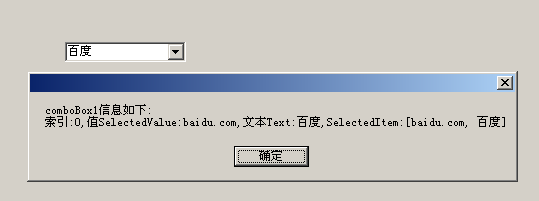
            comboBox1.DataSource = new BindingSource(dict, null);

            comboBox1.ValueMember = "Key";//文本对应的值

            comboBox1.DisplayMember = "Value";//显示的文本

            //绑定选择事件

            comboBox1.SelectedIndexChanged += new EventHandler(comboBox1_SelectedIndexChanged);

            //专门存储字符串健值的集合类

            //健值都是string类型

            System.Collections.Specialized.StringDictionary sd = new System.Collections.Specialized.StringDictionary();

            sd.Add("taobao.com", "淘宝");

            sd.Add("tamll.com", "天猫");

            sd.Add("jd.com", "京东");

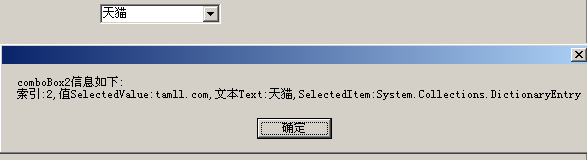
            comboBox2.DataSource = new BindingSource(sd, null);

            comboBox2.ValueMember = "Key";

            comboBox2.DisplayMember = "Value";

            comboBox2.SelectedIndexChanged += new EventHandler(comboBox2_SelectedIndexChanged);
完整代码:
/******************************************************************

 * 创建人:黄愿

 * 创建时间:2014-9-9 11:34:39

 * 说明:C# 将Dictionary,StringDictionary等集合数据绑定到如comboBox等控件数据源中

 * Email:huangyuan413026@163.com

 *******************************************************************/

using System;

using System.Windows.Forms;

namespace HTL

{

    public partial class BindDictionaryToDatasource : Form

    {

        public BindDictionaryToDatasource()

        {

            InitializeComponent();

        }

        private void BindDictionaryToDatasource_Load(object sender, EventArgs e)

        {

            System.Collections.Generic.Dictionary<string, string> dict = new System.Collections.Generic.Dictionary<string, string>();

            dict.Add("baidu.com", "百度");

            dict.Add("goolge.com", "谷歌");

            dict.Add("qq.com", "腾讯");

            //绑定数据

            comboBox1.DataSource = new BindingSource(dict, null);

            comboBox1.ValueMember = "Key";//文本对应的值

            comboBox1.DisplayMember = "Value";//显示的文本

            //绑定选择事件

            comboBox1.SelectedIndexChanged += new EventHandler(comboBox1_SelectedIndexChanged);

            //专门存储字符串健值的集合类

            //健值都是string类型

            System.Collections.Specialized.StringDictionary sd = new System.Collections.Specialized.StringDictionary();

            sd.Add("taobao.com", "淘宝");

            sd.Add("tamll.com", "天猫");

            sd.Add("jd.com", "京东");

            comboBox2.DataSource = new BindingSource(sd, null);

            comboBox2.ValueMember = "Key";

            comboBox2.DisplayMember = "Value";

            comboBox2.SelectedIndexChanged += new EventHandler(comboBox2_SelectedIndexChanged);

        }

        private void comboBox1_SelectedIndexChanged(object sender, EventArgs e)

        {

            MessageBox.Show("comboBox1信息如下:\r\n索引:" + comboBox1.SelectedIndex + ",值SelectedValue:" + comboBox1.SelectedValue + ",文本Text:" + comboBox1.Text + ",SelectedItem:" + comboBox1.SelectedItem.ToString());

        }

        private void comboBox2_SelectedIndexChanged(object sender, EventArgs e)

        {

            MessageBox.Show("comboBox2信息如下:\r\n索引:" + comboBox2.SelectedIndex + ",值SelectedValue:" + comboBox2.SelectedValue + ",文本Text:" + comboBox2.Text + ",SelectedItem:" + comboBox2.SelectedItem.ToString());

        }

    }

}
namespace HTL

{

    partial class BindDictionaryToDatasource

    {

        /// <summary>

        /// Required designer variable.

        /// </summary>

        private System.ComponentModel.IContainer components = null;

        /// <summary>

        /// Clean up any resources being used.

        /// </summary>

        /// <param name="disposing">true if managed resources should be disposed; otherwise, false.</param>

        protected override void Dispose(bool disposing)

        {

            if (disposing && (components != null))

            {

                components.Dispose();

            }

            base.Dispose(disposing);

        }

        #region Windows Form Designer generated code

        /// <summary>

        /// Required method for Designer support - do not modify

        /// the contents of this method with the code editor.

        /// </summary>

        private void InitializeComponent()

        {

            this.comboBox1 = new System.Windows.Forms.ComboBox();

            this.comboBox2 = new System.Windows.Forms.ComboBox();

            this.SuspendLayout();

            //

            // comboBox1

            //

            this.comboBox1.FormattingEnabled = true;

            this.comboBox1.Location = new System.Drawing.Point(, );

            this.comboBox1.Name = "comboBox1";

            this.comboBox1.Size = new System.Drawing.Size(, );

            this.comboBox1.TabIndex = ;

            //

            // comboBox2

            //

            this.comboBox2.FormattingEnabled = true;

            this.comboBox2.Location = new System.Drawing.Point(, );

            this.comboBox2.Name = "comboBox2";

            this.comboBox2.Size = new System.Drawing.Size(, );

            this.comboBox2.TabIndex = ;

            //

            // BindDictionaryToDatasource

            //

            this.AutoScaleDimensions = new System.Drawing.SizeF(6F, 12F);

            this.AutoScaleMode = System.Windows.Forms.AutoScaleMode.Font;

            this.ClientSize = new System.Drawing.Size(, );

            this.Controls.Add(this.comboBox2);

            this.Controls.Add(this.comboBox1);

            this.Name = "BindDictionaryToDatasource";

            this.Text = "BindDictionaryToDatasource";

            this.Load += new System.EventHandler(this.BindDictionaryToDatasource_Load);

            this.ResumeLayout(false);

        }

        #endregion

        private System.Windows.Forms.ComboBox comboBox1;

        private System.Windows.Forms.ComboBox comboBox2;

    }

}
C# 将Dictionary,StringDictionary等集合数据绑定到如comboBox等控件数据源中将获取健值的更多相关文章
- Windows Presentation Foundation(WPF)中的数据绑定(使用XmlDataProvider作控件绑定)
原文:Windows Presentation Foundation(WPF)中的数据绑定(使用XmlDataProvider作控件绑定) ------------------------------ ...
- 数据绑定(二)把控件作为Binding源
原文:数据绑定(二)把控件作为Binding源 下面的代码把一个TextBox的Text属性关联在了Slider的Value属性上 <Window x:Class="WpfApplic ...
- 数据绑定技术一:GridView控件
在网站或应用程序中,要显示数据信息,可用到ASP.NET提供的数据源控件和能够显示数据的控件. 一.数据源控件 数据源控件用于连接数据源.从数据源中读取数据以及把数据写入数据源. 1.数据源控件特点 ...
- iOS:集合视图UICollectionView、集合视图控制器UICollectionViewController、集合视图单元格UICollectionViewCell(创建表格的另一种控件)
两种创建表格方式的比较:表格视图.集合视图(二者十分类似) <1>相同点: 表格视图:UITableView(位于storyboard中,通过UIViewController控制器实现 ...
- DataGridView控件用法一:数据绑定
使用DataGridView控件,可以显示和编辑来自多种不同类型的数据源的表格数据. 将数据绑定到DataGridView控件非常简单和直观,在大多数情况下,只需设置DataSource属性即可.在绑 ...
- WP8.1学习系列(第二十三章)——到控件的数据绑定
在本文中 先决条件 将控件绑定到单个项目 将控件绑定到对象的集合 通过使用数据模板显示控件中的项目 添加详细信息视图 转换数据以在控件中显示 相关主题 本主题介绍了如何在使用 C++.C# 或 Vis ...
- 028. asp.net数据绑定控件值DataList控件
DataList控件可以使用模板与定义样式来显示数据并进行数据的选择, 删除及编辑工作. DataList控件的最大特点是一定要通过模板来定义数据的显示格式. 如果要设计出美观的界面, 就需要花费一番 ...
- 027. asp.net中数据绑定控件之 GridView控件
GridView控件支持下面的功能: 绑定至数据源控件, 如SqlDataSource 内置排序功能 内置更新和删除功能 内置分页功能 内置行选择功能 可以编程方式访问GridView对象模型以动态设 ...
- ASP.NET数据绑定控件
数据绑定控件简介 数据绑定分为:数据源 和 数据绑定控件 两部分,数据绑定控件通过数据源来获得数据,通过数据源来隔离数据提供者和数据使用者,数据源有:SqlDataSource,AccessDataS ...
随机推荐
- redis优化方案
流水线(pipelined) 批量提交redis命令,减少通信次数 事务 mulit,事务的开始 exec,执行事务快内的命令 discard,放弃事务快内的命令 watch,监视key,如果key改 ...
- Eclipse酷炫项目、最新趋势介绍
作为Eclipse基金组织的执行董事,我需要经常审阅每一个新提交的Eclipse项目协议书.作为Eclipse的一分子,我很乐意与加入我们团队的新开发人员互动.这也是我工作中的乐趣之一.2013年,我 ...
- SpringBoot学习(五)
package org.springboot.sample.config; import org.slf4j.Logger; import org.slf4j.LoggerFactory; impor ...
- [转载]mac软件
效率之王:Afred小帽子:通过前人的配置,替代掉了 有道词典.发音工具.开关机.快速搜索.地图.Spotlight等应用. 主力编辑器:Atom因为高颜值.强大的插件和预览功能 取代了之前的subl ...
- 51nod1648 洞 LCT
非常简单的一眼LCT,然而我没有在20min内码完,太失败了... 第一问,直接查根的前驱 第二问,查链的子树大小 复杂度$O((n + m) log n)$ #include <cstdio& ...
- JZYZOJ1540 BZOJ4035 [ haoi2015 上午] T3 博弈论 sg函数 分块 haoi
http://172.20.6.3/Problem_Show.asp?id=1540 之前莫比乌斯反演也写了一道这种找规律分块计算的题,没觉得这么恶心啊. 具体解释看代码. 翻硬币的具体方法就是分别算 ...
- Yii2 init 与 beforeAction 区别
1.执行顺序 init > beforeAction 2.调用子函数时,两个函数都不会再次执行 3.返回值 init返回false继续执行,beforeAction停止执行 4.执行EXIT,全 ...
- 【原创】LogCat信息演示Activity生命周期
界面如下:注意:这是在手机.竖屏状态下! (一)1个Activity /** * 7个方法 * 测试1个Activity的生命周期 * * LogCat: ...
- Codeforces Beta Round #4 (Div. 2 Only) B. Before an Exam dp
B. Before an Exam 题目连接: http://www.codeforces.com/contest/4/problem/B Description Tomorrow Peter has ...
- gitignore / Delphi.gitignore
https://github.com/github/gitignore/blob/master/Delphi.gitignore *.dcu *.~*~ *.local *.identcache __ ...