
用android:clipChildren来实现红心变大特效
最近在看别人技术博客(http://www.cnblogs.com/over140/p/3508335.html)的时候,发现一个属性:android:clipChildren属性。
翻文档找到下面介绍
| android:clipChildren | setClipChildren(boolean) | Defines whether a child is limited to draw inside of its bounds or not. |
| android:clipToPadding | setClipToPadding(boolean) | Defines whether the ViewGroup will clip its drawing surface so as to exclude the padding area. |
翻译就是,
1.clipChild用来定义他的子控件是否要在他应有的边界内进行绘制。 默认情况下,clipChild被设置为true。 也就是不允许进行扩展绘制。
2. clipToPadding用来定义ViewGroup是否允许在padding中绘制。默认情况下,cliptopadding被设置为ture, 也就是把padding中的值都进行裁切了。
还有该功能是android第一个版本就已经提供的方法。 所有可以跨任意android版本使用。
这两个属性联合起来能干什么呢? 哈, 用来做一些类似于心形放大等点击特效非常合适啊。 不用去更改布局, 只需加入这两个属相,并引入动画效果就完成了。
按照上面的思路,做个demo吧。
先看看最后的效果吧, 点击第三个机器人就会播放一个变大的效果(类似于心变大的效果)
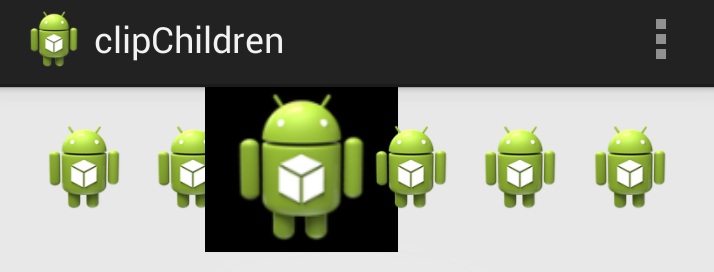
废话不多说,上关键代码:
1. 布局代码(核心)
主要看设的两个关键属性android:clipChildren和android:clipToPadding均为false。 这就让点击第三个小人时,可以跨边界进行绘制,并且允许其在padding区域内绘制。
<LinearLayout xmlns:android="http://schemas.android.com/apk/res/android"

    xmlns:tools="http://schemas.android.com/tools"

    android:layout_width="match_parent"

    android:layout_height="match_parent"

    android:paddingBottom="@dimen/activity_vertical_margin"

    android:paddingLeft="@dimen/activity_horizontal_margin"

    android:paddingRight="@dimen/activity_horizontal_margin"

    android:paddingTop="@dimen/activity_vertical_margin"

    tools:context=".MainActivity"

    android:clipChildren="false"

    android:clipToPadding="false">

    <ImageView

        android:id="@+id/img1"

        android:layout_width="wrap_content"

        android:layout_height="wrap_content"

        android:layout_weight="1"

        android:src="@drawable/ic_launcher" />

    <ImageView

        android:id="@+id/img2"

        android:layout_width="wrap_content"

        android:layout_height="wrap_content"

        android:layout_weight="1"

        android:src="@drawable/ic_launcher" />

    <ImageView

        android:id="@+id/img3"

        android:onClick="AA"

        android:layout_width="wrap_content"

        android:layout_height="wrap_content"

        android:layout_weight="1"

        android:background="@android:color/black"

        android:src="@drawable/ic_launcher" />

    <ImageView

        android:id="@+id/img4"

        android:layout_width="wrap_content"

        android:layout_height="wrap_content"

        android:layout_weight="1"

        android:src="@drawable/ic_launcher" />

    <ImageView

        android:id="@+id/img5"

        android:layout_width="wrap_content"

        android:layout_height="wrap_content"

        android:layout_weight="1"

        android:src="@drawable/ic_launcher" />

    <ImageView

        android:id="@+id/img6"

        android:layout_width="wrap_content"

        android:layout_height="wrap_content"

        android:layout_weight="1"

        android:src="@drawable/ic_launcher" />

</LinearLayout>
2. 其他辅助代码,如动画和act等内容
<?xml version="1.0" encoding="utf-8"?>

<scale

    xmlns:android="http://schemas.android.com/apk/res/android"

    android:fromXScale="1.0"

    android:fromYScale="1.0"

    android:toXScale="3.0"

    android:toYScale="3.0"

    android:duration="2000"

       android:pivotX="50%"

       android:pivotY="50%"

    >

</scale>
package com.example.clipchildren;

import android.os.Bundle;

import android.app.Activity;

import android.view.Menu;

import android.view.View;

import android.view.animation.Animation;

import android.view.animation.AnimationUtils;

import android.widget.ImageView;

import android.widget.Toast;

public class MainActivity extends Activity {

    //只对第三个小人做放大动作

    ImageView image3 =null;

    @Override

    protected void onCreate(Bundle savedInstanceState) {

        super.onCreate(savedInstanceState);

        setContentView(R.layout.activity_main);

        image3 = (ImageView) findViewById(R.id.img3);

    }

    @Override

    public boolean onCreateOptionsMenu(Menu menu) {

        // Inflate the menu; this adds items to the action bar if it is present.

        getMenuInflater().inflate(R.menu.main, menu);

        return true;

    }

    public void AA(View view) {

        Toast.makeText(this, "aa", Toast.LENGTH_SHORT).show();

        Animation an = AnimationUtils.loadAnimation(getApplicationContext(), R.anim.anims);

        image3.startAnimation(an);

    }

}
3. 除了这种应用,网上还有其他人对这两个属性的妙用:
用viewPaper来实现一个Gallery效果:http://www.iteye.com/topic/1129898
用android:clipChildren来实现红心变大特效的更多相关文章
- css3-12 transform:scale(1.2,1.2)实现移入元素变大特效
css3-12 transform:scale(1.2,1.2)实现移入元素变大特效 一.总结 一句话总结:transform:scale(1.2,1.2)鼠标移入的时候变大一点点,超出边框的部分隐藏 ...
- Android模仿三星手机系统滑动条滑动时滑块变大的特效
使用三星手机的过程中发现三星手机系统自带的滑动条有一个特效.比方调节亮度的滑动条.在滑动滑块的过程中,滑块会变大.功能非常小可是体验却非常好,于是决定做一个这种效果出来.好了废话不多说了,以下開始实现 ...
- Android RecyclerView使用GridLayoutManager导致间隙变大的问题
我用recyclerView的时候设置LayoutManager为Grid,添加decoration为Grid,作为二级列表时,多次点击一级列表来跳转的时候,两张图之间的间隙在逐渐变大,后来发现是因为 ...
- Android开发实战(二十一):浅谈android:clipChildren属性
实现功能: 1.APP主界面底部模块栏 2.ViewPager一屏多个界面显示 3......... 首先需要了解一下这个属性的意思 ,即 是否允许子View超出父View的返回,有两个值true . ...
- iframe ios中h5页面 样式变大
实际项目开发中,iframe在移动设备中使用问题还是很大的,说一说我的那些iframe坑 做过的这个后台管理框架,最开始的需求是PC,但随着业务需要,需要将项目兼容到ipad,后台的框架也是使用的开源 ...
- Linux use apktool problem包体变大GLIBC2.14等问题
Linux服务器在线打包遇到的问题 转载请标明出处: https://dujinyang.blog.csdn.net/article/details/80110942 本文出自:[奥特曼超人的博客] ...
- android:clipChildren属性的作用
该属性默认为true,这个属性需要添加到最顶层的ViewGroup,作用是控制子View是否可以超出它所在的父View设定的边界 比如ImageView设置高度100dp,而它所在的父View设置的高 ...
- CSS3实现鼠标移动到图片上图片变大
CSS3实现鼠标移动到图片上图片变大(缓慢变大,有过渡效果,放大的过程是有动画过渡的,这个过渡的时间可以自定义 <!DOCTYPE html><html> <head&g ...
- css3实现逐渐变大的圆填充div背景的效果
手机端现在的一些应用会运用上这样一个效果,就是duang的一下出现一个圆变大直到填充整个div,动感十足. 想到css3的scale属性,就自己来实现一下. <div id="bcd& ...
随机推荐
- ubuntu- eclipse、CDT安装
eclipse的安装: 应用程序->附件->终端 然后输入(中间可能需要你输入密码): ...
- 反向代理代理百度、google
<VirtualHost _default_:443> # ServerAdmin mail@localhost # DocumentRoot "/var/www/html&qu ...
- MyBatis java and MySql local variables
<insert id="create" parameterType="models.entities.CategoryEntity"> set @c ...
- Eclipse的中文字体设置
打开eclipse中文字体很小,简直难以辨认.在网上搜索发现这是由于Eclipse 用的字体是 Consolas,显示中文的时候默认太小了.解决方式有两种:一.把字体设置为Courier New 操 ...
- 【PDF】java使用Itext生成pdf文档--详解
[API接口] 一.Itext简介 API地址:javadoc/index.html:如 D:/MyJAR/原JAR包/PDF/itext-5.5.3/itextpdf-5.5.3-javadoc/ ...
- android学习笔记47——读写SD卡上的文件
读写SD卡上的文件 通过Context的openFileInput.openFileOutput来打开文件输入流.输出流时,程序打开的都是应用程序的数据文件夹里的文件,其存储的文件大小可能都比较有限- ...
- IO操作 第一篇 学习(转载)
问题8:如何使用通配符搜索指定目录内的所有文件: 解决方案: 使用DirectoryInfo.GetFiles方法的重载版本,它可以接受一个过滤表达式,返回FileInfo数组,另外它的参数还可以指定 ...
- try catch 怎么写?
除非必要,否则不在底层写try catch. 比如说,需要在catch里做一些处理,然后再抛出,一般不建议使用try catch掩盖程序出现的异常. try { BuildQueryComma ...
- Java System.out的输出缓冲
今天学习了java的正则表达式api,在写例子的时候遇到了让人摸不着头脑的问题:从控制台输入了字符串,却没有输出;直到输入的字符串不能匹配的时,一起与Unabled to match输出.相关代码如下 ...
- 深入ThreadLocal之二
概述 相信读者在网上也看了很多关于ThreadLocal的资料,很多博客都这样说:ThreadLocal为解决多线程程序的并发问题提供了一种新的思路:ThreadLocal的目的是为了解决多线程访问资 ...