
element table 表格嵌套
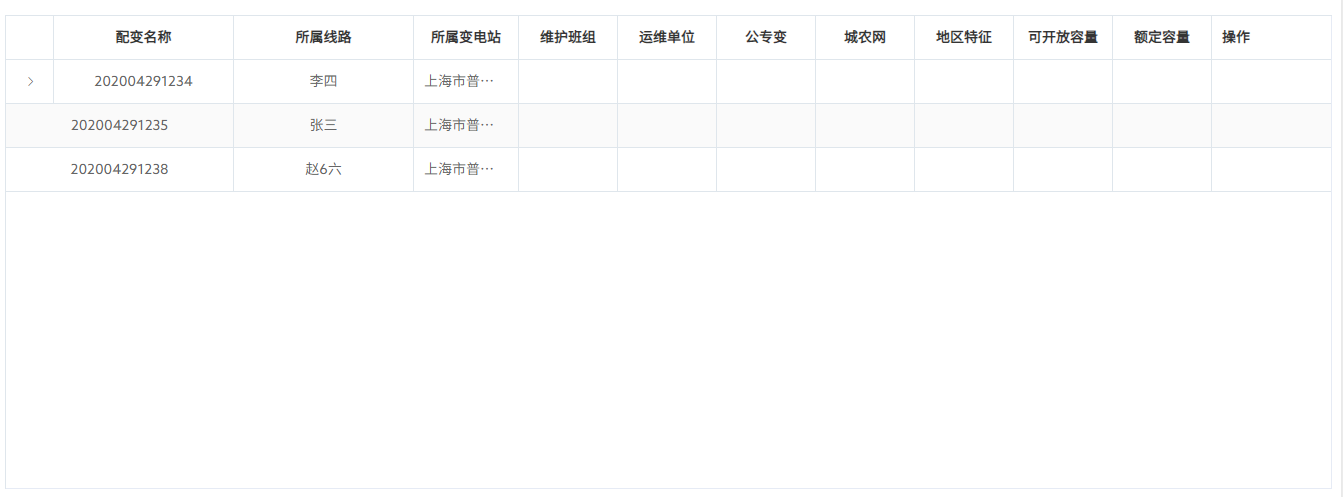
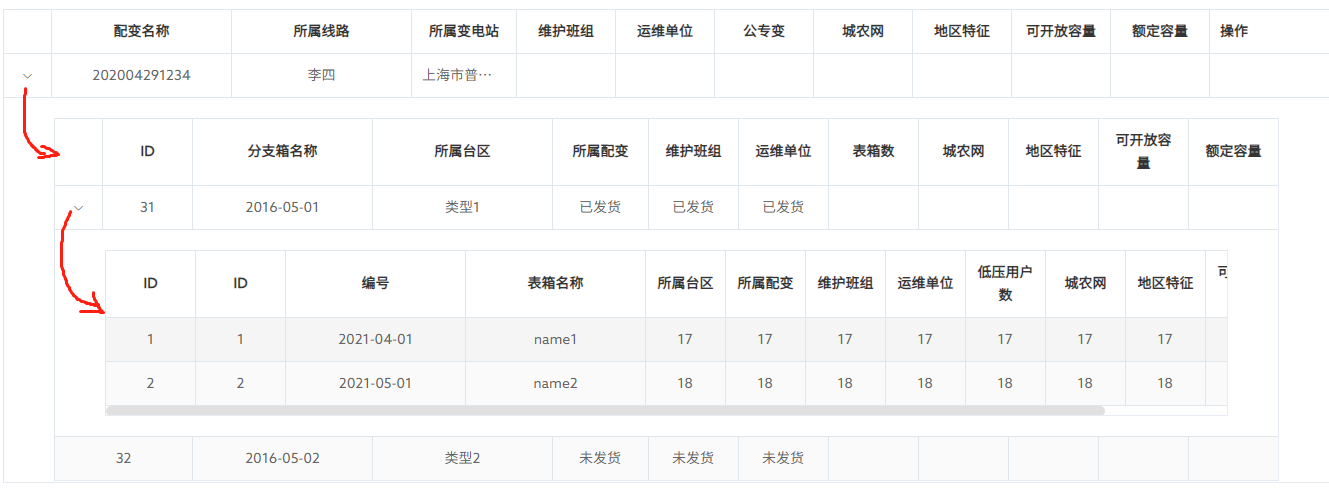
/////////////////////////// 代码如下
<template>
<div class="report-forms-page">
<div class="report-forms-main">
<div class="bottomForm">
<div style="margin-top:12px">
<el-table
:data="tableData"
:height=reportTableConfig.tableHeight
style="width: 100%;margin-bottom: 20px;"
:span-method="arraySpanMethod"
row-key="id"
border
stripe
>
<!-- 二级箱 -->
<el-table-column type="expand">
<template slot-scope="props">
<el-table
class="table-in-table"
:data="props.row.datas"
style="width: 100%;"
:span-method="arraySpanMethod"
row-key="id"
border
stripe
>
<!-- 三级箱 -->
<el-table-column type="expand">
<template slot-scope="props">
<el-table
class="table-in-table"
:data="props.row.datas"
style="width: 100%;"
row-key="id"
border
stripe
>
<el-table-column align='center' :show-overflow-tooltip="true" prop="id" label="ID"
width="90"></el-table-column>
<el-table-column align='center' :show-overflow-tooltip="true" prop="id" label="ID"
width="90"></el-table-column>
<el-table-column align='center' :show-overflow-tooltip="true" prop="number" label="编号"
width="180"></el-table-column>
<el-table-column align='center' :show-overflow-tooltip="true" prop="name" label="表箱名称"
width="180"></el-table-column>
<el-table-column align='center' :show-overflow-tooltip="true" prop="age"
label="所属台区"></el-table-column>
<el-table-column align='center' :show-overflow-tooltip="true" prop="age"
label="所属配变"></el-table-column>
<el-table-column align='center' :show-overflow-tooltip="true" prop="age"
label="维护班组"></el-table-column>
<el-table-column align='center' :show-overflow-tooltip="true" prop="age"
label="运维单位"></el-table-column>
<el-table-column align='center' :show-overflow-tooltip="true" prop="age"
label="低压用户数"></el-table-column>
<el-table-column align='center' :show-overflow-tooltip="true" prop="age"
label="城农网"></el-table-column>
<el-table-column align='center' :show-overflow-tooltip="true" prop="age"
label="地区特征"></el-table-column>
<el-table-column align='center' :show-overflow-tooltip="true" prop="age"
label="可开放容量"></el-table-column>
<el-table-column align='center' :show-overflow-tooltip="true" prop="age"
label="额定容量"></el-table-column>
</el-table>
</template>
</el-table-column>
<el-table-column align='center' :show-overflow-tooltip="true" prop="id" label="ID"
width="90"></el-table-column>
<el-table-column align='center' :show-overflow-tooltip="true" prop="date" label="分支箱名称"
width="180"></el-table-column>
<el-table-column align='center' :show-overflow-tooltip="true" prop="type" label="所属台区"
width="180"></el-table-column>
<el-table-column align='center' :show-overflow-tooltip="true" prop="status"
label="所属配变"></el-table-column>
<el-table-column align='center' :show-overflow-tooltip="true" prop="status"
label="维护班组"></el-table-column>
<el-table-column align='center' :show-overflow-tooltip="true" prop="status"
label="运维单位"></el-table-column>
<el-table-column align='center' :show-overflow-tooltip="true" prop="age"
label="表箱数"></el-table-column>
<el-table-column align='center' :show-overflow-tooltip="true" prop="age"
label="城农网"></el-table-column>
<el-table-column align='center' :show-overflow-tooltip="true" prop="age"
label="地区特征"></el-table-column>
<el-table-column align='center' :show-overflow-tooltip="true" prop="age"
label="可开放容量"></el-table-column>
<el-table-column align='center' :show-overflow-tooltip="true" prop="age"
label="额定容量"></el-table-column>
</el-table>
</template>
</el-table-column>
<el-table-column align='center' :show-overflow-tooltip="true" prop="applyNo" label="配变名称"
width="180"></el-table-column>
<el-table-column align='center' :show-overflow-tooltip="true" prop="name" label="所属线路"
width="180"></el-table-column>
<el-table-column align='center' :show-overflow-tooltip="true" prop="address"
label="所属变电站"></el-table-column>
<el-table-column align='center' :show-overflow-tooltip="true" prop="age" label="维护班组"></el-table-column>
<el-table-column align='center' :show-overflow-tooltip="true" prop="age" label="运维单位"></el-table-column>
<el-table-column align='center' :show-overflow-tooltip="true" prop="age" label="公专变"></el-table-column>
<el-table-column align='center' :show-overflow-tooltip="true" prop="age" label="城农网"></el-table-column>
<el-table-column align='center' :show-overflow-tooltip="true" prop="age" label="地区特征"></el-table-column>
<el-table-column align='center' :show-overflow-tooltip="true" prop="age" label="可开放容量"></el-table-column>
<el-table-column align='center' :show-overflow-tooltip="true" prop="age" label="额定容量"></el-table-column>
<el-table-column label="操作" width="120">
</el-table-column>
</el-table>
</div>
</div>
</div>
</div>
</template>
<script>
export default {
components: {
},
data() {
return {
filterText: '',
keyWord: '',
//////////////////////-------------------
tableData: [
{
id: 1,
applyNo: '202004291234',
name: '李四',
address: '上海市普陀区金沙江路 1518 弄',
datas: [
{
id: 31,
date: '2016-05-01',
type: '类型1',
status: '已发货',
datas: [
{
id: 1,
number: '2021-04-01',
name: 'name1',
age: '17'
},
{
id: 2,
number: '2021-05-01',
name: 'name2',
age: '18'
}
]
},
{
id: 32,
date: '2016-05-02',
type: '类型2',
status: '未发货'
}
]
},
{
id: 2,
applyNo: '202004291235',
name: '张三',
address: '上海市普陀区金沙江路 1517 弄'
},
{
id: 4,
applyNo: '202004291238',
name: '赵6六',
address: '上海市普陀区金沙江路 1516 弄'
}
],
radio: 'today',
}
},
created() {
},
methods: {
arraySpanMethod({ row, column, rowIndex, columnIndex }) {
if (!row.datas) {
if (columnIndex === 0) {
console.log(row)
// return [0, 0]
return [0, 0]
} else if (columnIndex === 1) {
// return [1, 2]
return [1, 2]
}
}
},
},
}
</script>
<style lang="scss" scoped>
.report-forms-page {
height: calc(100vh - 84px);
position: relative;
left: 10px;
.report-org-tree {
position: absolute;
margin-top: 10px;
border-bottom-right-radius: 0px;
border-top-right-radius: 0px;
background-color: #ffffff;
width: 340px;
height: calc(100% - 25px);
border-radius: 0.5rem;
.search {
padding: 10px;
}
.title {
color: #000;
font-size: 16px;
padding: 10px;
padding-top: 0;
font-weight: bold;
}
.tree {
padding: 10px;
height: calc(100% - 70px);
overflow: auto;
background-color: #ffffff;
}
}
.report-forms-main {
position: absolute;
top: 1.25%;
right: 1%;
padding: 1% 0.5% 0 0.5%;
width: calc(98.8% - 345px);
height: 97%;
background-color: #ffffff;
border-radius: 0.5rem;
box-shadow: 0 0.2rem 0.8rem 0 rgba(0, 0, 0, 0.1);
.el-col-lg-4-8 {
width: 20% !important;
.timePeriod {
width: 45%;
display: inline-block;
}
}
}
}
</style>
element table 表格嵌套的更多相关文章
- element table 表格 修改背景为透明并去除边框
.el-table{ /* 表格字体颜色 */ color:white; /* 表格边框颜色 */ /* border: 0.5px solid #758a99; */ height: 500px; ...
- 封装Vue Element的table表格组件
上周分享了几篇关于React组件封装方面的博文,这周就来分享几篇关于Vue组件封装方面的博文,也好让大家能更好地了解React和Vue在组件封装方面的区别. 在封装Vue组件时,我依旧会交叉使用函数式 ...
- 封装Vue Element的可编辑table表格组件
前一段时间,有博友在我那篇封装Vue Element的table表格组件的博文下边留言说有没有那种"表格行内编辑"的封装组件,我当时说我没有封装过这样的组件,因为一直以来在实际开发 ...
- JQuery结合Ajax实现双击Table表格,使Table变成可编辑,并保存到数据库中
本文属于原创,转载请标明出处! 近期在做项目时,要实现通过双击Table表格的TR,使Table行变成可编辑,来实现修改数据并保存到数据库中的功能,无需多说,直接贴代码吧.希望能得到各位同仁指正. f ...
- js 实现table表格拖拽和点击表头升降序排序
js 实现table表格拖拽和点击表头升降序排序,写的比较乱,用的时候可以把其中的一些模块函数提取出来 样式,由于是可拖拽表格,所以样式 table tr th{cursor:move;} js实现 ...
- bootstrap table表格属性、列属性、事件、方法
留存一份,原文地址http://bootstrap-table.wenzhixin.net.cn/zh-cn/documentation/ 表格参数 表格的参数定义在 jQuery.fn.bootst ...
- CSS控制表格嵌套
网页设计应用中,当我们不能完全放弃表格的使用时,为了达到预期的效果,不免要用到表格嵌套(特别是多层嵌套)方式来进行布局.可能很多同仁都遇到过这样的问题,为了达到显示效果要为每一个(每一层)的表格写不同 ...
- HTML表格嵌套、合并表格
一.表格元素< table> table常用属性 border:边框像素 width,height:表格宽度/高度 bordercolor:表格边框颜色 bgcolor:表格背景颜色 二. ...
- java:HTML(table表格,ul列表)和CSS(导入.css文件,三种定义颜色方式,三种样式选择器,a标签属性顺序,)
1.重点掌握: html: 1.form表单:input,checkbox,seelct,radio,button,submit 2.table表格:thead-->tr-->th;tbo ...
- ElementUI的Table表格添加自定义头CheckBox多选框
在ElmentUI的Table表格组件中,也许你会使用type为selection值的多选框功能,但是此时设置的label属性不生效,不能设置标题名称:有时候我们的需求就是要添加标题名称,那该如何处理 ...
随机推荐
- Quarkus入门体验,22ms启动一个Web服务
简介 Quarkus是类似于Spring Boot的框架,可以方便大家进行Java开发.利用GraalVM的魔力,能更好的适应云原生的场景,极快的启动速度. 创建项目 在IDEA就直接有创建Quark ...
- MATLAB人工神经网络ANN代码
本文介绍基于MATLAB实现人工神经网络(ANN)回归的详细代码与操作. 目录 1 分解代码 1.1 循环准备 1.2 神经网络构建 1.3 数据处理 1.4 模型训练参数配置 1.5 神经网络实 ...
- 力扣---45. 跳跃游戏 II
给定一个长度为 n 的 0 索引整数数组 nums.初始位置为 nums[0].每个元素 nums[i] 表示从索引 i 向前跳转的最大长度.换句话说,如果你在 nums[i] 处,你可以跳转到任意 ...
- maven打包失败 Cannot create resource output directory
转https://blog.csdn.net/wuyuanshun/article/details/103097447 maven clean后打包出现Cannot create resource o ...
- Spring IOC官方文档学习笔记(十)之类路径扫描与组件管理
1.@Component注解与其衍生注解 (1) 在Spring中,@Component注解用于说明某个类是一个bean,之后Spring在类路径扫描过程中会将该bean添加至容器中;@Compone ...
- freeRTOS检测栈溢出
将FreeRTOSConfig.h里面的configCHECK_FOR_STACK_OVERFLOW设置为2. 随便一个文件里,加入 #include "task.h" void ...
- Spring事务(Transaction)管理高级篇一栈式解决开发中遇到的事务问题
Spring是目前Java开发中最流行的框架了,它的事务管理我们在开发中常常的用到,但是很多人不理解它事务的原理,导致开发中遇到事务方面的问题往往都要用很长的时间才能解决,下面就带着大家去深入了解Sp ...
- Axios、Vue组件-生命周期、计算属性、Slot插槽、自定义事件、v-router、钩子函数
Axios:网络通信 <script> var vm =new vue({ el:"#app", data(){ return{ info:{ //返回的数据必须和js ...
- C#操作注册表简单教程(附带操作某数据库客户端注册表以实现重置试用期的效果)
前言: 使用Windows系统,经常会遇到需要做注册表的操作.例如,一些软件需要修改注册表.自己编写的软件需要新建注册表进行写入注册信息等等.以下内容以某常见的数据库操作客户端为例,做一个注册表操作的 ...
- Luogu P3919 【模板】可持久化线段树 1(可持久化数组)
板子,正好温习一下主席树的写法 记得数组开 \(32\) 倍!! \(Code\) #include<cstdio> using namespace std; const int N = ...