
ArcObjects SDK开发 014 MapSurround和普通Element
1、如何获取MapSurround
和获取MapFrame类似,如果你已经获取指北针、比例尺等对象,可以通过IGraphicsContainer的FindFrame函数获取。如果没有,则通过IGraphicsContainer循环所有Element去判断即可。
2、添加MapSurround
指北针、比例尺、图例等都是MapSurround,我们以最简单的指北针为例,把MapSurround添加到PageLayout上。
var myGraphicsContainer = pLayoutApplication.PageLayout as IGraphicsContainer;

var myActiveView = pLayoutApplication.PageLayout as IActiveView;

var myMap = myActiveView.FocusMap;

var myMapFrame = myGraphicsContainer.FindFrame(myMap) as IMapFrame;

if (this._MapSurroundFrame == null)

{

    this._MapSurroundFrame = new MapSurroundFrameClass();

    var myMarkerNorthArrow = new MarkerNorthArrowClass();

    var myMarkerSymbol = myMarkerNorthArrow.MarkerSymbol;

    var myCharacterMarkerSymbol = myMarkerSymbol as ICharacterMarkerSymbol;

    myCharacterMarkerSymbol.CharacterIndex = 177;

    myMarkerNorthArrow.MarkerSymbol = myCharacterMarkerSymbol;

    myMarkerNorthArrow.Size = 30;

    this._MapSurroundFrame.MapSurround = myMarkerNorthArrow;

    this._MapSurroundFrame.MapFrame = myMapFrame;

    var myQuerySize = this._MapSurroundFrame.MapSurround as IQuerySize;

    double myWidth = 0;

    double myHeight = 0;

    myQuerySize.QuerySize(ref myWidth, ref myHeight);

    var myUnitConverter = new UnitConverterClass();

    this.Width = Math.Round(myUnitConverter.ConvertUnits(myWidth, esriUnits.esriPoints, esriUnits.esriMillimeters), 1);

    this.Height = Math.Round(myUnitConverter.ConvertUnits(myHeight, esriUnits.esriPoints, esriUnits.esriMillimeters), 1);

}

else

{

    this._MapSurroundFrame.MapFrame = myMapFrame;

}

var myNewEnvelope = new EnvelopeClass

{

    XMin = this.X,

    YMin = this.Y,

    Width = this.Width,

    Height = this.Height

};

this.GetElment().Geometry = myNewEnvelope;

if (GraphicsContainerHelper.Contain(myGraphicsContainer, this.GetElment()) == false)

{

    myGraphicsContainer.AddElement(this.GetElment(), 0);

}
添加MapSurround流程都是一样的,不同的地方主要是在实例化具体MapSurround的代码。例如指北针、比例尺、图例等。实例化比例尺的代码如下。
IGraphicsContainer myGraphicsContainer = pLayoutApplication.PageLayout as IGraphicsContainer;

if (this._MapSurroundFrame != null)

{

    myGraphicsContainer.DeleteElement(this._MapSurroundFrame as IElement);

    this._MapSurroundFrame = null;

}

IActiveView myActiveView = pLayoutApplication.PageLayout as IActiveView;

IMap myMap = myActiveView.FocusMap;

IMapFrame myMapFrame = myGraphicsContainer.FindFrame(myMap) as IMapFrame;

this._MapSurroundFrame = new MapSurroundFrameClass();

this._MapSurroundFrame.MapFrame = myMapFrame;

//创建比例尺

this._ScaleBar = this.CreateScaleBar();

this._ScaleBar.Map = myMapFrame.Map;

this._ScaleBar.ResizeHint = esriScaleBarResizeHint.esriScaleBarFixed;

this._ScaleBar.LabelFrequency = esriScaleBarFrequency.esriScaleBarDivisions;

this._MapSurroundFrame.MapSurround = this._ScaleBar;

this._ScaleBar.BarHeight = this.BarHeight;

this._ScaleBar.Division = this.Division;

this._ScaleBar.Divisions = this.Divisions;

this._ScaleBar.Subdivisions = this.Subdivisions;

this._ScaleBar.DivisionsBeforeZero = this.DivisionsBeforeZero;

this._ScaleBar.LabelPosition = this.LabelPosition;

this._ScaleBar.LabelGap = this.LabelGap;

ITextSymbol myLabelSymbol = new TextSymbolClass();

IFontDisp myFontDisp = myLabelSymbol.Font;

myFontDisp.Name = "Times New Roman";

myLabelSymbol.Font = myFontDisp;

myLabelSymbol.Size = this.LabelSize;

this._ScaleBar.LabelSymbol = myLabelSymbol;

//pScaleBar的UnitLabel属性设置需要放在pScaleBar.Units设置代码之后。这样UnitLabel设置才有效果。

this._ScaleBar.Units = esriUnits.esriKilometers;

this._ScaleBar.UnitLabel = this.UnitLabel;

this._ScaleBar.UnitLabelGap = this.UnitLabelGap;

ITextSymbol myUnitLabelSymbol = new TextSymbolClass();

myFontDisp = myUnitLabelSymbol.Font;

myFontDisp.Name = "Times New Roman";

myUnitLabelSymbol.Font = myFontDisp;

myUnitLabelSymbol.Size = this.UnitLabelFontSize;

this._ScaleBar.UnitLabelSymbol = myUnitLabelSymbol;

this._ScaleBar.UnitLabelPosition = this.UnitLabelPosition;

IScaleMarks myScaleMarks = this._ScaleBar as IScaleMarks;

myScaleMarks.MarkFrequency = esriScaleBarFrequency.esriScaleBarDivisionsAndSubdivisions;

myScaleMarks.MarkPosition = this.MarkPosition;

myScaleMarks.DivisionMarkHeight = this.DivisionMarkHeight;

ILineSymbol myDivisionMarkSymbol = new SimpleLineSymbolClass();

myDivisionMarkSymbol.Color = new RgbColorClass() { Red = 0, Green = 0, Blue = 0 };

myDivisionMarkSymbol.Width = this.DivisionMarkWidth;

myScaleMarks.DivisionMarkSymbol = myDivisionMarkSymbol;

myScaleMarks.SubdivisionMarkHeight = this.SubdivisionMarkHeight;

ILineSymbol mySubdivisionMarkSymbol = new SimpleLineSymbolClass();

mySubdivisionMarkSymbol.Color = new RgbColorClass() { Red = 0, Green = 0, Blue = 0 };

mySubdivisionMarkSymbol.Width = this.SubdivisionMarkWidth;

myScaleMarks.SubdivisionMarkSymbol = mySubdivisionMarkSymbol;

IElement myElement = this._MapSurroundFrame as IElement;

IGeometry myGeometry = myElement.Geometry;

if (myGeometry != null && myGeometry.IsEmpty == false)

{

    IEnvelope myGeometryEnvelope = myGeometry.Envelope;

    this.Width = myGeometryEnvelope.Width;

    this.Height = myGeometryEnvelope.Height;

}

IEnvelope myEnvelope = new EnvelopeClass();

myEnvelope.PutCoords(this.X, this.Y, this.X + this.Width, this.Y + this.Height);

myElement.Geometry = myEnvelope;

myGraphicsContainer.AddElement(this._MapSurroundFrame as IElement, 0);

/// <summary>

/// 创建比例尺

/// </summary>

private IScaleBar CreateScaleBar()

{

    IScaleBar myScaleBar;

    if (this.BarType == "AlternatingScaleBar")

    {

        myScaleBar = new AlternatingScaleBar();

    }

    else if (this.BarType == "DoubleAlternatingScaleBar")

    {

        myScaleBar = new DoubleAlternatingScaleBar();

    }

    else if (this.BarType == "HollowScaleBar")

    {

        myScaleBar = new HollowScaleBar();

    }

    else if (this.BarType == "SteppedScaleLine")

    {

        myScaleBar = new SteppedScaleLine();

    }

    else

    {

        myScaleBar = new ScaleLine();

    }

    myScaleBar.Name = this.BarType;

    return myScaleBar;

}
3、普通Element
继承IElement接口的类如下图所示。
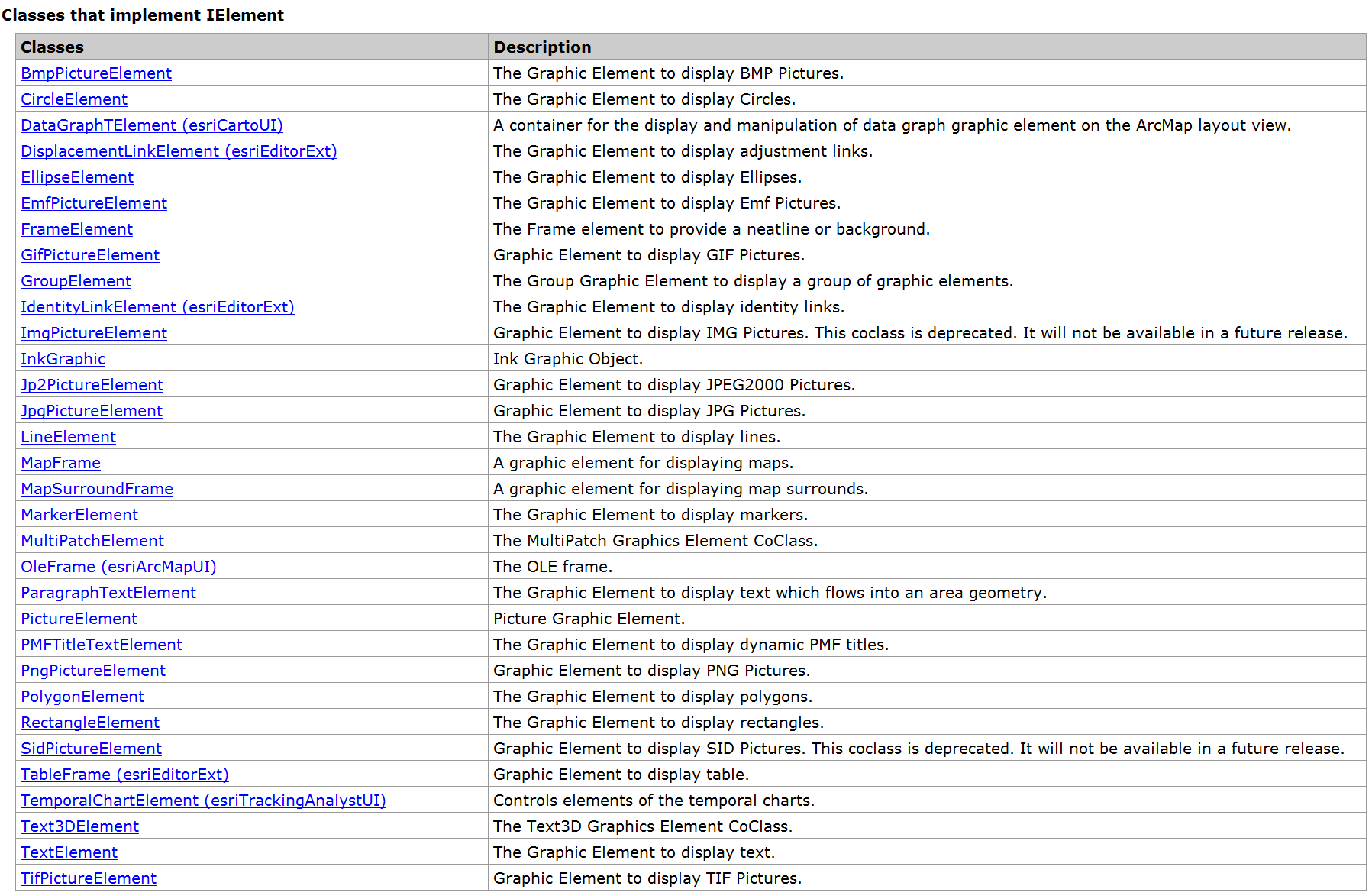
这个列表中的Elment,除了MapFrame、MapSurroundFrame以及后面带()的外,其他的基本上都是我们常用的,例如点元素、线元素、面元素、圆元素、椭圆元素、各种图片元素等。
IElement有一个关键属性Geometry,如果是MarkerElement或者TextElement,那么Geometry就是IPoint类型,如果是LineElement,那么Geometry是IPolyline类型,PolygonElement的Geometry为IPolygon类型,图片Element一般传入IEnvelope。
一些特殊的Element例如椭圆的Geometry传什么呢?这样不确定的问题,我们可以去SDK帮助中查找,一般帮助中会解释的很清楚。

帮助中说的比较明确,可以传递IEnvelope,这样会在IEnvelope生成 一个椭圆。也可以传由EllipticArc组成的Polygon对象。不过我们一般会传IEnvelope,主要原因是简单直观。
除了Geometry外,很对图形状的元素包含Symbol属性。例如MarkerElement可设置IMarkerSymbol,TextElement可以设置ITextSymbol,IPolylineElement可设置ILineSymbol,PolygonElement、CircleElement和EllipseElement可以设置IFillSymbol。
ArcObjects SDK开发 014 MapSurround和普通Element的更多相关文章
- Kinect for Windows SDK开发学习相关资源
Kinect for Windows SDK(K4W)将Kinect的体感操作带到了平常的应用学习中,提供了一种不同于传统的鼠标,键盘及触摸的无接触的交互方式,在某种程度上实现了自然交互界面的理想,即 ...
- 微信公众账号 Senparc.Weixin.MP SDK 开发教程 索引
Senparc.Weixin.MP SDK从一开始就坚持开源的状态,这个过程中得到了许多朋友的认可和支持. 目前SDK已经达到比较稳定的版本,这个过程中我觉得有必要整理一些思路和经验,和大家一起分享. ...
- 高拍仪拍照SDK开发(良田影像S300L|S500L)
高拍仪拍照SDK开发下载地址:点击下载 本SDK适用于:良田影像S300L|S500L 高拍仪如图: SDN开发包安装之后找到安装目录,如图: 大家找到各自需要的版本即可,需要注意的是如果需要上传图片 ...
- TortoiseSVN安装以及淘宝 TAE SDK 开发环境的搭建
一.TortoiseSVN 的下载和安装 1.进入TortoiseSVN 官网下载地址http://tortoisesvn.net/downloads.html,根据自己的操作系统位数下载相应最新版本 ...
- SDK开发断点失效
做SDK开发,一般会创建一个静态库工程,然后添加一个app的Target 可是,Xcode7创建的工程,app的Target中断点有效,能断住,为什么静态库的Target中的断点断不住呀. 断点断住发 ...
- Vmware Vsphere WebService SDK开发(第一讲)-基本知识学习
刚开始这方面开发的时候,不知道如何下手,能够查到的资料特别少,而且看到很多网友和我一样也在找这方面的资料.接下来的一段时间我就结合自己所参与的项目,完成关于Vmware Vsphere WebServ ...
- 【转】微信公众账号 Senparc.Weixin.MP SDK 开发教程 索引
微信公众账号 Senparc.Weixin.MP SDK 开发教程 索引 Senparc.Weixin.MP SDK从一开始就坚持开源的状态,这个过程中得到了许多朋友的认可和支持. 目前SDK已经达到 ...
- ArcObjects SDK(AE)10.1在vs2012安装的方法
ArcObjects SDK(以下简称AO)10.1只支持vs2010,如果装了vs2012,再安装AO会提示一串鸡肠(英文),意思是AO10.1只支持vs2010 想在2012下安装,可以通过修改注 ...
- 微信公众账号 Senparc.Weixin.MP SDK 开发教程
http://www.cnblogs.com/szw/archive/2013/05/14/weixin-course-index.html 微信公众账号 Senparc.Weixin.MP SDK ...
- Kinect for Windows SDK开发入门(一):开发环境配置
[译]Kinect for Windows SDK开发入门(一):开发环境配置 前几天无意中看到微软发布了Kinect for windows sensor,进去看了一下Kinect应用的例子,发现K ...
随机推荐
- 第三章:模版层 - 1:Django模板语言详解
本节将介绍Django模版系统的语法.Django模版语言致力于在性能和简单性上取得平衡. 如果你有过其它编程背景,或者使用过一些在HTML中直接混入程序代码的语言,那么你需要记住,Django的模版 ...
- Elasticsearch删除操作详解
文章转载自: https://mp.weixin.qq.com/s?__biz=MzI2NDY1MTA3OQ==&mid=2247484022&idx=1&sn=7a4de21 ...
- Grafana 入门知识介绍
通过[Configuration]>[Plugins]添加插件 通过[Configuration]>[Data Sources]添加数据源(分析对象) 通过[Server Admin]&g ...
- 【前端必会】不知道webpack插件? webpack插件源码分析BannerPlugin
背景 不知道webpack插件是怎么回事,除了官方的文档外,还有一个很直观的方式,就是看源码. 看源码是一个挖宝的行动,也是一次冒险,我们可以找一些代码量不是很大的源码 比如webpack插件,我们就 ...
- 关于private子网访问s3时报错:Connect timeout on endpoint URL
今天在使用private私有子网,通过aws s3命令访问s3时,报如下错误: [qq_5201351@private ~]$ aws s3 ls Connect timeout on endpoin ...
- HDU2586 How far away ? (树链剖分求LCA)
用树链剖分求LCA的模板: 1 #include<iostream> 2 #include<algorithm> 3 using namespace std; 4 const ...
- 数据结构之单链表(基于Java实现)
链表:在计算机中用一组任意的存储单元存储线性表的数据元素称为链式存储结构,这组存储结构可以是连续的,也可以是不连续的,因此在存储数据元素时可以动态分配内存. 注:在java中没有指针的概念,可以理解为 ...
- Period of an Infinite Binary Expansion 题解
Solution 简单写一下思考过程,比较水的数论题 第一个答案几乎已经是可以背下来的,在此不再赘述 考虑我们已经知道了\((p,q)\),其中\((p \perp q) \wedge (q \per ...
- 监控CPU状况并发送邮件shell脚本
#!/bin/bash #监控CPU状况并发送邮件 DATE=$(date +%y%m%d) TEMP=$(mktemp tmp.XXX.txt) cat /proc/cpuinfo >$TEM ...
- 腾讯云短信SDK-精简版
/** * 腾讯云短信SDK-精简版 * 本模块使用-向腾讯云短信服务器发送请求 * @return json 腾讯服务器返回值-json字符串 */ private function send_sm ...