
使用ASP.NET Core开发信息采集系统将用户数据添加至企业微信
一、启动Visual Studio 2019,创建ASP.NET Core Web应用程序

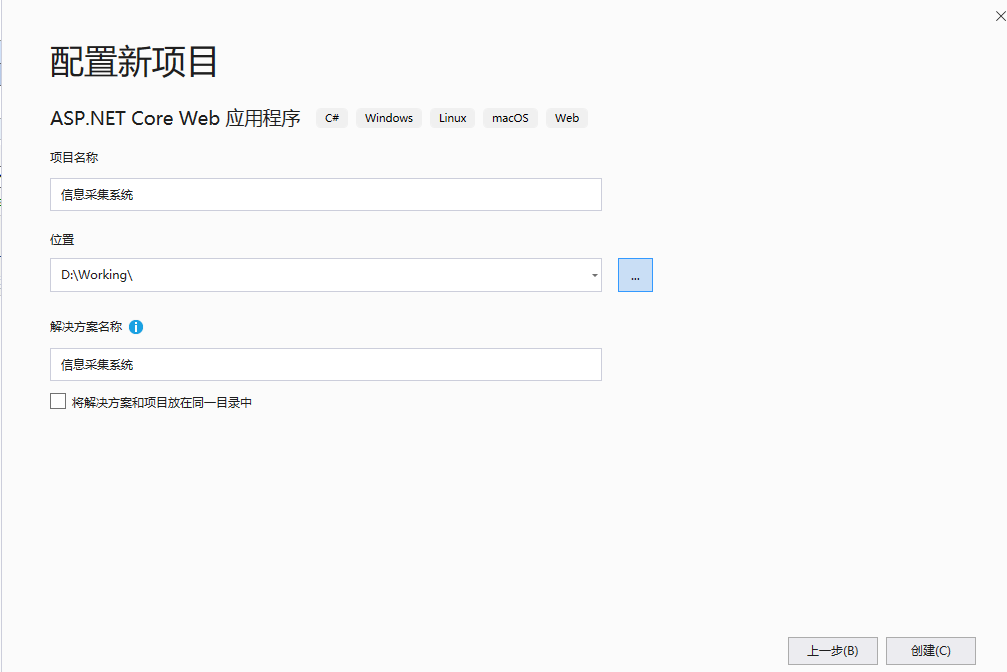
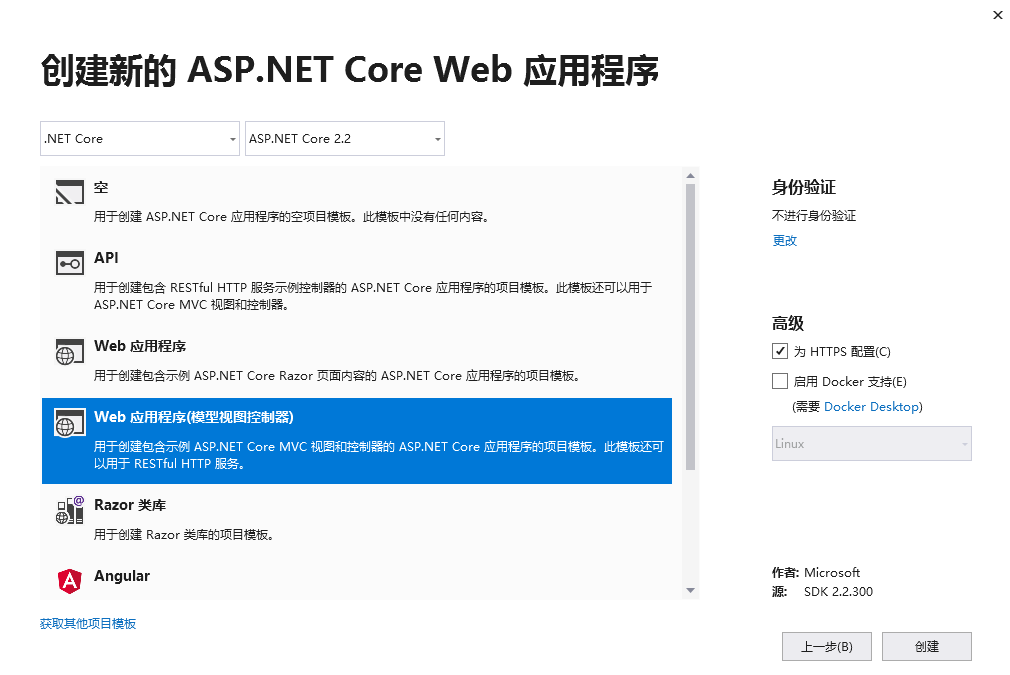
二、在Models文件夹添加新项 Person.cs

using System.ComponentModel.DataAnnotations;

using Microsoft.AspNetCore.Mvc;

namespace 信息采集系统.Models

{

    public class Person

    {

        [Display(Name = "编号")]

        public int ID { get; set; }

        [Display(Name = "姓名")]

        [Required(ErrorMessage = "必须输入姓名")]

        [Remote("CheckName", "MyValidation")]

        public string Name { get; set; }

        [Display(Name = "性别")]

        public Gender Gender { get; set; }

        [Display(Name = "手机号")]

        [Required(ErrorMessage = "必须输入手机号码")]

        [StringLength(11, ErrorMessage = "手机号码长度应为11位", MinimumLength = 11)]

        public string Mobile { get; set; }

        [Remote("CheckFatherName", "MyValidation")]

        public string FatherName { get; set; }

        [Remote("CheckMotherName", "MyValidation")]

        public string MotherName { get; set; }

        [Display(Name = "邀请码")]

        [Required(ErrorMessage = "必须输入认证码")]

        [Remote("CheckInvitationCode", "MyValidation")]

        public string InvitationCode { get; set; }

    }

    public enum Gender

    {

        [Display(Name = "男")]

        Male = 1,

        [Display(Name = "女")]

        Female = 2

    }

}
三、在Controllers文件夹,添加“新搭建基架的项目”
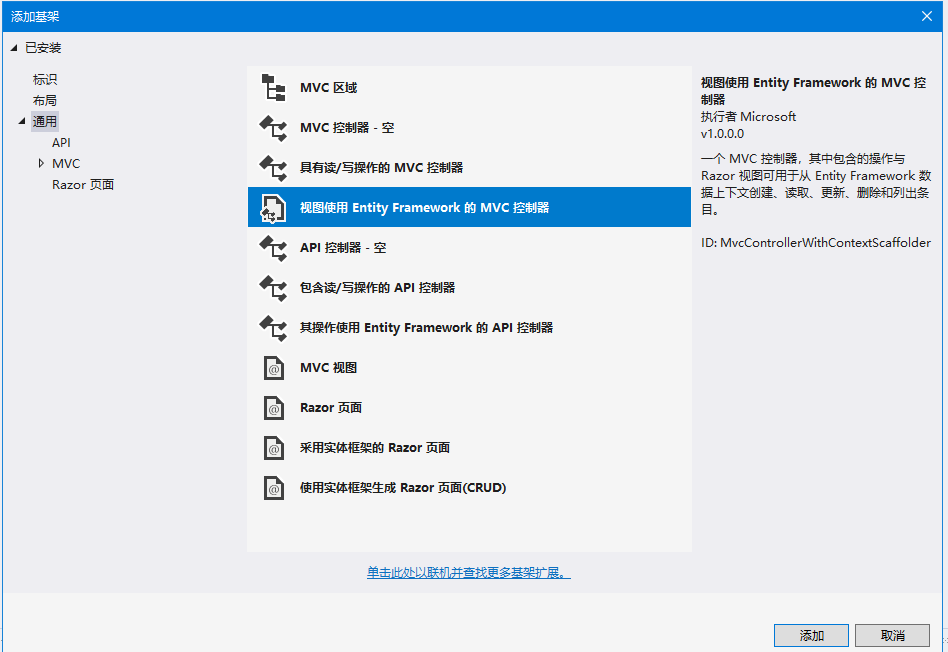
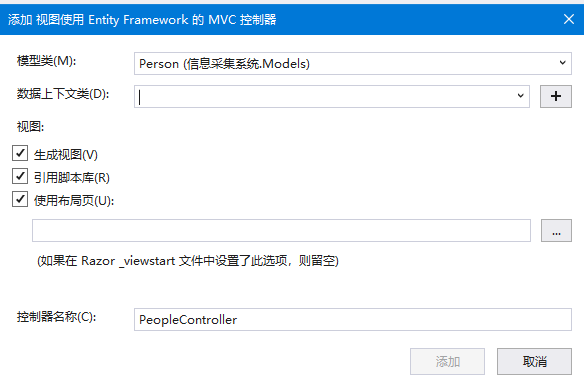
点击数据上下文右侧的加号按钮,新建一个数据上下文类
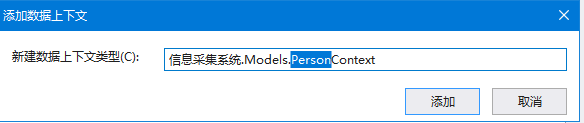
修改StartUp.cs
        public void ConfigureServices(IServiceCollection services)

        {

            services.Configure<CookiePolicyOptions>(options =>

            {

                // This lambda determines whether user consent for non-essential cookies is needed for a given request.

                options.CheckConsentNeeded = context => true;

                options.MinimumSameSitePolicy = SameSiteMode.None;

            });

            services.AddMvc().SetCompatibilityVersion(CompatibilityVersion.Version_2_2);

            services.AddDbContext<PersonContext>(options =>

                    options.UseSqlServer(PersonContext.ConnectionString));

        }
修改PersonContext.cs
using System.Collections.Generic;

using System.Linq;

using System.Threading.Tasks;

using Microsoft.EntityFrameworkCore;

namespace 信息采集系统.Models

{

    public class PersonContext : DbContext

    {

        public static string ConnectionString

        {

            get

            {

                var path = AppDomain.CurrentDomain.BaseDirectory;

                var DatabasePath = System.IO.Path.Combine(new string[] { path, "Person.mdf" });

                var s = $"Data Source=(LocalDB)\\MSSQLLocalDB;Initial Catalog=Person;AttachDbFilename={DatabasePath};";

                return s;

            }

        }

        public PersonContext (DbContextOptions<PersonContext> options)

            : base(options)

        {

        }

        public DbSet<信息采集系统.Models.Person> Person { get; set; }

    }

}
四、添加控制器MyValidationController.cs
using System;

using System.Collections.Generic;

using System.Linq;

using System.Threading.Tasks;

using Microsoft.AspNetCore.Mvc;

namespace 信息采集系统.Controllers

{

    public class MyValidationController : Controller

    {

        private Models.PersonContext _context { get; set; }

        public MyValidationController(Models.PersonContext context)

        {

            this._context = context;

        }

        public JsonResult CheckName(string Name)

        {

            var chinese= Common.PinyinHelper.IsChineseString(Name);

            if (chinese)

            {

                return Json(true);

            }

            else

            {

                return Json("姓名必须输入中文");

            }

        }

        public JsonResult CheckFatherName(string FatherName)

        {

            var chinese = Common.PinyinHelper.IsChineseString(FatherName);

            if (chinese)

            {

                return Json(true);

            }

            else

            {

                return Json("姓名必须输入中文");

            }

        }

        public JsonResult CheckMotherName(string MotherName)

        {

            var chinese = Common.PinyinHelper.IsChineseString(MotherName);

            if (chinese)

            {

                return Json(true);

            }

            else

            {

                return Json("姓名必须输入中文");

            }

        }

        public JsonResult CheckInvitationCode(string InvitationCode)

        {

            var b = Common.InvitationCode.IsValid(InvitationCode);

            if (b)

            {

                var item = _context.Person.FirstOrDefault(x => x.InvitationCode == InvitationCode);

                if (item == null)

                {

                    return Json(true);

                }

                else

                {

                    return Json($"此邀请码已被使用,使用人:{item.Name}");

                }

            }

            else

            {

                return Json("错误的邀请码");

            }

        }

    }

}
五、添加控制器Database.cs,用于创建数据库和删除数据库。
using System;

using System.Collections.Generic;

using System.Linq;

using System.Threading.Tasks;

using Microsoft.AspNetCore.Mvc;

namespace 信息采集系统.Controllers

{

    public class DatabaseController : Controller

    {

        private Models.PersonContext _context { get; set; }

        public DatabaseController(Models.PersonContext context)

        {

            this._context = context;

        }

        public string Create()

        {

            var isCreated = _context.Database.EnsureCreated();

            return $"Create={isCreated}";

        }

        public string Delete()

        {

            var IsDeleted = _context.Database.EnsureDeleted();

            return $"Create={IsDeleted}";

        }

    }

}
六、修改Views/Person/Create.cshtml,解决性别枚举类型无法列出枚举值的问题。
<select asp-for="Gender" asp-items="@Html.GetEnumSelectList(typeof(Gender))" class="form-control"></select>
七、修改StartUp.cs,增加配置文件读取
        public static IConfiguration Config { get; set; }

        public static string CorpId { get { return Config.GetSection("CorpId").Value; } }

        public static string CorpSecret { get { return Config.GetSection("CorpSecret").Value; } }

        public static long DefaultDepartment { get { return int.Parse(Config.GetSection("DefaultDepartment").Value); } }

        public Startup(IConfiguration configuration)

        {

            Configuration = configuration;

            Config = configuration;

        }
八、添加微信操作类AccessToken.cs
using System;

using System.Collections.Generic;

using System.Linq;

using System.Threading.Tasks;

using System.Runtime.Serialization;

using System.Runtime.Serialization.Json;

using System.IO;

using System.Text;

namespace 信息采集系统.Common

{

    public class AccessToken : JsonObject<AccessToken>

    {

        [DataMember] public int errcode { get; set; }

        [DataMember] public string errmsg { get; set; }

        [DataMember] public string access_token { get; set; }

        [DataMember] public int expires_in { get; set; }

        public static AccessToken Update()

        {

            var CorpId = Startup.CorpId;

            var Secret = Startup.CorpSecret;

            var url = $"https://qyapi.weixin.qq.com/cgi-bin/gettoken?corpid={CorpId}&corpsecret={Secret}";

            var b = WebHelper.HttpGet(url);

            var item = AccessToken.From(b);

            return item;

        }

    }

}
添加微信操作类QiYeWeiXinUser.cs
using System;

using System.Collections.Generic;

using System.Linq;

using System.Threading.Tasks;

using System.Runtime.Serialization;

using System.Runtime.Serialization.Json;

using System.IO;

using System.Text;

namespace 信息采集系统.Common

{

    public class QiYeWeiXinUser

    {

        [DataContract]

        private class GetUserInfo : JsonObject<GetUserInfo>

        {

            [DataMember] public long errcode { get; set; }

            [DataMember] public string errmsg { get; set; }

            [DataMember] public string userid { get; set; }

            [DataMember] public string name { get; set; }

            [DataMember] public long[] department { get; set; }

            [DataMember] public string mobile { get; set; }

            [DataMember] public string gender { get; set; }

            [DataMember]public UserExtAttr extattr { get; set; }

        }

        [DataContract]

        private class AddUserRequest : JsonObject<AddUserRequest>

        {

            [DataMember] public string userid { get; set; }

            [DataMember] public string name { get; set; }

            [DataMember] public long[] department { get; set; }

            [DataMember] public string mobile { get; set; }

            [DataMember] public string gender { get; set; }

            [DataMember]public UserExtAttr extattr { get; set; }

        }

        [DataContract]

        public class AddUserResponse : JsonObject<AddUserResponse>

        {

            [DataMember] public long errcode { get; set; }

            [DataMember] public string errmsg { get; set; }

        }

        [DataContract]

        public class UserExtAttr

        {

            [DataMember]public List<UserAttr> attrs { get; set; }

        }

        [DataContract]

        public class UserAttr

        {

            [DataMember]public long type { get; set; }

            [DataMember]public string name { get; set; }

            [DataMember]public AttrText text { get; set; }

        }

        [DataContract]

        public class AttrText

        {

            [DataMember]public string value { get; set; }

        }

        public static bool Exist(string access_token, string userid)

        {

            var url = $"https://qyapi.weixin.qq.com/cgi-bin/user/get?access_token={access_token}&userid={userid}";

            var web = System.Net.WebRequest.Create(url);

            using (var responseStream = web.GetResponse().GetResponseStream())

            {

                var sr = new System.IO.StreamReader(responseStream);

                var s = sr.ReadToEnd();

                var b = System.Text.Encoding.UTF8.GetBytes(s);

                var item = GetUserInfo.From(b);

                if (item == null)

                {

                    return false;

                }

                else

                {

                    if (item.userid != userid)

                    {

                        return false;

                    }

                    else

                    {

                        return true;

                    }

                }

            }

        }

        public static bool Add(string accesstoken, string userid, string name, string mobile, string gender, long[] department,string fatherName,string motherName, out string errmsg)

        {

            var user = new AddUserRequest()

            {

                userid = userid,

                name = name,

                mobile = mobile,

                gender = gender,

                department = department,

                extattr = new UserExtAttr()

                {

                    attrs = new List<UserAttr>()

                    {

                        new UserAttr()

                        {

                            type = 0,

                            name = "父亲",

                            text = new AttrText() { value = fatherName }

                        },

                        new UserAttr()

                        {

                            type = 0,

                            name = "母亲",

                            text = new AttrText() { value = motherName }

                        }

                    }

                }

            };

            var b = user.ToArray();

            var url = $"https://qyapi.weixin.qq.com/cgi-bin/user/create?access_token={accesstoken}";

            var rb = WebHelper.HttpPost(url, b);

            var response = AddUserResponse.From(rb);

            if (response.errcode == 0)

            {

                errmsg = "";

                return true;

            }

            else

            {

                errmsg = response.errmsg;

                return false;

            }

        }

    }

}
九、修改PersonController.cs
        public async Task<IActionResult> Create([Bind("ID,FullName,Gender,Mobile,InvitationCode")] Student student)

        {

            if (ModelState.IsValid)

            {

                #region 添加到企业微信

                var pinyin = PinyinHelper.GetPinyin(student.FullName);

                var token = AccessToken.Update();

                var index = 0;

                var userid = "";

                var exist = true;

                while (exist)

                {

                    if (index == 0)

                    {

                        userid = pinyin;

                    }

                    else

                    {

                        userid = $"{pinyin}{index}";

                    }

                    exist = QiYeWeiXinUser.Exist(token.access_token, userid);

                }

                string errmsg;

                var success = QiYeWeiXinUser.Add(token.access_token, userid, student.FullName, student.Mobile, student.Gender.ToString(), new long[] { Startup.DefaultDepartment },out errmsg);

                Console.WriteLine($"add user:{student.FullName}\t{userid}");

                #endregion

                if (success)

                {

                    _context.Add(student);

                    await _context.SaveChangesAsync();

                    //return RedirectToAction(nameof(Index));

                    return RedirectToAction(nameof(QRCode));

                }

                else

                {

                    return RedirectToAction(nameof(Error), new { errmsg });

                }

            }

            return View(student);

        }
10、修改appsettings.json,增加以下内容
  "CorpId": "wx8da1???????06720",

  "CorpSecret": "sc_LkWSzfKq2Y3x2??????????gMPlVtU5Ecx0zs",

  "DefaultDepartment": "3",
使用ASP.NET Core开发信息采集系统将用户数据添加至企业微信的更多相关文章
- asp.net core系列 47 Identity 自定义用户数据
一.概述 接着上篇的WebAppIdentityDemo项目,将自定义用户数据添加到Identity DB,自定义扩展的用户数据类应继承IdentityUser类, 文件名为Areas / Ident ...
- [转]ASP.NET Core 开发-Logging 使用NLog 写日志文件
本文转自:http://www.cnblogs.com/Leo_wl/p/5561812.html ASP.NET Core 开发-Logging 使用NLog 写日志文件. NLog 可以适用于 . ...
- ASP.NET Core 开发-Logging 使用NLog 写日志文件
ASP.NET Core 开发-Logging 使用NLog 写日志文件. NLog 可以适用于 .NET Core 和 ASP.NET Core . ASP.NET Core已经内置了日志支持,可以 ...
- ASP.Net Core开发(踩坑)指南
ASP.NET与ASP.NET Core很类似,但它们之间存在一些细微区别以及ASP.NET Core中新增特性的使用方法,在此之前也写过一篇简单的对比文章ASP.NET MVC应用迁移到ASP.NE ...
- C# -- HttpWebRequest 和 HttpWebResponse 的使用 C#编写扫雷游戏 使用IIS调试ASP.NET网站程序 WCF入门教程 ASP.Net Core开发(踩坑)指南 ASP.Net Core Razor+AdminLTE 小试牛刀 webservice创建、部署和调用 .net接收post请求并把数据转为字典格式
C# -- HttpWebRequest 和 HttpWebResponse 的使用 C# -- HttpWebRequest 和 HttpWebResponse 的使用 结合使用HttpWebReq ...
- windows/Linux下设置ASP.Net Core开发环境并部署应用
10分钟学会在windows/Linux下设置ASP.Net Core开发环境并部署应用 创建和开发ASP.NET Core应用可以有二种方式:最简单的方式是通过Visual Studio 2017 ...
- ASP.NET Core 开发-中间件(Middleware)
ASP.NET Core开发,开发并使用中间件(Middleware). 中间件是被组装成一个应用程序管道来处理请求和响应的软件组件. 每个组件选择是否传递给管道中的下一个组件的请求,并能之前和下一组 ...
- ASP.NET Core开发-Docker部署运行
ASP.NET Core开发Docker部署,.NET Core支持Docker 部署运行.我们将ASP.NET Core 部署在Docker 上运行. 大家可能都见识过Docker ,今天我们就详细 ...
- ASP.NET Core开发-后台任务利器Hangfire使用
ASP.NET Core开发系列之后台任务利器Hangfire 使用. Hangfire 是一款强大的.NET开源后台任务利器,无需Windows服务/任务计划程序. 可以使用于ASP.NET 应用也 ...
- ASP.NET Core开发-读取配置文件Configuration
ASP.NET Core 是如何读取配置文件,今天我们来学习. ASP.NET Core的配置系统已经和之前版本的ASP.NET有所不同了,之前是依赖于System.Configuration和XML ...
随机推荐
- lxml.etree.XMLSyntaxError: Opening and ending tag mismatch: meta line 4 and head, line 6, column 12 报错分析与解决方案
报错分析: 我们检查代码没有任何问题,但报错显示:开始和结束标记不匹配. html:因为html是超文本标记语言,代码不规范也能解析. python:python是编程语言,代码不规范则解析不了. 解 ...
- using Spire.Pdf 合并文件夹下.pdf 文件
using Spire.Pdf private void mergePDF() { List<string> filesList = new List<string>(); D ...
- Cascader 级联选择器 数据不回显
这次的问题原因主要是因为 数据存在于两张表 并且索引的字段不同 一个为id(int)一个为字符(string) 在做修改操作数据回显的时候会导致 后端返回的数组中一个为字符一个为bumber ...
- 5. Python 函数
函数:(方法.功能) 作用:1.提高代码的复用性,2.让代码更简洁 函数命名方法 函数不调用是不会被执行的 def calc(a,b): #形参 #位置参数,必填,否则报错 res = a ...
- 快速了解 Kubernetes 的架构及特性
kubernetes 已经成为容器编排领域的王者,它是基于容器的集群编排引擎,具备扩展集群.滚动升级回滚.弹性伸缩.自动治愈.服务发现等多种特性能力.本文将带着大家快速了解 kubernetes ,了 ...
- python爬虫实战——自动下载百度图片(文末附源码)
用Python制作一个下载图片神器 前言 这个想法是怎么来的? 很简单,就是不想一张一张的下载图片,嫌太慢. 在很久很久以前,我比较喜欢收集各种动漫的壁纸,作为一个漫迷,自然是能收集多少就收集多少.小 ...
- es6中箭头函数和this指向
箭头函数相当于匿名函数,简化了函数定义. 箭头函数有两种写法,当函数体是单条语句的时候可以省略{}和return. 另一种是包含多条语句,不可以省略{}和return. 特点 箭头函数最大的特点就是没 ...
- 通过flask完成web实时播放视频
def gen(): r = redis.StrictRedis(host=REDIS_HOST, port=REDIS_PORT, db=REDIS_DB, password=PASS_WORD) ...
- 作业三:CART回归树算法
作业三:CART回归树算法 班级:20大数据(3)班 学号:201613341 题目一 表1为拖欠贷款人员训练样本数据集,使用CART算法基于该表数据构造决策树模型,并使用表2中测试样本集确定剪枝后的 ...
- mac 安装 nginx 流程,并解决前端跨域问题
mac 安装 nginx 流程 首先mac安装brew包管理工具: /bin/zsh -c "$(curl -fsSL https://gitee.com/cunkai/HomebrewCN ...