
Gitlab注册Runner
1.先启动Gitlab,然后登陆进去,找到项目设置界面
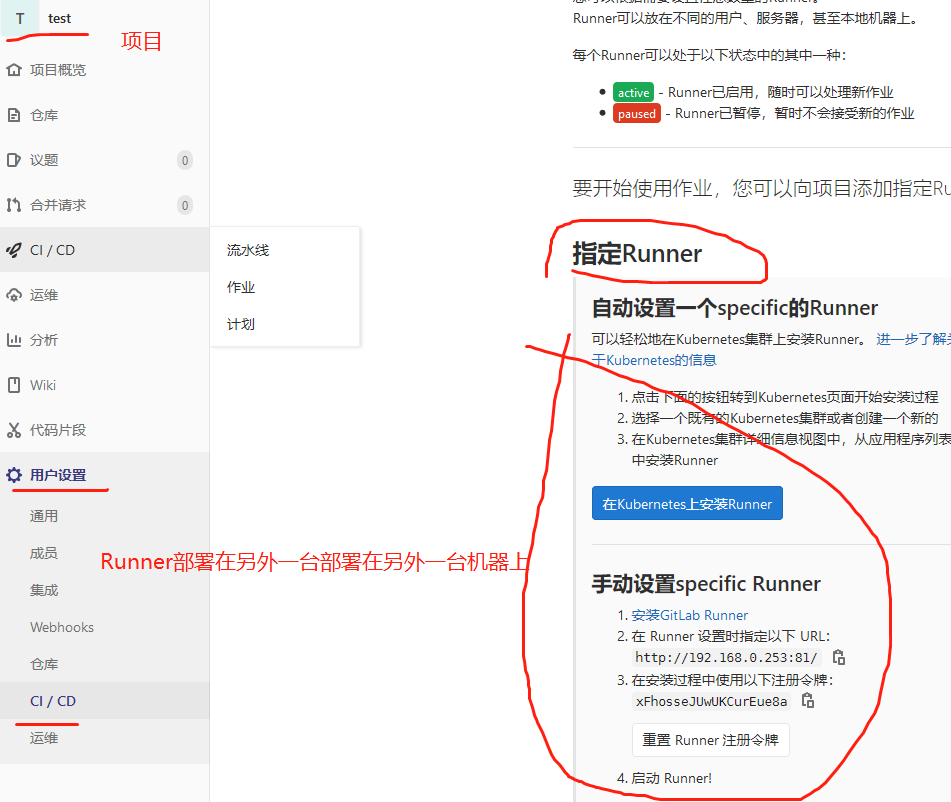
2.部署Runner
这里采用docker安装的方式,也可以采用其他方式安装
# 创建docker镜像使用的数据卷

{20-07-16 16:28}InternalServer:~ root# docker volume create gitlab-runner-config

gitlab-runner-config

# 拉取并运行docker镜像,运行容器并开始注册

{20-07-16 16:29}InternalServer:~ root# docker run -d -it -v gitlab-runner-config:/etc/gitlab-runner gitlab/gitlab-runner:latest register

Runtime platform                                    arch=amd64 os=linux pid=7 revision=6fbc7474 version=13.1.1

Running in system-mode.

Please enter the gitlab-ci coordinator URL (e.g. https://gitlab.com/): # 输入gitlab地址,上面图片中有

http://192.168.0.253:81/

Please enter the gitlab-ci token for this runner: # 输入gitlab上的token,上面图片中有

q86sGA5ekFseiyCNC2Ny

Please enter the gitlab-ci description for this runner: # 输入一段介绍

[f52d5d7d0252]: 192.168.0.253-gitlab

Please enter the gitlab-ci tags for this runner (comma separated): # 标签

tag

Registering runner... succeeded                     runner=q86sGA5e

Please enter the executor: custom, docker-ssh, shell, ssh, kubernetes, docker, parallels, virtualbox, docker+machine, docker-ssh+machine: # 输入命令执行方式

shell

Runner registered successfully. Feel free to start it, but if it's running already the config should be automatically reloaded!
效果

Runner地址
官方安装地址:https://docs.gitlab.com/runner/install/
官方注册地址:https://docs.gitlab.com/runner/register/
Gitlab注册Runner的更多相关文章
- gitlab 注册runner
个人pc注册runner 注册gitlab-runner ```textPlease enter the gitlab-ci coordinator URL (e.g. https://gitlab. ...
- 利用docker compose启动gitlab及runner
添加docker compose配置文件 新建文件docker-compose.yml,输入如下内容: gitlab: image: 'gitlab/gitlab-ce:latest' contain ...
- 持续集成Gitlab CICD Runner&Jenkins
目录 使用Gitlab Runner实现 再要部署的服务器上安装 gitlab runner 下载可执行文件 设置可执行权限权限 创建用户 运行服务 注册 Runner 到gitlab上找到需要用的U ...
- K8s 部署 Gitlab CI Runner
K8s 版本:1.20.6 GitLab CI 最大的作用是管理各个项目的构建状态.因此,运行构建任务这种浪费资源的事情交给一个独立的 Gitlab Runner 来做就会好很多,而且 Gitlab ...
- 在 Kubernetes 上安装 Gitlab CI Runner Gitlab CI 基本概念以及 Runner 的安装
简介 从 Gitlab 8.0 开始,Gitlab CI 就已经集成在 Gitlab 中,我们只要在项目中添加一个.gitlab-ci.yml文件,然后添加一个Runner,即可进行持续集成.在介绍 ...
- 3.在 Kubernetes 上安装 Gitlab CI Runner
结合文章:1. 在 Kubernetes 上安装 Gitlab ,地址:https://www.cnblogs.com/sanduzxcvbnm/p/13852854.html 总结: 结合开头的文章 ...
- Docker搭建自己的Gitlab CI Runner
转载自:https://cloud.tencent.com/developer/article/1010595 1.Gitlab CI介绍 CI:持续集成,我们通常使用CI来做一些自动化工作,比如程序 ...
- GitLab CI runner can't connect to tcp://localhost:2375 in kubernetes
报错的.gitlab-ci.yml配置如下 image: docker:latest services: - docker:dind variables: DOCKER_HOST: tcp://loc ...
- Docker安装GitLab与Runner(网关),常规设置,自动化用到k8s+token
[转]图文详解k8s自动化持续集成之GitLab CI/CD Windows里面使用Debian命令行工具完成 和Docker网络相关的命令 查看某一个容器的网络 docker inspect 容器I ...
随机推荐
- Java对接拼多多开放平台API(加密上云等全流程)
前言 本文为[小小赫下士 blog]原创,搬运请保留本段,或请在醒目位置设置原文地址和原作者. 作者:小小赫下士 原文地址:Java对接拼多多开放平台API(加密上云等全流程) 本文章为企业ERP(I ...
- LNMP架构及DISCUZ论坛部署
1)(5分)服务器IP地址规划:client:12.0.0.12/24,网关服务器:ens36:12.0.0.1/24.ens33:172.16.10.1/24,Web1:172.16.10.10/2 ...
- $\mathcal{A\,F\,O}$
突然间,告诉我不用学计算机了 真的有点像是做梦 回忆自己的OI生涯 真的不知从何说起 小学的时候 被家长哄着报名了当时很热门的 logo语言 在炎热的夏天,电脑里小海龟的步伐从未停歇 那时的自己很骄傲 ...
- selenium环境配置和八大元素定位
一.环境配置 1.selenium下载安装 安装一:pip install selenium(多数会超时安装失败) 安装二:pip install -i https://pypi.tuna.tsing ...
- Mybatis源码解读-插件
插件允许对Mybatis的四大对象(Executor.ParameterHandler.ResultSetHandler.StatementHandler)进行拦截 问题 Mybatis插件的注册顺序 ...
- rust实现http时如何读取一个完整的request
用stream.read_to_end是不行的,tcpstream不是文件没有明确的结束符 需要先读取http header节,再找Content-Length header,然后读取body. 这是 ...
- Spring 03 切面编程
简介 AOP(Aspect Oriented Programming),即面向切面编程 这是对面向对象思想的一种补充. 面向切面编程,就是在程序运行时,不改变程序源码的情况下,动态的增强方法的功能. ...
- Excel 统计函数(二):COUNTIF 和 COUNTIFS
COUNTIF [语法]COUNTIF(range, criteria) [作用]range 为统计的范围,criteria 是统计的条件. [题目]统计 A1 到 A10 范围内,出现"你 ...
- redis-hash命令
一.HDEL key field [field ...] 从 key 指定的哈希集中移除指定的域.在哈希集中不存在的域将被忽略. 如果 key 指定的哈希集不存在,它将被认为是一个空的哈希集,该命令将 ...
- 【java】学习路线11-四种权限修饰的测试
package com.remoo.test;public class Learn09_Test{ private static String welcomeWord1 = "你好,p ...