
Winform 动态 画图 不闪
一、问题:解决winform动态画图闪的问题,网上搜的方法,大部分都是:
- “this.SetStyle(ControlStyles.OptimizedDoubleBuffer | ControlStyles.AllPaintingInWmPaint, true);”,甚至直接“this.DoubleBuffered = true;”。
- 先 new 个Bitmap,画在Bitmap上,然后再把Bitmap画在界面上。
凡是直接这么给人解答问题的,基本都是属于道听途说,自己没试过的。或者根本就没注意要解决的是“动态”的问题。
二、解决方法:动态画图不闪的方法如下,先上效果图(请忽略鼠标样式,是gif录制软件的效果):
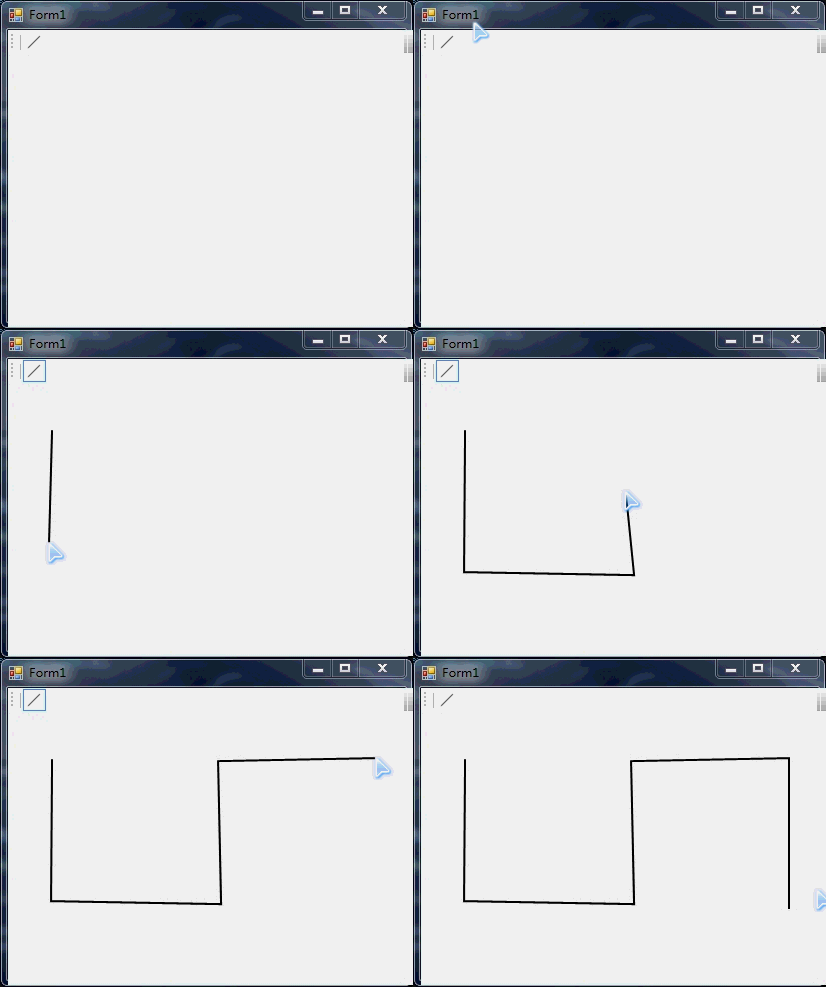
三、代码:简单封了个自定义控件,用Action传入画图方法:
 // --------------------------------------------------------------------------------------------------------------------

 // <copyright file="PictureBoxEx.cs" company="hyl">

 //   hyl

 // </copyright>

 // <summary>

 //   用Action传画图方法。不闪。

 // </summary>

 // --------------------------------------------------------------------------------------------------------------------

 namespace HYL

 {

     using System;

     using System.Drawing;

     using System.Windows.Forms;

     public partial class PictureBoxEx : PictureBox

     {

         /// <summary>

         /// 画图方法

         /// </summary>

         private Action<Graphics> draw;

         public PictureBoxEx()

         {

             this.InitializeComponent();

             // 开双缓存(用这种方法,画图不太复杂的话,甚至不开也不闪。。。)

             this.SetStyle(ControlStyles.OptimizedDoubleBuffer | ControlStyles.AllPaintingInWmPaint, true);

         }

         public void Rander(Action<Graphics> Draw)

         {

             this.Invalidate();

             this.draw = Draw;

         }

         protected override void OnPaint(PaintEventArgs pe)

         {

             base.OnPaint(pe);

             // 画图

             this.draw?.Invoke(pe.Graphics);

         }

     }

 }
重点在于要在 “OnPaint” 执行画图代码,也就是说要用 “OnPaint” 里的 “pe.Graphics” 来画。
四、调用的方式如下:
 namespace HYL

 {

     using System;

     using System.Collections.Generic;

     using System.Drawing;

     using System.Linq;

     using System.Windows.Forms;

     public partial class Form1 : Form

     {

         List<Line> lines = new List<Line>();

         private bool painting;

         public Form1()

         {

             this.InitializeComponent();

         }

         private void panel1_MouseDown(object sender, MouseEventArgs e)

         {

             if (e.Button == MouseButtons.Left)

             {

                 // 左键确定点

                 if (this.btnLine.Checked)

                 {

                     this.lines.Last().Points.Add(new LinePoint { IsTemp = false, Point = e.Location });

                     this.painting = true;

                 }

             }

             if (e.Button == MouseButtons.Right)

             {

                 // 右键停止画图

                 if (this.btnLine.Checked)

                 {

                     this.ClearEmptyLines();

                 }

                 this.painting = false;

                 this.btnLine.Checked = false;

             }

         }

         private void ClearEmptyLines()

         {

             this.lines = this.lines.Where(l => l.Points.Count > ).ToList();

             if (this.lines.Count > )

             {

                 var lastLine = this.lines.Last();

                 lastLine.ClearTempPoints();

             }

         }

         private void panel1_MouseMove(object sender, MouseEventArgs e)

         {

             if (this.painting)

             {

                 if (this.btnLine.Checked)

                 {

                     this.PaintingLine(e);

                 }

                 this.Draw();

             }

         }

         private void PaintingLine(MouseEventArgs e)

         {

             var lastLine = this.lines.Last();

             var lastPoint = lastLine.Points.Last();

             if (lastPoint.IsTemp)

             {

                 lastLine.Points.Remove(lastPoint);

             }

             LinePoint newPoint = new LinePoint { IsTemp = true, Point = e.Location };

             lastLine.Points.Add(newPoint);

         }

         /// <summary>

         /// 画图

         /// </summary>

         private void Draw()

         {

             Action<Graphics> draw = g =>

                 {

                     Pen pen = new Pen(Color.Black, );

                     g.SmoothingMode = System.Drawing.Drawing2D.SmoothingMode.HighQuality;

                     g.PixelOffsetMode = System.Drawing.Drawing2D.PixelOffsetMode.HighQuality;

                     if (this.lines != null)

                     {

                         foreach (Line line in this.lines)

                         {

                             g.DrawLines(pen, line.GetPoints().ToArray());

                         }

                     }

                 };

             this.pictureBoxEx1.Rander(draw);

         }

         private void btnLine_CheckedChanged(object sender, EventArgs e)

         {

             if (this.btnLine.Checked)

             {

                 this.lines.Add(new Line());

             }

             else

             {

                 this.ClearEmptyLines();

                 this.painting = false;

                 this.Draw();

             }

         }

     }

     public class Line : ShapeElement

     {

         public Line()

         {

             this.Points = new List<LinePoint>();

         }

         // 线里的点

         public IList<LinePoint> Points { get; set; }

         // 获取Point的集合

         public IList<Point> GetPoints()

         {

             return this.Points.Select(p => p.Point).ToList();

         }

         // 清理临时点

         public void ClearTempPoints()

         {

             this.Points = this.Points.Where(p => !p.IsTemp).ToList();

         }

     }

     public class LinePoint

     {

         public Point Point { get; set; }

         // 是否临时点

         public bool IsTemp { get; set; }

     }

 }
Winform 动态 画图 不闪的更多相关文章
- Android SurfaceView实现静态于动态画图效果
本文是基于Android的SurfaceView的动态画图效果,实现静态和动态下的正弦波画图,可作为自己做图的简单参考,废话不多说,先上图, 静态效果: 动态效果: 比较简单,代码注释的也比较详细,易 ...
- WinForm动态查询
WinForm 动态查询 1. 使用场景 在对数据进行筛选, 包含多个筛选字段时适用. 2. 接口设计 /// <summary> /// 定义可作为追加到 WHERE 子句的控件接口 / ...
- C# WinForm动态添加MSChart控件
添加mschart.dll动态链接库 添加引用 System.Windows.Forms.DataVisualization MSChart控件作为方便的用户数据展示控件,可以方便的使用控件提 ...
- c# winform动态生成控件与获取动态控件输入的值
差不多有2年没有写winform程序,一直都是写bs.最近项目需要,又开始着手写一个小功能的winform程序,需要动态获取xml文件的节点个数,生成跟节点个数一样的textbox, 最后还要获取操作 ...
- plt实现动态画图
用pycharm跑的没有出现动态线条的话: 1.点击setting,输入关键字Scien...搜索出Python Scientific, 在右侧去掉对勾(默认是勾选的),然后右下角Apply--OK, ...
- [C#]WinForm动态删除控件 Controls.Remove()
今天遇到一个奇怪的问题,在WinForm内动态添加Button后再动态的移除,发生稀奇古怪的现象,Button控件只被规律的移除,没有完全移除 foreach (Control c in this.C ...
- C#在透明窗体WinForm上面画图(电子尺小工具的实现)
前几天要做一个微信调一调的外挂,里面用到了尺子测量距离,然后就自己下载了一个电子尺,最近要升级我的跳一跳外挂,然后就准备自己做一个电子尺,嵌入到我的外挂里面,在嵌入到我的外挂之前,我自己做了一个完整版 ...
- winform 添加背景图 闪屏问题解决
winform中只要添加了背景图片资源,窗体加载显示的时候就会出现不停的闪屏操作,网上找了很多方法,效果都不明显: 然后自己观察和思路:看窗体的加载过程,当有背景图的时候,首先出来的是背景图,之后背景 ...
- 如何:在 Winform 动态启动、控制台命令行?
需求 winForm 程序输出类型为 windows 程序(不是命令行程序) 在运行时想输入一些信息编译开发调试,如何实现这一功能 解答: AllocConsole.FreeConsole ...
随机推荐
- [ZJb417]区间众数
题目大意: 给定一个长度为$n(1\leq n\leq10^5)$的正整数序列$s(1\leq s_i\leq n)$,对于$m(1\leq m\leq10^)$次询问$l,r$,每次求区间$[s_l ...
- 数值计算方法 | C语言实现几个数值计算方法(实验报告版)
目录 写在前面 实验一 牛顿插值方法的实现 实验二 龙贝格求积算法的实现 实验三 高斯列主元消去法的实现 实验四 最小二乘方法的实现 写在前面 使用教材:<数值计算方法>黄云清等编著 科学 ...
- LAMP----linux+apache+mysql+php详细安装步骤之一APACHE篇(openldap等)
LAMP----linux+apache+mysql+php详细安装步骤之一APACHE篇(openldap等) linux详细版本为RHEL5.3 [root@localhost mail]# un ...
- INNO SETUP脚本向导创建的基本脚本
脚本范例分析:先来看看一段用INNO SETUP脚本向导创建的基本脚本的[Setup]段: [Setup] AppName=Premiere 6.5 汉化补丁-----------------(程 ...
- iOS常用第三方库大全,史上最全第三方库收集
下拉刷新 EGOTableViewPullRefresh – 最早的下拉刷新控件. SVPullToRefresh – 下拉刷新控件. MJRefresh – 仅需一行代码就可以为UITableVie ...
- ElasticSearch 安装中文分词器
1.安装中文分词器IK 下载地址:https://github.com/medcl/elasticsearch-analysis-ik 在线下载安装: elasticsearch-plugin.bat ...
- ELKStack日志离线系统
通过Filebeat抽取数据到logstash中,转存到ElasticSearch中,最后通过Kibana进行展示 https://www.ibm.com/developerworks/cn/open ...
- 转:MyBatis学习总结(Mybatis总结精华文章)
http://www.cnblogs.com/xdp-gacl/tag/MyBatis%E5%AD%A6%E4%B9%A0%E6%80%BB%E7%BB%93/ 当前标签: MyBatis学习总结 ...
- 容量测试之tcpcopy引流模式
tcpcopy 给用户提供了很多命令参数来修改引流的模式和设置,详细可以查阅手册.在这里把几种常见的引流方式做个归纳小结,以tcpcopy传统架构使用命令举例. 1.分布式引流 用法:Tcpcopy可 ...
- Android 完美退出 App 方法
大家都知道 Android 的 Activity 是存着历史栈的,比如从 A -> B -> C,C 完成 finish 后回到 B,把所有的Activity 都 finish了,程序就自 ...