
ElasticSearch 全文检索— ElasticSearch 安装部署
ElasticSearch 规划-集群规划
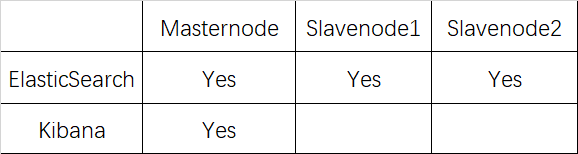
ElasticSearch 规划-集群规划
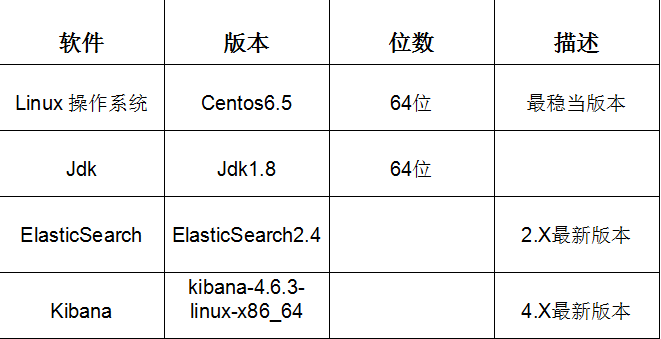
ElasticSearch 规划-用户规划

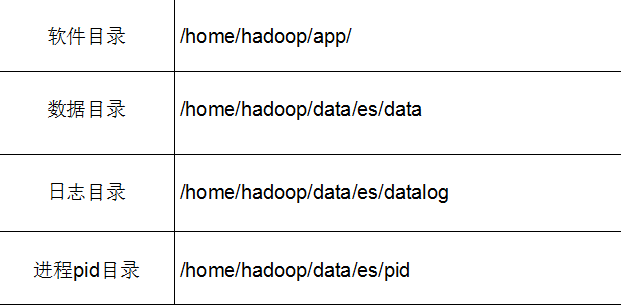
ElasticSearch 规划-目录规划
ElasticSearch 集群环境检查-时钟同步
1.设置本地时间
cp /usr/share/zoneinfo/Asia/Shanghai /etc/localtime
2.集群时间日期同步NTP
  yum install ntp

 ntpdate pool.ntp.org
ElasticSearch 集群环境检查-hosts文件检查
1.配置ElasticSearch集群ip与hostname之间的对应关系
 vi /etc/hosts

  192.168.86.135 masternode

  192.168.86.136 slavenode1

  192.168.86.137 slavenode2
2.ElasticSearch 集群环境检查-禁用防火墙
查看防火墙状态
service iptables status
关闭防火墙
chkconfig iptables off //永久关闭防火墙

service iptables stop //临时关闭防火墙
ElasticSearch 集群安装
1.下载
https://www.elastic.co/
2.上传并解压
[hadoop@masternode es]$ cd /home/hadoop/app/

[hadoop@masternode app]$ ls

hadoop  jdk1..0_60  zookeeper

[hadoop@masternode app]$ rz

[hadoop@masternode app]$ rz

[hadoop@masternode app]$ ls

elasticsearch-2.4..tar.gz  hadoop  jdk1..0_60  kibana-4.6.-linux-x86_64.tar.gz  zookeeper

[hadoop@masternode app]$ tar -xvf elasticsearch-2.4..tar.gz

[hadoop@masternode app]$ rm -rf elasticsearch-2.4..tar.gz
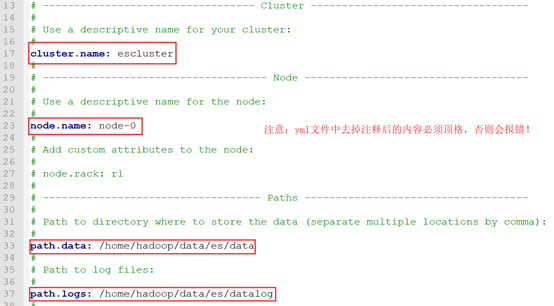
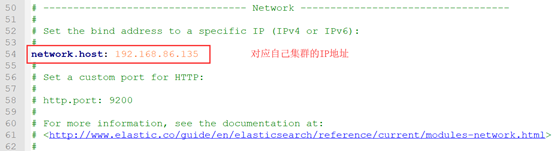
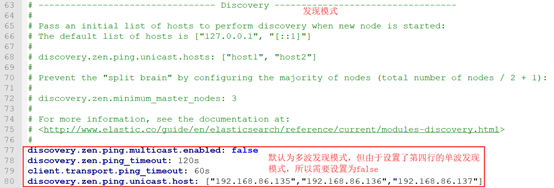
3.修改config/elasticsearch.yml配置文件
[hadoop@masternode app]$ cd elasticsearch-2.4./

[hadoop@masternode elasticsearch-2.4.]$ ls

bin  config  lib  LICENSE.txt  modules  NOTICE.txt  README.textile

[hadoop@masternode elasticsearch-2.4.]$ cd config/

[hadoop@masternode config]$ ls

elasticsearch.yml  logging.yml

[hadoop@masternode config]$ vim elasticsearch.yml
4.路径创建
[hadoop@masternode data]$ mkdir es/

[hadoop@masternode data]$ cd es

[hadoop@masternode es]$ mkdir data

[hadoop@masternode es]$ mkdir datalog

[hadoop@masternode es]$ mkdir pid

[hadoop@masternode es]$ ls

data  datalog  pid

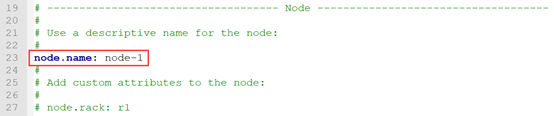
5.分发到其他节点并修改以下配置
[hadoop@masternode app]$ scp -r elasticsearch-2.4./ slavenode1:/home/hadoop/app/

[hadoop@masternode app]$ scp -r elasticsearch-2.4./ slavenode2:/home/hadoop/app/
Slavenode1:
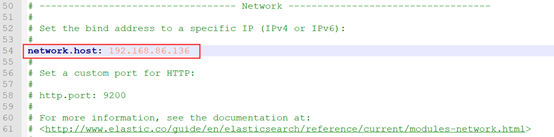
Slavenode2:
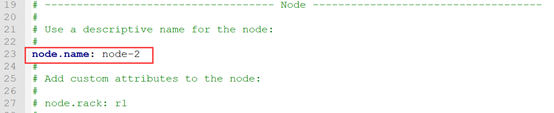
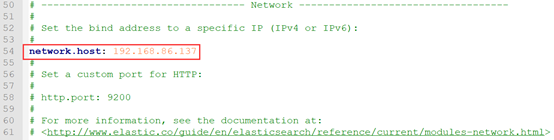
其它配置不变。
ElasticSearch 插件安装
1.安装marvel插件(所有节点都需要安装)
[hadoop@masternode app]$ cd elasticsearch-2.4.

[hadoop@masternode elasticsearch-2.4.]$ su

Password:

[root@masternode elasticsearch-2.4.]# bin/plugin install license

-> Installing license...

Plugins directory [/home/hadoop/app/elasticsearch-2.4./plugins] does not exist. Creating...

Trying https://download.elastic.co/elasticsearch/release/org/elasticsearch/plugin/license/2.4.0/license-2.4.0.zip ...

Downloading .......DONE

Verifying https://download.elastic.co/elasticsearch/release/org/elasticsearch/plugin/license/2.4.0/license-2.4.0.zip checksums if available ...

Downloading .DONE

Installed license into /home/hadoop/app/elasticsearch-2.4./plugins/license

[root@masternode elasticsearch-2.4.]# bin/plugin install marvel-agent

-> Installing marvel-agent...

Trying https://download.elastic.co/elasticsearch/release/org/elasticsearch/plugin/marvel-agent/2.4.0/marvel-agent-2.4.0.zip ...

Downloading ..........DONE

Verifying https://download.elastic.co/elasticsearch/release/org/elasticsearch/plugin/marvel-agent/2.4.0/marvel-agent-2.4.0.zip checksums if available ...

Downloading .DONE

@@@@@@@@@@@@@@@@@@@@@@@@@@@@@@@@@@@@@@@@@@@@@@@@@@@@@@@@@@@

@     WARNING: plugin requires additional permissions     @

@@@@@@@@@@@@@@@@@@@@@@@@@@@@@@@@@@@@@@@@@@@@@@@@@@@@@@@@@@@

* java.lang.RuntimePermission setFactory

* javax.net.ssl.SSLPermission setHostnameVerifier

See http://docs.oracle.com/javase/8/docs/technotes/guides/security/permissions.html

for descriptions of what these permissions allow and the associated risks.

Continue with installation? [y/N]y

Installed marvel-agent into /home/hadoop/app/elasticsearch-2.4./plugins/marvel-agent
2.安装head插件(选择一个节点安装即可)
[root@masternode elasticsearch-2.4.]# bin/plugin install mobz/elasticsearch-head

-> Installing mobz/elasticsearch-head...

Trying https://github.com/mobz/elasticsearch-head/archive/master.zip ...

Downloading ...................................................................................................................................................................................................................................................................................................................................................................................................................................................................................................................................................................................................................................................................................................DONE

Verifying https://github.com/mobz/elasticsearch-head/archive/master.zip checksums if available ...

NOTE: Unable to verify checksum for downloaded plugin (unable to find .sha1 or .md5 file to verify)

Installed head into /home/hadoop/app/elasticsearch-2.4./plugins/head

[root@masternode elasticsearch-2.4.]# ls

bin  config  lib  LICENSE.txt  modules  NOTICE.txt  plugins  README.textile

[root@masternode elasticsearch-2.4.]# cd plugins/

[root@masternode plugins]# ls

head  license  marvel-agent
Kibana 安装
1.下载
https://www.elastic.co/
2.解压
[root@masternode plugins]# cd ..

[root@masternode elasticsearch-2.4.]# cd ..

[root@masternode app]# tar –xvf kibana-4.6.-linux-x86_64.tar.gz

[root@masternode app]# rm -rf kibana-4.6.-linux-x86_64.tar.gz

[root@masternode app]# ls

elasticsearch-2.4.  hadoop  jdk1..0_60  kibana-4.6.-linux-x86_64  zookeeper
3.修改kibana.yml配置文件
[root@masternode app]# cd kibana-4.6.-linux-x86_64/

[root@masternode kibana-4.6.-linux-x86_64]# ls

bin  config  data  installedPlugins  LICENSE.txt  node  node_modules  optimize  package.json  README.txt  src  webpackShims

[root@masternode kibana-4.6.-linux-x86_64]# cd config/

[root@masternode config]# ls

kibana.yml

[root@masternode config]# vim kibana.yml

4.安装marvel插件
[root@masternode config]# cd ..

[root@masternode kibana-4.6.-linux-x86_64]# bin/kibana plugin --install elasticsearch/marvel/latest

Installing marvel

Attempting to transfer from https://download.elastic.co/elasticsearch/marvel/marvel-latest.tar.gz

Transferring  bytes....................

Transfer complete

Extracting plugin archive

Extraction complete

Optimizing and caching browser bundles...

Plugin installation complete

[root@masternode kibana-4.6.-linux-x86_64]# ls

bin  config  data  installedPlugins  LICENSE.txt  node  node_modules  optimize  package.json  README.txt  src  webpackShims

[root@masternode kibana-4.6.-linux-x86_64]# cd installedPlugins/

[root@masternode installedPlugins]# ls

Marvel
ElasticSearch、Kibana 启动
前台启动
1.启动ElasticSearch
[root@masternode kibana-4.6.-linux-x86_64]# su Hadoop

[hadoop@masternode elasticsearch-2.4.]$ bin/elasticsearch         //在三个节点执行相同的操作

[-- ::,][WARN ][bootstrap                ] unable to install syscall filter: seccomp unavailable: requires kernel 3.5+ with CONFIG_SECCOMP and CONFIG_SECCOMP_FILTER compiled in

[-- ::,][INFO ][node                     ] [node-] version[2.4.], pid[], build[ce9f0c7/--29T09::17Z]

[-- ::,][INFO ][node                     ] [node-] initializing ...

[-- ::,][INFO ][plugins                  ] [node-] modules [reindex, lang-expression, lang-groovy], plugins [head, license, marvel-agent], sites [head]

[-- ::,][INFO ][env                      ] [node-] using [] data paths, mounts [[/home (/dev/sda2)]], net usable_space [.7gb], net total_space [.8gb], spins? [possibly], types [ext4]

[-- ::,][INFO ][env                      ] [node-] heap size [.6mb], compressed ordinary object pointers [true]

[-- ::,][WARN ][env                      ] [node-] max file descriptors [] for elasticsearch process likely too low, consider increasing to at least []

[-- ::,][INFO ][node                     ] [node-] initialized

[-- ::,][INFO ][node                     ] [node-] starting ...

[-- ::,][INFO ][transport                ] [node-] publish_address {192.168.86.135:}, bound_addresses {192.168.86.135:}

[-- ::,][INFO ][discovery                ] [node-] escluster/pT7mHJglTw6euS87IbvMGg

[-- ::,][INFO ][marvel.agent.exporter    ] [node-] skipping exporter [default_local] as it isn't ready yet

[-- ::,][INFO ][marvel.agent.exporter    ] [node-] skipping exporter [default_local] as it isn't ready yet

[-- ::,][INFO ][marvel.agent.exporter    ] [node-] skipping exporter [default_local] as it isn't ready yet

[-- ::,][WARN ][discovery                ] [node-] waited for 30s and no initial state was set by the discovery

[-- ::,][INFO ][http                     ] [node-] publish_address {192.168.86.135:}, bound_addresses {192.168.86.135:}

[-- ::,][INFO ][node                     ] [node-] started
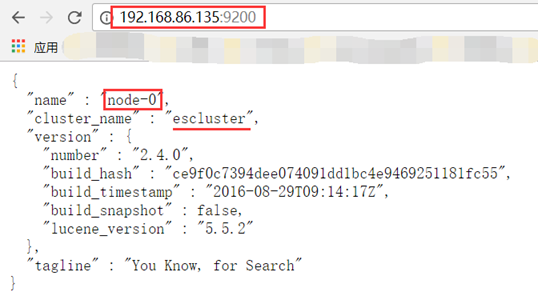
启动之后打开网页可以查看其状态:
2.启动kibana
[hadoop@masternode kibana-4.6.-linux-x86_64]$ bin/kibana

  log   [::07.744] [info][status][plugin:kibana@1.0.] Status changed from uninitialized to green - Ready

  log   [::07.792] [info][status][plugin:elasticsearch@1.0.] Status changed from uninitialized to yellow - Waiting for Elasticsearch

  log   [::07.816] [info][status][plugin:marvel@2.4.] Status changed from uninitialized to yellow - Waiting for Elasticsearch

  log   [::07.856] [info][status][plugin:kbn_vislib_vis_types@1.0.] Status changed from uninitialized to green - Ready

  log   [::09.699] [info][status][plugin:markdown_vis@1.0.] Status changed from uninitialized to green - Ready

  log   [::09.713] [info][status][plugin:metric_vis@1.0.] Status changed from uninitialized to green - Ready

  log   [::09.719] [info][status][plugin:spyModes@1.0.] Status changed from uninitialized to green - Ready

  log   [::09.723] [info][status][plugin:statusPage@1.0.] Status changed from uninitialized to green - Ready

  log   [::09.727] [info][status][plugin:table_vis@1.0.] Status changed from uninitialized to green - Ready

  log   [::09.736] [info][listening] Server running at http://0.0.0.0:5601

  log   [::14.719] [info][status][plugin:elasticsearch@1.0.] Status changed from yellow to yellow - No existing Kibana index found

  log   [::17.640] [info][status][plugin:marvel@2.4.] Status changed from yellow to green - Marvel ready

  log   [::17.644] [info][status][plugin:elasticsearch@1.0.] Status changed from yellow to green - Kibana index ready

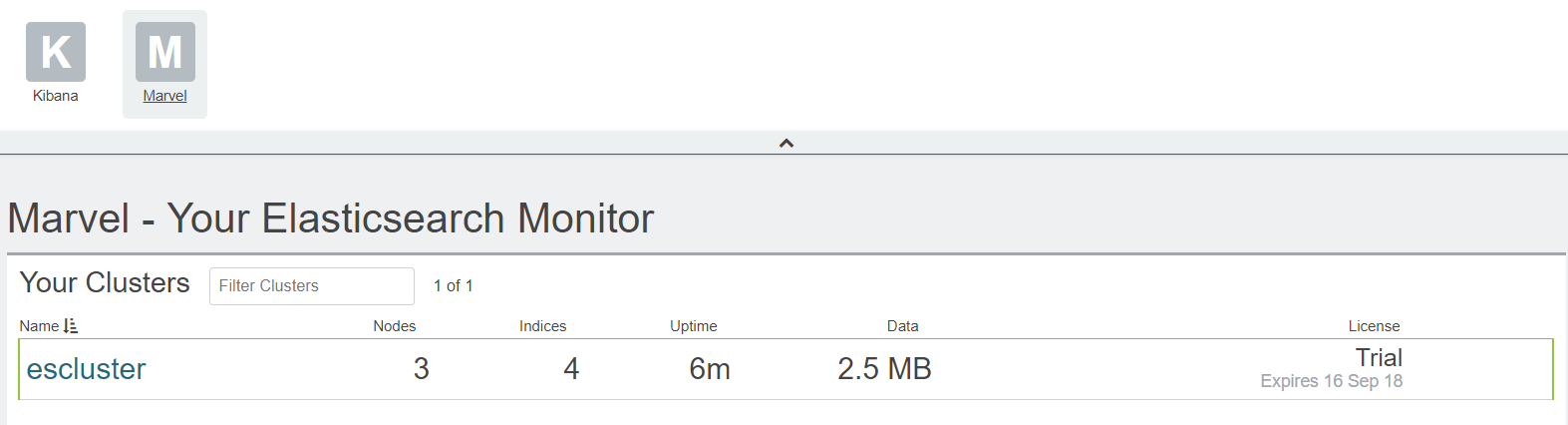
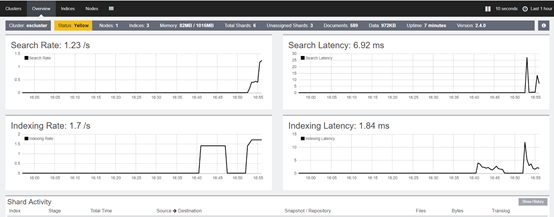

后台启动
bin/elasticsearch  -d  -p /home/hadoop/data/es/pid    //三个节点都执行

nohup /home/ybxiang/kibana/kibana-4.5.-linux-x64/bin/kibana & exit     //主节点执行
以上就是博主为大家介绍的这一板块的主要内容,这都是博主自己的学习过程,希望能给大家带来一定的指导作用,有用的还望大家点个支持,如果对你没用也望包涵,有错误烦请指出。如有期待可关注博主以第一时间获取更新哦,谢谢!
ElasticSearch 全文检索— ElasticSearch 安装部署的更多相关文章
- elasticsearch+kibana+metricbeat安装部署方法
elasticsearch+kibana+metricbeat安装部署方法 本文是elasticsearch + kibana + metricbeat,没有涉及到logstash部分.通过beat收 ...
- Elasticsearch介绍及安装部署
本节内容: Elasticsearch介绍 Elasticsearch集群安装部署 Elasticsearch优化 安装插件:中文分词器ik 一.Elasticsearch介绍 Elasticsear ...
- elasticsearch kibana的安装部署与简单使用(一)
1.先说说es 我早两年使用过es5.x的版本,记得当时部署还是很麻烦,因为es是java写的,要先在机器上部署java环境jvm之类的一堆东西,然后才能安装es 但是现在我使用的是目前最新的7.6版 ...
- ElasticSearch 全文检索— ElasticSearch概述
ElasticSearch 产生背景 1.海量数据组合条件查询 2.毫秒级或者秒级返回数据 Lucene 定义 lucene是一个开放源代码的全文检索引擎工具包,但它不是一个完整的全文检索引擎,而是一 ...
- elasticsearch kibana的安装部署与简单使用(二)
介绍一下elasticsearch和kibana的简单使用 es其实我理解为一个数据库,一个数据库无非就是增删改查, Delete PUT GET POST 这些接口关键字完美对应 比如,我想查一张 ...
- ElasticSearch 全文检索— ElasticSearch 核心概念
ElasticSearch核心概念-Cluster 1)代表一个集群,集群中有多个节点,其中有一个为主节点,这个主节点是可以通过选举产生的,主从节点是对于集群内部来说的.es的一个概念就是去中心化,字 ...
- ElasticSearch 全文检索— ElasticSearch 基本操作
REST 简介-定义 REST (REpresentation State Transfer)描述了一个架构样式的网络系统,比如 web 应用程序.它首次出现在 2000 年 Roy Fielding ...
- ELK日志监控平台安装部署简介--Elasticsearch安装部署
最近由于工作需要,需要搭建一个ELK日志监控平台,本次采用Filebeat(采集数据)+Elasticsearch(建立索引)+Kibana(展示)架构,实现日志搜索展示功能. 一.安装环境描述: 1 ...
- Elasticsearch学习之ElasticSearch 5.0.0 安装部署常见错误或问题
ElasticSearch 5.0.0 安装部署常见错误或问题 问题一: [--06T16::,][WARN ][o.e.b.JNANatives ] unable to install syscal ...
随机推荐
- poj 1658 Eva's Problem(水题)
一.Description Eva的家庭作业里有很多数列填空练习.填空练习的要求是:已知数列的前四项,填出第五项.因为已经知道这些数列只可能是等差或等比数列,她决定写一个程序来完成这些练习. Inpu ...
- jQuery做出手风琴效果
今天学到JQuery中的遍历-siblings,便手痒做了个手风琴的动态效果,有一点收获,分享给大家.mouseout的时候一定要记得opacity必须设置,不然li的opacity会保持mousem ...
- Python:str.ljust()、str.rjust()、str.center()函数
str.ljust().str.rjust().str.center()函数 功能:调整字符串站位宽度,并确定字符串对齐方式: #可以用其它字符填充字符: #字符串长度 = 字符串个数(包含空格.标点 ...
- 杂项:grunt-tmod
ylbtech-杂项:grunt-tmod 前端模板预编译工具 tmodjs 的grunt自动化插件. 1.返回顶部 1. grunt-tmod 前端模板预编译工具 tmodjs 的grunt自动化插 ...
- FATFS 文件系统
转载请注明出处:http://blog.csdn.net/qq_26093511/article/details/51706228 1.文件系统是什么? 负责管理和存储文件信息的软件机构称为文件管理系 ...
- ASP.NET MVC 3:缓存功能的设计问题
今天这一篇文章我来谈一谈在MVC 3项目中的缓存功能,以及针对缓存的一些设计上的考量,给大家参考参考. 为什么需要讨论缓存?缓存是一个中大型系统所必须考虑的问题.为了避免每次请求都去访问后台的资源(例 ...
- .net 缓存之应用程序数据缓存
CaCheHelp类中代码如下: #region 根据键从缓存中读取保持的数据 /// <summary> /// 根据键从缓存中读取保持的数据 /// </summary> ...
- assert.strictEqual()
assert.strictEqual(actual, expected[, message]) 使用全等运算符(===)测试 actual 参数与 expected 参数是否全等. // 格式 ass ...
- TCP三次握手四次挥手原理
转自http://www.cnblogs.com/liuxiaoming/archive/2013/04/27/3047803.html TCP协议三次握手原理: 首先,给张图片,建立TCP三次握手的 ...
- hdu1058
#include<iostream> #include<string> using namespace std; int const N = 4; int map[N] = { ...