
Linux更改文件权限(一)
更改文件权限(一)
==============================
(参考于千锋教育教学笔记)
设置权限
1.更改文件的属主、属组
chown (change owner)
[root@aminglinux ~]# ll 1.txt
-rw-r--r-- 1 root root 0 6月 24 21:17 1.txt
[root@aminglinux ~]# chown alice.jerry 1.txt //改属主、属组
[root@aminglinux ~]# ll 1.txt
-rw-r--r-- 1 alice jerry 0 6月 24 21:17 1.txt
[root@aminglinux ~]# ll 2.txt
-rw-r--r-- 1 root root 0 6月 24 21:22 2.txt
[root@aminglinux ~]# chown alice 2.txt //只改属主
[root@aminglinux ~]# ll 2.txt
-rw-r--r-- 1 alice root 0 6月 24 21:22 2.txt
[root@aminglinux ~]# ll 3.txt
-rw-r--r-- 1 root root 0 6月 24 21:22 3.txt
[root@aminglinux ~]# chown .hr 3.txt //只改属组
[root@aminglinux ~]# ll 3.txt
-rw-r--r-- 1 root hr 0 6月 24 21:22 3.txt
[root@aminglinux ~]# ll -d dir1
drwxr-xr-x 3 root root 18 6月 24 21:18 dir1
[root@aminglinux ~]# ll dir1
总用量 0
drwxr-xr-x 3 root root 18 6月 24 21:18 dir2
[root@aminglinux ~]# chown -R alice.hr dir1 //级联目录下的文件和目录
[root@aminglinux ~]# ll -d dir1
drwxr-xr-x 3 alice hr 18 6月 24 21:18 dir1
[root@aminglinux ~]# ll dir1
总用量 0
drwxr-xr-x 3 alice hr 18 6月 24 21:18 dir2
2,chgrp (change group)
[root@aminglinux ~]# ll 5.txt
-rw-r--r-- 1 root root 0 6月 24 21:49 5.txt
[root@aminglinux ~]# chgrp hr 5.txt //改文件属组
[root@aminglinux ~]# ll 5.txt
-rw-r--r-- 1 root hr 0 6月 24 21:49 5.txt
[root@aminglinux ~]# ll -d dir2
drwxr-xr-x 3 root root 18 6月 24 21:52 dir2
[root@aminglinux ~]# ll dir2
总用量 0
drwxr-xr-x 2 root root 6 6月 24 21:52 dir3
[root@aminglinux ~]# chgrp -R hr dir2 //改文件属组
[root@aminglinux ~]# ll -d dir2
drwxr-xr-x 3 root hr 18 6月 24 21:52 dir2
[root@aminglinux ~]# ll dir2
总用量 0
drwxr-xr-x 2 root hr 6 6月 24 21:52 dir3
3,chmod (change mode)
a.使用符号
对象 赋值符 权限类型
u + r
g - w
o = x
a
[root@aminglinux ~]# ll 1.txt
-rw-r--r-- 1 alice jerry 0 6月 24 21:17 1.txt
[root@aminglinux ~]# chmod u+x 1.txt //属主增加执行
[root@aminglinux ~]# ll 1.txt
-rwxr--r-- 1 alice jerry 0 6月 24 21:17 1.txt
[root@aminglinux ~]# ll 2.txt
-rw-r--r-- 1 alice root 0 6月 24 21:22 2.txt
[root@aminglinux ~]# chmod a=- 2.txt //所有人没有权限
[root@aminglinux ~]# ll 2.txt
---------- 1 alice root 0 6月 24 21:22 2.txt
[root@aminglinux ~]# chmod ug=rw,o=r 2.txt //属主属组等于读写,其他人等于读
[root@aminglinux ~]# ll 2.txt
-rw-rw-r-- 1 alice root 0 6月 24 21:22 2.txt
b,使用数字
r w x
4 2 1
示例:
[root@aminglinux ~]# ll -d dir1
d rwx r-x r-x 3 alice hr 18 6月 24 21:18 dir1
4+2=1 4+1 4+1
7 5 5
[root@aminglinux ~]# ll 3.txt
-rw-r--r-- 1 root hr 0 6月 24 21:22 3.txt
[root@aminglinux ~]# chmod 700 3.txt
[root@aminglinux ~]# ll 3.txt
-rwx------ 1 root hr 0 6月 24 21:22 3.txt
[root@aminglinux ~]# chmod 765 3.txt[
root@aminglinux ~]# ll 3.txt
-rwxrw-r-x 1 root hr 0 6月 24 21:22 3.txt
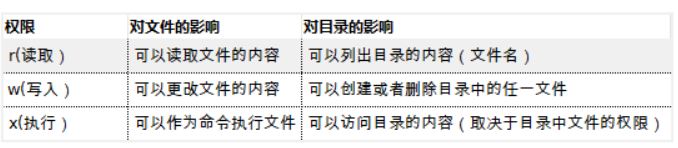
rwx对文件的影响
[root@aminglinux ~]# touch /home/1.txt
[root@aminglinux ~]# chmod 647 /home/1.txt
[root@aminglinux ~]# vim /home/1.txt
[root@aminglinux ~]# su - alice
上一次登录:日 6月 24 22:29:33 CST 2018pts/0 上
[alice@aminglinux ~]$ cat /home/1.txt //测试读
date
[alice@aminglinux ~]$ /home/1.txt //测试执行
2018年 06月 24日 星期日 22:32:16 CST
[alice@aminglinux ~]$ vim /home/1.txt //测试写
[alice@aminglinux ~]$ cat /home/1.txt
date
ls
rwx对目录的影响
1,目录中没有w,文件中有rwx
[root@aminglinux ~]# mkdir /home/dir1
[root@aminglinux ~]# touch /home/dir1/1.txt
[root@aminglinux ~]# chmod 777 /home/dir1/1.txt
[root@aminglinux ~]# ll -d /home/dir1
drwxr-xr-x 2 root root 19 6月 24 22:37 /home/dir1
[root@aminglinux ~]# ll /home/dir1
总用量 0
-rwxrwxrwx 1 root root 0 6月 24 22:37 1.txt
[alice@aminglinux ~]$ cat /home/dir1/1.txt
[alice@aminglinux ~]$ rm -rf /home/dir1/1.txt
rm: 无法删除"/home/dir1/1.txt": 权限不够
2,对目录有w,文件没有任何权限
[root@aminglinux ~]# chmod 777 /home/dir1
[root@aminglinux ~]# chmod 000 /home/dir1/1.txt
[root@aminglinux ~]# ll -d /home/dir1
drwxrwxrwx 2 root root 19 6月 24 22:37 /home/dir1
[root@aminglinux ~]# ll /home/dir1
总用量 0
---------- 1 root root 0 6月 24 22:37 1.txt
[alice@aminglinux ~]$ cat /home/dir1/1.txt
cat: /home/dir1/1.txt: 权限不够
[alice@aminglinux ~]$ rm -rf /home/dir1/1.txt
[alice@aminglinux ~]$ ls /home/dir1/
[alice@aminglinux ~]$ touch /home/dir1/2.txt
[alice@aminglinux ~]$ ls /home/dir1/
2.txt
小结:对目录有w权限,可以在目录中创建新文件,也可以删除目录中的文件
(跟目录中文件的权限无关)
注意事项:
文件 : x权限小心给予
目录:w权限小心给予
Linux更改文件权限(一)的更多相关文章
- Linux更改文件权限(二)
更改文件权限(二)============================== (参考于千锋教育教学笔记) 命令umask [root@aminglinux ~]# umask 0022 [root@ ...
- linux 更改文件权限命令 chmod
chmod -change file mode bits :更改文件权限 chmod是用来改变文件或者目录权限的命令,但只有文件的属主和超级用户(root)才有这种权限. 更改文件权限的2种方式: 一 ...
- Linux更改文件权限命令
chmod命令 1.格式:chmod [-cfvR][--help][--version]mode file 2.参数 1)必要参数 -c 当发送改变时,报告处理信息 -f 错误信息不输出 -R 处理 ...
- linux更改文件权限
chown –Rh cheat:cheat /home/cheat/task/Cheat
- [转]Linux中文件权限目录权限的意义及权限对文件目录的意义
转自:http://www.jb51.net/article/77458.htm linux中目录与文件权限的意义 一.文件权限的意义 r:可以读这个文件的具体内容: w:可以编辑这个文件的内容,包括 ...
- ubuntu批量更改文件权限
重装系统之后,把文件从windows分区拷到linux分区发现所有文件的权限全是777,在终端下看到所有文件的颜色都很刺眼,文件有很多,一个一个改不现实,所以写了一段python脚本批量更改文件权限. ...
- 第六章、Linux 的文件权限与目录配置
第六章.Linux 的文件权限与目录配置 1. 使用者与群组 2. Linux文件权限概念 2.1 Linux文件属性 2.2 如何改变文件属性与权限: chgrp, chown, chmod 2.3 ...
- linux初学者-文件权限
linux初学者-文件权限 lunix系统都是以文件的形式存在,自然而然的就会要求不同的用户拥有不同的权限,这也是系统能够运行的根本保证,下文将对文件的权限管理进行简要的介绍. 1.文件属性的查看 - ...
- 全面解析Linux数字文件权限
全面解析Linux数字文件权限 来源: 时间:2013-09-04 20:35:13 阅读数:11433 分享到:0 [导读] 在刚开始接触Linux时对于文件权限的理解并不是很透彻,这里详细 ...
随机推荐
- 10g duplicate and 11g dupliacte db for standby
###################10g Creating a Physical Standby Database OASSTBY Make sure database is in archive ...
- Unity Time.timeScale
原创网址: http://www.xuanyusong.com/archives/2956 项目里面一直在用Time.timeScale来做游戏的 1倍 2倍整体加速,今天我仔细看了一下Time.ti ...
- Spark Mllib里相似度度量(基于余弦相似度计算不同用户之间相似性)(图文详解)
不多说,直接上干货! 常见的推荐算法 1.基于关系规则的推荐 2.基于内容的推荐 3.人口统计式的推荐 4.协调过滤式的推荐 协调过滤算法,是一种基于群体用户或者物品的典型推荐算法,也是目前常用的推荐 ...
- MapReduce的输入格式
1. InputFormat接口 InputFormat接口包含了两个抽象方法:getSplits()和creatRecordReader().InputFormat决定了Hadoop如何对文件进行分 ...
- 修改response,报错Cannot call getWriter(), getOutputStream() already called
往response里面改数据,然后系统报这个错 此时直接return null即可解决 但是,要想返回相应的页面呢? 可以直接在response里设置返回的页面
- struts2 第二天
3.自动装配 零散属性:Action类中两个成员变量的名称和页面上表单元素name属性值保持一致. 规则:约定优于配置. 领域模型:两种配置 public class FirstA ...
- KendoUI 自定义验证:
Html: <label>@LogicNameAttribute.GetLogicName(typeof(Reward).GetProperty("ExtraRewardMone ...
- java 多线程之取消与关闭
要使线程安全,快速,可靠的停下来并不是一件容易的事情.java并没有提供任何机制来安全的终止线程.但是java提供了中断(interrupt)使一个线程可以终止另一个线程的当前工作 每个线程都有一个b ...
- Laravel事件监听器listener与事件订阅者Subscriber的区别
其实就一句话: Each event can have multiple listeners, but a listener can't listen to more than a single ev ...
- java网络编程—TCP(1)
演示tcp的传输的客户端和服务端的互访. 需求:客户端给服务端发送数据,服务端收到后,给客户端反馈信息. 客户端: 1,建立socket服务.指定要连接主机和端口. 2,获取socket流中的输出流. ...