
弹窗:popwindow 4部分
弹窗:popwindow
四部分
①windows.html
<!DOCTYPE html PUBLIC "-//W3C//DTD XHTML 1.0 Transitional//EN" "http://www.w3.org/TR/xhtml1/DTD/xhtml1-transitional.dtd">

<html xmlns="http://www.w3.org/1999/xhtml">

<head>

<meta http-equiv="Content-Type" content="text/html; charset=utf-8" />

<title>无标题文档</title>

<script type="text/javascript" src="jquery-1.11.2.min.js">

</script>

<script type="text/javascript" src="tanchuang.js">

</script>

<link href="tanchuang.css" rel="stylesheet" type="text/css" />

<style type="text/css">

*{

    margin: 0px auto;

}

</style>

</head>

<body style="background-color:#999">

<div style="width:200px; margin-top:10px"><input type="button" value="弹出窗口" id="btntc" style="width:100px; height:30px; font-size:18px;" /></div>

</body>

<script type="text/javascript">

$(document).ready(function(e) {

    $('#btntc').click(function(){

            var html = "<div style='color:red'>弹窗的内容</div>";

            var button ="<input type='button' value='确定' /><input type='button' value='取消' />";

            var win = new Window({

                //全部删除里面的设定 会出现默认的状态

                width : 800, //宽度

                height : 500, //高度

                title : '弹窗标题', //标题

                content : html, //内容

                isMask : true, //是否遮罩

                buttons: button, //按钮

                isDrag:true,

                });

        })

});

</script>

</html>
②tanchuang.js
// 每个弹窗的标识

var x =0;

var idzt = new Array();

var Window = function(config){

    //ID不重复

    idzt[x] = "zhuti"+x;  //弹窗ID

    //初始化,接收参数

    this.config = {

        width : config.width || 300, //宽度

        height : config.height || 200, //高度

        buttons : config.buttons || '', //默认无按钮

        title : config.title || '标题', //标题

        content : config.content || '内容', //内容

        isMask : config.isMask == false?false:config.isMask || true, //是否遮罩

        isDrag : config.isDrag == false?false:config.isDrag || true, //是否移动

        };

    //加载弹出窗口

    var w = ($(window).width()-this.config.width)/2;

    var h = ($(window).height()-this.config.height)/2;

    var nr = "<div class='zhuti' id='"+idzt[x]+"' bs='"+x+"' style='width:"+this.config.width+"px; height:"+this.config.height+"px; background-color:white; left:"+w+"px; top:"+h+"px;'></div>";

    $("body").append(nr);

    //加载弹窗标题

    var content ="<div id='title"+x+"' class='title' bs='"+x+"'>"+this.config.title+"<div id='close"+x+"' class='close' bs='"+x+"'>×</div></div>";

    //加载弹窗内容

    var nrh = this.config.height - 75;

    content = content+"<div id='content"+x+"' bs='"+x+"' class='content' style='width:100%; height:"+nrh+"px;'>"+this.config.content+"</div>";

    //加载按钮

    content = content+"<div id='btnx"+x+"' bs='"+x+"' class='btnx'>"+this.config.buttons+"</div>";

    //将标题、内容及按钮添加进窗口

    $('#'+idzt[x]).html(content);

    //创建遮罩层

    if(this.config.isMask)

    {

        var zz = "<div id='zz'></div>";

        $("body").append(zz);

        $("#zz").css('display','block');

    }

    //最大最小限制,以免移动到页面外

    var maxX = $(window).width()-this.config.width;

    var maxY = $(window).height()-this.config.height;

    var minX = 0,

        minY = 0;

    //窗口移动

    if(this.config.isDrag)

    {

        //鼠标移动弹出窗

        $(".title").bind("mousedown",function(e){

                var n = this.getAttribute("bs"); //取标识

                //使选中的到最上层

                $(".zhuti").css("z-index",3);

                $('#'+idzt[n]).css("z-index",4);

                //取初始坐标

                var endX = 0, //移动后X坐标

                    endY = 0, //移动后Y坐标

                    startX = parseInt($('#'+idzt[n]).css("left")), //弹出层的初始X坐标

                    startY = parseInt($('#'+idzt[n]).css("top")), //弹出层的初始Y坐标

                    downX = e.clientX, //鼠标按下时,鼠标的X坐标

                    downY = e.clientY; //鼠标按下时,鼠标的Y坐标

                //绑定鼠标移动事件

                $("body").bind("mousemove",function(es){

                    endX = es.clientX - downX + startX; //X坐标移动

                    endY = es.clientY - downY + startY; //Y坐标移动

                    //最大最小限制

                    if(endX > maxX)

                    {

                        endX = maxX;

                    } else if(endX < 0)

                    {

                        endX = 0;

                    }

                    if(endY > maxY)

                    {

                        endY = maxY;

                    } else if(endY < 0)

                    {

                        endY = 0;

                    }

                    $('#'+idzt[n]).css("top",endY+"px");

                    $('#'+idzt[n]).css("left",endX+"px");

                    window.getSelection ? window.getSelection().removeAllRanges():document.selection.empty(); //取消选中文本

                    });

            });

        //鼠标按键抬起,释放移动事件

        $("body").bind("mouseup",function(){

                $("body").unbind("mousemove");

            });

    }

    //关闭窗口

    $(".close").click(function(){

            var m = this.getAttribute("bs"); //找标识

            $('#'+idzt[m]).remove(); //移除弹窗

            $('#zz').remove(); //移除遮罩

        })

        x++;  //标识增加

}
③tanchuang.css
.zhuti

{

    position:absolute;

    z-index:3;

    font-size:14px;

    border-radius:5px;

    box-shadow:0 0 5px white;

    overflow:hidden;

    color:#333;

}

.title

{

    background-color:#3498db;

    vertical-align:middle;

    height:35px;

    width:100%;

    line-height:35px;

    text-indent:1em;

}

.close{

    float:right;

    width:35px;

    height:35px;

    font-weight:bold;

    line-height:35px;

    vertical-align:middle;

    color:white;

    font-size:18px;

    }

.close:hover

{

    cursor:pointer;

}

.content

{

    text-indent:1em;

    padding-top:10px;

}

.btnx

{

    height:30px;

    width:100%;

    text-indent:1em;

}

.btn

{

    height:28px;

    width:80px;

    float:left;

    margin-left:20px;

    color:#333;

}

#zz

{

    width:100%;

    height:100%;

    opacity:0.15;

    display:none;

    background-color:#ccc;

    z-index:2;

    position:absolute;

    top:0px;

    left:0px;

}
④jquery-1.11.1.min.js
显示效果:
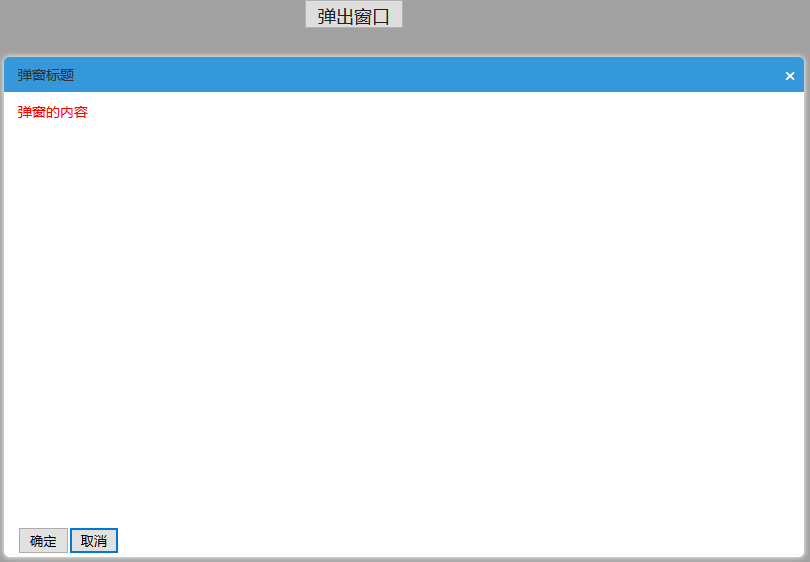
弹窗:popwindow 4部分的更多相关文章
- Dialog , ProgressDialog , PopWindow 区别
本质区别: Dialog:非阻塞对话框,弹出对话框时时,后台还可以做事情,点击背景时,对话框消失 ProgressDialog:带有圆形进度或者条形进度的对话框,一般结合handler使用.任务完成后 ...
- ajax练习习题一弹窗查看
显示页面 <!DOCTYPE html PUBLIC "-//W3C//DTD XHTML 1.0 Transitional//EN" "http://www.w3 ...
- Android进阶2之PopupWindow弹窗(有点悬浮窗的感觉)
PopupWindow是一个可以用来显示一个任意的视图的弹出窗口,他需要完全依赖layout布局. 它没什么界面,在弹出的窗口中完全显示布局中的控件. 上面两个美女头就是弹窗PopupWindow显示 ...
- android UI进阶之弹窗的使用(2)--实现通讯录的弹窗效果
相信大家都体验过android通讯录中的弹窗效果.如图所示: android中提供了QuickContactBadge来实现这一效果.这里简单演示下. 首先创建布局文件: <?xml versi ...
- 通用对话弹窗CommonDialog
代码地址如下:http://www.demodashi.com/demo/12592.html 通用对话弹窗CommonDialog Version 1.0 Created by chenchangj ...
- 自定义 popWindow弹框 工具包
前言:因为Android 没有像IOS一样的ActionSheet,虽然在github上看到有一些类似ActionSheet的库,总觉得不好用,不如自己写一个弹框通用类,样式全部自已来多好. Step ...
- 2016/4/2 json:js和jquery中轻量级数据交换格式 例: 窗口弹出 popwindow
JSON(JavaScript Object Notation) 是一种轻量级的数据交换格式.它基于ECMAScript的一个子集. JSON采用完全独立于语言的文本格式,但是也使用了类似于C语言家族 ...
- Android PopWindow的替代品BasePopup
版权声明:本文为xing_star原创文章,转载请注明出处! 本文同步自http://javaexception.com/archives/109 背景描述 最近一段时间,又看到了这个开源项目Base ...
- Android Popwindow使用总结
Android Popwindow使用总结 转 https://www.jianshu.com/p/3812ff5ef272 1.基本使用方法 View view = getLayoutInflate ...
随机推荐
- [置顶]
docker web-GUI DockerUI和Shipyard对比
DockerUI和Shipyard对比 相似 基于Docker API,提供等同Docker命令行的大部分功能,支持container管理,image管理. web页面查看和管理容器和镜像,均能批量管 ...
- QQ-weiyun(微云)-云储存
ylbtech-DatabaseDesgin:QQ-weiyun(微云)-云储存 1.A,数据库关系图(Database Diagram) -- =========================== ...
- pandas的loc, iloc, ix的操作
参考: https://blog.csdn.net/xw_classmate/article/details/51333646 1. loc——通过行标签索引行数据 2. iloc——通过行号获取行数 ...
- ISP模块之色彩增强算法--HSV空间Saturation通道调整 .
色彩增强不同于彩色图像增强,图像增强的一般处理方式为直方图均衡化等,目的是为了增强图像局部以及整体对比度.而色彩增强的目的是为了使的原有的不饱和的色彩信息变得饱和.丰富起来.对应于Photoshop里 ...
- Java6 WebService的发布
Java6 WebService的发布 WebService服务发布往往比较混乱,Axis2的发布形式与XFire发布方式差别很大,而Java6 Web服务的发布与Axis2.XFire的Web服 ...
- 机器学习第4课:多变量线性回归(Linear Regression with Multiple Variables)
4.1 多维特征 目前为止,我们探讨了单变量/特征的回归模型,现在我们对房价模型增加更多的特征, 例如房间数楼层等,构成一个含有多个变量的模型,模型中的特征为(x1,x2,...,xn).
- CvArr、Mat、CvMat、IplImage、BYTE转换
一.Mat类型:矩阵类型,Matrix. 在openCV中.Mat是一个多维的密集数据数组. 能够用来处理向量和矩阵.图像.直方图等等常见的多维数据. Mat有3个重要的方法: ...
- ES查询tags字段为空或null
现需要查询出tags为 "" 或者为 null 的数据 { "query": { "bool": { "must": { ...
- 【云计算】WAF简介、功能特性、部署方式等
之前写了一篇<WAF防御能力评测及工具>,是站在安全运维人员选型WAF产品的角度来考虑的(优先从测试角度考虑是前职业病,毕竟当过3年游戏测试?!).本篇文章从WAF产品研发的角度来YY如何 ...
- oracle sql试题
转载 数据准备 create table student( sno varchar2(10) primary key, sname varchar2(20), sage number(3), ...