
自定义 popWindow弹框 工具包
前言:因为Android 没有像IOS一样的ActionSheet,虽然在github上看到有一些类似ActionSheet的库,总觉得不好用,不如自己写一个弹框通用类,样式全部自已来多好。
Step 1
废话不多说,直接上代码。
public class CustomPopWindow implements PopupWindow.OnDismissListener{

    private static final String TAG = "CustomPopWindow";

    private static final float DEFAULT_ALPHA = 0.7f;

    private Context mContext;

    private int mWidth;

    private int mHeight;

    private boolean mIsFocusable = true;

    private boolean mIsOutside = true;

    private int mResLayoutId = -1;

    private View mContentView;

    private PopupWindow mPopupWindow;

    private int mAnimationStyle = -1;

    private boolean mClippEnable = true;//default is true

    private boolean mIgnoreCheekPress = false;

    private int mInputMode = -1;

    private PopupWindow.OnDismissListener mOnDismissListener;

    private int mSoftInputMode = -1;

    private boolean mTouchable = true;//default is ture

    private View.OnTouchListener mOnTouchListener;

    private Window mWindow;//当前Activity 的窗口

    /**

     * 弹出PopWindow 背景是否变暗,默认不会变暗。

     */

    private boolean mIsBackgroundDark = false;

    private float mBackgroundDrakValue = 0;// 背景变暗的值,0 - 1

    /**

     * 设置是否允许点击 PopupWindow之外的地方,关闭PopupWindow

     */

    private boolean enableOutsideTouchDisMiss = true;// 默认点击pop之外的地方可以关闭

    private CustomPopWindow(Context context){

        mContext = context;

    }

    public int getWidth() {

        return mWidth;

    }

    public int getHeight() {

        return mHeight;

    }

    /**

     *

     * @param anchor

     * @param xOff

     * @param yOff

     * @return

     */

    public CustomPopWindow showAsDropDown(View anchor, int xOff, int yOff){

        if(mPopupWindow!=null){

            mPopupWindow.showAsDropDown(anchor,xOff,yOff);

        }

        return this;

    }

    public CustomPopWindow showAsDropDown(View anchor){

        if(mPopupWindow!=null){

            mPopupWindow.showAsDropDown(anchor);

        }

        return this;

    }

    @RequiresApi(api = Build.VERSION_CODES.KITKAT)

    public CustomPopWindow showAsDropDown(View anchor, int xOff, int yOff, int gravity){

        if(mPopupWindow!=null){

            mPopupWindow.showAsDropDown(anchor,xOff,yOff,gravity);

        }

        return this;

    }

    /**

     * 相对于父控件的位置(通过设置Gravity.CENTER,下方Gravity.BOTTOM等 ),可以设置具体位置坐标

     * @param parent 父控件

     * @param gravity

     * @param x the popup's x location offset

     * @param y the popup's y location offset

     * @return

     */

    public CustomPopWindow showAtLocation(View parent, int gravity, int x, int y){

        if(mPopupWindow!=null){

            mPopupWindow.showAtLocation(parent,gravity,x,y);

        }

        return this;

    }

    /**

     * 添加一些属性设置

     * @param popupWindow

     */

    private void apply(PopupWindow popupWindow){

        popupWindow.setClippingEnabled(mClippEnable);

        if(mIgnoreCheekPress){

            popupWindow.setIgnoreCheekPress();

        }

        if(mInputMode!=-1){

            popupWindow.setInputMethodMode(mInputMode);

        }

        if(mSoftInputMode!=-1){

            popupWindow.setSoftInputMode(mSoftInputMode);

        }

        if(mOnDismissListener!=null){

            popupWindow.setOnDismissListener(mOnDismissListener);

        }

        if(mOnTouchListener!=null){

            popupWindow.setTouchInterceptor(mOnTouchListener);

        }

        popupWindow.setTouchable(mTouchable);

    }

    private PopupWindow build(){

        if(mContentView == null){

            mContentView = LayoutInflater.from(mContext).inflate(mResLayoutId,null);

        }

        // 2017.3.17 add

        // 获取当前Activity的window

        Activity activity = (Activity) mContentView.getContext();

        if(activity!=null && mIsBackgroundDark){

            //如果设置的值在0 - 1的范围内,则用设置的值,否则用默认值

            final  float alpha = (mBackgroundDrakValue > 0 && mBackgroundDrakValue < 1) ? mBackgroundDrakValue : DEFAULT_ALPHA;

            mWindow = activity.getWindow();

            WindowManager.LayoutParams params = mWindow.getAttributes();

            params.alpha = alpha;

            mWindow.addFlags(WindowManager.LayoutParams.FLAG_DIM_BEHIND);

            mWindow.setAttributes(params);

        }

        if(mWidth != 0 && mHeight!=0 ){

            mPopupWindow = new PopupWindow(mContentView,mWidth,mHeight);

        }else{

            mPopupWindow = new PopupWindow(mContentView, ViewGroup.LayoutParams.WRAP_CONTENT, ViewGroup.LayoutParams.WRAP_CONTENT);

        }

        if(mAnimationStyle!=-1){

            mPopupWindow.setAnimationStyle(mAnimationStyle);

        }

        apply(mPopupWindow);//设置一些属性

        if(mWidth == 0 || mHeight == 0){

            mPopupWindow.getContentView().measure(View.MeasureSpec.UNSPECIFIED, View.MeasureSpec.UNSPECIFIED);

            //如果外面没有设置宽高的情况下,计算宽高并赋值

            mWidth = mPopupWindow.getContentView().getMeasuredWidth();

            mHeight = mPopupWindow.getContentView().getMeasuredHeight();

        }

        // 添加dissmiss 监听

        mPopupWindow.setOnDismissListener(this);

        //2017.6.27 add:fix 设置  setOutsideTouchable(false)点击外部取消的bug.

        // 判断是否点击PopupWindow之外的地方关闭 popWindow

        if(!enableOutsideTouchDisMiss){

            //注意这三个属性必须同时设置,不然不能disMiss,以下三行代码在Android 4.4 上是可以,然后在Android 6.0以上,下面的三行代码就不起作用了,就得用下面的方法

            mPopupWindow.setFocusable(true);

            mPopupWindow.setOutsideTouchable(false);

            mPopupWindow.setBackgroundDrawable(null);

            //注意下面这三个是contentView 不是PopupWindow

            mPopupWindow.getContentView().setFocusable(true);

            mPopupWindow.getContentView().setFocusableInTouchMode(true);

            mPopupWindow.getContentView().setOnKeyListener(new View.OnKeyListener() {

                @Override

                public boolean onKey(View v, int keyCode, KeyEvent event) {

                    if (keyCode == KeyEvent.KEYCODE_BACK) {

                        mPopupWindow.dismiss();

                        return true;

                    }

                    return false;

                }

            });

            //在Android 6.0以上 ,只能通过拦截事件来解决

            mPopupWindow.setTouchInterceptor(new View.OnTouchListener() {

                @Override

                public boolean onTouch(View v, MotionEvent event) {

                    final int x = (int) event.getX();

                    final int y = (int) event.getY();

                    if ((event.getAction() == MotionEvent.ACTION_DOWN)

                            && ((x < 0) || (x >= mWidth) || (y < 0) || (y >= mHeight))) {

                        Log.e(TAG,"out side ");

                        Log.e(TAG,"width:"+mPopupWindow.getWidth()+"height:"+mPopupWindow.getHeight()+" x:"+x+" y  :"+y);

                        return true;

                    } else if (event.getAction() == MotionEvent.ACTION_OUTSIDE) {

                        Log.e(TAG,"out side ...");

                        return true;

                    }

                    return false;

                }

            });

        }else{

            mPopupWindow.setFocusable(mIsFocusable);

            mPopupWindow.setBackgroundDrawable(new ColorDrawable(Color.TRANSPARENT));

            mPopupWindow.setOutsideTouchable(mIsOutside);

        }

        // update

        mPopupWindow.update();

        return mPopupWindow;

    }

    @Override

    public void onDismiss() {

        dissmiss();

    }

    /**

     * 关闭popWindow

     */

    public void dissmiss(){

        if(mOnDismissListener!=null){

            mOnDismissListener.onDismiss();

        }

        //如果设置了背景变暗,那么在dissmiss的时候需要还原

        if(mWindow!=null){

            WindowManager.LayoutParams params = mWindow.getAttributes();

            params.alpha = 1.0f;

            mWindow.setAttributes(params);

        }

        if(mPopupWindow!=null && mPopupWindow.isShowing()){

            mPopupWindow.dismiss();

        }

    }

    public PopupWindow getPopupWindow() {

        return mPopupWindow;

    }

    public static class PopupWindowBuilder{

        private CustomPopWindow mCustomPopWindow;

        public PopupWindowBuilder(Context context){

            mCustomPopWindow = new CustomPopWindow(context);

        }

        public PopupWindowBuilder size(int width,int height){

            mCustomPopWindow.mWidth = width;

            mCustomPopWindow.mHeight = height;

            return this;

        }

        public PopupWindowBuilder setFocusable(boolean focusable){

            mCustomPopWindow.mIsFocusable = focusable;

            return this;

        }

        public PopupWindowBuilder setView(int resLayoutId){

            mCustomPopWindow.mResLayoutId = resLayoutId;

            mCustomPopWindow.mContentView = null;

            return this;

        }

        public PopupWindowBuilder setView(View view){

            mCustomPopWindow.mContentView = view;

            mCustomPopWindow.mResLayoutId = -1;

            return this;

        }

        public PopupWindowBuilder setOutsideTouchable(boolean outsideTouchable){

            mCustomPopWindow.mIsOutside = outsideTouchable;

            return this;

        }

        /**

         * 设置弹窗动画

         * @param animationStyle

         * @return

         */

        public PopupWindowBuilder setAnimationStyle(int animationStyle){

            mCustomPopWindow.mAnimationStyle = animationStyle;

            return this;

        }

        public PopupWindowBuilder setClippingEnable(boolean enable){

            mCustomPopWindow.mClippEnable =enable;

            return this;

        }

        public PopupWindowBuilder setIgnoreCheekPress(boolean ignoreCheekPress){

            mCustomPopWindow.mIgnoreCheekPress = ignoreCheekPress;

            return this;

        }

        public PopupWindowBuilder setInputMethodMode(int mode){

            mCustomPopWindow.mInputMode = mode;

            return this;

        }

        public PopupWindowBuilder setOnDissmissListener(PopupWindow.OnDismissListener onDissmissListener){

            mCustomPopWindow.mOnDismissListener = onDissmissListener;

            return this;

        }

        public PopupWindowBuilder setSoftInputMode(int softInputMode){

            mCustomPopWindow.mSoftInputMode = softInputMode;

            return this;

        }

        public PopupWindowBuilder setTouchable(boolean touchable){

            mCustomPopWindow.mTouchable = touchable;

            return this;

        }

        public PopupWindowBuilder setTouchIntercepter(View.OnTouchListener touchIntercepter){

            mCustomPopWindow.mOnTouchListener = touchIntercepter;

            return this;

        }

        /**

         * 设置背景变暗是否可用

         * @param isDark

         * @return

         */

        public PopupWindowBuilder enableBackgroundDark(boolean isDark){

            mCustomPopWindow.mIsBackgroundDark = isDark;

            return this;

        }

        /**

         * 设置背景变暗的值

         * @param darkValue

         * @return

         */

        public PopupWindowBuilder setBgDarkAlpha(float darkValue){

            mCustomPopWindow.mBackgroundDrakValue = darkValue;

            return this;

        }

        /**

         * 设置是否允许点击 PopupWindow之外的地方,关闭PopupWindow

         * @param disMiss

         * @return

         */

        public PopupWindowBuilder enableOutsideTouchableDissmiss(boolean disMiss){

            mCustomPopWindow.enableOutsideTouchDisMiss = disMiss;

            return this;

        }

        public CustomPopWindow create(){

            //构建PopWindow

            mCustomPopWindow.build();

            return mCustomPopWindow;

        }

    }

}
Step 2
make a example.举一个分享的例子吧。
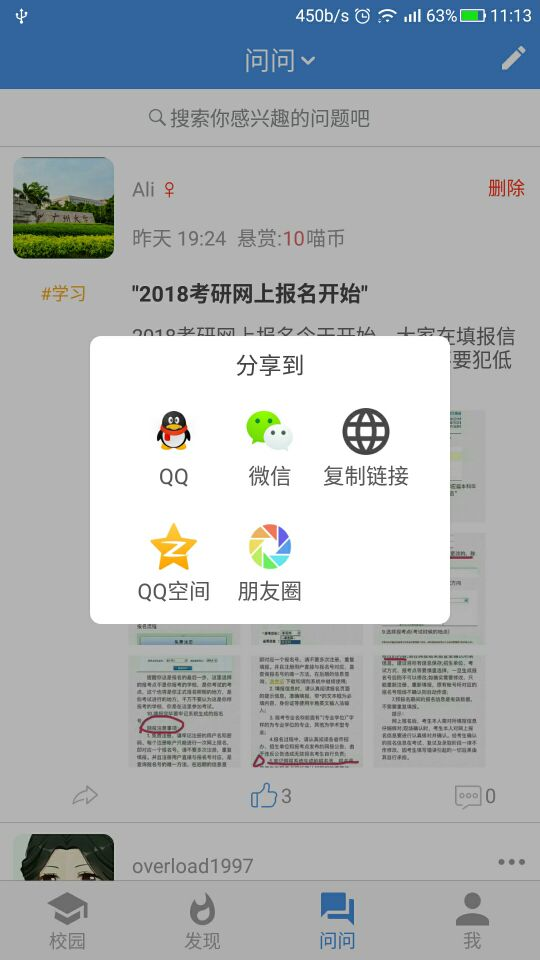
点击分享,弹出这样的一个分享框。
Step 3
怎么用呢?
1.调用的函数,展示一个分享的pop弹框,用kotlin来写。 声明一下:popWindow_share是CustomPopWindow类型的。
fun showShareDialog(title:String,content:String,link:String,id:String){

        val contentView:View=LayoutInflater.from(context).inflate(R.layout.ask_share,null)

        hanleShareDialog(contentView,title,content,link,id)//分享处理函数

        popWindow_share= CustomPopWindow.PopupWindowBuilder(context)

                .setView(contentView)

                .enableBackgroundDark(true)

                .setBgDarkAlpha(0.7f)

                .setFocusable(true)

                .setOutsideTouchable(true)

                .setAnimationStyle(R.style.ask_share_anim)

                .create()

        popWindow_share!!.showAtLocation(ask_main_right_btn,Gravity.CENTER,0,0)

    }
2.分享的布局--ask_share.xml
<?xml version="1.0" encoding="utf-8"?>

<LinearLayout xmlns:android="http://schemas.android.com/apk/res/android"

    android:layout_width="match_parent"

    android:layout_height="match_parent"

    android:orientation="vertical" >

    <LinearLayout

        android:layout_width="500pt"

        android:layout_height="400pt"

        android:background="@drawable/textview_four_round"

        android:orientation="vertical"

        >

    <TextView

        android:id="@+id/ask_choose_tv"

        android:layout_width="500pt"

        android:layout_height="80pt"

        android:text="分享到"

        android:textSize="32pt"

        android:gravity="center"

        android:textColor="@color/black"/>

        <LinearLayout

            android:id="@+id/ask_share_first_line"

            android:orientation="horizontal"

            android:layout_marginLeft="50pt"

            android:layout_marginRight="50pt"

            android:layout_width="match_parent"

            android:layout_height="160pt">

            <RelativeLayout

                android:id="@+id/ask_share_qq"

                android:layout_width="133pt"

                android:layout_height="133pt"

                android:background="@color/white"

                >

              <ImageView

                  android:id="@+id/ask_share_qq_iv"

                  android:layout_width="65pt"

                  android:layout_height="65pt"

                  android:layout_centerHorizontal="true"

                  android:layout_marginTop="20pt"

                  android:src="@mipmap/qq"

                  />

              <TextView

                  android:layout_width="wrap_content"

                  android:layout_height="wrap_content"

                  android:text="QQ"

                  android:layout_centerHorizontal="true"

                  android:layout_below="@+id/ask_share_qq_iv"

                  android:layout_marginTop="8pt"

                  android:textSize="30pt"

                  android:textColor="@color/share_words"

                  />

            </RelativeLayout>

            <RelativeLayout

                android:id="@+id/ask_share_wechat"

                android:layout_width="133pt"

                android:layout_height="133pt"

                android:background="@color/white"

                >

                <ImageView

                    android:id="@+id/ask_share_wechat_iv"

                    android:layout_width="65pt"

                    android:layout_height="65pt"

                    android:layout_centerHorizontal="true"

                    android:layout_marginTop="20pt"

                    android:src="@mipmap/wechat"

                    />

                <TextView

                    android:layout_width="wrap_content"

                    android:layout_height="wrap_content"

                    android:text="微信"

                    android:layout_centerHorizontal="true"

                    android:layout_below="@+id/ask_share_wechat_iv"

                    android:layout_marginTop="8pt"

                    android:textSize="30pt"

                    android:textColor="@color/share_words"

                    />

            </RelativeLayout>

            <RelativeLayout

                android:id="@+id/ask_share_copy"

                android:layout_width="134pt"

                android:layout_height="133pt"

                android:background="@color/white"

                >

                <ImageView

                    android:id="@+id/ask_share_copy_iv"

                    android:layout_width="65pt"

                    android:layout_height="65pt"

                    android:layout_centerHorizontal="true"

                    android:layout_marginTop="20pt"

                    android:src="@mipmap/link"

                    />

                <TextView

                    android:layout_width="wrap_content"

                    android:layout_height="wrap_content"

                    android:text="复制链接"

                    android:layout_centerHorizontal="true"

                    android:layout_below="@+id/ask_share_copy_iv"

                    android:layout_marginTop="8pt"

                    android:textSize="30pt"

                    android:textColor="@color/share_words"

                    />

            </RelativeLayout>

        </LinearLayout>

        <LinearLayout

            android:id="@+id/ask_share_second_line"

            android:layout_width="match_parent"

            android:orientation="horizontal"

            android:layout_marginLeft="50pt"

            android:layout_marginRight="50pt"

            android:layout_height="160pt">

            <RelativeLayout

                android:id="@+id/ask_share_qq_zone"

                android:layout_width="133pt"

                android:layout_height="133pt"

                android:background="@color/white"

                >

                <ImageView

                    android:id="@+id/ask_share_qq_zone_iv"

                    android:layout_width="65pt"

                    android:layout_height="65pt"

                    android:layout_centerHorizontal="true"

                    android:layout_marginTop="20pt"

                    android:src="@mipmap/qzone"

                    />

                <TextView

                    android:layout_width="wrap_content"

                    android:layout_height="wrap_content"

                    android:text="QQ空间"

                    android:layout_centerHorizontal="true"

                    android:layout_below="@+id/ask_share_qq_zone_iv"

                    android:layout_marginTop="8pt"

                    android:textSize="30pt"

                    android:textColor="@color/share_words"

                    />

            </RelativeLayout>

            <RelativeLayout

                android:id="@+id/ask_share_wechat_friends"

                android:layout_width="133pt"

                android:layout_height="133pt"

                android:background="@color/white"

                >

                <ImageView

                    android:id="@+id/ask_share_friends_iv"

                    android:layout_width="65pt"

                    android:layout_height="65pt"

                    android:layout_centerHorizontal="true"

                    android:layout_marginTop="20pt"

                    android:src="@mipmap/moments"

                    />

                <TextView

                    android:layout_width="wrap_content"

                    android:layout_height="wrap_content"

                    android:text="朋友圈"

                    android:layout_centerHorizontal="true"

                    android:layout_below="@+id/ask_share_friends_iv"

                    android:layout_marginTop="8pt"

                    android:textSize="30pt"

                    android:textColor="@color/share_words"

                    />

            </RelativeLayout>

        </LinearLayout>

    </LinearLayout>

</LinearLayout>
3.pop弹框的动画--ask_share_anim.xml
<!--问问分享弹框样式-->

    <style name="ask_share_anim" parent="android:Animation">

        <item name="android:windowEnterAnimation">@anim/pop_share_enter_anim</item>

        <item name="android:windowExitAnimation">@anim/pop_share_exit_anim</item>

    </style>
//pop_share_enter_anim.xml

<?xml version="1.0" encoding="utf-8"?>

<set xmlns:android="http://schemas.android.com/apk/res/android">

    <scale

        android:fromXScale="0.6"

        android:toXScale="1.0"

        android:fromYScale="0.6"

        android:toYScale="1.0"

        android:pivotX="50%"

        android:pivotY="50%"

        android:duration="300" />

    <alpha

        android:interpolator="@android:anim/decelerate_interpolator"

        android:fromAlpha="0.0"

        android:toAlpha="1.0"

        android:duration="300" />

</set>
//pop_share_exit_anim.xml

<?xml version="1.0" encoding="utf-8"?>

<set xmlns:android="http://schemas.android.com/apk/res/android">

    <scale

        android:fromXScale="1.0"

        android:toXScale="0.5"

        android:fromYScale="1.0"

        android:toYScale="0.5"

        android:pivotX="50%"

        android:pivotY="50%"

        android:duration="300" />

    <alpha

        android:interpolator="@android:anim/accelerate_interpolator"

        android:fromAlpha="1.0"

        android:toAlpha="0.0"

        android:duration="300" />

</set>
That's all.
If you have any qestions,please leave me messages .
自定义 popWindow弹框 工具包的更多相关文章
- JavaScript实现自定义alert弹框
aaarticlea/png;base64,iVBORw0KGgoAAAANSUhEUgAAAh0AAAFkCAYAAACEpYlzAAAfj0lEQVR4nO3dC5BddZ0n8F93pxOQCO
- CodePush自定义更新弹框及下载进度条
CodePush 热更新之自定义更新弹框及下载进度 先来几张弹框效果图 非强制更新场景 image 强制更新场景 image 更新包下载进度效果 image 核心代码 这里的热更新Modal框,是封装 ...
- 自定义alert弹框,title不显示域名
问题: 系统默认的alert弹框的title会默认显示网页域名 解决办法: (修改弹框样式) (function() { window.alert = function(name) { $(" ...
- WPF 如何自定义一个弹框
------------吾亦无他,唯手熟尔,谦卑若愚,好学若饥------------- 简述: 手工以原生Grid的方式,自定义了一个仿弹窗效果,优点可以自定义,缺点需要自己实现以及维护整个弹窗的效 ...
- 自定义alert弹框,title不显示域名(重写alert)
问题: 系统默认的alert弹框的title会默认显示网页域名 解决办法: (修改弹框样式) (function() { window.alert = function(name) { $(" ...
- swift4.2 - 一个自定义view弹框
import UIKit /* * 注册协议view:没找到 UI原图,咱不实现 */ class JYRegisterProtocolView: UIView { /// 点击同意协议的回调 pri ...
- 自定义alert弹框
/**************** UIAlertControllerStyleAlert *************************/ /*创建一个 可以自定义文字颜色和字体大小的IAler ...
- vue自定义插件-弹框
<template> <transition name="msgbox"> <div v-if="show" class=&quo ...
- vue 自定义动态弹框
<!DOCTYPE html> <html lang="en"> <head> <meta charset="UTF-8&quo ...
随机推荐
- SpringMVC08AnnotationException 注解异常
1.配置web.xml文件 <!DOCTYPE web-app PUBLIC "-//Sun Microsystems, Inc.//DTD Web Application 2.3// ...
- spring的工厂方法
http://blog.csdn.net/nvd11/article/details/51542360
- Javascript Functions
Javascript 全局对象 全局属性和函数可用于所有内建的Javascript对象 顶层函数(全局函数) decodeURI()解码某个编码的URI. decodeURIComponent()解码 ...
- 使用kvm制作Eucalyptus镜像(Windows Server 2008r2为例)
1.前言 Elastic Utility Computing Architecture for Linking Your Programs To Useful Systems (Eucalyptus) ...
- 解决“SQL Server 阻止了对组件 'Ad Hoc Distributed Queries' 的 STATEMENT 'OpenRowset/OpenDatasource' 的访问……”【转】
SQL Server 阻止了对组件 /'Ad Hoc Distributed Queries/' 的访问 在Sql Server中查询一下Excel文件的时候出现问题: SELECT * FROM ...
- LeetCode Add Binary 两个二进制数相加
class Solution { public: string addBinary(string a, string b) { if(a==""&&b==" ...
- SQLSERVER 创建ODBC 报错的解决办法 SQLState:'01000'的解决方案
错误详情如下: SQLState:'01000' SQL Server 错误:14 [Microsoft][ODBC SQL Server Driver][DBNETLIB] ConnectionOp ...
- HDU3577 线段树(区间更新)
题目链接:http://acm.hdu.edu.cn/showproblem.php?pid=3577 ,普通的线段树区间更新题目,较简单. 相当于一个区间覆盖问题,有一点要注意的就是叶子节点是一个长 ...
- pat乙级1049
浮点型乘整型和整型乘浮点型结果不同,不知为什么. double sum = 0.0; ; i < n; i++) { cin >> a[i]; sum += a[i] * (i + ...
- SEO人士一定要了解的搜索引擎惩罚原则
SEO人士一定要了解的搜索引擎惩罚原则 SEO 的人一般都知道SEO分为白帽,黑帽,甚至还有灰帽.简单说,如果你熟读过谷歌网站质量指南,就可以了解,符合搜索引擎质量规范并且符合用户体验的SEO ...