
DataGridView带图标的单元格实现
目的:

扩展 C# WinForm 自带的表格控件,使其可以自动判断数据的上下界限值,并标识溢出。
这里使用的方法是:扩展 表格的列 对象:DataGridViewColumn。
1.创建类:DataGridViewDecimalCheckCell.cs
    public class DataGridViewDecimalCheckCell : DataGridViewTextBoxCell

    {

        private bool checkMaxValue = false;

        private bool checkMinValue = false;

        private decimal maxValue = ;

        private decimal minValue = ;

        public decimal MaxValue

        {

            get { return maxValue; }

            internal set { maxValue = value; }

        }

        public decimal MinValue

        {

            get { return minValue; }

            internal set { minValue = value; }

        }

        public bool CheckMaxValue

        {

            get { return checkMaxValue; }

            internal set { checkMaxValue = value; }

        }

        public bool CheckMinValue

        {

            get { return checkMinValue; }

            internal set

            {

                checkMinValue = value;

            }

        }

        public override object Clone()

        {

            DataGridViewDecimalCheckCell c = base.Clone() as DataGridViewDecimalCheckCell;

            c.checkMaxValue = this.checkMaxValue;

            c.checkMinValue = this.checkMinValue;

            c.maxValue = this.maxValue;

            c.minValue = this.minValue;

            return c;

        }

        protected override void Paint(Graphics graphics, Rectangle clipBounds,

            Rectangle cellBounds, int rowIndex, DataGridViewElementStates cellState,

            object value, object formattedValue, string errorText,

            DataGridViewCellStyle cellStyle,

            DataGridViewAdvancedBorderStyle advancedBorderStyle,

            DataGridViewPaintParts paintParts)

        {

            // Paint the base content

            base.Paint(graphics, clipBounds, cellBounds, rowIndex, cellState,

              value, formattedValue, errorText, cellStyle,

              advancedBorderStyle, paintParts);

            // 上下界限溢出判断

            if (rowIndex <  || this.OwningRow.IsNewRow) // 行序号不为-1,且不是新记录行

                return;

            if (value == null) return;

            if (value.GetType() == typeof(DBNull)) return;

            decimal vCurValue= Convert.ToDecimal(value);

            bool overValue = false;

            Image img = null;

            if (checkMaxValue)

            {

                overValue = vCurValue > maxValue;

                img = VsTest.Properties.Resources.Undo;

            }

            if (checkMinValue && !overValue)

            {

                overValue = vCurValue < minValue;

                img = VsTest.Properties.Resources.Redo;

            }

            // 将图片绘制在 数值文本后面

            if (overValue && img != null)

            {

                var vSize = graphics.MeasureString(vCurValue.ToString(), cellStyle.Font);

                System.Drawing.Drawing2D.GraphicsContainer container = graphics.BeginContainer();

                graphics.SetClip(cellBounds);

                graphics.DrawImageUnscaled(img, new Point(cellBounds.Location.X + (int)vSize.Width, cellBounds.Location.Y));

                graphics.EndContainer(container);

            }

        }

        protected override bool SetValue(int rowIndex, object value)

        {

            if (rowIndex >= )

            {

                try

                {

                    decimal vdeci = Convert.ToDecimal(value);  // 筛选非数字

                    base.ErrorText = string.Empty;

                }

                catch (Exception ex)

                {

                    base.ErrorText = "输入错误" + ex.Message;

                    return false;

                }

            }

            return base.SetValue(rowIndex, value);

        }

    }
2.创建类:DataGridViewDecimalCheckColumn.cs
    public class  DataGridViewDecimalCheckColumn : DataGridViewColumn

    {

        private bool checkMaxValue = false;

        private bool checkMinValue = false;

        private decimal maxValue = ;

        private decimal minValue = ;

        public decimal MaxValue

        {

            get { return maxValue; }

            set

            {

                maxValue = value;

                (base.CellTemplate as DataGridViewDecimalCheckCell).MaxValue = value;

            }

        }

        public decimal MinValue

        {

            get { return minValue; }

            set

            {

                minValue = value;

                (base.CellTemplate as DataGridViewDecimalCheckCell).MinValue = value;

            }

        }

        /// <summary>

        /// 是否对值上界限进行检查,与MaxValue配合使用

        /// </summary>

        public bool CheckMaxValue

        {

            get { return checkMaxValue; }

            set

            {

                checkMaxValue = value;

                (base.CellTemplate as DataGridViewDecimalCheckCell).CheckMaxValue = value;

            }

        }

        /// <summary>

        /// 是否对值下界限进行检查,与MinValue配合使用

        /// </summary>

        public bool CheckMinValue

        {

            get { return checkMinValue; }

            set

            {

                checkMinValue = value;

                (base.CellTemplate as DataGridViewDecimalCheckCell).CheckMinValue = value;

            }

        }

        public DataGridViewDecimalCheckColumn()

            : base(new DataGridViewDecimalCheckCell())

        {

        }

        public override object Clone()

        {

            DataGridViewDecimalCheckColumn c = base.Clone() as DataGridViewDecimalCheckColumn;

            c.checkMaxValue = this.checkMaxValue;

            c.checkMinValue = this.checkMinValue;

            c.maxValue = this.maxValue;

            c.minValue = this.minValue;

            return c;

        }

    }
3.现在就可以使用了,在窗体上拖一个 dataGridView 控件,添加如下代码:
        private void TestForm_Load(object sender, EventArgs e)

        {

            InitControlsProperties(); // 初始化

            // 绑定数据

            DataTable dTabel = new DataTable();

            dTabel.Columns.Add("ID",typeof(int));

            dTabel.Columns.Add("TestValue",typeof(decimal));

            Random rnd = new Random();

            for (int i = ; i < ; i++) // 随机10个数

            {

                var vdr = dTabel.NewRow();

                vdr[] = i + ;

                vdr[] = rnd.Next();

                dTabel.Rows.Add(vdr);

            }

            this.dataGridView1.DataSource = dTabel;

        }

        private void InitControlsProperties()

        {

            var vColumnID = new DataGridViewDecimalCheckColumn();

            vColumnID.DataPropertyName = "ID";

            vColumnID.DefaultCellStyle.Alignment = DataGridViewContentAlignment.MiddleLeft;

            vColumnID.Name = "ID";

            vColumnID.HeaderText = "序号";

            vColumnID.Width = ;

            this.dataGridView1.Columns.Add(vColumnID);

            var vColumnValue = new DataGridViewDecimalCheckColumn();

            vColumnValue.DataPropertyName = "TestValue";

            vColumnValue.DefaultCellStyle.Alignment = DataGridViewContentAlignment.MiddleLeft;

            vColumnValue.Name = "TestValue";

            vColumnValue.HeaderText = "测试数据";

            vColumnValue.Width = ;

            vColumnValue.CheckMaxValue = true; // 进行最大值检查

            vColumnValue.MaxValue = ;

            vColumnValue.CheckMinValue = true; // 进行最小值检查

            vColumnValue.MinValue = ;

            this.dataGridView1.Columns.Add(vColumnValue);

            //this.dataGridView1.AllowUserToAddRows = false;

            //this.dataGridView1.AllowUserToDeleteRows = false;

            //this.dataGridView1.ReadOnly = true;

            this.dataGridView1.AutoGenerateColumns = false;

        }
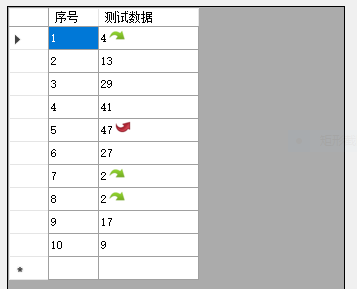
效果图:
[http://www.cnblogs.com/CUIT-DX037/]
DataGridView带图标的单元格实现的更多相关文章
- C# DataGridView中指定的单元格不能编辑
注意:DataGridView控件是从.NET Framework 2.0版本开始追加的. ReadOnly属性的使用 DataGridView内所有的单元格不能编辑 当DataGridView.Re ...
- c#DataGridView数据绑定示例——格式化单元格的内容(转)
转自http://blog.csdn.net/testcs_dn/article/details/37834063 c#DataGridView数据绑定示例 格式化单元格的内容 在使用DataGrid ...
- Easyui的datagrid的行编辑器Editor中添加事件(修改某个单元格带出其他单元格的值)
项目中有个datagrid需要编辑行时,用到Editor的属性,那么如何添加一个事件 问题:同一个编辑行中的某个单元格值改变时,修改其他单元格的值 页面用到的datagrid <table id ...
- datagridview 纵向 横向 合并单元格
datagridview 单元格合并:纵向以及横向合并参考了csdn上不知哪位的代码,具体哪位找不到连接了. 纵向合并: /// <summary> /// 纵向合并,即合并数据项的值 / ...
- DataGridView根据条件给单元格绑定图片
代码区: private void Form1_Load(object sender, EventArgs e) { myClass.mySqliteAPI conn = new myClass.my ...
- DataGridView单元格内容自动匹配下拉显示
页面显示数据使用的控件是ComponentFactory.Krypton.Toolkit中的KryptonDataGridView控件.在指定“商品”单元格中需要根据用户输入内容自动匹配数据库中商品信 ...
- DataGridView单元格显示GIF图片
本文转载:http://home.cnblogs.com/group/topic/40730.html DataGridView单元格显示GIF图片 gifanimationindatagrid.ra ...
- DataGridView 的单元格的边框、 网格线样式的设定【转】
1) DataGridView 的边框线样式的设定DataGridView 的边框线的样式是通过 DataGridView.BorderStyle 属性来设定的. BorderStyle 属性设定值是 ...
- c# WinForm开发 DataGridView控件的各种操作总结(单元格操作,属性设置)
一.单元格内容的操作 *****// 取得当前单元格内容 Console.WriteLine(DataGridView1.CurrentCell.Value); // 取得当前单元格的列 Index ...
随机推荐
- ubuntu - 14.04,配置GOPATH(GO语言开发代码存放目录)
一,创建GOPATH:选择一个目录或者在我们想要的地方创建一个作为GOPATH的目录,我的GOPATH是:“/home/sunylat/gopath”. 二,配置系统变量:在shell里面输入“sud ...
- JS随机数生成算法
------------------------------------------ 知乎上边淘到的知识,又学到了~ http://www.zhihu.com/question/22818104 -- ...
- Linux之rsync数据同步服务
rsync是一个开源.快速的.多动能的.可以实现全量,增量的本地或远程数据同步备份工具,它适用于多种操作系统平台. 1.rsync的特性(功能) (1)支持拷贝特殊文件(如链接文件.设备文件) (2) ...
- ObjectARXWizards & AutoCAD .NET Wizards 下载地址
Autodesk Developer Network ObjectARX Wizards The ObjectARX Wizards for AutoCAD 2016 for Visual Stud ...
- jpa batch批量操作save和persist比较
1.网上最常见的JPA----entityManager批量操作方法 private EntityManager em; @PersistenceContext(name = "Entity ...
- iOS10 新特性-新功能,以及ReplayKit库
iOS的10.0 本文总结了iOS的10,运行于目前推出iOS设备推出的主要开发者相关的功能. iOS版10引入了新的方法来增加您的应用程序通过帮助系统参与在适当的时候建议你的应用程序给用户.如果你在 ...
- BFS【bzoj1667】: [Usaco2006 Oct]Cows on Skates滑旱冰的奶牛
1667: [Usaco2006 Oct]Cows on Skates滑旱冰的奶牛 Description 经过跟Farmer John长达数年的谈判,奶牛们终于如愿以偿地得到了想要的旱冰鞋.农场上大 ...
- 【转】eclipse上的.properties文件中文编辑显示问题
首先,解决.properties文件中的中文编辑问题,我们发现,在.properties文件中输入的中文变成了这个样子: 这是eclipse的.properties文件,默认的编码方式是iso-885 ...
- python 字符串 操作
去空格及特殊符号 s.strip().lstrip().rstrip(',') 复制字符串 #strcpy(sStr1,sStr2) sStr1 = 'strcpy' sStr2 = sStr1 sS ...
- P1111 修复公路(并查集)
题目背景 AA地区在地震过后,连接所有村庄的公路都造成了损坏而无法通车.政府派人修复这些公路. 题目描述 给出A地区的村庄数NN,和公路数MM,公路是双向的.并告诉你每条公路的连着哪两个村庄,并告诉你 ...